

Your brand new firewall hardware is essentially a paperweight if the configuration hasn't changed since the day you plugged it in. While buying top-tier equipment feels like a win, "set it and forget it" is a dangerous myth in 2026. It's frustrating to watch threats slip through expensive devices while you're left drowning in technical jargon like DPI, VPN, and IPS. Mastering firewall configuration best practices for small business is the only way to ensure your hardware actually does its job. You deserve a network that acts as a silent protector, not a source of constant confusion.
We understand that the fear of a data breach causing a permanent business closure is a heavy burden. This guide will help you master the essential firewall settings and management strategies needed to shield your operations from modern cyber threats and costly downtime. We'll provide a clear roadmap for securing your remote workforce and show you how professional monitoring delivers the peace of mind you need to focus on growth. It's time to move past the technical noise and build a defense that works as hard as you do.
Key Takeaways
- Understand why a "set it and forget it" mentality fails against 2026 threats and how modern firewalls function as sophisticated traffic analyzers.
- Secure your network perimeter by adopting firewall configuration best practices for small business, including a "Deny All" default stance and the Principle of Least Privilege.
- Evaluate whether hardware or virtual firewalls best suit your operations, ensuring your remote team and cloud assets remain fully protected.
- Establish a proactive maintenance routine focused on critical firmware patching and log auditing to turn raw data into actionable security intelligence.
- Discover how 24/7 network monitoring and vCISO guidance remove the burden of technical management so you can focus on business growth.
Why Standard Firewall Settings Are No Longer Enough in 2026
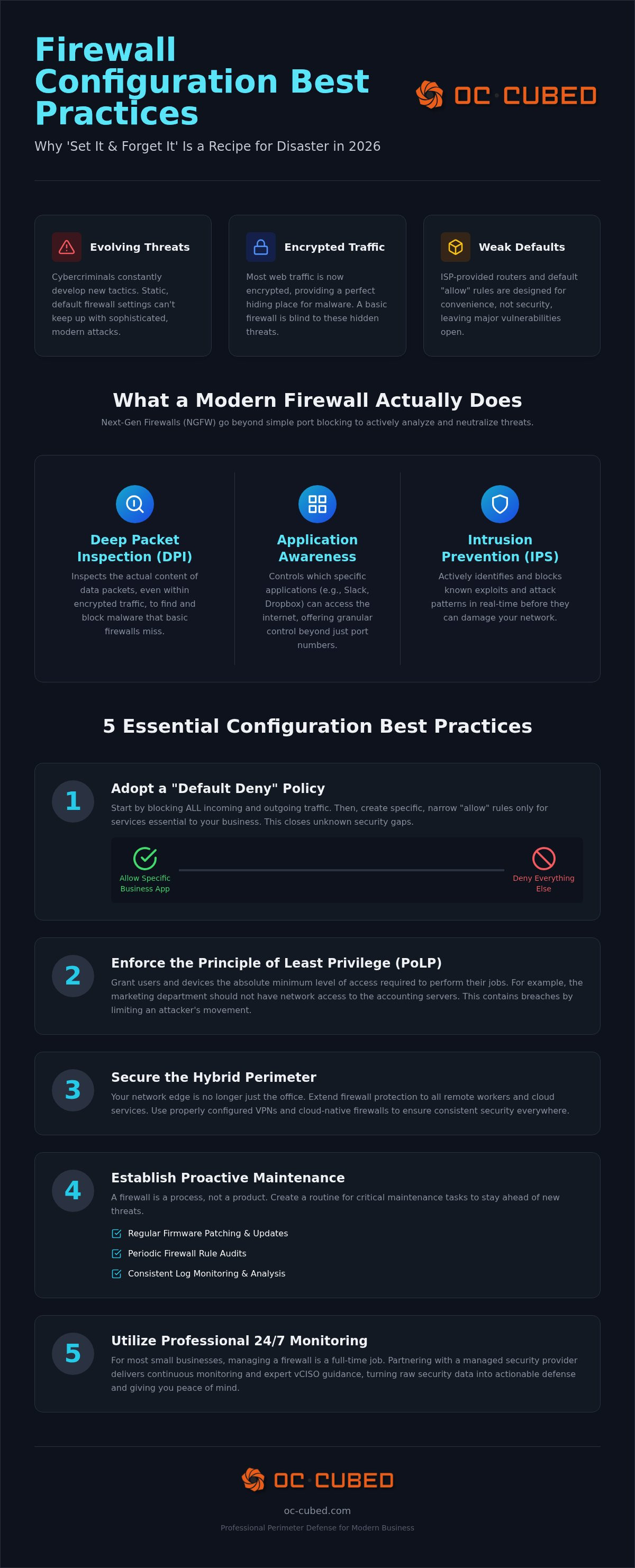
The definition of What is a Firewall? has fundamentally shifted. It's no longer just a digital gatekeeper sitting passively at the edge of your network. In 2026, a firewall acts as a sophisticated traffic analyzer that makes real-time decisions based on the content and intent of data packets. Small businesses often fall into the trap of the "Set-and-Forget" model. This approach is effectively dead. Threats now evolve faster than static hardware settings can handle, making legacy devices obsolete and leaving your data exposed.
Implementing firewall configuration best practices for small business requires moving toward Next-Gen Firewalls (NGFW). These devices utilize Deep Packet Inspection (DPI) to look inside encrypted traffic. Without DPI, your firewall is essentially blind to most modern web traffic. This allows malware to bypass your defenses under the guise of secure encryption. Staying current with firewall configuration best practices for small business means treating your network security as a living process rather than a one-time hardware purchase.
The Evolution of Network Threats
Cybercriminals have refined their tactics to exploit the specific vulnerabilities of smaller organizations. Most web traffic is now encrypted. While this protects privacy, it's also the perfect place for malware to hide. If your firewall cannot decrypt and inspect this data, you're leaving the door wide open. Ransomware remains a primary threat, often targeting unpatched vulnerabilities in entry-level hardware. Many owners rely on ISP-provided routers, but these consumer-grade devices lack the necessary security layers to defend against professional-grade exploits and targeted attacks.
Beyond Port Blocking: What Modern Firewalls Actually Do
Modern security is built on Application Awareness. It's not just about blocking a port; it's about controlling which specific software can "talk" to the internet. An effective firewall identifies whether a connection is a legitimate business tool or a malicious script attempting to exfiltrate data. Integrated Intrusion Prevention Systems (IPS) add another layer by stopping active exploits before they reach your internal servers. These systems work best when they integrate with remote IT management services to ensure security policies stay updated against emerging threats.
Ultimately, your firewall is the frontline of a broader cybersecurity risk management strategy. It provides the visibility needed to manage risks proactively. By moving beyond basic settings, you gain the control necessary to protect your business from the sophisticated landscape of 2026.
5 Essential Firewall Configuration Best Practices for Small Business
Effective security isn't about having the most rules; it's about having the right ones. For small businesses, the goal is to create a perimeter that is both rigid against attackers and transparent for employees. Establishing a firm foundation requires moving away from the permissive settings found on consumer devices. Instead, you need a configuration that assumes every connection is a risk until it's proven otherwise.
Rule #1: The Default Deny Policy
Default Deny is the practice of blocking all network traffic except for explicitly permitted connections. Most hardware comes with broad "allow" rules to ensure ease of setup, but this is a major security liability. You should block all incoming and outgoing traffic by default and only whitelist the specific services required for your business operations. A common mistake in firewall configuration best practices for small business is poor rule ordering. Since firewalls process rules from top to bottom, an overly broad "allow" rule at the top of the list can render your specific "deny" rules useless. Adhering to industry-standard Firewall Best Practices ensures that your rule hierarchy remains logical and protective.
You should also implement the Principle of Least Privilege (PoLP) for network access. Don't give every device access to every server. If a marketing workstation doesn't need to reach the accounting database, the firewall should prevent that connection. This limits the "blast radius" if a single device on your network becomes compromised.
Securing the Hybrid Perimeter
The rise of remote work has moved the perimeter into your employees' homes. Basic VPNs are no longer sufficient to protect your assets. You must use AES-256 encryption and mandatory Multi-Factor Authentication (MFA) for every remote connection. We often recommend disabling "split tunneling" for high-security environments. This ensures all remote traffic passes through your security stack before reaching the internet, preventing unsecured home devices from leaking threats into your network. This level of control is essential when managing a hybrid workforce.
Your firewall strategy should also align with your Microsoft 365 security management. For example, your firewall can restrict access to your M365 tenant based on verified IP addresses or device health markers. Network segmentation is another pillar of firewall configuration best practices for small business. Keep your guest Wi-Fi and IoT devices, like smart cameras or printers, on a separate VLAN. This prevents a compromised printer from becoming a gateway to your sensitive client data. If managing these rules feels overwhelming, our team provides expert Firewall and Switch Management to keep your network secure and your team productive.
Hardware vs. Virtual Firewalls: Choosing Your Shield
Selecting the right form factor for your security is a strategic decision. It's no longer just about buying a box; it's about where that box lives and how it interacts with your team. Hardware firewalls remain the gold standard for businesses with physical offices and on-site servers. They provide a physical anchor for your network security. Virtual or cloud-delivered firewalls, on the other hand, are designed to follow your users wherever they go. Most modern businesses find that a hybrid approach offers the most reliable protection.
When to Invest in Physical Appliances
Physical appliances offer dedicated hardware resources to handle intense security processing. When choosing a device, you must look past the "marketing throughput" numbers. A firewall might boast 1Gbps speeds, but that number often reflects raw traffic with all security features turned off. Once you enable Deep Packet Inspection and antivirus scanning, that speed can drop significantly. You don't want your security to become a bottleneck for your productivity. It's better to over-spec your hardware than to deal with a sluggish network.
Redundancy is another critical factor for physical setups. High-availability (HA) pairs involve running two identical firewalls in a cluster. If the primary unit fails, the secondary takes over instantly. This prevents a hardware glitch from causing hours of downtime. Following Firewall Rules for Small Business means planning for these physical contingencies just as much as the digital ones. Reliable hardware is the foundation of a stable network.
The Rise of Cloud-Delivered Security
For remote-first or hybrid teams, cloud firewalls provide a more flexible shield. Secure Access Service Edge (SASE) allows you to apply firewall configuration best practices for small business directly to the user's connection. This eliminates the need for "backhauling," where remote employees must send all their internet traffic through the office hardware just to stay secure. Backhauling creates latency and slows down cloud applications like Microsoft 365. It's a common source of frustration for remote workers.
Cloud firewalls scale with your growth. You can add users or offices without waiting for hardware shipments or performing manual installs. These virtual shields integrate perfectly with managed cybersecurity services. This integration allows for centralized monitoring and policy enforcement across your entire organization. Whether your data is in a local server or a cloud app, your protection remains consistent. Choosing between hardware and virtual isn't about which is better; it's about which combination keeps your specific business moving forward. Implementing firewall configuration best practices for small business ensures that no matter the delivery method, your data stays protected.
The Proactive Maintenance Checklist: Beyond the Initial Setup
Configuring your firewall is only the first step toward a secure perimeter. A secure network requires ongoing hygiene to remain effective against evolving threats. Without a consistent maintenance schedule, your security posture will naturally degrade as new vulnerabilities are discovered and your business needs change. Adhering to firewall configuration best practices for small business means treating your security stack as a living system that needs regular attention.
Regular firmware updates are the most critical task on your checklist. Manufacturers frequently release patches to close security holes that hackers are actively exploiting. If you miss these updates, you're leaving a known door open to your network. Beyond patching, you should perform quarterly rule reviews. Temporary rules granted to vendors or for specific projects often become permanent vulnerabilities if they aren't removed. Cleaning up these legacy permissions ensures that your "Deny All" stance remains intact and effective.
You must also prioritize configuration backups. If your hardware fails or a setting causes a network conflict, you don't want to rebuild your entire rule set from memory. Maintaining current backups allows you to restore your firewall settings in minutes rather than days. This level of preparedness is what separates resilient businesses from those that suffer extended, costly downtime.
Why Logging and Monitoring Are Non-Negotiable
Logging provides the visibility necessary to understand what's happening on your network. A Managed Service Provider uses these logs to spot brute-force attacks or unusual traffic patterns in real-time. There's a significant difference between simply seeing a threat and remediating it. Through Helpdesk and NOC integration, suspicious activity is blocked before it can escalate into a breach. Firewall logs are the "black box" of your network, essential for forensic analysis after a security event.
The Annual Security Audit
Once a year, you should subject your network to a formal security audit. This process involves testing your configuration with vulnerability scanning to identify weaknesses that automated systems might miss. It's also the time to ensure your firewall policy still matches your current business operations and vendor list. As you add new cloud services or remote tools, your firewall configuration best practices for small business must adapt to cover these new entry points. Proactive hygiene turns raw data into actionable intelligence, giving you the confidence that your perimeter is truly secure.
Professional Perimeter Defense with OC Cubed
Implementing firewall configuration best practices for small business is a full-time commitment. Most owners simply don't have the hours to monitor logs or audit rules every quarter. OC Cubed removes this technical burden entirely. We handle the complexity of firewall and switch management so you can focus on your core operations. Our team provides the quiet authority of seasoned professionals who know exactly how to secure your perimeter and keep it that way. We act as your silent protector, removing obstacles before they impact your productivity.
Our 24/7 network monitoring ensures that your defense is never "off the clock." While automated hardware catches some threats, our team identifies the subtle anomalies that signal a sophisticated attack. We catch the threats you might miss, providing a layer of human expertise that software alone cannot replicate. This proactive stance turns your firewall into a dynamic shield that evolves alongside the 2026 threat landscape.
Our Proactive Approach to Network Configuration
Our approach to network configuration is entirely proactive. We don't wait for a breach to happen before checking your settings. We manage the heavy lifting of firmware updates, rule changes, and security patches. Every business has unique requirements. We customize your security policies to meet specific industry standards, whether you need to satisfy HIPAA, PCI, or other regulatory frameworks. Your network infrastructure should support your growth, not hinder it with security gaps or performance bottlenecks. By standardizing your firewall configuration best practices for small business, we create a stable environment where your team can thrive without fear of downtime.
Get Enterprise-Grade Protection on a Small Business Budget
Small businesses often feel they have to choose between cost and quality. With OC Cubed, you get enterprise-grade protection on a predictable budget. You won't face surprise emergency IT bills because we manage your network for a flat monthly fee. This steady reliability moves your business away from "Break-Fix" anxiety toward managed peace of mind. You gain the confidence that your network is being watched by experts who genuinely care about your results.
You also gain access to high-level strategy through our vCISO leadership. This ensures your firewall strategy aligns with your long-term business goals. You get the expertise of a Chief Information Security Officer without the overhead of a full-time executive hire. It's a results-driven model designed to protect your assets while enabling your expansion. We provide the brain behind the firewall, ensuring every rule and policy serves a clear business purpose.
Securing Your Perimeter for Long-Term Growth
Your network perimeter is more than just a barrier; it's the foundation of your business continuity. By adopting firewall configuration best practices for small business, you transition from a reactive mindset to a proactive security posture. You gain control over your data and the freedom to scale without the constant fear of a breach. A well-configured firewall doesn't just block threats. It enables your team to work securely from anywhere in the world.
OC Cubed provides the expertise required to manage this technical complexity. Our approach includes 24/7 network monitoring to catch threats before they cause downtime. We also offer vCISO security governance to ensure your technology strategy aligns with your long-term goals. All of this is delivered through predictable monthly IT retainers that keep your costs stable and your focus on growth.
You deserve the peace of mind that comes with a professionally managed defense. Let us handle the technical burden so you can focus on building your future with confidence.
Frequently Asked Questions
Do I really need a firewall if I only use cloud-based apps like Microsoft 365?
Yes, a firewall is essential even for cloud-heavy businesses. While Microsoft 365 is secure, your local network and devices are still vulnerable to attacks. A firewall prevents unauthorized traffic from entering your office and stops malicious software from communicating with hacker servers. It also provides a secure tunnel for your remote team. Without it, you lack visibility into the traffic moving in and out of your physical workspace.
What is the difference between a firewall and an antivirus?
A firewall acts as a digital perimeter for your entire network, while antivirus protects individual devices. Think of the firewall as the security guard at the front gate and antivirus as the locks on each interior door. Firewalls analyze network traffic to block unauthorized access attempts. Antivirus, or endpoint protection, scans files and software on your computer for known threats. You need both to achieve a comprehensive security posture.
How often should a small business update its firewall firmware?
You should update your firewall firmware as soon as the manufacturer releases security patches. For standard maintenance, a monthly or quarterly review is recommended. Cybercriminals actively exploit known vulnerabilities in outdated hardware. Missing a single critical update can leave your entire business exposed to ransomware. We include regular patching in our firewall and switch management services to ensure your perimeter remains resilient against the latest 2026 threats.
Can a firewall protect my employees when they work from home?
Yes, a modern firewall protects remote employees through secure VPN tunnels or cloud-delivered security. These tools extend your office's security policies to the home environment. By routing remote traffic through your firewall, you ensure that employees follow the same safety rules as on-site staff. This prevents unsecured home networks from becoming a backdoor into your sensitive business data. It's a key part of firewall configuration best practices for small business.
What is Deep Packet Inspection (DPI) and why does it slow down my internet?
Deep Packet Inspection (DPI) is a security feature that examines the actual data inside network packets rather than just their headers. It slows down the internet because the firewall must decrypt, scan, and re-encrypt every piece of data. This requires significant processing power. If your hardware is under-specced, you'll notice a lag. However, DPI is non-negotiable in 2026 because it's the only way to catch malware hiding in encrypted web traffic.
Is it better to buy a firewall or rent one through a managed service provider?
Renting through a managed service provider is often superior for small businesses. It replaces a large upfront hardware cost with a predictable monthly IT retainer. This model ensures you always have current, enterprise-grade equipment without the burden of ownership. When you partner with an MSP, you also get 24/7 network monitoring and expert configuration. You don't just get a box; you get a fully managed security outcome.
How do I know if my current firewall is actually working?
You can verify your firewall's effectiveness by reviewing its traffic logs and security reports. These logs show you exactly which threats were blocked and which devices are communicating with the internet. Regular penetration testing or vulnerability scanning also reveals if your firewall configuration best practices for small business are actually working. If you aren't receiving monthly reporting on your network health, you're essentially flying blind. Professional monitoring provides the visibility needed to confirm your perimeter is secure.


