

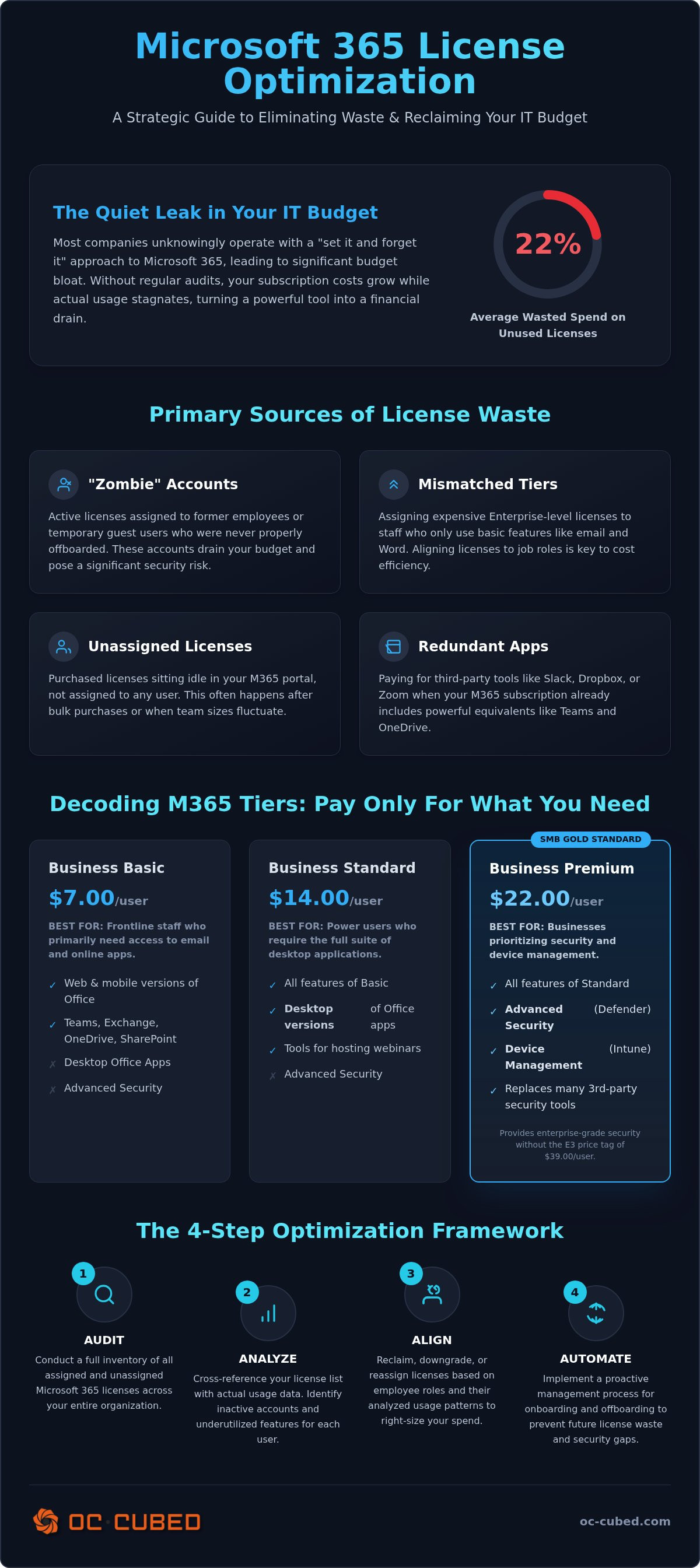
Most companies are currently wasting 22% of their Microsoft 365 spend on licenses they don't actually use. It's a quiet leak in your IT budget that adds up to thousands of dollars every year. If you've felt the sting of the July 2026 price hikes, you aren't alone. Managing a growing team is difficult enough without the added confusion of "zombie" accounts or overpaying for Enterprise features your staff never touches. Effective microsoft 365 license optimization isn't just about cutting costs. It's about taking control of your environment and ensuring your technology scales alongside your business.
You deserve an IT budget that's predictable and lean. This article provides a clear roadmap to help you right-size your subscriptions and stop the cycle of overpayment. We'll show you exactly how to identify underutilized seats, choose the right tiers for every role, and maintain a secure tenant that supports your growth. We'll cover everything from the latest 2026 pricing structures to the strategic benefits of regular license audits. By the end, you'll have the confidence to ensure every dollar spent on Microsoft 365 is a dollar spent on productivity.
Key Takeaways
- Identify the common "set it and forget it" traps that lead to overpaying for inactive accounts and redundant features.
- Learn how to select the ideal license tier for your team to ensure you aren't paying for Enterprise-level tools that go unused.
- Implement a proven 4-step framework for microsoft 365 license optimization that cross-references actual usage data with your monthly spend.
- Discover tactical ways to reduce costs immediately, such as utilizing shared mailboxes and creating license pools for fluctuating headcounts.
- Understand why proactive tenant maintenance is essential for preventing future budget bloat and maintaining a secure, efficient environment.
The Hidden Costs of Microsoft 365: Why Most Businesses Overpay
Many business owners view their IT subscriptions as a fixed utility. They set up the tenant, assign licenses, and let the automatic renewals run without a second thought. This "set it and forget it" mentality is exactly how license waste mounts over time. Microsoft 365 is a dynamic ecosystem, not a static purchase. Without regular oversight, your monthly bill grows while your actual usage remains flat or even declines. Effective microsoft 365 license optimization requires a proactive approach to auditing these hidden costs before they impact your bottom line.
Industry data indicates that organizations waste between 20% and 35% of their Microsoft 365 budget on licenses that aren't actually needed. For a growing company, this isn't just a rounding error; it's capital that could be reinvested into new hires or strategic initiatives. Bloat typically comes from three distinct areas: unassigned licenses sitting in the portal, users assigned to tiers that are far too expensive for their daily tasks, and accounts for people who no longer work at the company.
Beyond the budget, microsoft 365 license optimization is a critical security necessity. Every unmanaged license represents a potential entry point for a breach. Reducing your digital footprint directly reduces your risk. It's about maintaining a lean, secure environment where every active seat is accounted for, utilized, and properly protected.
The "Zombie Account" Problem
A "zombie account" is an active license assigned to a non-existent or inactive user. These often belong to former employees who weren't properly offboarded or guest users who only needed temporary access for a specific project. These accounts drain your budget every month without providing any value. Worse, they often lack multi-factor authentication or regular monitoring, making them prime targets for credential theft. Cleaning up these accounts provides immediate financial relief and hardens your tenant security.
Redundant Third-Party Apps
Shadow IT is another major source of waste. Teams often pay for standalone tools like Slack or Dropbox because they're familiar with them, even though the Microsoft 365 product family already includes Teams and OneDrive. You're effectively paying for the same feature twice. Consolidating your tech stack allows you to maximize your existing investment and simplify your workflows. Adopting a clear Microsoft 365 license management for small business strategy ensures you only pay for the tools your team actually uses to stay productive.
Decoding Microsoft 365 License Tiers: Choosing the Right SKU
Selecting the right license tier is the most direct path toward microsoft 365 license optimization. Microsoft offers a dizzying array of options, and it's easy to default to the most expensive plan "just in case." However, a GAO report on federal software license management shows that a lack of centralized oversight leads to significant overspending. For a growing business, the goal is to align your subscription with your actual operational needs rather than paying for features that sit idle.
For most small to mid-sized businesses, the choice lies between Business Basic, Standard, and Premium. Business Basic ($7.00/user) works for frontline staff who only need web-based apps. Standard ($14.00/user) adds desktop apps for power users. Premium ($22.00/user) is the strategic choice for those prioritizing security. You don't always need to upgrade every user to the same tier. Mixing and matching SKUs based on job roles is a primary strategy for microsoft 365 license optimization.
The 2026 landscape adds a new layer of complexity with AI. Microsoft Copilot is a powerful tool, but universal licensing is rarely necessary. A strategic rollout to high-value roles is more effective than a blanket purchase. Similarly, consider add-ons for specific features like Power BI or advanced storage. Buying an add-on is often cheaper than jumping the entire organization to a higher Enterprise tier.
Business Premium: The SMB Gold Standard
If your team is under 300 users, Business Premium is often the most cost-effective choice. It includes advanced security features like Intune for device management and Defender for Business. These tools often replace expensive third-party antivirus and endpoint protection services. It bridges the gap between basic productivity and the Enterprise E3 tier, providing enterprise-grade protection without the E3 price tag ($39.00/user).
The Enterprise E5 Premium: Is It Worth It?
Enterprise E5 ($60.00/user) is the top-tier offering. It includes advanced threat protection, eDiscovery, and phone system capabilities. You should only consider E5 if your industry regulations, like HIPAA or CMMC, mandate specific compliance and auditing features. Determining these requirements is a core function of a fractional CIO small business advisor. They help you navigate these technical triggers to ensure you aren't over-provisioning. If you're unsure which tier fits your growth plan, our team can provide proactive tenant maintenance to keep your costs in check.
The 4-Step Microsoft 365 License Audit Framework
A successful audit transforms your IT spend from a guessing game into a precise business operation. Most organizations wait until a renewal date to look at their licenses, but high-growth businesses require a more agile approach. This framework ensures you only pay for the value you actually receive. It moves beyond simple headcounts to focus on how your team interacts with the software every day.
The process begins with a comprehensive inventory. You must export a complete list of users and their assigned SKUs from the Microsoft 365 Admin Center. Once you have this list, you move to analysis, where you cross-reference active usage data with license costs. Right-sizing follows, involving the strategic downgrading or reassignment of licenses based on specific job requirements. Finally, deprovisioning creates a strict, repeatable process for reclaiming licenses as your team changes. This four-step cycle is the core of sustainable microsoft 365 license optimization.
Analyzing Usage Data
The Microsoft 365 Admin Center provides a wealth of information that often goes ignored. By reviewing reports on app usage, you can identify users who haven't logged in for 30 days or longer. This data is critical for distinguishing between power users who need desktop applications and frontline staff who are perfectly productive with web-based versions. Usage data is the only objective metric for license value. According to Gartner research on optimizing M365 costs, creating specific user profiles based on these activity patterns is the most effective way to prevent over-licensing. This level of detail is the foundation of long-term microsoft 365 license optimization.
The Offboarding Checklist
One of the most common sources of waste is the "zombie" license left behind by a former employee. Simply deleting a user is often a mistake because you may lose critical data or access to their files. A better approach involves converting the user’s mailbox to a Shared Mailbox. This allows you to retain all email data and provide access to a manager without paying for an active license. It's a simple change that yields immediate savings.
Your offboarding checklist should include these essential steps:
- Convert the departing employee's mailbox to a Shared Mailbox.
- Remove the assigned license immediately after the conversion is complete.
- Move relevant files to a shared SharePoint site for long-term retention.
- Reclaim the license into your available pool for the next hire.
Automating this reclamation process ensures that your tenant stays lean by default. By treating offboarding as a financial step as much as a technical one, you protect your budget and your data simultaneously. This proactive approach prevents the slow accumulation of unused seats that often follows a period of rapid hiring.
Optimization Strategies: Cutting Waste Without Losing Productivity
Scaling a business requires a flexible IT infrastructure that doesn't penalize you for growth. You shouldn't be stuck in a cycle of reactive purchasing every time you hire a new team member. A "License Pool" strategy allows you to maintain a small buffer of unassigned seats, which simplifies the onboarding process and prevents the delay of individual SKU orders. This approach, combined with the strategic use of Shared Mailboxes and Resource Mailboxes, can significantly reduce your monthly overhead. Shared mailboxes don't require a paid license for general addresses like "info@" or "sales@", allowing you to maintain professional communication channels at zero additional cost. It's a simple way to achieve microsoft 365 license optimization without sacrificing your brand's outward-facing professionalism.
Another powerful strategy involves standardizing your licensing based on job functions rather than individual requests. By creating a matrix of roles, you ensure that every employee has exactly what they need to be productive. This prevents the common issue of "license creep," where employees are assigned expensive tiers for features they'll never use. This level of discipline is the hallmark of a well-maintained tenant and leads to a leaner, more predictable IT budget.
Standardizing User Profiles
Creating user profiles is the most effective way to manage a growing team. A "Frontline" profile might utilize F1 or F3 licenses for mobile-only workers who only need access to email and basic collaboration tools. Conversely, a "Power User" profile is reserved for departments like finance or data science that require advanced analytics or AI capabilities. Standardizing these profiles ensures consistency across your entire remote IT management services environment. It removes the guesswork from the onboarding process and ensures that your microsoft 365 license optimization efforts are baked into your operational DNA.
Smart Billing Cycles
The choice between monthly and annual billing is often a balance between agility and cost. Paying month-to-month carries a 20% "flexibility tax" compared to an annual commitment. For your core staff, an annual commitment is the logical choice to secure the lowest possible rate. For contractors, interns, or seasonal help, the 20% premium for monthly flexibility is often worth the cost to avoid being locked into a seat you won't need in ninety days. Proactive vendor management helps you navigate these cycles and avoids surprise price increases by locking in rates during your annual renewal window.
Learn more about our Microsoft 365 license management strategies.
Proactive Tenant Maintenance: The Role of an MSP
Effective microsoft 365 license optimization is not a one-time project. It's a recurring operational requirement. As your business scales, your team's needs change and Microsoft evolves its product offerings. A static audit performed once a year quickly becomes obsolete. Proactive maintenance ensures your tenant remains lean, secure, and aligned with your current headcount. Relying on Microsoft 365 managed services provides the ongoing oversight necessary to prevent budget bloat before it starts.
Many organizations attempt to manage this internally or use automated software. While tools can identify unused seats, they lack the strategic context required for true optimization. They don't understand your hiring roadmap or the specific security requirements of your industry. A dedicated partner provides strategic IT leadership through vCIO advisory services. This moves your technology from a simple support function to a growth enabler. We don't just swap SKUs; we align your entire digital environment with your business goals.
Continuous Monitoring and Reporting
Visibility is the foundation of control. Our approach includes monthly reporting that highlights license utilization, active usage patterns, and potential areas of waste. We monitor your tenant for "license creep" and provide proactive alerts when new seats are purchased outside of established policies. This ensures your tenant stays secure and compliant as you scale. Regular reviews prevent the accumulation of zombie accounts and ensure that every dollar in your IT budget is working toward your productivity. We treat your tenant as a dynamic asset that requires constant calibration.
The OC Cubed Advantage
At OC Cubed, we believe in radical transparency and incentive alignment. Our flat-rate retainer model means we're incentivized to keep your environment efficient. We don't profit from your technical debt or license waste. Instead, we focus on removing obstacles so you can focus on growth. By combining microsoft 365 license optimization with comprehensive cybersecurity risk management for small business, we protect your bottom line and your data simultaneously. You gain the quiet authority of a seasoned IT team that knows exactly how to fix what's wrong.
Ready to stop the waste? Contact OC Cubed for a Microsoft 365 Tenant Review.
Take Control of Your Microsoft 365 Environment
Microsoft 365 licensing shouldn't be a source of stress or a drain on your resources. By implementing a consistent audit framework and standardizing user profiles, you transform a complex billing line item into a lean, strategic asset. You've learned how to identify inactive accounts and choose the tiers that actually match your team's daily tasks. This proactive approach to microsoft 365 license optimization protects your margins and hardens your security posture simultaneously. It's about ensuring every dollar spent contributes directly to your team's productivity.
True efficiency comes from continuous oversight rather than a one-time cleanup. Our model provides the vCIO leadership and no-nonsense remote support you need to maintain a predictable IT budget. We manage the technical complexity so you can focus on scaling your business with absolute confidence. Reliability isn't just a goal; it's the standard we maintain every day. You deserve a technology environment that enables your vision without the burden of unnecessary costs.
We're here to help you secure that peace of mind. Let's build a more efficient and protected future for your business together.
Frequently Asked Questions
How do I know if I am overpaying for Microsoft 365 licenses?
You are likely overpaying if your Microsoft 365 Admin Center shows unassigned licenses or users who haven't logged in for over 30 days. These "zombie" accounts often belong to former employees or contractors. Another sign is having every staff member on the most expensive tier regardless of their actual job duties. Identifying these gaps is the first step toward effective microsoft 365 license optimization and a leaner IT budget.
What is the difference between Microsoft 365 Business and Enterprise licenses?
Business licenses are designed for companies with fewer than 300 users and offer a balance of productivity and security. Enterprise licenses, such as E3 and E5, have no user limits and include advanced compliance, eDiscovery, and higher-level security features. Most growing businesses find their ideal value in Business Premium. It provides enterprise-grade protection without the higher cost of a full Enterprise subscription for every user.
Can I mix and match different Microsoft 365 licenses in one tenant?
Yes, you can assign different license tiers to different users within the same tenant. You don't have to pay for a high-level security license for every employee if only a few departments require those specific tools. This flexibility is a vital part of microsoft 365 license optimization. It allows you to align your software spend with the specific functional requirements of each role across your entire organization.
Do I need a license for a shared mailbox or a resource mailbox?
No, shared mailboxes and resource mailboxes do not require a paid license as long as they stay under 50GB of data. This is a highly effective way to save money when an employee leaves the company. Instead of keeping a paid license active to retain their email history, you can convert the account to a shared mailbox. This keeps the data accessible to management while allowing you to reclaim the paid seat.
What happens to my data if I downgrade or remove a license?
Microsoft generally provides a 30-day grace period where your data remains accessible after a license is removed. After this window, the data is permanently deleted. If you downgrade to a lower tier, you may lose access to specific features like desktop applications or advanced security logs. It's essential to have a clear data retention strategy in place before making changes to ensure your critical business information remains protected during the transition.
Is Microsoft 365 Copilot included in my current license?
No, Microsoft 365 Copilot is a separate add-on that requires an additional monthly fee per user. It also requires you to have a qualifying base license, such as Business Standard or Business Premium, already in place. Because it is a significant investment, we recommend a strategic rollout to specific roles that will benefit most from AI. A vCIO can help you determine which departments will see the best return on this investment.
How often should a small business perform a license audit?
We recommend performing a license audit at least once per quarter to catch waste before it accumulates. For businesses with high turnover or rapid hiring phases, monthly reviews are even more effective. Frequent audits ensure that your offboarding checklist is being followed and that you aren't paying for "ghost" seats. Regular reporting keeps your IT costs predictable and ensures that your technology environment scales at the same pace as your headcount.
Can a Managed Service Provider help me lower my Microsoft bill?
Yes, an MSP provides the strategic leadership and technical oversight needed to maintain a lean tenant. We integrate license auditing into our monthly managed IT services to ensure you only pay for what you actually use. Our vCIO advisory services help you navigate complex SKU changes and price increases. We focus on eliminating unplanned IT costs, allowing you to reinvest those savings back into your core business growth.


