

Are you still paying for the digital ghost of an employee who left your company six months ago? It's a common oversight that quietly drains your budget while creating unnecessary security holes. Most small business owners feel the weight of rising software costs, especially following the July 2026 price increases that moved Business Basic to $7.00 and Business Standard to $14.00 per user. You want a lean operation, but technical jargon and manual onboarding tasks often get in the way of true efficiency.
Effective Microsoft 365 license management for small business is more than a simple administrative chore. It's a core financial and security strategy that protects your bottom line. We understand the frustration of trying to decide if the $22.00 Business Premium price point is worth the jump or if you're overpaying for features your team never touches. You deserve a tenant that runs itself without the constant fear of surprise IT costs.
This guide provides a clear roadmap to optimize your environment and eliminate wasted spend. We'll explore the critical differences between license tiers, show you how to automate user lifecycle management, and help you build a secure, zero-touch system. By the end, you'll have the confidence to scale your business without the administrative headache.
Key Takeaways
- Identify how license bloat and administrative drain impact your bottom line, and learn to reclaim wasted budget.
- Compare the specific benefits of cloud-only versus desktop licenses to find the right functional fit for your staff.
- Close the "Premium Gap" by identifying security vulnerabilities that arise from choosing the wrong license tier for sensitive data.
- Streamline your operations with a standardized 5-step lifecycle for Microsoft 365 license management for small business.
- Discover how a managed IT approach provides the proactive maintenance and vCIO strategy needed to scale without administrative headaches.
The Hidden Cost of Poor Microsoft 365 License Management
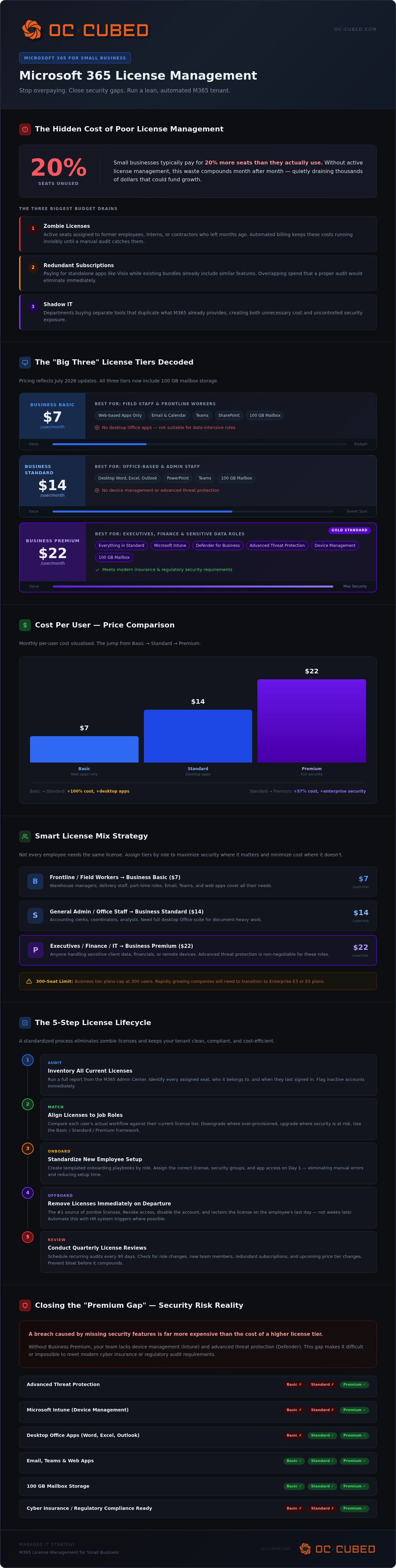
Many business owners treat their software subscriptions like a utility bill. They pay the invoice and move on. This "set it and forget it" approach is a recipe for financial waste in 2026. Without active Microsoft 365 license management for small business, you likely suffer from license bloat. Industry trends suggest small businesses often pay for 20% more seats than they actually use. These unused licenses represent pure profit for the vendor and pure loss for your company. Over a year, that waste adds up to thousands of dollars that could have been reinvested in growth.
Beyond the direct costs, there's the administrative drain. Navigating the M365 Admin Center is complex. Your team wastes hours every month on manual onboarding and offboarding. This time has a clear dollar value. When your internal staff struggles with technical configurations, they aren't focusing on their primary roles. It's an inefficient use of talent that slows down your entire organization.
The Invisible Drain on Small Business Budgets
The most common culprit for overspending is the "zombie license." These are active seats assigned to former employees, interns, or contractors who left months ago. Because the billing is automated, these costs remain hidden until someone performs a manual audit. You also face redundant subscriptions. This happens when you pay for standalone apps like Visio while already having bundles that include similar features. Shadow IT complicates this further; different departments might buy separate tools that duplicate what Microsoft 365 already provides. Effective Microsoft 365 license management for small business identifies these overlaps and consolidates your spend.
The Compliance and Security Connection
License management is the first line of defense in cybersecurity risk management. Choosing an inadequate licensing tier can leave sensitive data unprotected. For example, lower tiers often lack the advanced threat protection and device management found in Business Premium. This gap makes it difficult to meet modern insurance or regulatory requirements. If you face a security audit, an unmanaged tenant becomes a major liability. A breach caused by missing security features is far more expensive than the cost of a higher license tier. Proper oversight ensures you have the right protection without overspending on features you don't need.
Decoding the Microsoft 365 Business License Maze
Choosing the right path through the Microsoft ecosystem can feel like a full-time job. Most small business owners get stuck in a "one-size-fits-all" mindset, buying the same license for every employee. Effective Microsoft 365 license management for small business requires a more nuanced strategy. You need to match the specific toolset to the actual workflow of your team members to avoid paying for features they'll never use.
The "Big Three" business plans offer distinct value. Microsoft 365 Business Basic, at $7.00 per user, is ideal for field staff who only need email and web-based apps. Business Standard, priced at $14.00, is the sweet spot for most office-based teams who require full desktop versions of Word, Excel, and Outlook. However, Business Premium remains the gold standard at $22.00 per user. It bridges the gap between simple productivity and enterprise-grade security, which is critical for protecting sensitive client data in 2026.
Feature Comparison for Small Business Leaders
Business Premium combines productivity with advanced security tools like Intune and Defender. While Business Standard gives you the desktop apps your team expects, it lacks the device management capabilities needed to secure remote workstations. Choosing between web and desktop apps depends entirely on user workflow. A data analyst needs the power of desktop Excel, while a warehouse manager might thrive on the web-based version. As of the July 2026 updates, all three tiers now include 100GB of mailbox storage, so you don't have to upgrade just to gain more email space. Understanding these nuances helps you build a lean, functional environment.
Selecting the Right Mix for Your Team
You don't need the same license for every employee. A smart strategy involves mixing licenses based on job roles. You might assign Business Basic to frontline workers, Standard to general administrative staff, and Premium to executives or finance teams handling high-risk data. This approach keeps your costs low while maintaining high security where it matters most. Keep an eye on the 300-seat limit for these business tiers. If your company is growing rapidly, you'll eventually need to transition to Enterprise (E3 or E5) plans. A dedicated IT advisor can help you map these roles to the right licenses to ensure your growth remains cost-effective.
Avoiding the Most Common Licensing Pitfalls
Small business owners often view licensing as a simple checkbox. This oversight creates two primary risks: financial leakage and security vulnerabilities. Effective Microsoft 365 license management for small business prevents these issues by identifying pitfalls before they impact your operations. You need a strategy that balances cost with actual protection to ensure your team remains productive and secure.
The Security Blind Spot
Choosing Business Standard over Premium might save a few dollars per user, but it creates a dangerous "Premium Gap." Standard licenses lack the conditional access policies essential for modern remote IT management. These policies ensure only verified users on healthy devices can touch your sensitive data. Some businesses attempt to save money by using shared accounts for multiple staff members. This is a significant security failure. It destroys your audit trail and makes it impossible to identify the source of a breach. Without the Defender for Business features found in Premium, your attack surface remains exposed to modern threats.
Subscription Lock-in and Billing Surprises
The New Commerce Experience (NCE) rules in 2026 dictate how you interact with Microsoft billing. You must choose between monthly flexibility and annual discounts. Monthly commitments allow you to reduce seat counts at any time, but you pay a premium for that right. Annual commitments offer lower rates but lock you into a seat count for twelve months. If you don't manage this balance, you'll pay for licenses of former employees for the remainder of the term. Mid-year upgrades are usually seamless, but scaling down mid-term is often prohibited. Strategic planning avoids these billing surprises that drain your monthly budget.
Self-service purchase risks also threaten your bottom line. When employees buy their own licenses, you lose centralized control and visibility. This leads to fragmented billing and unmanaged security settings across the organization. You might also miss out on ecosystem benefits like integrated email security or automated backups because the configuration was never finished. For instance, many businesses fail to properly configure SharePoint permissions, leading to data sprawl. A professional management approach ensures every license is part of a cohesive, secure strategy that supports your growth rather than hindering it. It turns a collection of apps into a unified business engine.
A 5-Step Lifecycle for License Management
Managing software isn't just about the day someone starts. It's about the entire time they're with your company and what happens after they leave. A structured approach to Microsoft 365 license management for small business ensures you never pay for more than you need. It also keeps your data secure by removing access as soon as a role changes.
Step 1 begins with Role-Based Access Control (RBAC) mapping. Instead of guessing which license a new hire needs, you define tiers based on job functions. Sales might need Business Standard, while a part-time contractor only requires Business Basic. Step 2 involves standardized onboarding workflows. You create a repeatable checklist so that license assignment happens correctly every time. Step 3 is the quarterly audit, where you "right-size" your environment by identifying underutilized seats. Step 4 focuses on secure offboarding to reclaim licenses immediately. Finally, Step 5 is continuous security posture monitoring to ensure your configurations stay aligned with modern protection standards.
Standardizing Onboarding and Offboarding
A user creation checklist is your best defense against administrative errors. It should specify exactly which license and permissions a new hire receives based on their RBAC tier. We recommend the 24-hour rule for departures. Reclaim the license within one business day of an employee's exit. Automating this process ensures no "orphan" licenses remain active. This prevents financial waste and closes a major security gap that former employees could exploit.
The Quarterly Audit Framework
Every three months, compare your active M365 users against your current HR roster. This simple check often reveals zombie accounts that were missed during previous offboarding cycles. During this audit, look for underutilized licenses. If a user has a Premium license but never uses advanced security features or desktop apps, downgrade them to save on monthly costs. If your organization has multiple domains from mergers or old projects, consolidate them into a single tenant. This reduces complexity and makes Microsoft 365 license management for small business much easier to handle.
The Managed Approach: Why Small Businesses Outsource M365
Professional oversight changes the dynamic of your technology stack. For many leaders, the complexity of Microsoft 365 license management for small business is a distraction from their core mission. Outsourcing this responsibility transforms your IT from a source of stress into a stable foundation for growth. It moves your organization from a reactive stance to a proactive one. You stop fixing problems after they occur; you start preventing them entirely.
A proactive approach prevents issues before they disrupt your workflow. Instead of waiting for a login failure or a billing surprise, your partner monitors the environment constantly. This is the primary role of Managed IT Services in maintaining tenant health. Beyond daily maintenance, Virtual CIO leadership ensures your technology roadmap aligns with your long-term business plan. You gain a strategic advisor who understands how to scale your licensing as your team expands. This long-term perspective eliminates the surprise IT costs that often plague growing companies.
Strategic Tenant Maintenance
Technical debt often accumulates in unmanaged environments. Old configurations, unused groups, and outdated security policies slow down your team and increase risk. OC Cubed - Your trusted MSP actively manages this debt to keep your environment lean. We ensure that third-party integrations, such as Proofpoint for email security, are correctly licensed and configured. Our team provides 24/7 network monitoring for your cloud-based identity. This constant oversight ensures that your security posture remains strong even outside of standard business hours. You gain the quiet authority of a managed environment that just works.
Peace of Mind for Growing Teams
Founders and office managers often end up as the accidental IT person. This burden takes time away from high-value tasks and strategic growth. Outsourcing your Microsoft 365 license management for small business removes this weight. You gain predictable monthly costs through all-inclusive IT retainers. There are no hidden fees or sudden spikes when a renewal date arrives. Each month, you receive clear reporting on your tenant status and license utilization. This transparency allows you to make informed decisions about your budget.
Getting started doesn't have to be complicated. A tenant health check is the first step toward a more secure and cost-effective environment. We analyze your current seat counts, security settings, and administrative workflows. This audit reveals exactly where you're wasting money or leaving data exposed. It's the fastest way to gain confidence in your technology stack and ensure every user has exactly what they need to succeed.
Secure Your Growth with Strategic Management
Managing your digital environment shouldn't feel like a constant battle against hidden fees and security risks. By implementing a structured lifecycle and decoding the license maze, you transform your tenant into a lean, high-performing asset. Effective Microsoft 365 license management for small business ensures every dollar spent translates directly into productivity and protection. You gain the quiet authority of a system that just works.
Success requires identifying zombie licenses from former staff and matching tiers to specific user roles. This strategy stops financial leakage and ensures your team has the right tools for their specific workflows. Proactive maintenance closes security gaps before they become breaches, protecting your reputation and your bottom line simultaneously.
Our flat-rate managed IT services provide the steady reliability you need to focus on growth. With a dedicated Virtual CIO strategy, your technology roadmap will finally align with your long-term vision. OC Cubed - Your trusted MSP is here to help you move forward with the confidence that your infrastructure is protected, optimized, and ready for whatever comes next.
Frequently Asked Questions
Is Microsoft 365 Business Premium worth the extra cost for a small business?
Yes, it's the most cost-effective way to secure your company. While it costs $22 per user, it includes advanced features like Intune for device management and Defender for Business. These tools would cost significantly more as standalone products. For businesses handling sensitive data or meeting insurance requirements, the peace of mind and protection provided by the Premium tier outweigh the monthly price difference.
What happens to a user’s data when I unassign their Microsoft 365 license?
Microsoft retains the data for 30 days before it's permanently deleted. To avoid losing critical information, you should convert the user's mailbox to a shared mailbox or back up their OneDrive files before you unassign the license. Once that 30-day window closes, the data is gone. A proactive approach involves a standardized offboarding checklist to ensure no valuable company assets are accidentally destroyed during license reclamation.
Can I mix and match different types of Microsoft 365 licenses in one tenant?
You can definitely mix and match licenses to fit your team's needs. This is a core part of effective Microsoft 365 license management for small business. You might assign Business Basic to field staff who only need email, while providing Business Premium to your administrative team for enhanced security. This strategy prevents you from overpaying for advanced features where they aren't strictly necessary for the user's specific job function.
How do I stop employees from buying their own Microsoft 365 licenses?
You must disable "Self-Service Purchases" within your tenant settings using PowerShell. This prevents individual users from buying their own subscriptions with company credit cards. Centralizing your purchasing ensures that every license is managed, secure, and visible to your IT leadership. It also stops "shadow IT" from creating fragmented billing and unmanaged security gaps that could leave your organization vulnerable to external threats.
What is the New Commerce Experience (NCE) and how does it affect my billing?
The New Commerce Experience (NCE) is the billing model Microsoft launched to standardize subscription terms. It forces a choice between monthly flexibility and annual commitment. Monthly terms allow you to decrease seat counts at any time but come with a 20% price premium. Annual terms offer the lowest rates but lock you into a specific seat count for the year. Balancing these options is vital for maintaining a predictable IT budget.
Does Microsoft 365 include a backup for my business data?
No, Microsoft does not provide a comprehensive backup for your data. They operate under a "Shared Responsibility Model" where they guarantee the service is available, but you are responsible for the data itself. If an employee accidentally deletes a file or a ransomware attack encrypts your SharePoint site, Microsoft cannot always restore it. You need a dedicated third-party backup solution to ensure your business remains resilient against data loss.
How often should a small business audit their Microsoft 365 licenses?
You should perform a comprehensive audit every three months. A quarterly review allows you to compare your active license count against your current HR roster to identify "zombie" accounts. It's also the best time to check if users are actually utilizing the features in their assigned tier. Regular audits are a fundamental pillar of Microsoft 365 license management for small business, helping you maintain a lean, secure, and cost-optimized environment.


