

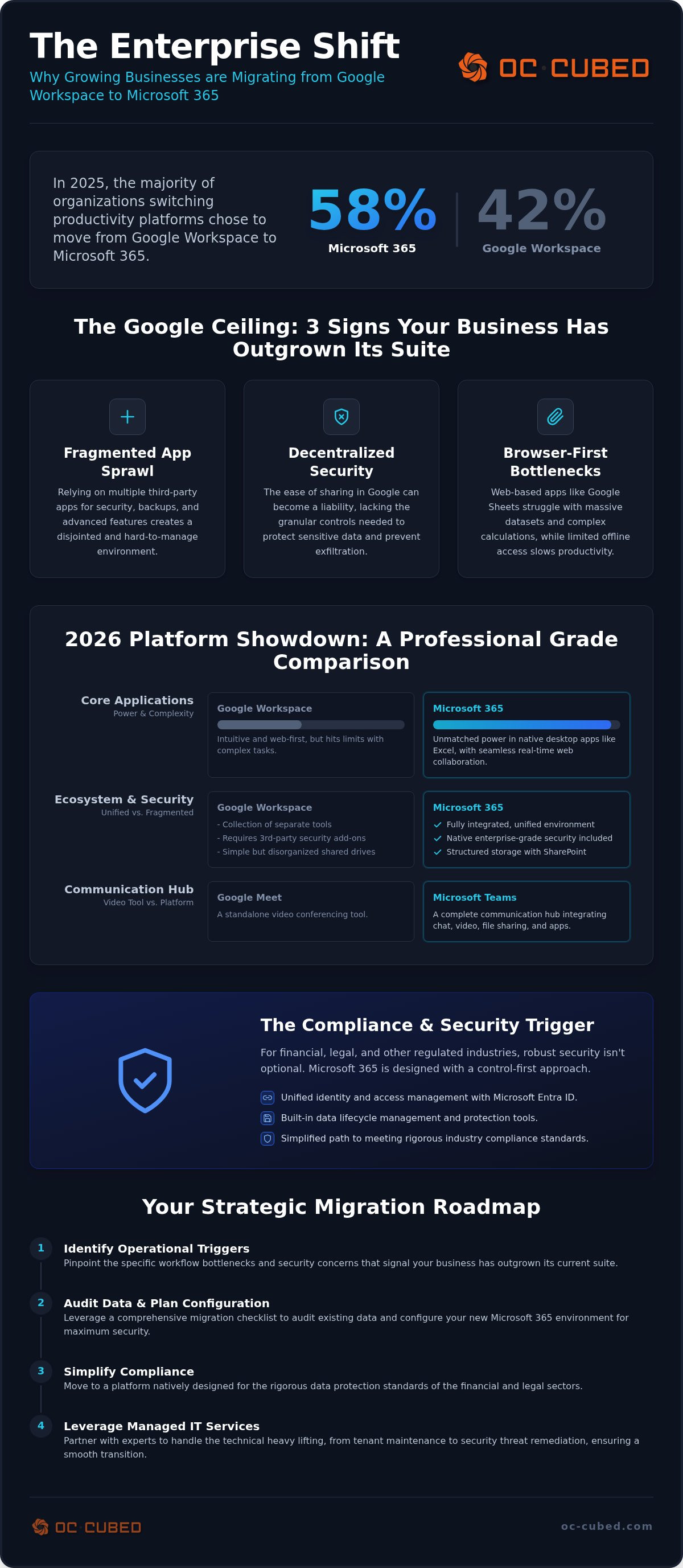
Did you know that 58% of organizations switching productivity platforms in 2025 chose to move from Google Workspace to Microsoft 365? It's a significant shift that signals a broader trend in business maturity as we enter 2026. You likely started with Google because it was fast and familiar. But as your firm grows, you've probably noticed the cracks. Fragmented security across third-party apps and limited offline access in Google Docs can slow down your team. Utilizing a comprehensive google workspace to office 365 migration checklist helps bridge the gap between a startup setup and a professional enterprise environment.
Meeting strict industry compliance standards shouldn't feel like a constant struggle. This article explores why businesses are graduating to a more structured, secure IT ecosystem. We'll show you how to unlock enterprise-grade data protection and seamless integration with your essential financial and legal software. We'll also provide a clear preview of the strategic advantages that come with a centralized IT environment, ensuring your transition is both smooth and results-driven.
Key Takeaways
- Identify the specific operational triggers that signal your business has outgrown the "startup" suite phase and requires more robust tools.
- Evaluate the 2026 platform landscape to understand how Microsoft 365 now delivers real-time collaboration without sacrificing professional power.
- Leverage a comprehensive google workspace to office 365 migration checklist to audit your data and configure your new environment for maximum security.
- Simplify compliance by moving to a platform designed for the rigorous data protection standards of the financial and legal sectors.
- Realize the value of managed IT services that handle the technical heavy lifting, from tenant maintenance to security threat remediation.
The Google Ceiling: Why Growing Businesses Reevaluate Their Suite
Every startup begins with a focus on speed. Google Workspace fits that mold perfectly. It is intuitive, requires almost zero training, and allows teams to collaborate in real time without friction. However, as your firm matures, you eventually enter the enterprise phase. This is where the focus shifts from simply getting work done to controlling how that work is protected. The very ease of sharing that makes Google great becomes a liability when you need granular control over data exfiltration. You aren't just looking for apps anymore; you're looking for a professional operating system.
The transition usually starts when you notice the weight of app sprawl. You realize you're paying for Google plus five other third-party apps to handle functions that Google doesn't support natively. This creates a fragmented environment that is harder to secure and even harder to manage. Business maturity requires a shift toward a control-first environment. Leaders who recognize this often seek out a google workspace to office 365 migration checklist to begin their graduation to a more robust, unified suite. It is about moving from a collection of tools to a singular, secure infrastructure.
The Limitations of a Browser-First Workflow
Power users in finance and legal departments often reach the end of the road with Google Sheets. Complex calculations and massive datasets cause lag or hit cell limits that stall productivity. In a hybrid work world, robust offline access is a requirement, not a luxury. Browser-based tools struggle when the internet is spotty. Native applications like Word and Excel provide formatting parity that web-only tools can't match. Professional industries demand this precision to ensure documents look the same on every screen. You can review a detailed Comparison of office suites to see how these feature sets diverge as your needs become more complex.
Fragmented vs. Unified Ecosystems
Google Workspace often functions as a collection of separate tools. You might use one app for mail, another for storage, and three more for security add-ons. Microsoft 365 offers a unified environment where everything is connected by design. With Microsoft Entra ID, your team has one identity for every tool in the stack. This reduces friction for employees and simplifies the job for IT. Managing this transition effectively is easier when you understand what is a managed service provider and how they bridge the gap between fragmented setups and unified systems. A strategic google workspace to office 365 migration checklist ensures you don't leave critical data or security configurations behind during the move.
Microsoft 365 vs. Google Workspace: A 2026 Comparison
By September 2026, the technical gap between Google's collaboration and Microsoft's power has evaporated. Microsoft 365 now offers seamless real-time co-authoring across all desktop applications. You no longer have to choose between a "live" document and a "powerful" one. Storage architecture also marks a major difference. Google uses shared drives, which are simple but often lead to disorganized file structures over time. SharePoint offers a structured, enterprise-grade environment that mirrors professional server logic. This allows for more granular permissions and better data lifecycle management. When you evaluate the all-in cost, Google Workspace often requires additional third-party security and backup tools to meet industry standards. Microsoft 365 Business Premium includes these features natively. This provides better long-term value for growing firms that need to consolidate their stack. This consolidation reduces the technical debt that often accumulates during a company's early years. Moving to a unified system allows your team to focus on growth rather than managing a dozen different subscriptions. It also simplifies the onboarding process for new employees, as they only need to learn one integrated ecosystem. In 2026, the ability to manage your entire digital estate from a single admin center is a competitive advantage.
Application Depth: Beyond the Basics
Excel remains the undisputed leader for data complexity. Finance and legal teams require the advanced calculation power of native Excel over Sheets. Communication has also evolved. Google Meet is a video tool, but Microsoft Teams is a full communication hub. Outlook serves as a productivity command center with deeper calendar integration than Gmail. This depth is a primary driver for teams following a google workspace to office 365 migration checklist. Our team provides remote IT support to guide this transition.
AI and Automation in 2026
Microsoft Copilot works across the entire operating system, assisting with data in Excel and drafting in Word. For automation, Power Automate offers a robust environment more versatile than Google Apps Script. Security is the final piece. Integrated AI keeps intellectual property inside your secure boundary. It prevents data leaks common with public LLM extensions. A google workspace to office 365 migration checklist ensures your AI tools are configured for protection from day one. This keeps your sensitive business data under your control at all times.
The Compliance and Security Trigger
Regulated industries like legal, finance, and healthcare often reach a point where "simple" isn't enough. While Google Workspace can be configured for HIPAA compliance, Microsoft 365 was built with these frameworks as a foundation. It offers granular control that extends far beyond the inbox. You can manage what happens to an attachment even after it's been downloaded or shared. This level of governance is a primary reason why a google workspace to office 365 migration checklist is essential for firms moving toward SOC 2 or other professional certifications. It's about moving from basic protection to enterprise-grade defense.
True security requires a layered approach. We often integrate Proofpoint email security with the Microsoft tenant to provide a higher tier of threat detection. This combination catches sophisticated phishing attempts that standard filters might miss. Effective security also relies on proper Microsoft 365 license management. You need the right tier to unlock the specific features your industry demands. Without the correct license, you might lack the tools needed to satisfy an auditor or protect sensitive client files. This graduation to a more secure environment provides the peace of mind growing businesses require.
Data Loss Prevention (DLP) and Governance
DLP policies prevent your team from accidentally sharing sensitive client data like social security numbers or private financial records. If a staff member tries to send a protected file to an external address, the system can block it automatically. Built-in eDiscovery also simplifies legal holds and internal investigations. Centralized device management with Microsoft Intune provides more control over mobile hardware than Google Endpoint Management. This ensures company data stays on company-approved devices, even in a hybrid work setting.
Advanced Threat Remediation
Proactive monitoring is the standard for 2026. You need to catch identity theft before a breach occurs, not after. Endpoint protection must be integrated directly into your productivity suite for maximum visibility. NOC integration provides 24/7 oversight, monitoring for suspicious tenant activity and unauthorized access attempts in real time. This level of protection is often the final piece of a google workspace to office 365 migration checklist for businesses that value long-term stability. It removes the guesswork from your security posture.
Google Workspace to Office 365 Migration Checklist
A migration isn't just a file transfer. It's a strategic infrastructure shift that requires precision. You need a structured approach to ensure nothing gets lost in transit. This google workspace to office 365 migration checklist provides the framework for a clean transition. We break the process down into four distinct phases to maintain business continuity.
- Phase 1: The Pre-Migration Audit. Map your existing environment. Identify every user, shared drive, and third-party app integration. Don't move junk; use this time to archive outdated data.
- Phase 2: Tenant Configuration. Set up the Microsoft environment before the data arrives. This includes domain verification, security baseline settings, and license assignment.
- Phase 3: The Data Cutover. Sync email, files, and calendars using professional migration tools. Perform a final delta sync to capture last-minute changes before the official switch.
- Phase 4: User Adoption. Provide your team with the resources to succeed. Focus on the workflow differences between Google and Microsoft applications to reduce Day 1 frustration.
Avoiding the Messy Migration Trap
Configuration errors cause the most friction during a move. We recommend starting with a pilot group of five to ten users. This allows you to test file permissions and mail flow before the entire company makes the switch. A google workspace to office 365 migration checklist should always include this testing phase to catch issues early. Utilizing enterprise-grade IT leadership ensures these technical hurdles don't turn into business-wide delays. Common pitfalls include broken document links, missing folder permissions, and orphaned calendar invites. Addressing these in the pilot phase prevents employee downtime.
Post-Migration Optimization
The work isn't finished once the mail is flowing. You must clean up legacy permissions that might have carried over from the Google environment. Implementing Multi-Factor Authentication (MFA) is a non-negotiable Day 1 requirement for every user. You should also verify that your endpoint protection is communicating correctly with the new tenant. Ongoing tenant maintenance ensures that your security settings don't experience configuration drift over time. This proactive approach keeps your environment stable and protected as your business continues to scale. It moves you from a reactive state to a managed, professional infrastructure.
Managed Microsoft 365: The Logic of Outsourced Maintenance
Completing your google workspace to office 365 migration checklist is a significant milestone, but the work doesn't end at the cutover. The true success of this transition depends on proactive management. Many businesses treat IT as a reactive cost center, only seeking help when a system fails. A mature enterprise environment requires a shift to a managed model where issues are prevented rather than just repaired. OC Cubed - Your trusted MSP, specializes in Microsoft 365 tenant maintenance to keep your environment secure, compliant, and performing at its peak. We provide 24/7 network monitoring and configuration to ensure your team stays productive without interruption.
Eliminating surprise IT costs is a core benefit of this partnership. We operate on a flat-rate monthly retainer model that provides predictable budgeting for your firm. You won't face unexpected invoices for emergency troubleshooting or security remediation. Instead, you gain a dependable team that acts as a protector of your digital assets. We handle the technical heavy lifting, from endpoint protection to firewall management, so you can focus on scaling your business. This steady reliability is what separates a chaotic IT setup from a professional infrastructure.
Proactive Support vs. Break-Fix
Don't wait for a login error or a sync failure to address your tenant settings. Proactive support involves constant oversight and incremental improvements. We provide detailed monthly reporting on security threats and system health to keep you informed. This transparency ensures you always know the status of your data protection. We also verify that your firewall and switch management aligns perfectly with your cloud suite. If your local network hardware isn't tuned for Microsoft 365, you'll encounter performance bottlenecks that slow down your workflows. We ensure your entire stack is synchronized for speed and stability.
Your Strategic IT Partner
A technology partner should provide leadership, not just support. A Virtual CIO helps align your technology choices with your 2026 growth goals. We look at the big picture to ensure your IT investments drive actual business results. Our team also handles vendor management. We manage Microsoft support tickets and third-party software communications on your behalf. This removes the frustration of technical bureaucracy from your daily schedule. We're here to ensure your google workspace to office 365 migration checklist results in a high-performing, professional operating system.
Graduate to a Professional IT Infrastructure
Transitioning to Microsoft 365 isn't just about changing email providers. It's about moving your business into a more mature and secure environment. By following a thorough google workspace to office 365 migration checklist, you eliminate the risks of data loss and configuration errors. You gain the granular control required by today's strict compliance standards. This shift prepares your firm for the advanced AI and automation tools defining the 2026 landscape. As Microsoft 365 tenant maintenance experts, we ensure your new environment remains stable from day one. Our team provides 24/7 proactive network monitoring to catch threats before they impact your operations. We offer flat-rate monthly IT support to give you the peace of mind that comes with predictable costs. You deserve an IT partner that acts as a protector of your growth. Your business is ready for this next level of professional infrastructure.
Taking this step ensures your technology finally matches the ambition of your business. We look forward to helping you secure your digital future.
Frequently Asked Questions
Will I lose my old emails when I switch from Google Workspace to Microsoft 365?
No. Professional migration tools sync every mailbox, folder, and label. We use a delta sync process to capture any messages that arrive during the cutover. This ensures zero data loss. Your team picks up exactly where they left off. The process is designed to be invisible to your clients. You won't miss a single message during the transition, provided the DNS records are updated correctly.
How long does a full migration from Google to Microsoft usually take?
A standard migration for a mid-sized firm typically takes two to four weeks from audit to completion. The actual data transfer happens in the background. The final switch often occurs over a weekend. This timeline allows for thorough testing and user training. Using a google workspace to office 365 migration checklist helps keep the project on schedule. It prevents common delays that occur when businesses try to rush the technical configuration.
Is Microsoft 365 more expensive than Google Workspace in the long run?
The total cost of ownership is often lower with Microsoft 365 Business Premium. Google Workspace frequently requires third-party add-ons for advanced security, backup, and device management. Microsoft includes these features natively. When you eliminate those extra subscriptions, the all-in cost becomes very competitive. A consolidated stack also reduces the labor hours needed for IT management. It simplifies your billing by moving multiple services into a single, predictable monthly license fee for your team.
Can I still use my custom domain name with Microsoft 365?
Yes. You retain full ownership and use of your custom domain. During the tenant configuration phase, we verify your domain with Microsoft and update your DNS records. This transition is seamless for your clients. They will continue to send emails to your existing address without any interruption. Your professional identity remains consistent. We handle the technical handshakes between your domain registrar and Microsoft to ensure a smooth transition.
What happens to my Google Drive files during the migration?
We map your Google Drive and Shared Drives to OneDrive and SharePoint. Permissions are recreated to ensure the right people still have access to the right files. We identify and resolve potential naming conflicts or file path length issues before the move. This structured approach prevents orphaned files. Your documents remain organized. They are accessible within the Microsoft ecosystem immediately after the cutover is complete, maintaining your team's existing workflow.
Do I need to hire a full-time IT person to manage Microsoft 365?
No. Many firms use managed service providers to handle tenant maintenance and security. Our monthly managed IT services retainer provides remote support and NOC integration for a predictable fee. This gives you access to a team of experts without the overhead of a full-time salary. We handle the updates, security monitoring, and user support. You get enterprise-grade IT leadership and 24/7 network monitoring, allowing your staff to focus entirely on their core business objectives.
Is Microsoft Teams better than Google Meet for large client meetings?
Teams offers a more robust environment for large-scale collaboration. It supports up to 1,000 participants in standard meetings and includes advanced features like breakout rooms and live captions. The integration with the rest of the Microsoft suite allows you to share and edit files live during the call. It functions as a complete communication hub. This is a significant step up from simple video conferencing, providing a more professional experience for clients.
How does Microsoft 365 help with industry compliance like HIPAA or GDPR?
Microsoft 365 includes native governance tools designed for regulated industries. Features like Data Loss Prevention (DLP) and eDiscovery help you manage sensitive information and legal holds. Microsoft provides a standard Business Associate Agreement (BAA) for HIPAA compliance across its paid business plans. Following a google workspace to office 365 migration checklist ensures these security baselines are configured correctly. This proactive setup protects your client data and ensures you meet the strict standards required by your industry.


