

A successful cloud migration depends on disciplined project management, not provider choice alone. It moves data, applications, and other business resources to cloud infrastructure, with each workload assessed, prioritized, migrated, and tested against business needs. Effective cloud migration project management keeps the work aligned with those needs while managing dependencies, disruption, security, and cost.
Moving systems to the cloud can increase flexibility, but the transition affects the people and processes that rely on them. A clear plan helps teams make informed decisions and address risks before they interrupt daily operations.
This guide explains how to assess your current environment, compare cloud providers, and build a migration framework around your technical and business goals. It also covers organizing stakeholders, sequencing migration work, testing systems, and evaluating results after deployment.
Key Takeaways
- Assess infrastructure, application dependencies, and workload requirements before deciding what to move or modernize.
- Compare cloud providers by security, performance, support, reliability, and how well their services fit your needs.
- Set business goals and technical measures first, then build a migration roadmap with clear milestones and stakeholder communication.
- Move work in manageable stages, test applications before and after deployment, and track performance, cost, and user experience.
- Use virtual project management to coordinate migration tasks and keep decisions, teams, and timelines aligned.
What is cloud migration?
Cloud migration moves data, applications, and business services from on-premises infrastructure to cloud environments. Start with an inventory, then assess workloads, security, dependencies, and business priorities before choosing a migration strategy.
-
Assess Existing Infrastructure and Workloads
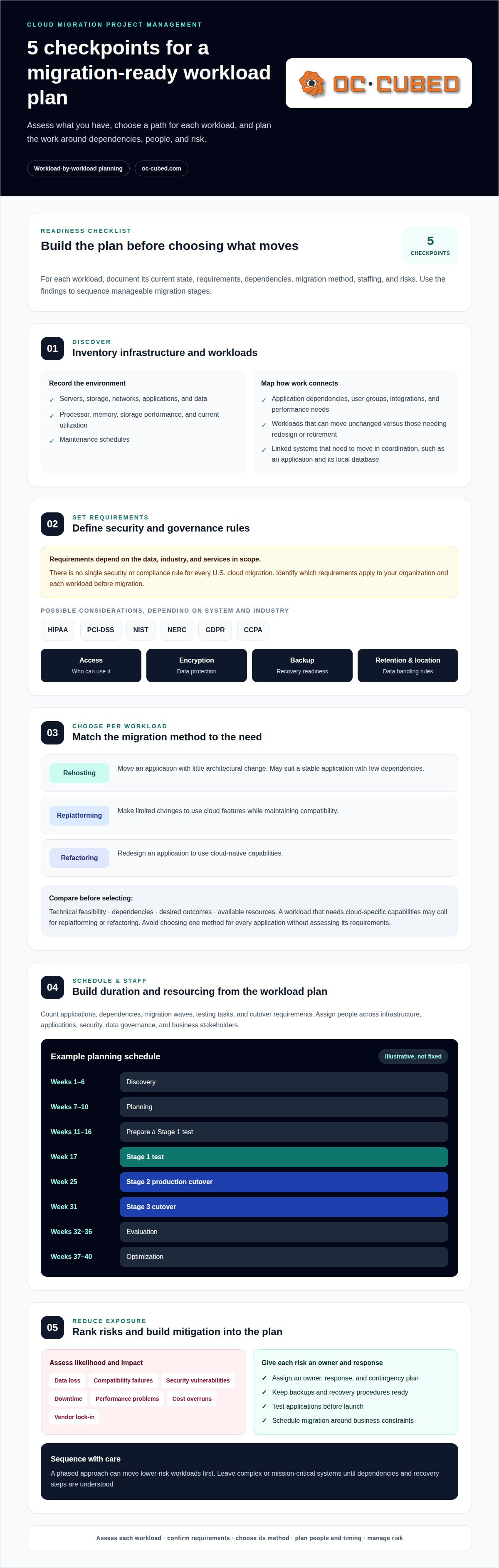
Inventory servers, storage, networks, applications, and data before selecting workloads. Record processor, memory, storage performance, current utilization, and maintenance schedules. Map application dependencies, user groups, integrations, and performance needs. For example, an application linked to a local database may need to move in coordination with it. Distinguish workloads that can move unchanged from those that need redesign or retirement.
-
Identify Security and Governance Rules
Identify the security, compliance, and data governance requirements that apply to your organization and each workload. In the United States, relevant considerations may include HIPAA, PCI-DSS, NIST, and NERC, depending on the system and industry. GDPR and CCPA may also apply to organizations handling data covered by those regulations. Set access, encryption, backup, retention, and data-location requirements before migration.
There is no single security or compliance rule for every U.S. cloud migration. The data, industry, and services in scope determine which requirements and controls apply.
- Choose a migration method for each workload. Rehosting moves an application with little architectural change. Replatforming makes limited changes to use cloud features while maintaining compatibility. Refactoring redesigns an application to use cloud-native capabilities. Compare technical feasibility, dependencies, desired outcomes, and available resources before choosing.
For example, a stable application with few dependencies may suit rehosting. A workload that needs cloud-specific capabilities may call for replatforming or refactoring. Avoid choosing one method for every application without assessing its requirements.
- Estimate duration and staffing from the workload plan. Count applications, dependencies, migration waves, testing tasks, and cutover requirements. Assign people according to the work, including infrastructure, application, security, data governance, and business stakeholders.
A sample schedule uses weeks 1-6 for discovery, weeks 7-10 for planning, and weeks 11-16 to prepare a Stage 1 test. It schedules that test in week 17, Stage 2 production cutover in week 25, and Stage 3 cutover in week 31. Evaluation occupies weeks 32-36, followed by optimization during weeks 37-40. Treat this as a planning example, not a fixed duration.
- Rank risks and build mitigation into the plan. Assess the likelihood and impact of data loss, compatibility failures, security vulnerabilities, downtime, performance problems, cost overruns, and vendor lock-in. Assign each risk an owner, response, and contingency plan.
Keep backups and recovery procedures ready, test applications before launch, and schedule migration around business constraints. A phased approach can move lower-risk workloads first, leaving complex or mission-critical systems until dependencies and recovery steps are understood.
Cloud provider selection criteria
Compare providers against workload requirements, operating needs, and your migration strategy before committing.
-
Set Provider Selection Criteria
Rank providers by network capacity, performance, security, support, and reliability. Review certifications and standards, governance controls, technology roadmaps, and migration assistance. Examine contract terms, service-level agreements, dependencies, partnerships, and exit planning. These criteria help show whether a provider can support your workloads now and adapt as they change. Don’t let one attractive feature outweigh essential operational requirements.
-
Choose a Cloud Provider
Match provider capabilities to the environment and workloads identified during assessment. Compare how each option handles required integrations, access controls, backup needs, and expected performance. Review provider stability and support arrangements, then map contract terms to your organization’s operational needs. For Microsoft-based workloads, include identity, email, and application integration in the comparison rather than treating migration as infrastructure alone.
- Test the workloads that matter most. Use a representative application or development environment to evaluate performance, interoperability, availability, security, and recovery. Include common user tasks, such as signing in, opening shared files, and accessing connected applications. Testing can reveal compatibility issues before a wider move. Record results against clear acceptance criteria, then resolve gaps before migrating dependent workloads.
- Review security and compliance alignment. Map your organization’s applicable requirements to provider controls and operating procedures. Depending on the data and industry, relevant frameworks may include HIPAA, PCI-DSS, NIST, and NERC; GDPR and CCPA may also be relevant. Confirm how access authorization, encryption, data integrity, and audit information fit your environment. Don’t assume a provider’s certification alone satisfies every organizational obligation.
- Compare service agreements and support. Read service-level agreements for availability commitments, support scope, incident processes, and responsibilities. Identify what the provider handles and what remains with your internal teams or partners. Check how changes, outages, and escalations are managed. A clear division of responsibilities helps prevent gaps during migration and ongoing operations, especially when applications rely on multiple providers or services.
- Assess long-term fit and exit options. Compare technology roadmaps with planned application changes, growth, and integration needs. Review dependencies and partnerships that could affect future flexibility. Document how data and workloads could be transferred if requirements change, including the steps, responsibilities, and technical dependencies involved. This connects provider selection to broader business strategy rather than focusing only on the initial migration phase.
Building a migration framework aligned with business and technical goals
Define the business outcome first, then translate it into technical work. A practical framework connects priorities, workload choices, testing, and communication.
- Set measurable business goals. Define what success means before choosing migration tasks. A goal might be improving access to shared files, supporting remote collaboration, or strengthening recovery processes. Pair each goal with a measure, such as application availability or user task completion. Conduct a cost-benefit analysis that includes migration effort, ongoing cloud use, and required support. This helps separate essential outcomes from features that add complexity without meeting a clear need.
- Map goals to technical requirements. Translate each business goal into functional and technical considerations. For example, a collaboration goal may require reliable access, identity integration, and clear permissions. A recovery goal requires suitable backup and restoration processes. Assess workload compatibility, dependencies, security, performance, and data governance. Then evaluate technical feasibility for each workload. The results should show which migration method fits and what changes or preparation each application needs.
- Build a workload roadmap. Group applications by business value, complexity, risk, and dependency. Plan migration waves so teams can learn from early deployments before moving more demanding systems. AWS and Azure Migration Competency guidelines, combined with internal playbooks, can inform a secure and scalable strategy. Use those references to shape repeatable steps while adapting decisions to your environment. Record each workload’s intended outcome, migration method, owner, and required test.
- Set timelines, resources, and measures. Create a roadmap with milestones for preparation, migration, testing, and deployment. Assign responsibility for infrastructure, application changes, security, data governance, and business decisions. Define project metrics that connect technical progress to goals. For example, track whether a migrated application passes functional testing and supports its expected user tasks. Include decision points to pause a wave if a dependency, performance issue, or security finding needs attention.
- Plan stakeholder communication. Identify affected teams and explain what will change, when access may be affected, and where users can get updates. Schedule regular project sync-ups and keep shared documentation current. For a finance application, tell finance staff about its testing window and any sign-in changes before deployment. A communication plan should also specify who approves decisions and how issues are escalated. This keeps business owners, technical teams, and users aligned throughout each migration wave.
Conduct a cost-benefit analysis and define your goals before cloud migration. Evaluate technical feasibility to identify the right migration method. Use the findings to confirm that the selected workload, approach, and planned tests support the intended business outcome. Technical completion alone is not a measure of success.
Cloud migration plans should include roadmaps, timelines, project metrics and goals, and a communication strategy for stakeholders. Keep these elements connected: milestones should reflect the work needed to meet goals, metrics should show progress and outcomes, and updates should explain relevant changes and decisions. Review the plan as teams learn from each migration wave, and adjust later work when testing or dependencies reveal a need for preparation.
Cloud migration benefits
Connect each migration decision to a practical business outcome. Use these steps to identify where cloud platforms can improve capacity, collaboration, resilience, and application management.
- Match cloud capacity to changing demand. Cloud computing can let businesses use the capacity they need and scale resources as demand changes, rather than adding on-site capacity in advance. Identify workloads with uneven demand, such as a reporting system used heavily during monthly close. Plan resources around actual use patterns, then monitor consumption after migration. This helps align infrastructure with operating needs instead of maintaining unused capacity.
- Improve access to collaboration tools. Identify work that depends on shared documents, communication, or access across locations. Cloud-based collaboration platforms can support teams working with shared information, while cloud communications can bring voice, email, chat, and video together. For example, a project team can work with shared files and meet without relying on one office’s local systems. Map permissions and user workflows to keep access controlled.
- Choose suitable workloads, including critical applications. Cloud migration can support productivity tools, mission-critical enterprise applications, backup and recovery, and software development. Match each workload to its operational needs. For instance, a development team may benefit from cloud environments for building and testing applications. A critical business system needs close attention to performance, availability, integrations, and recovery. Set acceptance measures for each workload before migration.
- Strengthen backup and recovery planning. Consider whether cloud services can support recovery if an on-premises data center becomes unavailable. Some organizations use public cloud resources to back up private cloud systems, adding a recovery option if an attack or disaster affects local infrastructure. Define which data and services are essential, how restoration will be tested, and who needs access during recovery. Keep backup design aligned with business continuity needs.
- Reduce application overlap and maintenance effort. Review the application portfolio for redundant tools, unused systems, and upgrade opportunities. Retiring an outdated application can eliminate duplicate resources and reduce maintenance work. For example, two departments may use separate tools for the same business process. Confirm which system supports required workflows, plan for affected users, and retire redundant applications only after addressing their data and dependencies.
- Track business value after deployment. Compare each migrated workload with its original purpose. For a collaboration platform, review whether users can complete shared tasks smoothly. For a development workload, assess whether the environment supports planned testing and releases. Monitor performance and costs, then adjust resources to match demand. These follow-up actions connect technical results with business outcomes and guide future improvements.
Cloud migration project management
Manage migration as connected phases, with owners, decision points, and measurable outcomes. The work involves coordinating applications, people, dependencies, testing, and operational readiness.
-
Estimate Migration Project Costs
Build an itemized estimate based on the work each application requires. Project costs are case-specific and follow a quote request; key factors include workload complexity, data volume, infrastructure changes, licensing, security controls, staffing, testing, and downtime planning. Include migration tasks and ongoing cloud operations. Compare scenarios, such as rehosting versus refactoring, because redesign requires different work from moving an application largely unchanged.
Keep contingency planning separate from planned work. Record assumptions, dependencies, and ownership, then update estimates when discovery reveals new requirements.
-
Plan the Migration Phases
Organize work into discovery, planning, preparation, testing, production migration, and post-migration evaluation. Assign an owner and exit criteria to each phase. During discovery, confirm workload dependencies and stakeholders. Preparation should cover security, backups, access, and cutover steps. Test migrated applications before production use, then review performance, cost, and user experience after launch.
Move applications in waves rather than treating them as one release. If testing reveals a compatibility issue, resolve it before moving dependent workloads. This structure gives teams flexibility while keeping milestones under control.
-
Select Project Management Tools
Choose tools that make responsibilities, dependencies, and decisions visible. A project schedule or task tracker can record owners, due dates, risks, and migration status. Shared documentation keeps architecture decisions and runbooks accessible. Regular sync-ups and open communication channels help teams resolve blockers promptly.
Infrastructure as code and CI/CD pipelines can streamline provisioning and reduce manual errors while preserving governance. Use cloud migration tools when they support assessment, transfer, or testing, and connect their outputs to the central project record. Avoid spreading critical decisions across disconnected files.
-
Measure Project Success
Set success measures before the first migration wave. Track application performance, response times, resource utilization, and availability. Test functionality, integrations, security, and user acceptance against agreed expectations. For example, verify that a migrated application completes its core workflow and connects to required systems.
Compare results with business goals, not just migration completion. Review cost patterns and user experience after deployment, then assign follow-up actions. A successful cutover is not the final measure if the application remains slow, insecure, or difficult to use.
OC Cubed - Your trusted MSP: Virtual Project Management
OC Cubed - Your trusted MSP provides Virtual Project Management to help coordinate cloud migration work across teams, timelines, and dependencies. Turn to this support when internal teams need help tracking project decisions, managing vendor communication, or keeping migration tasks aligned.
As systems move, Remote IT Support can help address user and technical needs, while Microsoft 365 Tenant Maintenance supports tenant administration. Security Threat Detection and Remediation can help address security issues as your environment changes. These services support related IT needs without losing sight of the migration plan.
Clear ownership and steady coordination help your team keep work moving from planning through post-migration review. Contact OC Cubed - Your trusted MSP to discuss your cloud migration project.
Make the Next Cloud Decision with Confidence
Migration completion marks the start of a new operating cycle. Give each cloud environment a clear owner, review how it supports daily work, and record decisions that affect security, performance, and future changes. This makes cloud migration project management an ongoing discipline, not a temporary effort focused only on cutover.
Set a regular review schedule for application needs and changing business priorities. When a process changes or a workload no longer fits its environment, use the review to decide whether to adjust, modernize, or retire it. Clear ownership also helps bring the right technical and business stakeholders into those decisions.
OC Cubed - Your trusted MSP can support ongoing IT operations through Remote IT Support, Microsoft 365 Tenant Maintenance, and Security Threat Detection and Remediation. Choose the next step that helps your team keep cloud services aligned with its work.
With steady oversight, your cloud environment can continue to support your business as it grows.
Frequently Asked Questions
What is cloud migration project management?
Cloud migration project management coordinates the people, decisions, and technical work needed to move business systems to cloud infrastructure. It connects project scope with workload dependencies, vendor responsibilities, user needs, and operational readiness. For example, a project manager can coordinate an application owner, security lead, and cloud engineer before a system change. This keeps decisions visible and clarifies who resolves issues as work progresses.
How do you create a cloud migration project plan and timeline?
Build the timeline around dependencies and decision points, not just a list of applications. Identify systems that rely on shared identity, databases, or network connections, then schedule their work in a workable order. Allow for stakeholder approvals and user preparation. For example, a department’s sign-in process may need coordination before its application moves. Set review points so teams can adjust sequencing when testing reveals a blocker.
What are the main risks and challenges in cloud migration projects?
Common challenges include overlooked dependencies, unclear responsibilities, unexpected application behavior, and users losing access to familiar workflows. These issues can compound: a missed integration may disrupt a business process and delay a planned release. Assign an owner to each material risk, record its warning signs, and agree on a response. For a critical workflow, define who can pause the change and how teams will restore service.
How do you minimize downtime and ensure business continuity during cloud migration?
Reduce disruption by preparing a cutover runbook with named owners, validation steps, and a clear decision point for continuing or reversing the change. Where feasible, keep the existing and migrated systems available in parallel while teams verify essential workflows. Tell affected users when access may change and how to report problems. For example, validate a customer-facing process with its business owner before directing all users to the migrated application.
How do you compare cloud migration approaches across AWS, Microsoft Azure, and Google Cloud?
Compare AWS, Microsoft Azure, and Google Cloud against the same workload requirements rather than relying on platform names alone. Assess compatibility, identity integration, security controls, network performance, support, contract terms, and exit options. Then test a representative application or workflow in each environment using consistent acceptance criteria. Record operational fit alongside technical results, including compatibility with existing tools and the skills available to support it.

Article by
Peter Irizarry
Peter Irizarry founded OC Cubed, LLC in 2023 to help small to mid-sized businesses stop worrying about downtime and cybersecurity threats. A frequent speaker on SMB digital transformation, Peter is passionate about translating complex IT roadmaps into plain-English business growth strategies. He resides in North Texas with his family.


