

A password plus another prompt isn’t automatically multi-factor authentication. MFA requires evidence from at least two distinct factor categories, such as something a person knows and something they have. A practical multi-factor authentication implementation guide starts by enforcing this consistently through an identity provider or authentication gateway, then protecting enrollment, recovery, and sign-in.
Adding a login step can improve security, but the factor matters. A security question is still “something you know,” while an authenticator app or security key can provide a different kind of proof. A sound implementation also accounts for lost devices, account recovery, and the applications employees use.
This guide explains how to plan an MFA rollout: set authentication requirements, choose suitable factors, secure registration and recovery, and test compatibility and resistance to attacks. You’ll also learn why phishing-resistant options can offer stronger protection and how a phased rollout can reveal access or support issues before deployment expands.
Key Takeaways
- Secure MFA enrollment and recovery so lost devices don’t become an easy path into an account.
- Apply authentication policies through a central identity provider or gateway for consistent protection across applications.
- Set requirements around account risk, prioritizing privileged access, remote connections, and critical business systems.
- Choose factors from distinct categories, favoring phishing-resistant options where available and avoiding security questions as a second factor.
- Test enrollment, recovery, application compatibility, and resistance to phishing and other attacks before expanding a rollout.
How professionals secure MFA registration and upgrade authentication methods
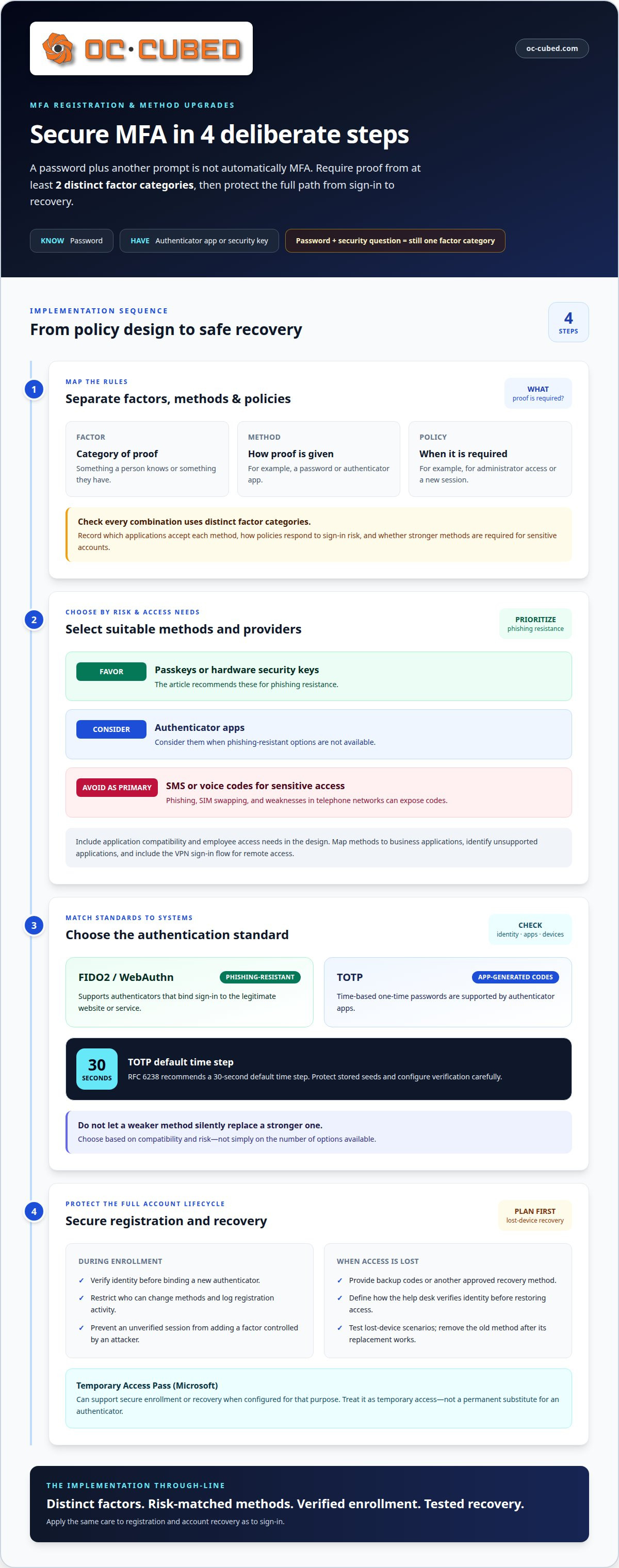
Professionals secure MFA by controlling enrollment, choosing distinct factors, and protecting recovery as carefully as sign-in. FIDO2 and WebAuthn support phishing-resistant authentication, while TOTP provides app-generated codes; RFC 6238 recommends a 30-second default time step.
-
Distinguish Factors, Methods, and Policies
Map each authentication factor, method, and policy before changing enrollment. A factor is a category of proof, such as something a person knows or has. A method is how that proof is provided, such as a password or authenticator app. A policy sets when and where a method is required, for example, for administrator access or a new session.
Check that each proposed combination uses distinct factors. A password followed by a security question still relies on knowledge, so it does not provide a second factor. Record which applications accept each method and how policies respond to sign-in risk. This helps ensure a strong method is not optional for a sensitive account.
-
Select MFA Methods and Providers with Professional Guidance
Choose methods based on account risk, application compatibility, and employee access needs. Favor passkeys or hardware security keys for phishing resistance, and consider authenticator apps where those options aren’t available. Avoid SMS or voice codes as primary methods for sensitive access: phishing, SIM swapping, and weaknesses in telephone networks can expose codes.
When evaluating implementation support, look for the ability to map authentication methods to business applications, preserve usable access, and plan secure recovery. The design should identify unsupported applications and explain how policies apply across identity systems. For remote access, include the VPN and its sign-in flow instead of treating them as a separate exception.
-
Choose MFA Standards with Professional Guidance
Ask the provider to select standards according to the systems being protected. FIDO2 and WebAuthn support phishing-resistant authenticators that bind sign-in to the legitimate website or service. TOTP supports time-based codes in authenticator apps; RFC 6238 recommends a 30-second default time step.
Check that the chosen standard works with the organization’s identity provider, applications, and devices. The design should prevent a weaker method from silently replacing a stronger one during sign-in. For TOTP, protect stored seeds and configure verification carefully. Choose methods based on compatibility and risk, not simply on the number of options available.
-
Secure Registration and Recovery Through Professional Implementation
Protect enrollment by requiring verification before binding a new authenticator to an account. Restrict who can change methods, log registration activity, and prevent an unverified session from adding a factor controlled by an attacker. Plan recovery before rollout, so a lost phone doesn’t lead staff to bypass normal controls.
Provide backup codes or another approved recovery method, and define how the help desk verifies identity before restoring access. A Microsoft Temporary Access Pass can support secure enrollment or recovery when configured for that purpose. Treat it as temporary access, not a permanent substitute for an authenticator. Test lost-device scenarios and remove an old method after its replacement works.
What is Multifactor Authentication (MFA) Implementation?
MFA connects identity checks to the applications employees use and applies consistent access policies. Enforce it for employees, administrators, and remote access by requiring verification at sign-in, with stronger controls for privileged accounts and sensitive systems.
-
Plan Application and Identity-Provider Integration with a Provider
Map the organization’s identity provider, applications, and sign-in paths before integration. Applying MFA centrally through the identity provider or an authentication gateway can help policies cover connected services consistently. Identify applications using modern federation, such as SAML or OpenID Connect, and those relying on older connections. Check single sign-on and session behavior to ensure verification doesn’t create unexpected gaps.
For on-premises services, include Active Directory Federation Services (AD FS) and applications using RADIUS in the inventory. Microsoft recommends migrating applications that use RADIUS authentication to modern protocols such as SAML, OpenID Connect, or OAuth when possible. Maintain a clear route for applications that can’t move immediately, and review their access paths rather than assuming they’re protected.
-
Deploy MFA Across Applications and Employees with Professional Support
Start with a small pilot group, then assess enrollment, application access, and support needs before expanding in waves. Include representative employees, administrators, devices, and core applications in the pilot. This can reveal integration issues before the policy reaches the full organization. Use the results to adjust enrollment instructions and deployment timing to match support capacity.
Prioritize business email, cloud services, customer databases, and remote desktop access because they can expose sensitive information. Then expand coverage across employee accounts and important applications. Track which groups have completed registration and where sign-in failures occur. Don’t enable a broad policy before testing the related applications and recovery paths.
-
Enforce MFA for Access Through Professional Implementation
Set policies by role, application sensitivity, and access route. Require MFA when employees access business applications, and apply stronger controls to administrators who can change identity settings or permissions. Include remote workers’ VPN access in the policy. MFA on a VPN helps protect the route into internal systems, but connected applications still need appropriate access rules.
Coordinate identity, policy, and session behavior so each application receives the intended verification result. Issue authentication tokens only after MFA verification succeeds. Review exceptions carefully, especially legacy sign-in paths that might bypass the identity provider. A provider should document which users and applications each rule covers, then monitor failed sign-ins and access patterns after deployment.
-
Explain MFA Protection
When correctly enforced, MFA makes a stolen password alone insufficient for access. For example, a person may need a password and an authenticator method before opening a cloud application. This extra check can limit the impact of credential theft, but it doesn’t replace secure sessions, access controls, or threat monitoring.
Connect MFA planning with broader identity and threat protections. Review how applications issue sessions after login, and ensure an attacker cannot bypass verification through an older sign-in route. For organizations coordinating access controls with remote IT support, align the rollout with employee access needs and support procedures.
MFA authentication requirements
Set MFA requirements by considering applicable U.S. standards, account risk, and access needs. Define who must authenticate, which systems need stronger controls, and how device behavior affects sign-in.
-
Review Regulatory Requirements
Map each applicable regulation or standard to the systems and accounts it covers. In the United States, CISA and the Federal Trade Commission emphasize MFA as a baseline security measure. HIPAA and PCI DSS identify MFA as a critical safeguard for healthcare and payment environments.
Treat these references as compliance considerations, not a universal rule that every organization has identical legal duties. Identify relevant data, customer commitments, and industry obligations, then document which access controls address them. For example, a payment environment and a general office application may need different protections.
-
Decide When to Require MFA with Professional Guidance
Require MFA for privileged users, remote access, critical systems, identity-management tools, and important business applications. Prioritize email, cloud services, customer databases, financial accounts, and remote desktop systems because compromised access can expose sensitive information or enable further changes.
Apply requirements across employee accounts, including administrators and contractors with elevated permissions. Use behavior and device context to identify unusual sign-ins, but don’t treat location alone as a second authentication factor. State which access routes require verification and how exceptions are reviewed.
- Set the assurance target before selecting authentication methods. According to the National Institute of Standards and Technology, Authentication Assurance Level 2 (AAL2) requires proof of the possession and control of two distinct authentication factors. Use that requirement when the organization’s risk or assurance needs call for AAL2, rather than assuming every system needs the same level.
Build the policy around the account being authenticated and its bound authenticators. Review how identity infrastructure handles recovery, administrator changes, and access to sensitive applications. This keeps required proof connected to the right account and reduces gaps when users change devices.
- Account for the time employees need to complete authentication. Most modern MFA systems take only a few seconds to use. The exact experience depends on the method, device, network, and sign-in flow, so include those conditions when assessing user experience.
Test routine sign-ins and less common tasks, such as using a new device or recovering an account. Even a short verification step can disrupt work if it repeatedly interrupts a session or fails on a critical application. Track completion and failure patterns during rollout, then refine policies without weakening protection for sensitive access.
- Review the full access path after setting requirements. Check whether employees, administrators, and remote users encounter MFA before accessing applications or starting a session. Include legacy systems and identity-management infrastructure, since an uncovered route can leave a compromised password useful.
Document the policy by role and application, then review sign-in activity for unexpected behavior. For example, repeated denials or unusual access to an administrator account may warrant investigation. Keep the experience practical, but don’t create an unprotected exception for critical systems in the name of convenience.
Professional testing of MFA compatibility and attack resistance
Test application compatibility and resistance to attacks before expanding MFA. Common attacks include phishing for credentials, SIM swapping to take over phone numbers, and prompt bombing, which floods users with approval requests.
-
Check Compatibility and Technical Limitations During Implementation
Test each authentication flow across business applications, single sign-on, and federation. Include employee enrollment, account recovery, and access from managed and personal devices. Record whether policies work as intended and whether an older application blocks the chosen method.
Assess technical limits before rollout. Legacy applications may not support modern authentication, and device differences can affect enrollment and sign-in. Identify these constraints, test integration paths, and plan a phased deployment. Include employees in the pilot and explain the new verification step. This helps surface usability concerns without weakening controls to avoid resistance.
Test recovery and session behavior alongside routine login. Confirm that successful verification leads to the right application, while failed or incomplete checks don’t grant access. Track recurring failures and support requests to identify problems before expanding deployment.
-
Evaluate Common MFA Attacks
Simulate phishing and credential theft to assess whether an attacker could reuse a stolen password or relay a sign-in. Test session hijacking too, since an active session can pose a risk even after authentication succeeds. Review how the system handles denied requests and suspicious sign-in behavior.
Include SIM swapping in the threat assessment when accounts rely on SMS codes. Phone-based methods can be exposed through number takeover, so don’t treat them as equivalent to phishing-resistant authentication. Test prompt bombing through a controlled exercise with repeated unexpected approval requests. Employees should know not to approve a prompt they didn’t initiate.
Use simulated phishing exercises to assess employee behavior and identify training needs. Pair the results with sign-in logs, help desk reports, and policy reviews. The aim is to find where an unauthorized attempt might succeed, not to create unnecessary friction for normal work.
-
Test Passkeys and Phishing Resistance During Implementation
Test passkeys and FIDO2/WebAuthn authenticators against the applications and devices employees actually use. These methods bind authentication to the legitimate origin, helping resist credential theft, MFA fatigue, and reverse-proxy phishing. Verify enrollment, routine sign-in, recovery, and access through single sign-on before making them broadly available.
Check how the method works when an employee uses an unsupported application or loses an authentication device. Confirm that fallback options don’t quietly weaken protection for sensitive accounts. Compare test results with access needs and support capacity to balance strong controls with a workable experience.
Repeat compatibility and attack-resistance tests after meaningful policy or application changes. Review failures, employee feedback, and simulated attack outcomes, then adjust deployment plans. This provides a practical path to stronger MFA without leaving technical gaps hidden until full rollout.
Authentication factor categories
Classify each sign-in proof by its source before deciding whether a combination counts as MFA. Understanding these categories gives a multi-factor authentication implementation guide a practical foundation: the key test is whether an account presents evidence from distinct factor categories, not simply whether login includes multiple prompts.
- Identify the three factor categories in every authentication flow. “Something you know” includes a password; “something you have” can be a smartphone generating a one-time password; and “something you are” includes a biometric characteristic. MFA combines evidence from different categories, such as a password and authenticator app. Two methods from the same category don’t become MFA just because users complete them separately.
Map the source of proof for each step. A password plus a PIN still relies on knowledge, while a password plus a phone-based code combines knowledge and possession. This distinction helps prevent a policy from counting two prompts as independent factors when they aren’t.
- Check whether the method proves possession of a device or merely uses information sent to it. An authenticator app on a smartphone can provide a possession factor, while a password remains a knowledge factor. A passkey uses a cryptographic key stored on a device and typically requires biometric verification. Assess how the system binds that authenticator to the account.
Separate the authenticator from its activation method. A biometric check may unlock a passkey on a device, but the implementation should follow the authentication system’s factor model. Review whether enrollment, recovery, and replacement preserve the intended proof rather than allowing an unverified method to take over an account.
- Reject combinations that only appear to use separate factors. A password followed by a security question asks for two pieces of knowledge, so it doesn’t meet the distinct-category test. Security question answers may also be guessed or found online. Treating them as a second factor creates a false sense of assurance for sensitive accounts.
Review email codes carefully, too. If the mailbox can reset the primary credential, an attacker who controls email may gain both access and recovery. The code’s source doesn’t automatically make it an independent possession factor. Document dependencies between accounts before accepting a method as separate proof.
- Keep contextual signals separate from authentication factors. Location, device reputation, and sign-in behavior can help assess risk, but location alone isn’t an independent factor. A password plus a location check therefore isn’t MFA. Use these signals to adjust verification requirements, not to claim another factor has been presented.
For example, a familiar device can inform a risk decision, while an authenticator supplies the required second category. This distinction clarifies policies and helps teams understand which evidence actually blocks access when a credential is compromised.
- Match factor choices to account sensitivity and user access. A hardware security key may suit privileged accounts, while an authenticator app can support broader employee access. Consider device availability, recovery needs, and application compatibility. Keep factor categories consistent across policies and document approved combinations so administrators can assess exceptions.
Use a factor map to record the proof source, its category, and the accounts that accept it. This helps security teams assess exceptions and maintain clear access decisions as methods change. It also makes the multi-factor authentication implementation guide easier to apply to new applications and user groups.
OC Cubed - Your trusted MSP
OC Cubed - Your trusted MSP helps businesses strengthen the IT environment surrounding their authentication policies. When MFA needs to fit into existing accounts, devices, and security processes, its Remote IT Support and Microsoft 365 Tenant Maintenance can help address practical access and configuration needs.
Security Threat Detection and Remediation and Endpoint Protection/Antivirus provide related safeguards for managing threats across business systems. They complement MFA but don’t replace careful factor selection, secure enrollment, recovery planning, or testing. This support is particularly useful when access policies span multiple applications or must work alongside existing security controls.
Contact OC Cubed - Your trusted MSP to discuss your business’s IT security needs.
Keep authentication aligned as your business changes
MFA works best as an ongoing part of access management, not a one-time rollout. As employees join or change roles and applications evolve, authentication policies need to keep pace. A multi-factor authentication implementation guide sets the direction, while regular reviews help keep controls relevant to how your business operates.
Make the next step a practical review of your current sign-in paths, recovery processes, and security priorities. OC Cubed can help businesses connect IT support and security management to those needs, including threat detection and Microsoft 365 environment maintenance.
Strong authentication supports confident work when it fits the systems and people it protects. Take the next step at a pace that works for your organization.
Frequently Asked Questions
What Is MFA and How Does It Work?
MFA checks more than a password before granting access. After entering credentials, a user completes another verification step, such as approving a sign-in or using a passkey. The identity system then decides whether to allow access to the requested application. For example, an employee signing in from a new device may need another check before opening company email.
Can MFA be hacked?
Yes. MFA can be bypassed if an attacker steals an active session, tricks a user into approving a fraudulent prompt, or exploits a weak recovery process. The risk depends on the method and how access is managed after sign-in. Organizations can reduce exposure by limiting unnecessary approvals, monitoring unusual account activity, and promptly revoking sessions when credentials or devices are compromised.
How much does MFA slow you down?
For many modern systems, MFA adds a brief verification step, but the exact time depends on the sign-in method, device, network, and policy. Repeated prompts can create more friction than a check at the start of a session. A rollout should assess routine tasks, such as opening email or switching applications, and tune verification frequency without leaving sensitive access unprotected.
Where should a provider enable MFA?
Where possible, enforce MFA through the organization’s identity provider or authentication gateway, then confirm that connected applications follow its policies. Prioritize administrator accounts, email, cloud services, financial systems, customer databases, and remote access. Include older applications and service accounts in the access review, since they may use different sign-in paths or require separate controls.
What are the steps a provider follows to implement multi-factor authentication?
First, map users, applications, and existing sign-in routes. Then set access policies, configure supported authentication methods, and prepare enrollment and recovery processes. A pilot tests the design with representative users before wider deployment. After expansion, review sign-in failures, support requests, and access logs to identify gaps and refine policies.
Which MFA methods are most secure and user-friendly?
Passkeys and FIDO2 security keys offer strong resistance to phishing, while authenticator apps provide a practical code-based option for compatible accounts. The best fit depends on employee devices, application support, account sensitivity, and recovery needs. A provider should plan for different user circumstances without allowing weaker fallback methods to become the default for privileged or sensitive access.
How do passkeys, authenticator apps, SMS, and hardware security keys compare?
Passkeys and hardware security keys can resist phishing by binding authentication to the legitimate service. Authenticator apps generate verification codes, but users still need to protect against code theft or relay. SMS is convenient, yet phone-number takeover and phishing make it weaker for sensitive access. Device availability and recovery arrangements also affect which method works best for each employee.
How should organizations work with a provider to roll out MFA and handle user enrollment?
Share an accurate application and user inventory, identify administrator roles, and flag legacy sign-in routes before deployment. Agree on a pilot group, employee instructions, support ownership, and how enrollment completion will be tracked. The provider can then stage the rollout, review enrollment problems, and adjust guidance before expansion. Plan replacement and recovery processes alongside registration, not after users lose access.

Article by
Peter Irizarry
Peter Irizarry founded OC Cubed, LLC in 2023 to help small to mid-sized businesses stop worrying about downtime and cybersecurity threats. A frequent speaker on SMB digital transformation, Peter is passionate about translating complex IT roadmaps into plain-English business growth strategies. He resides in North Texas with his family.


