

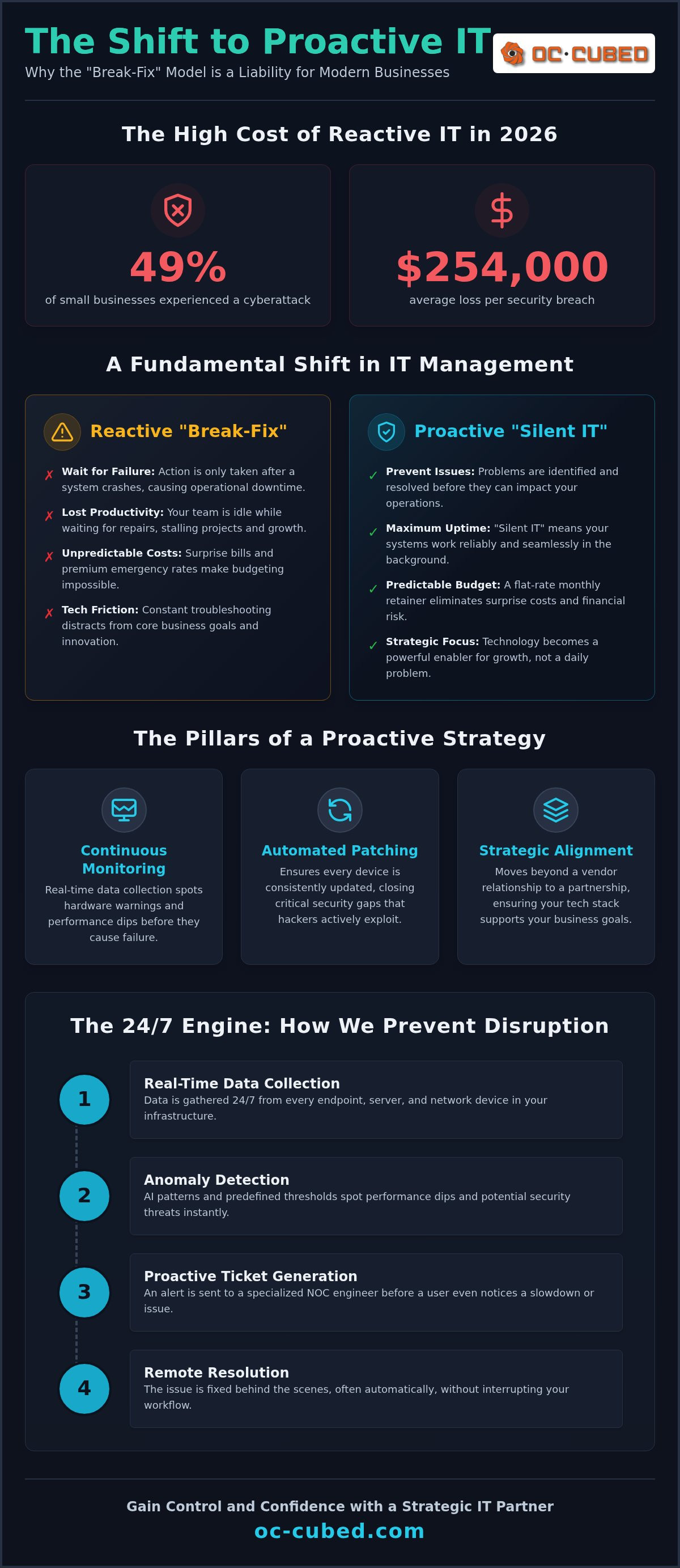
In 2026, 49% of small businesses experienced a cyberattack, resulting in an average loss of $254,000 per breach. When you look at those numbers, the traditional "break-fix" model stops looking like a cost-saver and starts looking like a liability. You likely know the frustration of waiting for a support ticket to be resolved while your operations grind to a halt. It's exhausting to manage unpredictable monthly expenses and the constant anxiety of a potential data leak.
We understand that you need technology to be a silent, reliable engine for your growth. This guide explains how to transition to proactive IT support for small business, moving away from reactive repairs and toward a strategy that eliminates unplanned downtime. You'll learn how to secure your business with enterprise-grade protection while maintaining a predictable, flat-rate monthly budget. We will walk through the essential steps to modernize your infrastructure, from Microsoft 365 tenant maintenance to advanced threat detection, ensuring your technology finally works as hard as you do.
Key Takeaways
- Stop the cycle of reactive repairs by understanding the financial benefits of a model that prevents issues before they occur.
- Learn how 24/7 network monitoring and NOC integration provide an early warning system against hardware failure and system lag.
- Secure your operations with active Microsoft 365 maintenance and enterprise-level email protection designed for small team budgets.
- Leverage proactive IT support for small business to gain access to fractional leadership that bridges the gap between technical fixes and strategic growth.
- Discover why a flat-rate retainer model is the most predictable way to manage your technology costs while eliminating the risk of surprise bills.
What Is Proactive IT Support? Moving Beyond the Break-Fix Trap
Proactive IT support for small business is a fundamental shift in how you manage your company's digital backbone. Most businesses operate in a "break-fix" cycle. They wait for a server to crash or a laptop to fail before calling for help. This model is inherently reactive. It forces you to pay for repairs only after your team has already lost hours of work. In contrast, a proactive model focuses on proactive maintenance to identify and resolve vulnerabilities before they trigger a system failure.
We call this "Silent IT." You know the system is working because nothing happens. There are no emergency calls. There are no sudden outages. In the competitive environment of 2026, a preventative-first mindset is essential. With 49% of small businesses experiencing a cyberattack this year, waiting for a breach to occur is no longer a viable strategy. You need a partner who finds the smoke before there is ever a fire. The goal is steady reliability.
The Hidden Costs of Reactive IT Support
Reactive support is the most expensive way to run a business. When a system fails, the invoice for the repair is only the beginning. The real cost is lost productivity. If your team cannot access their files for even one hour, the financial impact can be staggering. You're paying for idle time while your deadlines slip. This creates a cycle of surprise bills that destroy monthly budgets. Emergency repairs often carry premium rates, making it impossible to forecast your technology spending. Beyond the money, tech friction creates an opportunity cost. When you're busy troubleshooting basic tools, you aren't focusing on growth. Tech friction slows momentum.
Key Pillars of a Proactive Strategy
A successful proactive strategy relies on three main elements. First, continuous monitoring replaces the old method of periodic check-ins. We use real-time data to spot hardware warning signs like overheating or storage limits. Second, automated patch management ensures every device stays updated. This closes the security gaps that hackers love to exploit. Finally, we focus on strategic alignment. This ensures your tech stack supports your specific 2026 business goals. It's about moving from a vendor relationship to a strategic partnership. We help you gain control over your environment so you can scale with confidence. Results matter most.
The 24/7 Engine: NOC Integration and Network Monitoring
Small businesses often misunderstand the role of a Network Operations Center (NOC). It's not just a helpdesk. It's a specialized command center where engineers monitor your infrastructure every second of the day. This integration is the backbone of proactive IT support for small business. While your team is off the clock, our NOC identifies hardware warning signs like failing hard drives, memory leaks, or abnormal CPU temperatures. We catch these signals before they cause a total system crash.
Modern IT has moved beyond simple alerting to automated remediation. In the past, a system would send an alert, and a human would eventually fix it. Now, if a specific service hangs or a security protocol is bypassed, our system can often restart the service or block the threat automatically. This speed is why remote monitoring is more effective than intermittent on-site visits. An on-site technician only sees what's wrong during their scheduled visit. Remote monitoring sees everything, all the time, across your entire national operation. Adhering to FTC cybersecurity guidelines for network security ensures that your infrastructure remains a fortress against unauthorized access.
How Remote Monitoring Prevents Disruption
System disruption is rarely a sudden event. It's usually the final stage of a series of ignored warnings. Our remote monitoring process follows a disciplined four-step sequence to keep your business moving:
- Step 1: Real-time data collection from every endpoint, server, and piece of network hardware.
- Step 2: Anomaly detection using predefined thresholds and AI patterns to spot performance dips.
- Step 3: Proactive ticket generation that alerts a specialized engineer before a user even notices a slowdown.
- Step 4: Remote resolution by NOC engineers who fix the issue behind the scenes without interrupting your workflow.
This workflow ensures that your technology remains an enabler rather than an obstacle. By identifying these patterns early, we provide proactive IT support for small business that eliminates the panic of sudden hardware failure.
Firewall and Switch Management
Many business owners believe that network hardware like firewalls and switches are "set it and forget it" tools. This is a dangerous myth. These devices are your first line of defense. They require proactive firmware updates to close critical security vulnerabilities as they emerge. We also provide active bandwidth management. This ensures that your most critical business applications always have the speed they need, even during peak usage times. If you're ready to move toward a more stable environment, our remote IT support offers the steady reliability your growth requires. We handle the complex technical details so you can focus on leading your team.
Securing the Modern Workplace: Microsoft 365 and Email Protection
Email isn't just for communication; it's the primary target for attackers. In 2026, phishing accounted for 33.8% of all small business breaches. This makes your inbox the most vulnerable part of your operations. Relying on default settings is no longer enough. Effective proactive IT support for small business must focus on the cloud environment first. We provide endpoint protection that moves beyond basic antivirus. We use advanced threat detection and remediation to stop malicious actors before they can move laterally through your network. One unchecked cyberattack can cost a small firm an average of $254,000. Proactive security is the only way to prevent a breach that could end your business growth.
Microsoft 365 is a powerful tool, but it requires active "Tenant Maintenance" to stay secure. It's not a set-and-forget service. Without constant oversight, configuration drifts and security gaps emerge. We monitor your tenant to ensure that security policies remain strictly enforced. We also manage the transition from "alerting" to "automated remediation." If a suspicious login occurs, the system can block access instantly. This is the difference between a technician who fixes a leak and a partner who builds a flood wall.
Microsoft 365 Tenant Maintenance Essentials
Managing user permissions is a core part of tenant health. When an employee leaves, their access must be terminated immediately to prevent internal data leaks. This offboarding process is often overlooked by busy owners. Regular security audits of your cloud environment help us find orphaned accounts or misconfigured settings. We also handle license optimization. This ensures you aren't paying for features or seats you don't use. We keep your environment compliant with 2026 data protection standards so you can focus on your clients. Results matter most.
Proofpoint and the Fight Against Phishing
Email remains the leading entry point for ransomware and business email compromise. Basic filters often miss sophisticated social engineering attempts that use your vendors' names or urgent financial requests. We integrate Proofpoint to stop these threats before they reach your team. This advanced filtering identifies malicious attachments and deceptive links that look legitimate to the untrained eye. Linking your email security to your overall remote IT management services strategy creates a unified defense. While Multi-Factor Authentication (MFA) can block 99.9% of automated attacks, only 34% of small businesses have implemented it. We ensure your business is part of the protected minority. Steady reliability starts with a secure inbox.
Fractional Leadership: The Virtual CIO and CISO Advantage
A technician reacts to broken hardware. A Chief Information Officer (CIO) plans for your next three years of growth. Most small businesses don't need a six-figure executive salary on their books. This is where fractional leadership becomes a major competitive advantage. It integrates high-level strategy into your proactive IT support for small business. We act as your advocate in the technology space. We ensure your digital investments align directly with your revenue targets and operational needs. We remove the guesswork from your technology decisions.
This strategic layer is what separates a vendor from a partner. While a helpdesk handles the daily tickets, fractional leaders focus on the horizon. We help you avoid the common trap of buying technology that doesn't scale. By providing steady reliability and clear direction, we turn your IT from a cost center into a growth engine. Results matter more than the tools themselves. We focus on the outcomes that drive your business forward.
What Does a Virtual CIO Actually Do?
A vCIO develops a comprehensive 3-year technology roadmap. This plan eliminates "tech debt" by identifying aging systems before they fail. We handle your budget planning to prevent surprise capital expenditures. You'll know exactly what you need to spend and when. We also conduct Quarterly Business Reviews (QBRs). These meetings measure IT performance against specific KPIs. This keeps your infrastructure efficient and your goals on track. We provide the clarity you need to lead with confidence.
The Security Governance of a Virtual CISO
Security isn't just about software; it's about governance. A Virtual CISO (vCISO) brings enterprise-grade oversight to smaller teams. We focus on implementing a cybersecurity risk management small business framework. This approach identifies your most critical data assets and builds defenses around them. We also manage complex compliance requirements like SOC2 or HIPAA. This provides IT leadership without full-time hire costs. You get the expertise of a seasoned security officer on a fractional basis.
Beyond security, we handle the daily friction of vendor management. Your IT partner should be the one talking to your ISP and software providers. We speak their technical language so you don't have to spend hours on hold. If your fiber connection drops or a software update breaks an integration, we resolve it. Our virtual project management also keeps infrastructure upgrades on time and under budget. We coordinate every detail of a new rollout, from procurement to final testing. This ensures your business stays focused on serving clients while we manage the complex technical heavy lifting.
The Economics of Proactive Support: Flat-Rate vs. Hourly Bills
The traditional "break-fix" model is built on a fundamental conflict of interest. In that system, your IT provider only makes money when your technology fails. This means they profit from your downtime. Switching to proactive IT support for small business changes this dynamic entirely through the "Managed IT Services Retainer" model. You pay one flat monthly fee for total care. This shift creates what we call Aligned Incentives. When your systems are running perfectly, our costs are low and your productivity is high. If your network goes down, it costs us time and resources to fix it. We are financially motivated to ensure you never have a problem in the first place.
Achieving true financial predictability in 2026 requires moving away from the "nickel and dime" trap. Many hourly contracts include hidden fees for "emergency" responses or basic software updates. A flat-rate model eliminates these surprises. It allows you to treat IT as a controlled utility rather than a volatile emergency expense. You gain a partner who is invested in your stability, not your struggle. Steady reliability becomes the baseline for your budget.
Break-Fix vs. Managed Retainer: A Financial Breakdown
Hourly IT often seems cheaper on the surface, but the "Cheap IT" trap leads to higher annual spending. One major server failure or a single ransomware incident can result in a bill that exceeds an entire year of managed support. A retainer allows you to scale your business without scaling your IT bill proportionally. As you add more data or complex workflows, your costs remain predictable. Most what is a managed service provider guides emphasize this model because it removes the financial friction of maintaining a modern infrastructure. You can plan your growth with confidence.
Monthly Reporting and Transparency
Proactive work is often invisible. Because we resolve issues before they impact your team, you might wonder what you're paying for. This is why transparent monthly reporting is essential. Your report should clearly document your environment's health, including:
- Total system uptime and performance metrics.
- The number of security threats blocked by Proofpoint and endpoint protection.
- Patch status and successful software deployments.
- Hardware health status for servers and network switches.
This data proves the value of the work happening behind the scenes. It also helps you make informed decisions about your next technology investment. Instead of guessing when to upgrade, you use hard data to time your capital expenditures perfectly. We provide the clarity you need to stay in control of your technology and your budget. Results are the only metric that matters.
Take Control of Your Technology Strategy
Transitioning your technology management isn't just a technical upgrade; it's a commitment to your company's operational stability. You've seen how the old break-fix model creates financial friction and keeps your team in a reactive loop. By choosing proactive IT support for small business, you move into a model where your technology finally supports your growth instead of hindering it. You gain the advantage of fractional C-suite leadership and enterprise-grade security without the overhead of a full-time staff.
This strategy guide has outlined the path from unpredictable downtime to steady reliability. We focus on the outcomes that matter to you: cost predictability, constant protection, and the ability to scale with confidence. It's time to stop managing vendors and start leading your industry. We handle the complex technical layers so you can keep your focus on the big picture. OC Cubed - Your trusted MSP is ready to help you build a resilient foundation for the years ahead.
Your business deserves a technology foundation that works as hard as you do. We're here to ensure your systems remain a silent, powerful engine for your success.
Frequently Asked Questions
What is the difference between proactive and reactive IT support?
Proactive support identifies and fixes vulnerabilities before they cause failure. Reactive support, or "break-fix," only responds after a system has crashed. Proactive models use 24/7 network monitoring to spot warning signs like overheating or storage limits. This approach prevents downtime and ensures steady reliability. In a reactive model, you're constantly fighting fires and losing productivity while waiting for a technician to respond to a ticket.
Is proactive IT support more expensive than calling a technician when something breaks?
Proactive support is more cost-effective in the long run because it eliminates the high cost of emergency repairs and unplanned downtime. While break-fix hourly rates might seem lower on the surface, the total annual spending is often higher due to surprise bills and lost revenue. Our flat-rate monthly retainer model provides total cost predictability. This allows you to scale your business without the financial volatility of a pay-as-you-go system.
Does proactive support include cybersecurity protection?
Yes, modern proactive IT support for small business integrates security as a core function. This includes endpoint protection, security threat detection, and email security with Proofpoint. We don't just wait for an infection; we actively manage your environment to close vulnerabilities. This preventative-first mindset is essential in 2026, where automated attacks target organizations of all sizes. We ensure your data remains protected through continuous oversight and remediation.
How does remote IT support handle hardware issues without being on-site?
Remote support handles hardware issues by monitoring environmental data and performance logs to predict failures. If a hard drive shows signs of failure or a switch overheats, we identify the specific part and coordinate the replacement through your hardware vendors. Our NOC integration allows us to troubleshoot configuration issues or reboot systems remotely. For physical replacements, we manage the logistics so your team knows exactly what needs to be swapped out.
What is a Virtual CIO and do I really need one for a small business?
A Virtual CIO (vCIO) provides high-level technology leadership and strategic planning on a fractional basis. You need one if you want to align your IT investments with your revenue goals without hiring a full-time executive. We develop three-year roadmaps, manage vendor relationships, and conduct quarterly business reviews. This ensures your technology is a growth engine rather than a series of expensive, disconnected purchases. It brings enterprise-grade direction to your small team.
How long does it take to transition from a reactive model to proactive support?
The initial transition usually takes between 30 and 60 days. This period involves a deep audit of your current infrastructure, the deployment of monitoring tools, and the stabilization of your Microsoft 365 tenant. We focus on resolving the most critical technical debt first to stop the cycle of immediate emergencies. Once the foundation is stable, we move into the steady state of continuous maintenance and strategic reporting to ensure long-term reliability.
Can proactive IT support help with Microsoft 365 management?
Proactive IT support for small business includes comprehensive Microsoft 365 tenant maintenance. We don't just set up accounts; we manage user permissions, enforce security policies, and optimize your licenses. This ensures you aren't paying for unused seats while keeping your cloud environment compliant with current data standards. We also handle the transition to automated remediation for suspicious login attempts, providing a much higher level of protection than default settings.
Will proactive monitoring slow down my computers or network?
No, modern monitoring tools are designed to be extremely lightweight and run in the background without impacting user performance. In fact, proactive monitoring often makes computers faster. By identifying resource-heavy background processes or failing hardware early, we can optimize your systems before they become sluggish. Our NOC integration ensures that your network bandwidth is prioritized for critical business applications, maintaining a smooth and efficient workflow for your entire team.


