

Over 70% of cyberattacks now deliberately target small businesses, often through the very cloud tools you use to run your company every day. Managing your digital perimeter feels like a full-time job when you're already trying to grow a business. Effective Microsoft 365 security management isn't about buying more licenses; it's about mastering the configuration game to ensure your data stays private and your users stay productive.
We understand the hesitation that comes with the Microsoft 365 Admin Center. It's a complex environment where the fear of accidentally locking out your team often outweighs the desire to tighten security. You need a way to stop constant phishing attempts and business email compromise risks without the technical overwhelm. This guide provides a practical, step-by-step framework to harden your tenant using 2026 best practices. We'll walk through a specific checklist of settings to enable, including the transition to passkeys and advanced threat protection. You'll gain a clear path to protect your data and the confidence to focus on your next big project.
Key Takeaways
- Understand the Shared Responsibility Model to recognize why you are responsible for securing the data and identities within your cloud environment.
- Develop a proactive posture through consistent Microsoft 365 security management focused on identity, access, and threat protection.
- Use the Microsoft Secure Score as a clear, actionable roadmap to identify vulnerabilities and measure your security progress over time.
- Implement high-impact hardening steps immediately, including the reduction of global administrator roles and the enforcement of multi-factor authentication.
- Shift the technical burden to a professional maintenance framework to ensure your security settings evolve alongside new 2026 threats.
Why Microsoft 365 Security Management is Not 'Set and Forget'
Security isn't a destination; it's a constant state of vigilance. For many small businesses, Microsoft 365 is the engine of their daily operations. However, simply buying a subscription doesn't make your data safe. Effective Microsoft 365 security management requires the continuous configuration of your digital identities, data access, and devices. It's the difference between having a lock on your door and actually remembering to turn the key every night.
You must understand the Shared Responsibility Model. Microsoft is responsible for the physical security of data centers and global infrastructure. You are responsible for everything inside your specific tenant. This includes who has access, what they can share, and how their devices connect. In 2026, the risks have evolved. Hackers now use AI to craft perfect phishing emails and deploy sophisticated methods to steal session tokens, bypassing traditional passwords. A hardened environment is the only way to stay ahead of these threats.
The Danger of Default Settings
Many owners assume that cloud services are inherently secure from the moment they sign up. This is a dangerous myth. Default settings often prioritize ease of use over strict protection. For example, legacy authentication protocols are frequently left active by default. These older methods don't support modern security features like passkeys, making them a primary target for automated credential stuffing attacks. While Microsoft provides "Security Defaults," these are basic guardrails. They don't account for your specific business risks or industry compliance needs. Relying on defaults leaves gaps that modern attackers exploit with ease.
The Business Impact of Poor Tenant Management
Neglecting your tenant settings leads to expensive consequences. Business Email Compromise (BEC) remains a top threat in 2026. It often results in direct financial loss through fraudulent wire transfers or diverted payroll. Beyond the immediate cash loss, a breach can trigger legal nightmares. If you handle sensitive data, failing to secure it can lead to heavy fines under HIPAA or GDPR. Proactive remote it management services solve this by providing continuous monitoring and auditing. This approach prevents unplanned downtime and ensures your business remains a difficult target for criminals. Comprehensive Microsoft 365 security management ensures your growth isn't derailed by a preventable security failure.
The 4 Pillars of Microsoft 365 Security Management
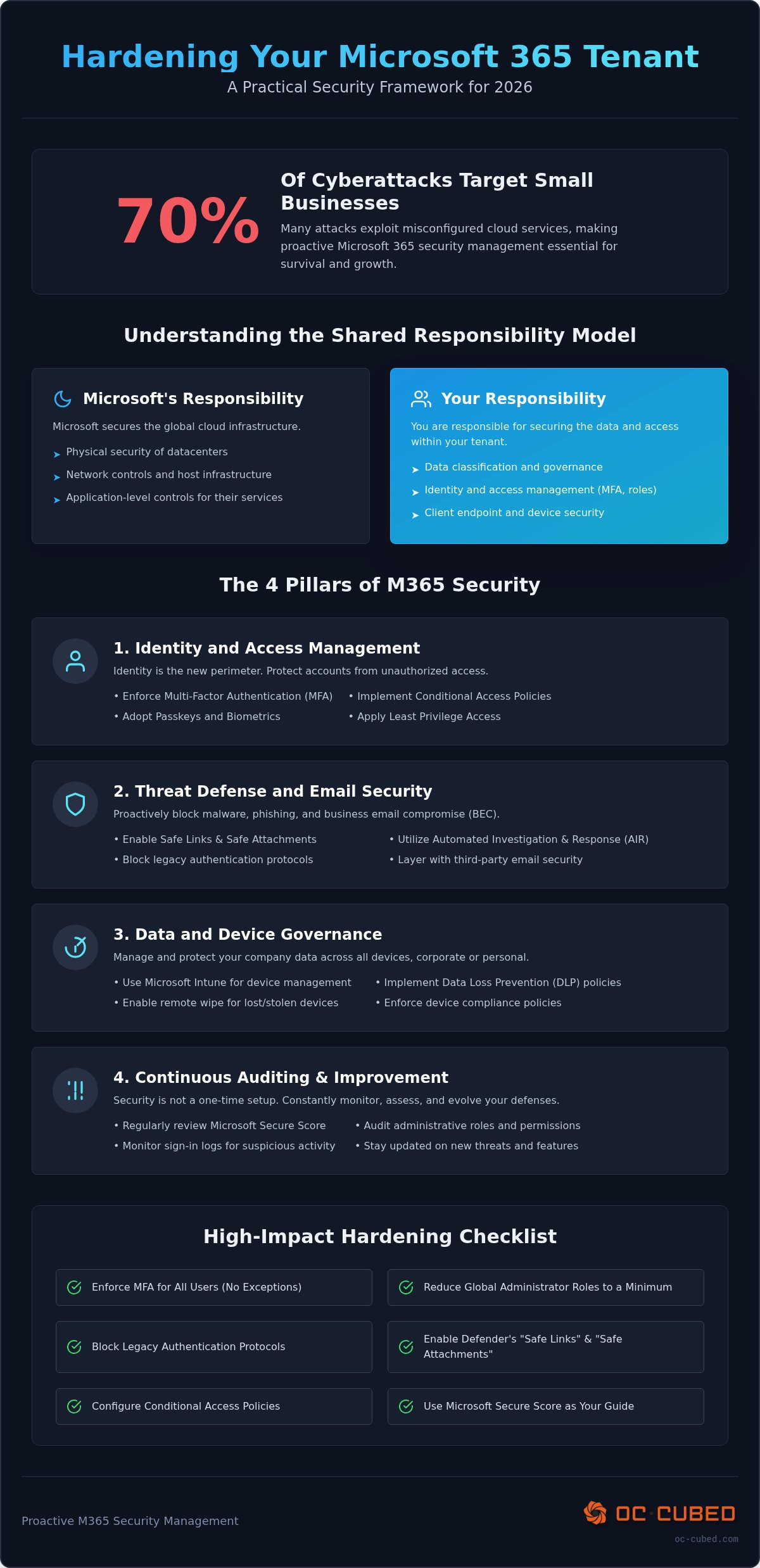
Effective Microsoft 365 security management isn't a single setting. It's a framework built on four pillars: identity, threat protection, data governance, and continuous auditing. These pillars work together to create a resilient environment that handles modern risks without slowing down your team. By focusing on these core areas, you move from a reactive "hope for the best" strategy to a proactive defense that protects your bottom line.
Identity and Access: The New Perimeter
Identity is your new security perimeter. Passwords alone are obsolete in 2026. Multi-Factor Authentication (MFA) is the most critical tool in your arsenal. We recommend using passkeys or biometrics whenever possible to prevent session hijacking. Conditional Access policies add another layer of control by blocking logins from high-risk locations or unsecured devices. This approach follows CISA's security recommendations for cloud environments. To minimize risk, implement Least Privilege Access, which means giving users only the specific data and permissions they need to perform their jobs.
Threat Defense and Email Security
Attackers target your inbox first. Microsoft Defender provides "Safe Links" and "Safe Attachments" to scan content before it reaches a user. These tools analyze links and files in a sandbox environment to catch malware before it can execute. However, native tools sometimes miss sophisticated AI-generated phishing. This is why robust email security for small business often involves layering enterprise-grade tools like Proofpoint. Automated Investigation and Response (AIR) also plays a vital role by automatically isolating compromised accounts or deleting malicious emails across the entire tenant before a breach spreads.
Data and Device Governance
Your data lives on more than just office desktops. Employees use personal phones and remote laptops every day. Microsoft Intune allows you to manage these devices without invading user privacy. You can wipe corporate data from a lost phone while leaving personal photos untouched. Sensitivity Labels further protect proprietary info by encrypting files based on their content, ensuring that even if a file is leaked, it cannot be opened by unauthorized parties. Ensuring endpoint protection is active on every remote workstation is non-negotiable for a secure 2026 workforce.
The final component of this framework is ongoing security management. This involves monitoring sign-in logs and auditing administrative changes to catch suspicious activity early. Building these pillars takes time and technical precision. If you want to ensure your configuration is airtight, our team provides comprehensive Microsoft 365 tenant maintenance to keep your business protected and your team productive.
Assessing Your Posture: Using Microsoft Secure Score
You cannot manage what you do not measure. Within the Microsoft 365 Defender portal, the Secure Score provides a numerical representation of your current security posture. It aggregates your settings across identity, data, and devices into a single percentage. This tool is a cornerstone of effective Microsoft 365 security management because it translates complex configurations into actionable data. You can find it by navigating to the "Security" section of your admin center and selecting "Secure Score" from the dashboard.
Interpret this score as a roadmap rather than a final grade. While a higher percentage is generally better, chasing a perfect 100% score often introduces unnecessary friction for your employees. The goal is to reach an "optimal" score that balances protection with productivity. Many small businesses begin in the 30 to 45% range; however, reaching a benchmark of 65 to 80% is considered a strong posture for most organizations in 2026. This approach aligns with Microsoft 365 security best practices by prioritizing high-impact changes that close the most dangerous gaps first.
How to Use Secure Score for Governance
Consistency is the secret to long-term safety. We recommend reviewing your score at least once a month to combat "configuration drift." This happens when new users are added or settings are tweaked for temporary projects but never reverted. The Secure Score dashboard allows you to compare your percentage against industry benchmarks. This data is invaluable when you need to justify security investments to stakeholders. It provides clear, visual evidence of where your business stands compared to similar organizations and highlights exactly which "Improvement Actions" will yield the best return on your time.
The Limitations of Automated Audits
Automated tools have blind spots. A high Secure Score suggests your technical "locks" are in place, but it cannot measure human behavior. Hackers in 2026 frequently use social engineering to trick users into handing over access, regardless of how many security boxes you have checked. Technical metrics must be paired with human oversight. This is where a Virtual CISO becomes essential. They look beyond the dashboard to integrate these metrics into a comprehensive cybersecurity risk management for small business plan. This ensures your strategy covers both the digital configurations and the human elements of your defense.
How to Harden Your Tenant: A Step-by-Step Guide
Hardening your tenant is the practical application of Microsoft 365 security management. It involves closing the technical gaps that attackers exploit most frequently. You don't need a massive enterprise budget to secure your environment. You simply need to follow a disciplined configuration framework. Start with these five essential steps to build a resilient defense.
- Step 1: Audit Global Admins. Limit this role to the bare minimum, ideally between two and four people. Every administrative account is a high-value target for hackers.
- Step 2: Enforce MFA. Enable multi-factor authentication for every single user. In 2026, there are no exceptions to this rule.
- Step 3: Block Legacy Authentication. Disable older protocols that don't support MFA. Hackers use these backdoors to bypass your modern defenses.
- Step 4: Configure Access Policies. Use Security Defaults for a basic setup or build custom Conditional Access policies for more granular control over where and how users log in.
- Step 5: Enable Anti-Phishing. Activate safety tips that alert users when they receive an email from a first-time sender or an external source.
Immediate Wins for Admin Security
Protecting your administrators is the most effective way to prevent a total tenant takeover. Set up "Break Glass" accounts. These are emergency access accounts stored securely and used only if you're locked out of your primary admin roles. Require MFA for every administrative action. If your license includes Entra ID P2, implement Just-In-Time (JIT) access. This grants administrative privileges only when they're needed for a specific task, reducing the time an account is vulnerable.
Hardening the User Experience
Security should support your team, not hinder them. Turn on "External Tagging" for all incoming emails. This simple visual cue helps users identify potential phishing attempts from outside the company. You should also disable auto-forwarding to external addresses. This prevents attackers from silently bcc-ing themselves on your sensitive communications. If you've recently moved to the cloud, review our Microsoft 365 migration services checklist to ensure no legacy gaps were carried over during the transition. Comprehensive Microsoft 365 security management ensures these settings remain active as your business grows.
Proactive Microsoft 365 Tenant Maintenance with an MSP
Security isn't a one-time project you can check off a list. It's a recurring cycle. Threats in 2026 move fast. New vulnerabilities appear daily. Consistent Microsoft 365 security management ensures your defenses evolve as quickly as the risks. This proactive approach prevents "configuration drift," where small changes over time create large security gaps. You need a system that stays ahead of the curve, not one that just reacts to yesterday's problems.
At OC Cubed, we include tenant maintenance as a core part of our managed IT services. This includes continuous Microsoft 365 license management to ensure you're only paying for the features you actually use. We provide 24/7 monitoring to catch compromised accounts at 3 AM, long before your team starts their workday. This level of oversight moves your business from basic protection to being truly compliance-ready.
What Proactive Maintenance Looks Like
Effective maintenance starts with visibility. We provide monthly security reports that detail blocked threats and suspicious login attempts. Our team regularly reviews audit logs to spot anomalous user behavior that automated tools might miss. As Microsoft rolls out new security features throughout 2026, we update your policies to ensure you're always using the latest protections. We don't just set a policy and walk away; we refine it as your business grows.
Why Leaders Outsource M365 Management
Managing a tenant requires deep, specialized expertise. Most small businesses don't need a full-time, in-house expert on the payroll. Outsourcing gives you access to a team that lives in the Admin Center every day. We integrate enterprise-grade tools like Proofpoint to harden your email security beyond standard levels. You gain Virtual CISO leadership for a predictable monthly fee. This allows you to focus on your core business goals while we handle the technical complexity of Microsoft 365 security management. It's about gaining peace of mind through steady, reliable expertise.
Protect Your Business Growth with Confidence
Security in 2026 isn't a passive state. It's an active process of refinement and vigilance. You've seen that moving beyond default settings and prioritizing identity protection builds a resilient foundation for your company's data. Effective Microsoft 365 security management ensures your team remains productive without leaving the door open to sophisticated phishing or credential theft. It's about moving from a reactive posture to a hardened, proactive defense.
Managing these technical layers shouldn't distract you from your core mission. We provide the expertise needed to secure your environment through a flat-rate monthly retainer. This includes 24/7 proactive threat detection and remediation, giving you the quiet confidence that your tenant is protected around the clock. You can finally stop worrying about the Admin Center and focus on your next phase of growth.
Your business deserves a protector that works as hard as you do. We're here to handle the complexity so you can lead with peace of mind.
Frequently Asked Questions
Is Microsoft 365 security included in my subscription?
Basic security features are included in every subscription, but the level of protection varies by plan. Microsoft 365 Business Basic and Standard now include URL time-of-click protection and expanded storage as of August 2026. However, advanced tools like Microsoft Defender for Office 365 Plan 1 are reserved for Business Premium. You always have the tools to start, but you must actively configure them to be effective against modern threats.
What is the most important security setting in Microsoft 365?
Multi-factor authentication (MFA) is the single most critical setting for your tenant. In 2026, Microsoft has shifted toward passkeys as the default for users enabled for SMS or voice. Implementing MFA correctly can block the vast majority of identity-based attacks. Without it, even the strongest passwords won't protect you from modern session hijacking or AI-driven phishing attempts that steal credentials in real-time.
Does Microsoft 365 protect against ransomware?
Microsoft 365 provides several layers of protection against ransomware through automated detection and file recovery. OneDrive and SharePoint use versioning, which allows you to roll back files to a point before the encryption occurred. Additionally, Microsoft Defender for Business includes endpoint detection and response (EDR) to identify and stop ransomware processes before they spread across your network. Proper Microsoft 365 security management ensures these features are active and monitored.
What is the difference between Security Defaults and Conditional Access?
Security Defaults provide a baseline "all-or-nothing" protection that enforces MFA for everyone but offers no customization. Conditional Access is a more advanced tool available with Business Premium or Entra ID P1 licenses. It allows you to create specific rules, such as requiring MFA only when a user logs in from a new country or an unmanaged device. This granularity reduces user friction while maintaining high security standards.
How often should I audit my Microsoft 365 security settings?
You should perform a formal audit of your security settings at least once a month. This helps you identify "configuration drift" and ensure that new user accounts follow your established security protocols. Regular reviews of your Microsoft Secure Score and sign-in logs are essential parts of Microsoft 365 security management. Constant auditing ensures that your tenant remains hardened against the evolving threat landscape throughout 2026.
Can I manage Microsoft 365 security without an IT background?
You can enable basic "Security Defaults" through the Admin Center without deep technical knowledge. However, managing advanced configurations like Conditional Access or Intune device policies carries the risk of accidentally locking users out or creating security gaps. Most business owners find that the time required to master these settings is better spent on growth. Professional maintenance ensures your tenant is configured correctly without the steep learning curve.
What happens if a user loses their MFA device?
If a user loses their device, an administrator must reset their MFA sessions and provide a temporary access pass. This process is straightforward but requires a designated admin to be available to verify the user's identity. We recommend having at least two Global Admins or a "Break Glass" account to ensure you aren't permanently locked out of your own tenant if a primary admin loses their device or access credentials.
Is Microsoft Defender for Business enough for my small company?
Microsoft Defender for Business is an excellent foundation for endpoint protection and threat detection. It handles most malware and common phishing attempts effectively. However, many small businesses require additional layers, such as Proofpoint, to catch highly sophisticated email threats that bypass standard filters. Combining Defender with specialized email security and proactive monitoring provides the comprehensive coverage needed to truly lower your risk of a business email compromise.


