

What if the biggest risk to your company isn't the migration itself, but the "default" security settings you leave active once the data is moved? Many leaders seeking Microsoft 365 migration services for small business view the cloud as a simple destination for their files. You likely worry about losing access to critical emails or facing hours of expensive downtime. These are valid fears. A poorly managed transition often results in data gaps and unexpected licensing fees that strain your resources.
You deserve a transition that feels like a strategic upgrade rather than a technical hurdle. At OC Cubed - Your trusted MSP, we've built this framework to ensure your move is seamless and your new digital office is hardened against modern threats. Our approach prioritizes steady reliability and proactive protection. By following an expert-led management plan, you can eliminate the anxiety of the unknown and start your cloud journey with a secure, optimized tenant.
This guide delivers the essential 2026 checklist to master your transition. We'll show you how to guarantee zero data loss, stop phishing with advanced tools like Proofpoint, and lock in predictable monthly IT costs. It's time to move beyond basic file transfers and build a foundation for long-term growth.
Key Takeaways
- Understand why professional Microsoft 365 migration services for small business go beyond moving files to include a complete infrastructure hardening.
- Learn how to enforce identity security using Microsoft Entra ID and the Principle of Least Privilege to stop unauthorized access before it starts.
- Discover the "Zombie License" audit technique to eliminate paying for unused seats and right-size your monthly subscription costs.
- Establish a "Day 2" operational routine that uses your Secure Score and Teams management to prevent digital clutter and security gaps.
- Transition from a reactive IT mindset to a proactive managed tenant model that secures your business growth without hidden fees.
What are Microsoft 365 Migration Services for Small Business?
Moving to the cloud isn't just a change in where you store files. It is a fundamental shift in how your company functions. True Microsoft 365 migration services for small business involve moving your entire digital infrastructure, from user identities to complex communication channels. It's more than a technical task; it's an operational evolution.
Don't confuse a simple data transfer with a professional tenant setup. A transfer is a one-time event that moves files from point A to point B. A setup is a structural design process. It involves mapping your business workflows to the cloud environment to ensure your team stays productive from the moment they log in. It's the difference between moving boxes into a new office and actually setting up the desks and security system.
Small businesses are often seen as easy targets for cybercriminals. During a migration, your DNS settings and email routing are in flux. This creates a window of opportunity for Business Email Compromise (BEC). Professional remote IT management services provide the necessary guardrails to ensure your move is silent and secure. We handle the technical complexity so you can focus on your clients.
The Default Settings Trap
When you first sign up for Microsoft 365, the platform is configured for maximum accessibility to help users get started quickly. Microsoft prioritizes ease of use over maximum security in these default configurations. This often means legacy authentication protocols remain active, leaving your business vulnerable to outdated attack methods that bypass modern security.
A hardened tenant is one where security policies are actively managed, not just toggled. This requires ongoing oversight to ensure that as your business grows, your security posture remains rigid and effective against evolving threats.
Migration vs. Ongoing Tenant Maintenance
The "set it and forget it" mentality often leads to security gaps and unplanned downtime. Cyber threats don't stay static, and your cloud environment shouldn't either. A managed retainer ensures your environment evolves alongside new threats. This proactive approach keeps your systems running smoothly while eliminating the surprise bills that come with reactive IT support.
Having a Virtual CIO oversee your strategy is vital for a successful move. They provide the roadmap to ensure your technology investments align with your long-term business goals. Choosing the right Microsoft 365 migration services for small business means finding a partner who values your long-term growth as much as your initial uptime.
The Essential Security and Identity Migration Checklist
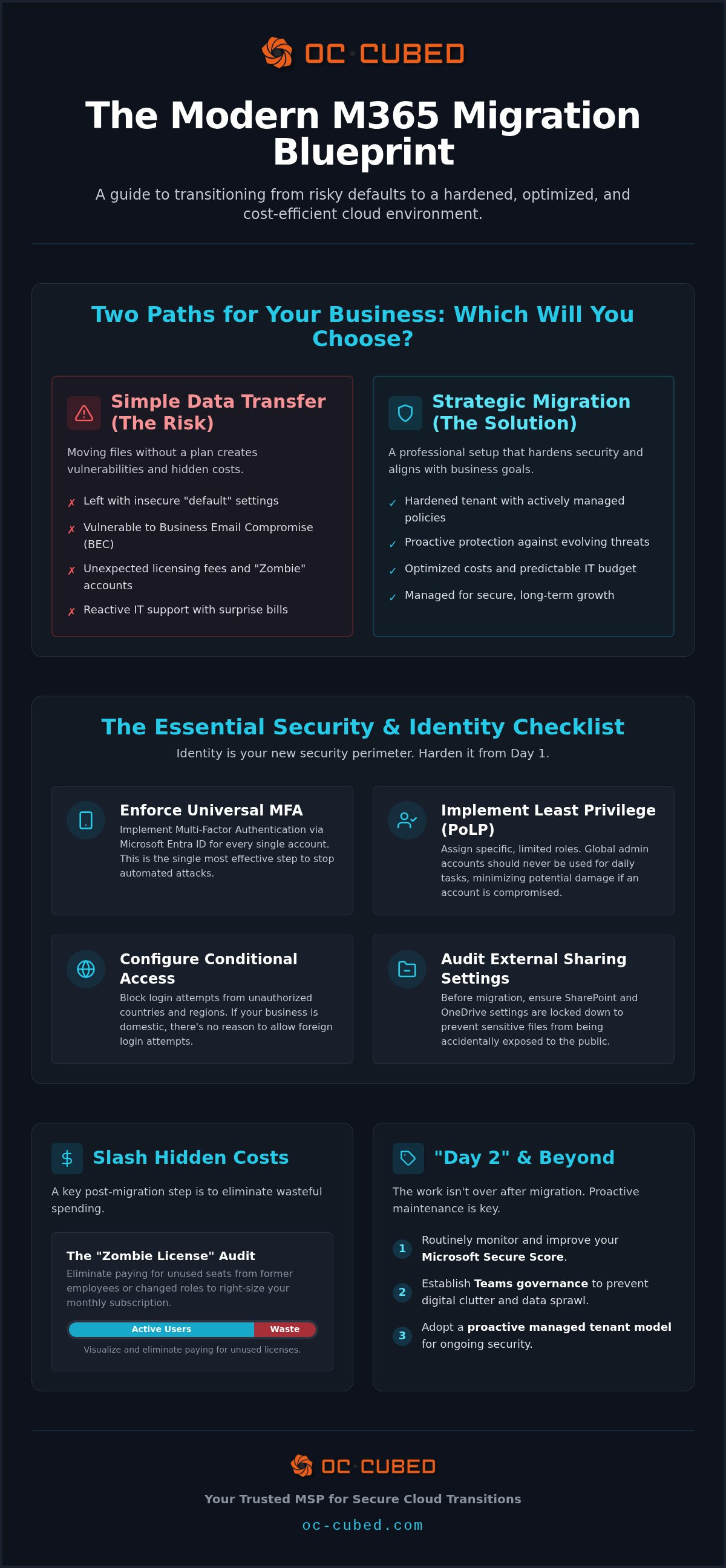
Identity is the new security perimeter for your digital office. When you migrate your small business to the cloud, your focus must shift from physical firewalls to identity authentication. High-quality Microsoft 365 migration services for small business prioritize identity security to prevent unauthorized access from the moment your data lands in the cloud. This starts with enforcing Multi-Factor Authentication (MFA) via Microsoft Entra ID. We don't allow exceptions. Every account, from the executive suite to the front desk, requires a second factor for access. This single step stops the vast majority of automated account compromise attempts.
We also implement the Principle of Least Privilege (PoLP) for all administrative roles. Your team members should never use global admin accounts for daily tasks like checking email or editing documents. Instead, we assign specific, limited roles that provide only the access necessary for a particular job. This strategy contains the potential damage if an individual account is ever compromised. Additionally, we configure Conditional Access policies to block logins from unauthorized regions. If your team operates solely within the United States, there is no reason to permit login attempts from foreign data centers. Before any data moves, we audit external sharing settings in SharePoint and OneDrive to ensure sensitive files aren't accidentally exposed to the public.
Identity Protection in 2026
Modern security requires active, ongoing monitoring. Our team watches for "impossible travel" alerts. These occur when a user logs in from two distant geographic locations faster than a plane could fly between them. OC Cubed - Your trusted MSP integrates these Microsoft 365 alerts directly into our 24/7 Network Operations Center (NOC). This ensures a human expert investigates every anomaly immediately. For high-risk administrative accounts, we implement passwordless authentication. This removes the primary target for credential harvesting attacks and simplifies the login process for your team.
Email Security: Strengthening the Inbox
Standard Exchange Online Protection (EOP) provides basic filtering, but it often fails to stop sophisticated, targeted phishing campaigns. We strengthen your inbox by integrating email security with Proofpoint to block advanced threats. Our team also manages the configuration of SPF, DKIM, and DMARC records. These technical standards verify your identity to other mail servers. This protects your brand reputation and ensures your messages reach their destination without being flagged as spam. If you want to ensure your environment is truly secure, a proactive tenant security audit can identify hidden vulnerabilities before they are exploited.
Microsoft 365 License Optimization: Cutting Hidden Costs
Unchecked licensing costs can quietly erode your IT budget. When you invest in Microsoft 365 migration services for small business, you aren't just buying software; you're subscribing to a scalable ecosystem. Without active oversight, that scalability often leads to "license bloat." We conduct a "Zombie License" audit to identify and remove accounts assigned to former employees. These inactive seats serve no purpose but to inflate your monthly bill.
Right-sizing your plans is the next step in effective Microsoft 365 license management for small business. Not every user needs the advanced security and desktop apps included in Business Premium. Many administrative or part-time roles thrive on Business Basic. We help you map specific job functions to the most cost-effective plan. For general accounts like "info@" or "support@", we leverage shared mailboxes. These accounts provide a professional appearance and collaborative access without the need for an additional paid seat.
Visibility remains the biggest challenge for growing companies managing Microsoft 365. If you can't see where your money is going, you can't optimize it. Our proactive philosophy ensures every dollar spent on your tenant drives actual business value. We manage the technical details so you can focus on your bottom line.
The ROI of Proactive License Management
Annual savings from reclaiming unused M365 seats can be substantial. For a 25-person company, even a few "zombie" licenses represent hundreds of dollars in wasted capital each year. Our Virtual CIO works with you to align your technology spend with your 2026 growth goals. This prevents the "surprise bill" that occurs when unused licenses auto-renew. We turn your IT expenses into a predictable, flat-rate monthly cost.
Managing the Offboarding Process
Employee turnover is a natural part of business, but it shouldn't create security holes or financial waste. We standardize the offboarding process to ensure licenses are reclaimed immediately while critical data is preserved. This ensures compliance during staffing changes and maintains a clean environment. Our flat-rate IT retainer includes this managed tenant maintenance as a standard feature. We handle the administrative heavy lifting so you can stay focused on your team's performance.
Operational Maintenance: The "Day 2" Migration Checklist
The successful transfer of your mailboxes is just the beginning. Real stability comes from "Day 2" operations, where the focus shifts from deployment to long-term health. High-quality Microsoft 365 migration services for small business don't end when the data arrives; they provide a framework for ongoing tenant maintenance. One of the most effective ways to stay ahead of threats is by establishing a monthly schedule to review your Microsoft 365 Secure Score. This tool provides a quantifiable measure of your security posture and offers prioritized recommendations to harden your environment further.
You also need to manage "Teams Sprawl" before it compromises your productivity. Without a clear governance plan, your environment can quickly become cluttered with redundant channels and orphaned files. We implement structures that ensure your data remains organized and discoverable. Additionally, we enforce mobile device management (MDM) via Intune for all remote endpoints. This ensures that every phone or laptop accessing your company data meets your specific security standards. Finally, we verify that cloud-to-cloud backups are running and restorable. Microsoft provides platform availability, but you are responsible for your own data backups.
Data Governance and Compliance
Visibility is the foundation of any secure office. Effective cybersecurity risk management for small business starts with knowing where your sensitive information lives. We help you set retention policies that meet your industry’s specific legal requirements, ensuring you don't keep data longer than necessary. We also implement Data Loss Prevention (DLP) protocols. These automated rules stop sensitive information, such as credit card numbers or social security data, from leaving your tenant via email or shared links.
Endpoint and Device Management
Securing the cloud is only half the battle; you must also secure the devices connecting to it. We automate software updates for all M365 apps to ensure your team is always running the latest, most secure versions. Through the tenant, we enforce BitLocker encryption on all company laptops. This protects your data even if a physical device is lost. If a device is stolen, we have remote wipe protocols in place to erase company information instantly, preventing a potential breach. This level of control provides the peace of mind you need to focus on growth.
Why OC Cubed - Your trusted MSP is the Logical Choice for M365 Migration
Selecting Microsoft 365 migration services for small business shouldn't feel like a gamble. Many vendors treat a move to the cloud as a one-time technical project. They hand you the keys to an unconfigured tenant and walk away. OC Cubed - Your trusted MSP operates with a different philosophy. We believe that a migration is only successful if it leads to a secure, high-performing environment that requires zero effort from your leadership team. We manage the complexity of the Microsoft 365 Admin Center so you can keep your focus entirely on growing your business.
Our service is built on a flat-rate monthly retainer. This means tenant maintenance isn't a hidden add-on or a billable "extra"; it's a standard feature of how we protect our clients. You get continuous 24/7 monitoring through our integrated Network Operations Center (NOC). If a threat emerges or a configuration drifts, our team catches it before it impacts your workflow. Every client also gains access to executive-level leadership through a Virtual CIO and CISO. This ensures your technology roadmap is always aligned with your long-term business strategy and security requirements.
Eliminating Unplanned Downtime
We stop migration issues before they reach your users. Our proactive monitoring identifies sync errors or authentication hurdles in real-time. We also provide comprehensive vendor management. If there's a technical glitch on Microsoft's end, we handle the back-and-forth with their support teams for you. You don't have to waste hours on hold or decode technical jargon. This approach creates predictable budgeting. You won't see surprise invoices for troubleshooting or "out-of-scope" migration work. We provide the steady reliability you need to scale without technical friction.
Start with a Professional Tenant Audit
The first step toward a more secure office is a comprehensive review of your current posture. We look at your security settings, license usage, and identity controls to find immediate "quick wins." These are simple adjustments that harden your environment today while we build your long-term strategy. We don't just move your data; we optimize the foundation it sits on. Our team ensures your Microsoft 365 migration services for small business deliver a measurable return on investment through better security and lower overhead.
Build a Resilient Cloud Foundation
Transitioning to the cloud is a significant milestone for any growing company. It's not just about moving data; it's about building a secure, scalable foundation for your future. You've seen how a hardened tenant, optimized licensing, and proactive "Day 2" maintenance can eliminate downtime and protect your brand reputation. These steps move you from a reactive IT posture to one of steady reliability and control.
Choosing the right partner makes all the difference. Investing in Microsoft 365 migration services for small business should provide you with peace of mind, not a list of technical chores. With OC Cubed - Your trusted MSP, you gain the protection of 24/7 proactive monitoring and the strategic oversight of our Virtual CIO and CISO advisory team. We handle the administrative complexity of the cloud through a predictable, flat-rate monthly retainer.
Your digital office is now ready to support your ambitions. Let's make your move to the cloud the most successful upgrade your business has ever seen. We're here to ensure your technology never stands in the way of your growth.
Frequently Asked Questions
Does Microsoft 365 automatically back up my small business data during a migration?
No, it doesn't. Microsoft follows a shared responsibility model where they guarantee platform uptime, but you are responsible for the data within it. They don't offer point-in-time recovery for individual files or mailboxes. To prevent data loss, you must implement a third-party cloud-to-cloud backup solution. This ensures your records are protected from accidental deletion or ransomware attacks during and after your transition to the cloud.
What is the most common security mistake small businesses make in M365?
The most frequent error is trusting default configurations. Microsoft builds the platform for ease of use, which often leaves legacy protocols active and MFA unenforced. Owners often assume the cloud is inherently secure without realizing they must actively harden the tenant. Failing to disable outdated authentication methods leaves a door open for credential harvesting. Secure environments require a proactive approach to managing security toggles rather than a set-it-and-forget-it mindset.
Is Microsoft 365 Business Premium worth the extra cost for a small team?
Yes, especially if you have remote employees. Business Premium includes Intune for mobile device management and Defender for Business. These tools allow you to enforce BitLocker encryption on laptops and perform remote wipes if a device is stolen. For most teams, the cost is justified because it consolidates several separate security tools into one managed subscription. It provides the high-level protection usually reserved for much larger enterprises.
How long does a typical Microsoft 365 migration take for a small business?
Most projects take between two to four weeks. This period includes a thorough audit of your current data, the technical setup of your new tenant, and the final data transfer. The actual cutover usually occurs over a weekend to ensure your team experiences zero downtime during business hours. We use this structured timeline to verify that every mailbox and file moves correctly before your users log in on Monday morning.
What is the difference between a Microsoft 365 tenant and a license?
Your tenant is the private digital container for your entire organization. It houses your domain, security policies, and all company data. A license is a specific subscription you assign to an individual user to grant them access to apps like Outlook or Teams. You can think of the tenant as your company's virtual office building and the licenses as the specific permissions each employee has to use the facilities.
Can I manage my own Microsoft 365 tenant without an IT background?
While the Admin Center is accessible, managing it without expertise is risky. The platform contains hundreds of technical settings that directly impact your security and email deliverability. Misconfiguring a single DNS record or identity policy can lead to significant downtime. This is why many leaders choose Microsoft 365 migration services for small business. It ensures the technical heavy lifting is handled by experts, allowing you to focus on growth.
What happens to my data if I cancel a Microsoft 365 license after migration?
Microsoft generally purges user data 30 days after a license is canceled. This includes all emails and OneDrive files. To avoid losing valuable company information when an employee leaves, we convert their account to a shared mailbox before removing the license. This process preserves the data for future reference at no extra cost. It's a standard part of our managed maintenance to ensure your business stays organized and compliant.
How does OC Cubed handle migrations from Google Workspace to Microsoft 365?
We use a specialized framework to move your Gmail, Drive, and Calendar data into the Microsoft ecosystem. Our team performs a pre-migration audit to map permissions and identify potential sync issues. We also integrate Proofpoint email security as part of the transition to block advanced phishing threats immediately. Our goal is a seamless move that preserves your historical data while providing a much more secure and manageable environment for your team.


