

What if your next technology investment added complexity instead of helping your business grow? An IT roadmap for business growth can prevent that by tying each decision to a business outcome, its risks, and an accountable owner. Without that connection, worthwhile projects can compete for limited budget and attention while important gaps remain unresolved.
It’s reasonable to want a clear plan before committing time and money to technology. The challenge is deciding which systems need attention first, how projects depend on one another, and who will measure success. A practical roadmap turns those questions into decisions your business can act on.
This guide shows you how to start with business goals, assess technology needs and risks, and prioritize initiatives by value, dependencies, and available capacity. You’ll also learn how to assign owners, set milestones, and define measurable outcomes. The result is an adaptable plan for the next 12 to 36 months, with a regular review process to keep technology work aligned as priorities change.
Key Takeaways
- See how an IT roadmap differs from a budget, system inventory, and project list, and why the distinction matters for planning.
- Use a structured review of business goals, systems, stakeholder needs, and constraints to identify what deserves attention.
- Compare potential investments across business impact, risk, urgency, dependencies, effort, and available capacity.
- Shape your IT roadmap for business growth into practical phases, with clear accountability and progress measures that can adapt as priorities change.
- Learn when virtual technology leadership and managed IT support can help your team plan, oversee vendors, and keep work moving.
What Is an IT Roadmap for Business Growth, and What Should It Solve?
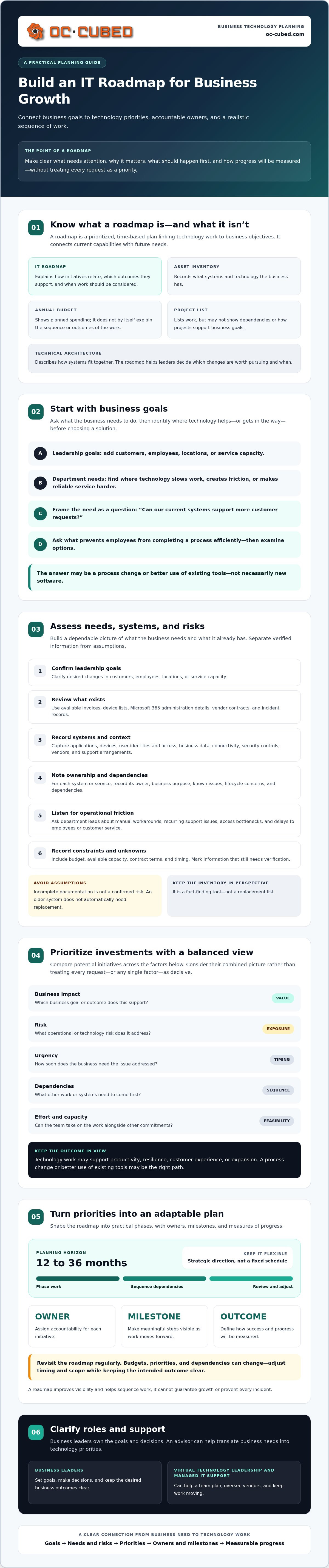
An IT roadmap is a prioritized, time-based plan that connects technology work to business objectives. It helps leaders decide what needs attention, why it matters, and what should happen first. A useful technology roadmap links current capabilities to future needs, but a growing business doesn’t need a large IT strategy team to make one practical. Start with decisions that affect your ability to serve customers, support employees, and manage risk.
An IT roadmap for business growth connects business goals to technology priorities, accountable owners, and a realistic sequence of work. It isn’t an asset inventory, which records what you have, or an annual budget, which shows planned spending. And it’s more than a project list: a roadmap explains how initiatives relate to one another and which outcomes they support. Technical architecture describes how systems fit together; the roadmap helps decide which changes are worth pursuing and when.
For example, plans to increase service capacity may prompt a review of whether current systems and support arrangements can handle more employees or customer demand. A customer experience goal may raise questions about delays, disconnected processes, or unreliable service. The answer could be a process change or better use of existing tools, not necessarily new software. A well-built roadmap helps technology support productivity, resilience, customer experience, and expansion without treating every request as a priority.
Which business goals should shape the roadmap?
Begin with leadership’s goals, such as adding customers, employees, locations, or service capacity. Then ask department leads where technology slows work, creates friction, or makes reliable service harder. Frame a question around each goal before choosing a solution: “Can our current systems support more customer requests?” or “What prevents employees from completing this process efficiently?” This keeps planning focused on business needs, even when there’s no in-house IT strategy team.
What a roadmap can, and cannot, promise
A roadmap improves visibility and helps sequence work, but it can’t guarantee growth or prevent every incident. Treat it as strategic direction, not a fixed delivery schedule. Budgets, business priorities, and dependencies can change, so revisit timing and scope when circumstances shift. Keep the intended outcome clear, even if the path needs to change.
If you’re clarifying what external IT support can contribute, see this managed service provider guide. An advisor can help translate business needs into technology priorities, while business leaders remain responsible for goals and decisions.
How to Build an IT Roadmap: Assess Goals, Systems, and Risks
Before ranking projects, build a dependable picture of what the business needs and what it already has. You don’t need a portfolio-planning system or a dedicated IT strategy team to begin. A shared spreadsheet, focused conversations, and existing records can surface important gaps. The aim is to distinguish verified information from assumptions, then connect each gap to a business need or operational risk.
Before ranking IT initiatives, capture business goals, systems and owners, known issues, dependencies, stakeholder needs, risks, and practical constraints. Work through the assessment in order: confirm leadership goals, inventory the environment, identify gaps, gather staff input, and record constraints such as budget, available capacity, contract terms, and timing.
How should a small business assess its current IT environment?
Start with evidence already at hand: invoices, device lists, Microsoft 365 administration details, vendor contracts, and incident records. Record applications, devices, user identities and access, business data, connectivity, security controls, vendors, and support arrangements. For each system or service, note its owner, business purpose, known issues, lifecycle concerns, and dependencies. An inventory is a fact-finding tool, not a replacement list.
Then ask department leads where work slows down. Which tasks rely on manual workarounds? Which support issues recur? Where do access bottlenecks delay employees or customer service? Add the answers alongside the records, and label gaps in your knowledge as unknowns to verify. Don’t treat incomplete documentation as a confirmed risk or assume an older system must be replaced.
How do you identify roadmap gaps without creating a wish list?
Compare current capabilities with specific needs and expected changes in scale. If the business plans to add employees, check whether access processes, support arrangements, and key applications can accommodate that change. Separate required remediation, such as addressing a known security or reliability issue, from optional enhancements. Set aside ideas without a defined business outcome until someone can explain the problem they solve.
For ongoing monitoring and support context, read this remote IT management guide. It can help clarify how recurring oversight fits alongside a one-time assessment. If your team needs added planning capacity, virtual IT leadership from OC Cubed can help assess needs and shape priorities while your business retains ownership of its goals and decisions.
How to Prioritize IT Roadmap Investments by Growth Value and Risk
A useful priority list makes trade-offs visible. Compare each initiative against the same criteria, then discuss what should move first based on business value, exposure, dependencies, and the team’s ability to deliver. For an IT roadmap for business growth, the goal isn’t to turn every worthwhile idea into a current project. It’s to direct limited attention toward the work that matters most and can realistically move forward.
How can leaders compare competing IT initiatives?
For each proposal, write down its intended outcome, affected teams, accountable owner, dependencies, and evidence of need. Use consistent qualitative ratings, such as low, medium, and high, and record why one initiative ranks above another. The framework below is illustrative. It supports discussion, not precise forecasts or automatic decisions.
| Initiative | Business impact | Risk reduction | Urgency | Dependencies | Effort | Available capacity |
|---|---|---|---|---|---|---|
| Review access controls | Medium | High if a known gap exists | High if exposure is active | Few or identified | Medium | Confirm owner availability |
| Improve a customer-facing workflow | High if tied to a defined service goal | Low to medium | Set by business need | May depend on data or vendor decisions | Medium to high | Check staff time and readiness |
These example ratings aren’t universal. Update them with evidence from your own environment. A high-impact project may still need to wait if its prerequisites aren’t ready or its owner lacks time. A foundational fix may take priority because it addresses a known exposure or supports several later initiatives.
How should security and dependencies affect priority?
Assess known security exposure, service continuity, and access control as business risks, not isolated technical concerns. Separate required remediation from growth-enabling improvements and optional enhancements. Then map prerequisites: network readiness, data quality, vendor decisions, and staff training can determine whether a project is ready to start or still blocked.
Ranking rule: Prioritize work that reduces material risk or advances a clear business goal, but only when its dependencies and available capacity make progress realistic. Scores guide the conversation; they don’t replace leadership judgment. Record the reason for each decision so the ranking can be revisited when conditions change. For more detail on risk planning, see this small-business cybersecurity strategy.
Turn the IT Roadmap into Phases, Owners, and Measurable Progress
A prioritized plan becomes useful when people know what happens next. Group initiatives into near-term actions, later phases, and longer-range options. Use timing ranges rather than exact dates when budgets, vendor decisions, or dependencies are still uncertain. This keeps the roadmap actionable without implying that every milestone is guaranteed.
For each initiative, name one accountable owner who tracks progress, a sponsor who can resolve business decisions, and the dependencies that must be addressed first. Identify decision points and define the next milestone, such as confirming requirements, approving a vendor choice, or completing a readiness review. The owner coordinates the work but doesn’t necessarily complete every task.
What belongs in a useful IT roadmap template?
Keep the roadmap concise enough for leaders and department owners to use together. Include:
- Business goal and initiative: What outcome does the work support, and what change is proposed?
- Rationale and priority: Why does it matter now, and what risk or opportunity does it address?
- Owner, sponsor, and dependencies: Who is accountable, who supports decisions, and what must happen first?
- Timing range, risk, and success measure: What phase is planned, what could affect delivery, and how will progress be assessed?
- Status: Mark each item proposed, approved, active, paused, or completed.
Define measures before work starts and tie each one to the intended outcome. For a service reliability initiative, track relevant service availability or issue trends. For a workflow improvement, consider whether employees can complete the target task more reliably or with fewer delays. Keep detailed technical specifications and task plans in project documents, then link to them from the roadmap rather than crowding its summary view.
How can a business keep the plan adaptable?
Set a regular operating rhythm. A monthly check can surface stalled milestones, new dependencies, and capacity conflicts. A quarterly leadership review can confirm priorities and their continued alignment with business goals. Adjust the cadence to fit the size and pace of your initiatives. Reassess sooner if growth assumptions, staffing, security needs, incidents, vendor arrangements, budgets, or operational constraints materially change.
An IT roadmap for business growth should show both progress and decisions still needed. Update status based on evidence, record why priorities shift, and keep paused work visible so it can be reconsidered deliberately. Monthly reporting and virtual project management can support oversight, while business leaders retain ownership of goals and choices.
Explore virtual IT leadership and project support from OC Cubed if your team needs help coordinating roadmap decisions and approved work.
How OC Cubed - Your trusted MSP Can Support an IT Roadmap for Business Growth
A roadmap needs both direction and follow-through. OC Cubed can help assess IT needs, support planning, manage vendors, and oversee scoped projects. The right level of support depends on your goals, technology environment, and available internal capacity. Your leaders still own business priorities and decisions; external support can add expertise or coordination to help move work forward.
For strategic direction, virtual CIO, CTO, or CISO guidance can help connect technology choices to business goals, security governance, and leadership needs without a full-time executive hire. For ongoing operations, OC Cubed offers remote helpdesk support, network monitoring, endpoint protection, and Microsoft 365 tenant maintenance. Vendor management and virtual project management can also support oversight as approved initiatives progress. Advisory, operational support, and project coordination address different needs, so clarify which gaps you’re trying to address.
When might a business need outside IT roadmap support?
Consider outside guidance if priorities are unclear, IT issues keep recurring, vendor responsibilities are difficult to coordinate, or projects lack accountable owners. These signs don’t automatically call for the same response. A business may need strategic advice to decide what to do, ongoing helpdesk or monitoring support for day-to-day needs, or project oversight to keep a defined initiative organized. Choose based on the work that needs attention, not on a one-size-fits-all service assumption.
What should leaders bring to an initial roadmap discussion?
Bring your business goals, known technology challenges, major vendors, current projects, and upcoming changes. You don’t need a perfect inventory. A clear account of what’s working, what’s causing friction, and what the business expects next gives the discussion a practical starting point. If you need strategic guidance without a full-time executive hire, review these virtual IT leadership options.
Ask how recommendations will be prioritized, who will own each action, how progress will be reported, and when the plan will be revisited. Also clarify how decisions and changes will be handled if assumptions, budgets, or dependencies shift. Those answers help you assess whether the approach supports accountability as well as planning.
If you’re ready to bring more clarity to your priorities, discuss your roadmap needs with OC Cubed. Start with the goals and challenges your business wants to address, then determine what kind of support fits.
Put Your Roadmap into Motion
A practical IT roadmap for business growth starts with business goals, not a technology wish list. Assess what you have, identify the gaps that matter, then rank initiatives by value, risk, dependencies, and available capacity. Give each priority an owner, a next milestone, and a measure of progress. Review the plan as business needs and conditions change.
You don’t have to manage every part of that work alone. OC Cubed can support planning with virtual CIO, CTO, and CISO advisory services, alongside remote support, network monitoring, and monthly reporting. Vendor management and virtual project management can help keep agreed work visible and coordinated. Your leadership team remains responsible for business goals and decisions.
Start with the next decision that will make work more reliable, protect what matters, or create room to grow. Clear priorities and steady review can help you move forward with confidence.
Frequently Asked Questions
What is an IT roadmap for business growth?
An IT roadmap for business growth is a prioritized, time-based plan that connects technology initiatives to business goals. It helps leaders decide which needs to address first, who is accountable, and how progress will be measured. Unlike an asset inventory or project list, it shows how proposed work supports outcomes such as stronger service capacity, improved productivity, or reduced operational risk. The roadmap should adapt as priorities and constraints change.
How do you create an IT roadmap for a small business?
Start by agreeing on business goals, then review current systems, support arrangements, vendors, and known risks. Gather employee input about recurring issues, workarounds, and bottlenecks. Compare what the business needs with what its technology can support, and separate urgent remediation from optional improvements. Then rank initiatives based on value, risk, dependencies, and available capacity. Assign an owner and next milestone to each approved item, even if the team is small.
What should an IT roadmap include?
An IT roadmap should show the business goal behind each initiative, why it matters, its priority, accountable owner, timing range, dependencies, risks, and measure of success. It should also indicate whether work is proposed, approved, active, paused, or completed. Keep the roadmap readable and focused on decisions. Store detailed technical specifications and task lists in project documents, then refer to them as needed rather than turning the roadmap into a technical manual.
How often should a business update its IT roadmap?
Review progress regularly and revisit the roadmap when business conditions change. A monthly check can highlight stalled work, shifting dependencies, or capacity issues. A broader leadership review can confirm that priorities still match business goals. Update the plan sooner after a significant incident or a material change in staffing, security needs, vendors, budget, or growth assumptions. The right rhythm depends on how quickly your business and technology priorities change.
How do you prioritize IT projects when the budget is limited?
Compare initiatives using consistent criteria: business impact, risk reduction, urgency, dependencies, effort, and available capacity. Give priority to work that addresses a known material risk or supports a clear business outcome, provided the team can realistically deliver it. Don’t treat a score as a precise forecast. Record the reasons behind each decision, distinguish required fixes from optional enhancements, and defer ideas without a defined outcome or practical path forward.
Who is responsible for an IT roadmap?
Business leadership owns the roadmap’s goals and key decisions because technology priorities should support the direction of the business. An accountable initiative owner tracks each item, coordinates contributors, and reports progress. Internal IT staff or an external advisor can provide technical input and help manage the work. In a smaller business, one person may hold several roles, but decision authority, ownership, and reporting expectations should still be clear.
Can a managed service provider help create an IT roadmap?
Yes. A managed service provider can help assess technology needs, identify risks and dependencies, compare priorities, and support planning and project oversight. OC Cubed offers remote IT support, network monitoring, Microsoft 365 tenant maintenance, vendor management, virtual project management, and virtual CIO, CTO, or CISO guidance. The business remains responsible for its goals and decisions. Clarify how recommendations will be prioritized, assigned, reported, and reviewed before work begins.


