

What if the question isn’t whether Google Workspace works, but whether it still fits the way your business needs to operate? The answer to why we switched from Google Workspace came down to maturity. We needed more than familiar collaboration tools. We needed stronger control over security, compliance, and the systems our work depends on.
Moving an entire team can feel like a major undertaking, especially when people rely on shared files and established routines. That concern is real. But fragmented protection across third-party apps, limited offline access in Google Docs, and friction with financial and legal software can also cost time and create risk.
In this article, we explain why moving to Microsoft 365 can be a strategic step toward a more centralized IT environment. We’ll look at security and compliance capabilities, desktop Office apps for offline work, and integrations that can simplify business workflows. We’ll also cover practical migration steps, including how virtual project management and ongoing Microsoft 365 tenant maintenance help keep the transition organized. The goal isn’t to switch for the sake of switching. It’s to build a stronger foundation for what comes next.
Key Takeaways
- Recognize when simple, focused tools start to constrain more complex business workflows.
- Compare Microsoft 365 and Google Workspace by security, compliance, offline work, and integration needs, not collaboration features alone.
- Understand why we switched from google workspace: for some growing businesses, a more centralized environment can offer greater control over data and systems.
- Use a pre-migration audit and careful tenant setup to organize the move and reduce disruption.
- Plan for proactive Microsoft 365 maintenance so the new environment stays aligned with your business as it grows.
The Google Ceiling: Why Growing Businesses Reevaluate Their Suite
Google Workspace can be a good fit when a business is small, workflows are straightforward, and collaboration is the main technology priority. As teams grow, their needs often expand to include financial analysis, document control, security oversight, and software that works reliably together. The question behind why we switched from google workspace is often really a question of maturity. The tools may still work, but the operating environment around them may need more control.
This isn’t a claim that one suite is universally better. It’s about moving from choosing tools for simplicity to choosing a platform that supports complex work with fewer disconnected systems. Each third-party add-on can bring another login, contract, data flow, and administrative task. The cost isn’t only financial. Teams may spend time managing access, troubleshooting integrations, and tracking where business information is stored.
The Limitations of a Browser-First Workflow
Google Sheets works well for everyday collaboration, but finance and data teams may run into friction when models become more complex or rely on specialized Excel workflows, add-ins, or established templates. Compatibility matters when files move between teams, clients, and professional software.
Offline access is another consideration. Google Docs supports offline work when configured, but a browser-first workflow may be less dependable when staff need familiar desktop tools during travel, outages, or limited connectivity. Native Word and Excel applications may suit businesses that rely on precise formatting, complex spreadsheets, or documents that need to retain consistent layouts across systems.
Fragmented vs. Unified Ecosystems
When essential functions depend on separate apps, administrators have to manage multiple permissions and security settings. Microsoft 365 can bring productivity tools and identity management closer together. Microsoft Entra ID, formerly Azure Active Directory, can provide a shared identity layer for supported business applications, helping simplify sign-in and access administration. The goal isn’t to force every tool into one vendor. It’s to reduce avoidable fragmentation and improve visibility.
For a neutral overview of how office suites differ in features and platform support, see this comprehensive comparison of office suites. The right choice depends on how your people work and which systems your business needs to support.
A mature environment also needs ongoing oversight. This guide to what a managed service provider does explains how structured IT management can help keep tools, access, and security aligned. That foundation can help a business move beyond collaboration alone and gain greater control.
Microsoft 365 vs. Google Workspace: A 2026 Comparison
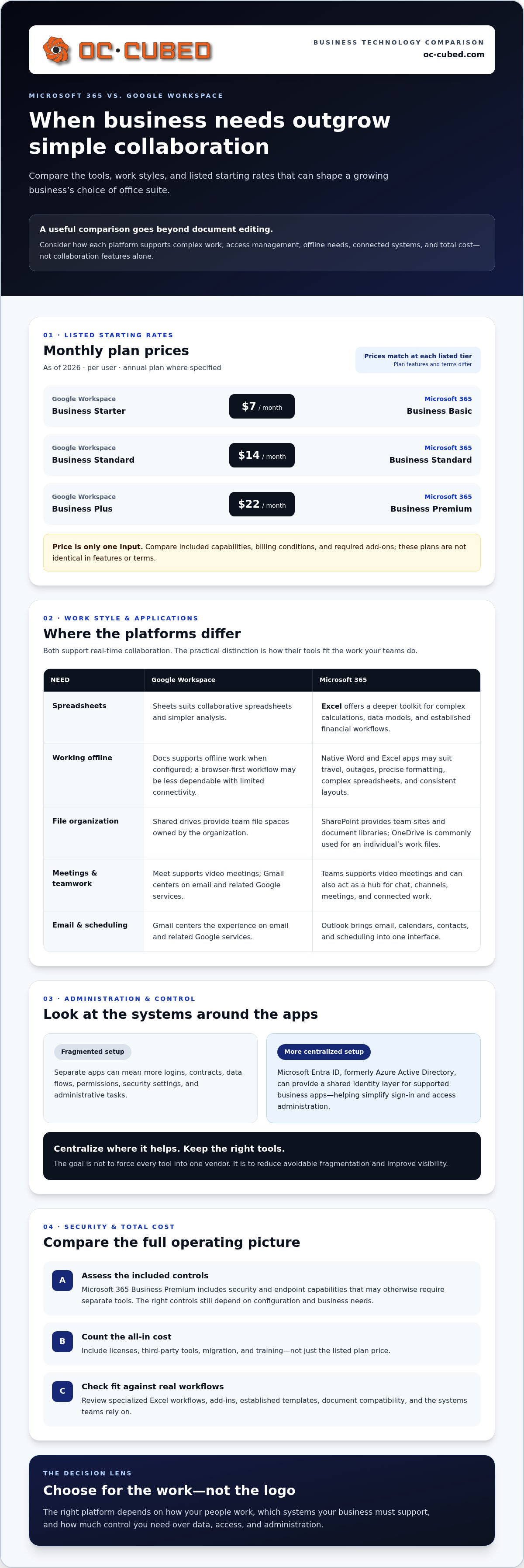
For mid-market businesses, the choice is less about which suite can edit a document and more about how well its tools, administration, and costs fit together. Both platforms support real-time collaboration. Microsoft 365’s co-authoring in apps such as Word and Excel lets teams work together on shared files while retaining access to desktop applications when their workflows call for them.
Storage works differently, too. Google Workspace shared drives provide team file spaces owned by the organization rather than an individual. In Microsoft 365, SharePoint provides team sites and document libraries, while OneDrive is commonly used for an individual’s work files. Permissions, ownership, and file organization should reflect how each team works.
Application Depth: Beyond the Basics
Excel offers a deeper toolkit for complex calculations, data models, and established financial workflows. Sheets remains a practical option for collaborative spreadsheets and simpler analysis. Teams and Meet both support video meetings, but Teams can also serve as a hub for chat, channels, meetings, and connected work. Outlook brings email, calendars, contacts, and scheduling into one interface, while Gmail centers the experience on email and related Google services. The better fit depends on which applications your teams rely on and what they need to do in them.
Pricing, Security, and the All-In Cost
As of 2026, listed starting rates are similar at the entry points: Google Workspace Business Starter is $7 per user monthly on an annual plan, and Microsoft 365 Business Basic is $7. Google Business Standard and Microsoft 365 Business Standard are each listed at $14; Google Business Plus and Microsoft 365 Business Premium are each listed at $22. These plans aren’t identical in features or terms, so compare included capabilities, billing conditions, and required add-ons rather than prices alone.
Estimate the full cost of ownership, including licenses, third-party tools, migration, and training. Microsoft 365 Business Premium includes security and endpoint capabilities that may otherwise require separate tools. Microsoft cites Forrester’s recognition in the Forrester Wave: Endpoint Management Platforms, which can be one reference when assessing endpoint management. The right controls still depend on your configuration and needs.
AI and Automation in 2026
Microsoft Copilot features are available in supported Microsoft apps and services, subject to licensing and configuration. Google includes Gemini in its Workspace Business plans. For eligible Microsoft business customers, a promotional Copilot add-on price of $18 per user monthly is available through December 31, 2026. Power Automate and Google Apps Script can both automate routine work, but they differ in approach and the systems they connect to. Integrated AI may be easier to govern than separate public AI extensions when administrators apply appropriate access and data controls. It isn’t automatically safe by default.
A structured review of Microsoft 365 tenant maintenance can connect licensing, security, and workflow requirements before decisions are made. Learn how Microsoft 365 tenant maintenance supports a more deliberate platform comparison.
The Compliance and Security Trigger
For legal, finance, and healthcare organizations, security decisions need to account for sensitive records, access requirements, and obligations that vary by industry. Microsoft 365 is often considered because its ecosystem can bring identity, email, devices, and collaboration controls under more centralized administration. Choosing a platform alone doesn’t make a business compliant. Controls must be configured, maintained, and matched to the organization’s policies and applicable requirements.
That distinction often explains why we switched from google workspace: the priority has shifted from simply sharing information to controlling who can access it, where it can go, and how activity is reviewed. Microsoft 365 features vary by license and configuration, so plan selection is part of the security strategy, not an afterthought.
Data Loss Prevention and Governance
Data loss prevention policies can help identify or restrict sharing of sensitive information, such as client records or financial details. Retention and eDiscovery tools can also support legal holds and investigations when included in the organization’s plan and configured for its needs. These capabilities let teams apply consistent rules instead of relying only on individual judgment.
Device management is another consideration. Microsoft Intune can provide centralized management for supported devices and applications; Google Endpoint Management offers management capabilities within Google Workspace. Compare the controls each platform provides for your device mix, security policies, and operating model. Microsoft 365 license management helps keep assigned plans aligned with users’ roles and the capabilities they need, reducing gaps caused by inconsistent licensing.
Advanced Threat Remediation
Account protection involves more than setting a password policy. Monitoring for unusual sign-in patterns and responding to suspicious activity can help IT teams investigate potential identity misuse earlier. Endpoint protection adds another layer by helping detect and remediate threats on the devices people use to access business data. It is most effective when device controls, identity safeguards, and incident response work together.
Email remains a common route for phishing and malicious attachments. Proofpoint email security can add a dedicated layer alongside Microsoft 365’s email environment, while security threat detection and remediation help address suspicious activity. The goal is layered protection, not the assumption that any one tool prevents every incident.
NOC integration connects network operations monitoring with IT support processes so unusual tenant or network activity can be reviewed and escalated for investigation. That visibility helps teams respond with context rather than treating each alert as an isolated event.
For a growing organization, the practical test is whether security settings, licenses, devices, and monitoring work as one managed system. Regular Microsoft 365 tenant maintenance helps keep that structure aligned as users and business needs change.
The Migration Roadmap: Switching Without the Stress
A successful move to Microsoft 365 starts before files are copied. Treat it as a business change with clear ownership, a practical sequence, and time to test. The reasons behind why we switched from google workspace matter, but careful planning determines whether the new environment delivers on them.
Phase 1: Pre-migration audit. Inventory users, shared drives, email, calendars, third-party integrations, and access permissions. Identify which information is active, what needs to move, and what can be archived. Flag shared files with complex access rules and workflows that rely on Google-specific features so they can be reviewed before the transition.
Phase 2: Tenant configuration. Set up the Microsoft 365 environment before moving business data. Establish user accounts, groups, security settings, sharing policies, and the intended structure for SharePoint and OneDrive. Define how access should work before employees begin using the new environment.
Phase 3: Data cutover. Plan the transfer of email, files, and calendars around business priorities. Validate sample data and permissions, communicate any planned service interruptions, and provide a clear route for reporting issues. A migration plan can reduce disruption, but don’t treat “zero downtime” as a guarantee. The right approach depends on the systems and data involved.
Phase 4: User adoption. Give employees role-based guidance on the tools they’ll use most, including where to find shared documents, how to collaborate, and how to manage meetings. Clear instructions and a way to get help can prevent confusion from turning into workarounds.
Avoid the “Messy Migration” Trap
Use a pilot group to test common workflows before the wider cutover. Include people who work with different file types, permissions, and calendar needs. This can uncover broken links, missing access, or calendar invitations that need attention while there’s still time to adjust. Enterprise-grade IT leadership helps coordinate decisions, dependencies, and project responsibilities. Virtual project management can keep migration tasks moving and make responsibilities clear.
Secure and Tune the New Environment
After migration, review old sharing links and permissions, then remove access that’s no longer appropriate. Make multi-factor authentication a Day 1 requirement for user accounts, with policies aligned to your organization’s security needs. Continue Microsoft 365 tenant maintenance to review settings and limit configuration drift as people, devices, and workflows change.
A migration is complete when people can work securely in the new setup, not simply when the data has moved. A planned transition gives the team a clearer path from old habits to a managed Microsoft 365 environment.
Managed Microsoft 365: The Logic of Outsourced Maintenance
A migration changes the platform. Ongoing management determines whether the new environment stays organized, secure, and useful as the business changes. Microsoft 365 settings can drift as employees join or leave, devices change, and new tools are added. Without regular oversight, even a carefully configured tenant can become difficult to manage.
That’s an important part of why we switched from google workspace: the move isn’t simply about gaining new applications. It’s about building an environment with clear ownership for maintenance, security, and support. A managed service provider can coordinate those responsibilities, including Microsoft 365 tenant maintenance, security threat detection, network monitoring, and vendor management. Regular review also helps business leaders understand ongoing technology needs and plan accordingly, rather than responding only when something breaks.
Proactive Support vs. Break-Fix
A login error may be the first visible sign of a deeper issue, such as outdated access settings or a misconfigured account. Proactive support reviews the environment before everyday problems disrupt work. Monthly reporting can give decision-makers a clearer view of system health, security activity, and areas that need attention.
Cloud tools still depend on the networks and devices people use to reach them. Firewall and switch management should support the organization’s security policies and connectivity requirements. Keeping these pieces aligned helps reduce blind spots between the Microsoft 365 tenant and the infrastructure around it.
Your Strategic IT Partner
A Virtual CIO can connect technology decisions to business priorities, from planning for growth to setting a sensible order for security improvements. That guidance matters when a business is deciding which Microsoft 365 capabilities to adopt and how to manage them over time.
Vendor management adds another layer of coordination. Instead of leaving internal staff to track every provider, account, and support issue, an IT partner can help organize communications and clarify responsibilities. Combined with Microsoft 365 maintenance and monthly reporting, this gives leadership a more consistent view of the environment.
Evaluate support costs alongside licensing, project work, and the level of ongoing management your business needs. Clear scope and regular reporting make it easier to understand what’s being maintained and where future investment may be needed. The right operating model should fit the organization’s needs, rather than rely on surprise fixes as the default.
Build a More Confident Foundation for Growth
The reasons behind why we switched from google workspace go beyond a preference for one set of apps. Growing businesses may need greater control over data, stronger alignment between security and daily workflows, and applications that support complex work. Microsoft 365 can provide that foundation, but a successful move also depends on a careful migration plan and proactive management afterward.
Start with your business needs, not the software alone. Assess which tools and workflows must carry over, configure the new environment before moving data, and support employees as they adapt. Then keep the tenant maintained as users, devices, and priorities change.
OC Cubed provides Microsoft 365 tenant maintenance and strategic IT guidance to help businesses manage that transition. With a clear plan and ongoing oversight, your team can move from a patchwork of tools toward a more structured environment, with greater clarity and confidence.
Your next stage of growth deserves technology that’s ready to support it.
Frequently Asked Questions
Will I lose my old emails when I switch from Google Workspace to Microsoft 365?
No, your existing emails don’t have to be lost during a migration. Email can be transferred to Exchange Online, but the process needs planning around accounts, folders, archives, and any shared mailboxes. Before cutover, confirm what data is included, test a sample, and verify mail in the new environment. Keeping the old service accessible during the transition can also help resolve gaps discovered after migration.
How long does a full migration from Google to Microsoft usually take?
There isn’t one reliable timeline for every migration. Duration depends on the number of users, data volume, file and permission complexity, connected applications, and how much testing and training the team needs. A pre-migration audit and pilot can expose issues before the full move. Build the schedule around business needs, and allow time to verify email, files, calendars, and user access after cutover.
Is Microsoft 365 more expensive than Google Workspace in the long run?
Not automatically. Compare equivalent plans and include more than the license fee: third-party apps, security tools, migration work, training, and ongoing administration all affect total cost. In 2026, Google Workspace Business Standard and Microsoft 365 Business Standard are each listed at $14 per user monthly on annual plans, while their features differ. Your actual long-term cost depends on which capabilities your business needs and already pays for.
Can I still use my custom domain name with Microsoft 365?
Yes, Microsoft 365 supports business email using a custom domain. The domain can remain registered with its current registrar; the migration typically involves verifying ownership and updating DNS records so email routes to Microsoft 365. Plan those changes as part of the cutover, and check how they affect mail delivery and related services. You can keep your existing domain name while changing the platform that manages your business email.
What happens to my Google Drive files during the migration?
Google Drive files can be moved into Microsoft 365 storage, commonly OneDrive for individual work and SharePoint for team files. The migration plan should account for folder structure, file formats, sharing permissions, and links people rely on. Some Google-specific features may not transfer in exactly the same form, so test important workflows and review access before retiring the old environment. Confirm that teams can find and use key documents after the move.
Do I need to hire a full-time IT person to manage Microsoft 365?
No, a full-time hire isn’t the only way to manage Microsoft 365. A managed service provider can support tenant maintenance, remote IT support, security monitoring, and user issues. Virtual CIO leadership can also guide technology planning without creating a full-time executive role. The right arrangement depends on your organization’s complexity, internal skills, and support needs. Assign clear ownership so configuration, licensing, and security don’t become neglected.
Is Microsoft Teams better than Google Meet for large client meetings?
Not for every organization or meeting. Both Teams and Google Meet support video meetings, while Teams can also bring chat, channels, and collaboration into a broader work hub. The best fit depends on client preferences, your workflows, licensing, and the meeting features you need. Before switching, test the meeting experience with your typical participants and review the applicable plan limits rather than assuming one platform is always better for large groups.
How does Microsoft 365 help with industry compliance like HIPAA or GDPR?
Microsoft 365 offers tools that can support data protection and governance, such as access controls, retention, auditing, and data loss prevention, depending on the plan and configuration. That may help explain why we switched from google workspace, but using the platform alone doesn’t make an organization compliant. Businesses still need appropriate policies, staff practices, and provider agreements, and must configure and maintain controls to fit their obligations.


