

The lowest per-user or per-device rate may not be the easiest MSP budget to manage. With per-user vs per-device MSP pricing, the real difference is not just the unit on the invoice. It is what the provider counts, what support includes, and how charges change when your team or equipment changes.
If you are comparing proposals, get clear answers on who qualifies as a billable user, which devices are covered, and whether security or additional support costs extra. A rate that looks simple can be difficult to compare when providers define those details differently.
This guide explains how per-user and per-device models work, what each typically counts, and where each may fit based on your workforce and device mix. You will also learn how to compare service scope, clarify fees for new users or equipment, and assess whether a model can keep pace with your business. The goal is a predictable support arrangement, not just a lower headline number.
Key Takeaways
- Per-user vs. per-device MSP pricing counts different things, so confirm how the agreement defines covered people and equipment.
- Match the billing unit to the counts your business can track and forecast as staffing and equipment change.
- Assess how remote work, shared devices, and expected growth may affect which model fits your environment.
- Compare proposals using consistent user and device counts, service scope, exclusions, support processes, and change terms.
- Separate recurring managed IT services from project work, hardware, licensing, and other potential extras before evaluating proposals.
Per-User vs. Per-Device MSP Pricing: What's Counted
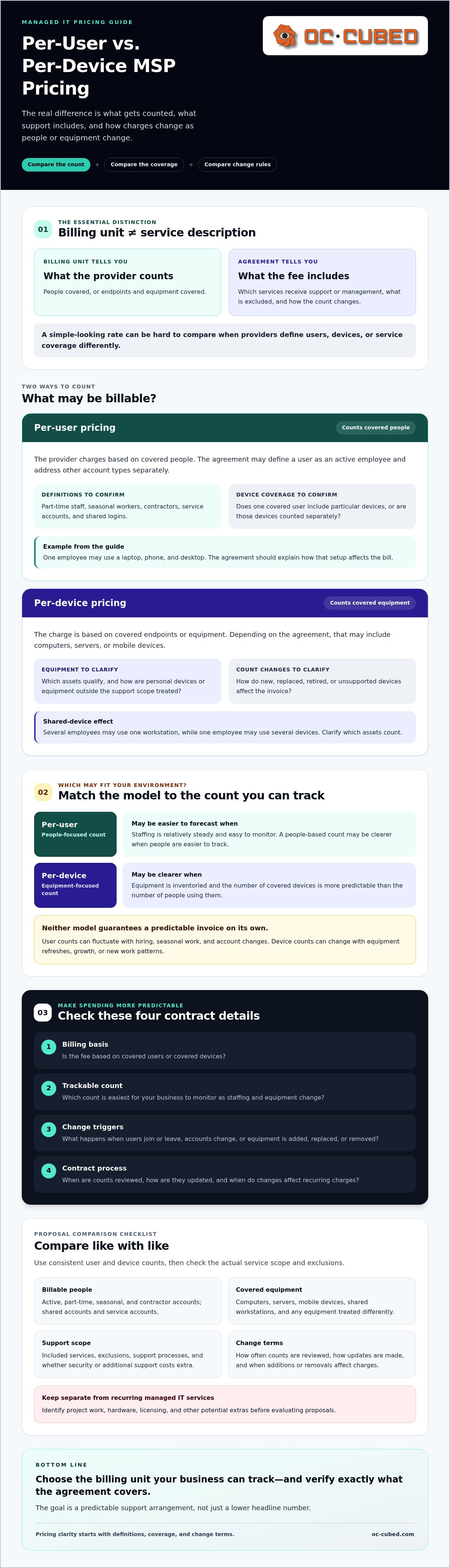
Start by comparing what each proposal counts and what that count covers, not just whether the pricing label says “per user” or “per device.” These are billing units, not service descriptions. The billing unit determines how a fee is counted; the agreement determines which services are included. For a high-level overview of the subscription-based model and the role an SLA can play, see Managed services.
With per-user billing, the provider charges based on covered people. With per-device billing, the charge is based on covered endpoints or equipment. In either model, the written agreement defines the boundaries: what receives support or management, what is excluded, and how the count changes when someone joins, leaves, or receives new equipment.
What does per-user MSP pricing usually count?
A contract may define a user as an active employee and separately address part-time staff, seasonal workers, contractors, service accounts, or shared logins. These definitions vary by provider. Confirm whether one covered user includes particular devices or whether devices are counted separately. For example, an employee might use a laptop, phone, and desktop. The agreement should make clear how that setup affects the bill.
What does per-device MSP pricing usually count?
Depending on the agreement, covered equipment may include computers, servers, or mobile devices. Ask how the provider distinguishes managed equipment from personal devices or equipment it does not support. Shared workstations can affect the comparison: several employees may use one device, while one employee may use several. Clarify which assets count and how newly added or retired equipment changes the invoice.
Before comparing proposals, ask for a plain-language inventory of billable users and devices, including any categories treated differently. Then verify:
- How active, part-time, seasonal, and contractor accounts are counted.
- Whether shared accounts or workstations are included, excluded, or billed differently.
- Which computers, servers, and mobile devices qualify as covered equipment.
- How often counts are reviewed and what process updates them.
These details make the pricing model easier to evaluate against your actual environment. A user-based count may be clearer when people are easy to track. A device-based count may be more transparent when equipment is the better measure of support scope. Neither label guarantees what is included. In per-user vs. per-device MSP pricing, the agreement's definitions and service coverage make a proposal understandable.
MSP Pricing Models and Predictable IT Spending
Predictable IT spending depends on more than choosing a billing unit. The billing unit predicts what is counted, not what is covered. An MSP's service scope and rules for adjusting counts determine whether monthly charges remain understandable as your business changes. If you are new to managed IT, What Is A Managed Service Provider (MSP)? offers a useful overview of the provider's role.
For a fair comparison, consider four things: the billing basis, which count is easiest for you to track, what changes that count, and how the contract handles those changes. User-based billing may be simpler to forecast when staffing levels are relatively steady and easy to monitor. Device-based billing may be clearer when equipment is inventoried and the number of covered devices is more predictable than the number of people using them.
When can per-user pricing be easier to budget?
Picture a business where each employee uses a company laptop and phone. If the agreement includes those devices under each covered user, tracking people may be simpler than monitoring every endpoint. That is an assumption to verify, not a standard rule. Ask whether support and security coverage follow the user across devices, and how onboarding, offboarding, contractors, or shared accounts change the billable count.
When can per-device pricing make the count clearer?
A workplace with fixed workstations and a maintained equipment inventory may find it straightforward to track covered devices. But the count can still shift when new endpoints are added, old ones are replaced, or equipment falls outside the provider's support scope. Check whether servers, mobile devices, and network equipment are included, and how unsupported or personal devices are treated.
Neither model guarantees a predictable invoice on its own. User counts can fluctuate with hiring, seasonal work, and account changes. Device counts can change with equipment refreshes, growth, or new work patterns. Ask the provider to spell out:
- When user or device counts are reviewed and updated.
- How additions, removals, and replacements affect recurring charges.
- Whether changes take effect immediately or at a defined billing point.
- Which services are included and what may be billed separately.
Then compare the proposed rules against your staffing plans and equipment inventory. A managed IT retainer that brings together remote support, helpdesk and NOC integration, network monitoring, endpoint protection, and Microsoft 365 tenant maintenance is one service scope to assess alongside its billing basis. If you are reviewing ongoing support options, explore managed IT support options and compare the included services with your needs.
Which MSP pricing model fits your workforce and device environment?
The right fit depends on which count best reflects your support needs and is easiest to keep accurate. A team of employees using several company devices may find a user-based structure easier to track, while a business with a stable inventory of shared or specialized equipment may prefer a device-based count. Neither model is automatically less expensive. Compare the agreement's definitions, service scope, and rules for changes.
Use these scenarios as a starting point, not a rule. The provider's contract determines how each environment is billed.
- Office-based team: Per-user billing may be easier to follow if staffing is steady and each employee's support needs are similar.
- Remote workforce: A user count may be simpler than tracking laptops and phones, if the agreement clarifies which devices and services follow each person.
- Shared-device workplace: Per-device pricing may be worth comparing when multiple people use a defined set of workstations.
- Device-heavy operation: A device-based count may suit a large, well-documented equipment inventory, provided specialized equipment is explicitly addressed.
How does team structure change the comparison?
Count employees, contractors, part-time staff, seasonal workers, and shared accounts before seeking proposals. Remote employees may use multiple endpoints, but do not assume each is separately billable or included with a user. Record today's headcount and likely hiring or seasonal changes, then ask providers how those changes affect covered users. For a broader view of included support and responsibilities, review this guide to managed IT services scope.
How does your device environment change the comparison?
Build an inventory of computers, servers, mobile devices, and network equipment. Note who owns each item, whether it is supported, and whether it is shared or specialized. This helps identify devices that may need separate treatment in the agreement, including equipment outside the provider's standard scope. For context on managing systems remotely, see the guide to remote IT management services.
Finally, ask whether the provider offers a hybrid structure that combines user and device counts. Consider it only if the provider confirms the approach and explains how each component is counted. In per-user vs. per-device MSP pricing, the best choice is the one that maps clearly to your real workforce, equipment, and expected changes.
Comparing MSP Proposals Beyond Unit Rates
A lower rate does not tell you whether two MSP proposals cover the same work. Compare equivalent service scopes before comparing proposal totals. First, normalize the proposed user and device counts. Then compare included services, exclusions, support processes, and how the recurring charge changes when your business changes.
Check whether each proposal clearly addresses endpoint protection, Microsoft 365 tenant maintenance, network monitoring, and monthly reporting. A service may be included in one proposal but excluded or handled as an extra in another. Separate recurring managed services from project work, hardware, licensing, and other potential charges so the comparison reflects the ongoing support you need.
What should an MSP proposal clearly define?
Review how the provider defines billable users and devices, which systems are covered, and where your team's responsibilities begin and end. The proposal should also put support channels, escalation steps, service hours, and response commitments in writing. Check exclusions and ask how project work, licensing, hardware, and other out-of-scope requests are handled.
Use the same checklist for every provider. That makes differences easier to spot:
- Counts: Confirm the covered users, devices, shared equipment, and any separately counted systems.
- Scope: Compare included remote support, monitoring, security, Microsoft 365 maintenance, and reporting.
- Boundaries: Identify exclusions, customer responsibilities, and work treated as a separate project.
- Support process: Compare channels, escalation paths, stated service hours, and written response commitments.
- Other charges: Ask about licensing, hardware, project work, and any other possible extras.
In a per-user vs. per-device MSP pricing comparison, matching the counts is only the first step. The services behind those counts must also be comparable.
How can you test whether billing will stay predictable?
Ask each provider to explain sample billing scenarios: a new hire, a departing employee, a new device, and a replacement or retired device. Confirm how often counts are reconciled, who approves updates, and when changes affect the recurring retainer. These practical examples can reveal ambiguities a headline rate will not show. For more budgeting context, read this guide to predictable IT cost planning.
Use your completed checklist to compare service scope and billing rules side by side. Clear definitions make it easier to understand what the agreement covers and plan for changes. You can also review OC Cubed's managed IT support services as one example of a recurring service scope.
Choose an MSP pricing model that supports dependable IT operations
The strongest choice connects a count you can verify with the services your business needs. In per-user vs. per-device MSP pricing, the billing unit matters, but so does the work behind it. Ask providers to explain their proposed model against your actual inventory and priorities, not an assumed typical business.
Prepare a clear picture of your environment before discussing service scope:
- People and locations: Current employee, contractor, part-time, and seasonal user counts, plus the locations your organization needs covered.
- Equipment: An inventory of computers, servers, mobile devices, and network equipment, noting ownership, shared use, and support status.
- Expected changes: Planned hiring, departures, equipment replacements, or technology changes that could affect the counts.
- Current needs: Support gaps, security priorities, Microsoft 365 responsibilities, and reporting expectations.
- Work type: Must-have recurring services listed separately from projects and one-time requests.
This preparation helps providers distinguish ongoing support from project work and clarify how proposed services align with your priorities. OC Cubed, LLC provides remote IT support, network monitoring, endpoint protection, and Microsoft 365 tenant maintenance. Evaluate these services as part of the scope you need, without assuming a specific billing model. To discuss those needs, contact OC Cubed.
Choose a pricing model with confidence
Use your comparison framework to identify the MSP agreement that best fits your business. The right fit should make the service scope clear and support dependable operations as your needs evolve.
As you evaluate per-user vs. per-device MSP pricing, focus on clear definitions and services that match your priorities. OC Cubed offers a monthly managed IT retainer that bundles remote support with proactive services, including endpoint protection, network monitoring, and Microsoft 365 tenant maintenance. Review how those services align with your requirements without assuming a particular billing model.
With a clear plan, you can move forward with greater confidence and keep your team focused on the work ahead.
Frequently Asked Questions
What is the difference between per-user and per-device MSP pricing?
Per-user pricing calculates charges based on covered people, while per-device pricing bases them on covered equipment. With per-user vs. per-device MSP pricing, the billing unit is distinct from the services included. An employee may use several devices, or several employees may share a workstation. The agreement determines how those situations are counted, which systems receive support, and how changes affect recurring charges.
Is per-user or per-device MSP pricing cheaper?
Neither model is consistently cheaper. The total depends on your workforce, equipment, service requirements, and the provider's definitions and exclusions. A business with employees using multiple devices might find a user-based structure easier to track, while a business with shared workstations may prefer a device count. Compare proposals using the same assumptions, then assess the full service scope and any potential extra charges.
What does per-user MSP pricing include?
Per-user pricing identifies how the provider calculates charges, but it does not define what support or protection each person receives. The contract should list included services, covered accounts, device treatment, exclusions, and separately billed work. OC Cubed offers a monthly managed IT retainer with bundled services. Ask any provider to document what its agreement includes rather than inferring coverage from the pricing label.
What does per-device MSP pricing count?
Per-device pricing counts equipment specified as covered in the agreement. Depending on the contract, that could include computers, servers, mobile devices, or network equipment. Confirm how the provider treats shared workstations, personal devices, unsupported equipment, and replacements. Also ask whether the device charge includes support, monitoring, security, and maintenance, or whether some services are separate. Written definitions clarify both the count and coverage.
Can an MSP use both per-user and per-device pricing?
Yes, a provider may offer a hybrid structure that combines user and device counts, but confirm that option directly. Ask which services or assets are billed by each unit and how the provider avoids counting the same scope twice. Request a sample calculation based on your inventory. A hybrid model is useful only if its definitions, included services, and procedures for updating counts are clear.
How do I compare MSP pricing proposals fairly?
Compare proposals using consistent user and device counts, then match the service scope line by line. Check inclusions, exclusions, support channels, escalation processes, written response commitments, and how the provider handles changes. Separate recurring managed services from projects, hardware, licensing, and other potential extras. Ask providers to explain differences in plain language. This gives you a stronger basis for reviewing proposals than comparing unit rates alone.
What happens if my business adds users or devices?
The effect depends on the agreement's rules for updating billable counts. A new employee may change a per-user count, while new equipment may affect a per-device count. Ask how the provider handles hires, departures, additions, replacements, and retired equipment, including when approved changes affect recurring charges. Clear procedures help your team understand billing adjustments and plan for operational changes with fewer surprises.


