

The cheapest-looking IT support can become the most expensive way to keep your business running. When every support call is billed by the hour, recurring problems and downtime can turn a low monthly bill into an unpredictable expense. Flat-rate IT support pricing uses a different model: the provider charges a recurring fee for an agreed scope of services, which can include ongoing maintenance as well as support.
It’s reasonable to ask whether a flat monthly fee will actually cost less over time. The answer depends on what the agreement includes, how well the services match your needs, and which tasks trigger extra charges. A fixed fee brings useful predictability only when the scope and exclusions are clear.
This guide explains how flat-rate models work, how they compare with hourly billing, and what to check before choosing a plan. You’ll learn how helpdesk support, network monitoring, endpoint protection, and Microsoft 365 maintenance can fit into an ongoing agreement. You’ll also see how to compare the retainer with the full cost of break-fix support, including time employees lose to IT delays.
Key Takeaways
- Understand how flat-rate IT support pricing can shift support from individual repairs toward ongoing system care.
- Assess how user count, device count, and infrastructure complexity affect a monthly retainer’s scope.
- Compare annual support spending by including repair bills and employee time lost to IT delays.
- Use a checklist to evaluate helpdesk support, NOC integration, network monitoring, Microsoft 365 maintenance, and email security.
- See how OC Cubed’s remote IT retainer combines defined support services in a recurring monthly model.
Beyond the Hourly Bill: The Financial Logic of Flat-Rate IT Support
Hourly billing can make IT feel like an emergency expense: something breaks, support starts the clock, and the final bill depends on how long it takes to restore service. Flat-rate IT support pricing typically uses a monthly retainer for an agreed scope of ongoing support, with maintenance intended to reduce disruptions. This managed services model treats IT as a continuing business function rather than a series of unrelated repair jobs.
The financial difference is also about incentives. Under break-fix billing, each issue can generate another billable task. That doesn’t mean every hourly provider wants systems to fail, but the model focuses more directly on responding to problems than preventing them. With a flat-rate agreement, the provider has a reason to manage covered systems efficiently and address recurring issues. The value isn’t simply a fixed bill. It’s an ongoing support relationship with a defined scope.
The Hidden Costs of the Break-Fix Model
A repair invoice captures only part of an outage’s cost. To estimate the impact, account for employees who can’t work, time spent waiting or finding workarounds, delayed customer service, and interrupted business activity. Then consider how often the same issue returns. An hourly rate may seem manageable, but repeat incidents can add up across the year, while lost productivity remains outside the repair bill.
Technical debt is the long-term cost of reactive IT decisions that leave unresolved problems and make future maintenance or change more difficult.
Alignment of Interests: Why MSPs Want You to Succeed
With flat-rate support, the provider’s revenue is tied to an ongoing agreement rather than each individual repair. That can create an incentive to keep covered systems stable and reduce avoidable support work. For example, monitoring may flag a system issue early enough for the team to investigate before employees lose access to a tool.
The arrangement can also make the provider a more strategic partner. Instead of asking only, “How much will this fix cost?” you can discuss how maintenance, security, and support fit into your operations. The shift is from paying for each fix to paying for an agreed scope of support, with covered issues handled according to the terms of the agreement.
That predictability depends on the agreement being specific. Review which services and systems are covered, how support requests are handled, and what falls outside the retainer. A clear scope makes a fixed monthly fee a useful planning tool, not just a different way to receive an IT bill.
How Flat-Rate IT Support Pricing Is Calculated in 2026
There’s no single formula for a monthly IT retainer. Flat-rate IT support pricing usually reflects the number of people and devices supported, the complexity of the environment, and the services included. A business with a straightforward remote setup has different support needs from one managing multiple systems, security tools, and demanding operational requirements.
Ask a provider to explain how each factor affects the scope and fee. Common drivers include:
- User count: The number of employees who need helpdesk and account support.
- Device count: The computers and other endpoints the provider is responsible for protecting or managing.
- Infrastructure complexity: The networks, servers, firewalls, and business systems that require oversight.
- Service depth: The level of monitoring, security coverage, and strategic guidance included.
Monitoring hours, security requirements, and compliance needs can change the work involved. A plan with 24/7 network monitoring, for example, has a different scope from one with limited monitoring. Clarify whether security threat detection, endpoint protection, and specialized email security are included in the retainer or billed separately.
Per-User vs. Per-Device: Which Is Better for Your Budget?
With per-user pricing, each employee is generally counted as one supported user, even if they work across a laptop, tablet, and phone. That can make budgeting straightforward for businesses where employees use multiple devices. When you hire, you can estimate the budget impact by asking how adding a user changes the supported headcount and fee.
Per-device pricing counts the equipment instead. It may suit environments with shared workstations, where several employees use the same computer. Compare how each provider counts shared devices, mobile equipment, and servers before choosing a model. The right structure is the one that reflects how your team actually works.
The “Service Stack” Factor
The tools and expertise included in a plan also shape its value. Email security with Proofpoint and endpoint protection address different parts of a business’s security environment, while Microsoft 365 tenant maintenance supports ongoing management of the tenant. Confirm exactly what “included” means, including whether licenses or third-party tools are billed separately.
Some retainers also include virtual CIO, CTO, or CISO guidance. These fractional leadership roles can support technology planning and security governance without requiring a full-time executive hire. Remote support can also serve organizations across the country. To see how these elements can fit into an ongoing agreement, review OC Cubed’s remote IT support services and compare the scope with your needs.
Flat-Rate vs. Hourly: A Direct ROI Comparison
To compare a flat-rate retainer with hourly support, look beyond the invoice. Review a full year of repair bills, emergency work, recurring incidents, and the time employees lost waiting for help. Then compare those costs with the retainer’s annual total and confirm which services it covers. This gives you a clearer view of cost and value without assuming every business has the same support needs.
- Break-fix total: Add support invoices and separately billed services from the past 12 months.
- Downtime impact: Estimate employee hours spent waiting or working around IT issues, plus any delayed business activity.
- Retainer total: Multiply the monthly fee by 12, then identify excluded services or project work that could add costs.
Include “soft downtime” in the comparison. If employees can’t access email or a business system, the cost includes more than the eventual repair. Time spent waiting for a response or finding a workaround is time diverted from normal work. Track these disruptions to make the comparison more realistic.
Predictability as a Growth Multiplier
A defined monthly retainer makes IT spending easier to plan across the year. With a clearer forecast, business owners and CFOs can allocate capital to hiring, equipment, or other priorities rather than setting aside funds for unpredictable support invoices. Budget certainty may also reduce the temptation to delay reporting a minor issue because another support call could mean another charge.
Check whether the agreement allows employees to contact the helpdesk for covered issues without separate per-ticket approval. Removing that barrier can make it easier to report problems early, before they interrupt more work. For guidance on planning remote support, see the Remote IT Management Guide.
The Cost of Cybersecurity Neglect
There’s no single ransomware remediation cost that applies to every business. The impact depends on the incident and the work needed to restore operations. For a useful comparison, review your organization’s risk planning and estimate potential response costs, including investigation, recovery, downtime, and outside expertise. Compare that exposure with the retainer’s security scope, not just its headline fee.
Hourly billing doesn’t automatically mean a provider lacks security tools, just as a flat fee doesn’t guarantee comprehensive protection. Ask what threat detection and remediation are included, what is billed separately, and whether network monitoring runs around the clock. Monitoring coverage varies by agreement, so confirm the hours and response responsibilities in writing. Flat-rate IT support pricing is most useful when the service scope is transparent and the budget aligns with the protection your business needs.
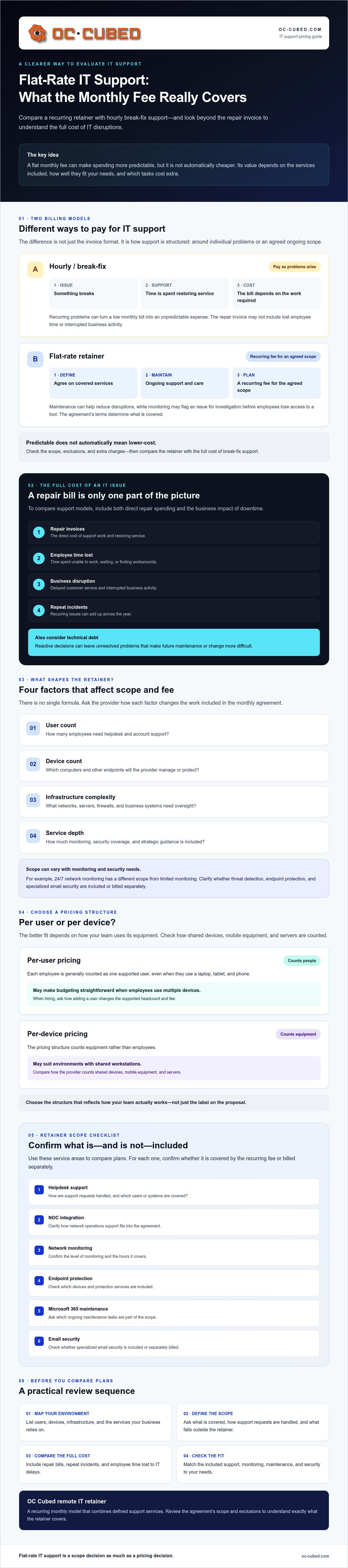
What Should Be Included in Your Monthly IT Retainer?
A predictable monthly fee is only useful if the support scope is clear. Use this checklist to evaluate what a retainer covers and which services might trigger an additional charge:
- Helpdesk and NOC integration: Check how employees request support and what network operations oversight is provided.
- Network monitoring: Confirm which systems are monitored, the coverage hours, and how alerts are handled. OC Cubed provides 24/7 network monitoring and configuration.
- Microsoft 365 tenant maintenance: Check for ongoing management of the business’s Microsoft 365 environment, not just support for individual user issues.
- Email and endpoint security: Ask whether Proofpoint email security, endpoint protection, and antivirus are included in the retainer.
- Vendor management: Support coordinating with internet, software, and technology providers can save your team from chasing vendors when an issue crosses systems.
Firewall and switch management also matter for businesses relying on managed network infrastructure. These components need configuration and oversight even when support is delivered remotely. Review the agreement for exclusions, too. Security threat detection and remediation should have a clearly defined place in the monthly scope, so you know whether covered response work is included or treated as a separate project.
Modern Security Essentials
Proofpoint email security and endpoint protection address different parts of a business’s security environment. Ask how each is configured, monitored, and supported, and whether the retainer includes responding to detected threats. A provider should explain what “security included” means in practical terms rather than rely on a broad label.
Also check that firewall and switch management is specified alongside network monitoring. These services can help maintain visibility and control across a remote environment. Make sure the agreement distinguishes routine security remediation from larger projects, with clear examples of what is covered and what may be quoted separately.
Strategic Leadership: vCIO and vCISO
Some higher-level retainers include access to virtual CIO, CTO, or CISO leadership. These fractional roles can guide technology planning and security governance without requiring a full-time executive hire. Ask how much strategic guidance is included and how it connects to your business priorities. For more on this model, read the IT Leadership Strategy Guide.
Strong flat-rate IT support pricing depends on matching the monthly scope to real operational needs. Get every inclusion, limit, and potential add-on in writing before comparing proposals.
The OC Cubed Approach: All-Inclusive Remote IT Management
OC Cubed provides remote IT support through an all-inclusive monthly retainer. The goal is a defined, predictable cost for the services in your agreement rather than separate hourly charges for every covered support issue. The scope still matters: before signing, confirm which systems and services the retainer covers and how project work or other exclusions are handled.
The agreement can bring helpdesk support, network monitoring and configuration, Microsoft 365 tenant maintenance, endpoint protection, email security with Proofpoint, and virtual executive leadership into one ongoing relationship. OC Cubed’s NOC integration and 24/7 network monitoring support proactive oversight. Monitoring is not the same as 24/7 helpdesk availability, so clarify support hours and response responsibilities in the agreement.
Eliminating Surprise IT Invoices
A predictable retainer makes costs easier to plan, but “all-inclusive” should always come with a clear service description. Check how the agreement defines routine support, security work, and project requests. If a major upgrade or other work falls outside the monthly scope, ask how it will be identified, approved, and billed before work begins.
Monthly reporting and ongoing service oversight can also make the relationship easier to manage. Reports can give your team visibility into support activity and the state of your IT environment, while regular oversight helps connect service delivery to business priorities. Clear scope and reporting help reduce billing uncertainty without implying that every possible IT expense is covered by a retainer.
Moving from hourly support should begin with a review of your users, devices, systems, current providers, and recurring issues. Use that review to document what transfers into the new support arrangement, what remains outside it, and how open requests will be handled. A defined transition plan helps avoid gaps and gives both sides a shared starting point. Ask the provider to explain the sequence and responsibilities before the changeover.
Your National Remote IT Partner
A remote provider serving businesses nationally can support teams across multiple locations through a consistent service model. For businesses with distributed employees, that can simplify oversight and budgeting. OC Cubed’s network monitoring and configuration, Microsoft 365 maintenance, security services, and virtual CIO, CTO, or CISO leadership bring operational and strategic support into the same relationship.
For business owners comparing flat-rate IT support pricing, the key is not simply one monthly number. It’s knowing what that number covers, how exceptions are handled, and how support aligns with the way your team works. Review the scope, reporting, monitoring coverage, and transition plan to make an informed decision.
Build a More Predictable IT Budget
Choosing flat-rate IT support pricing is about more than replacing hourly invoices. The right retainer gives you a clear view of what support includes, helps you plan around a consistent monthly commitment, and makes it easier to evaluate IT as an ongoing business need rather than a string of emergencies. Confirm the scope, exclusions, and how project work is handled.
OC Cubed’s remote IT support retainers include Microsoft 365 tenant maintenance, along with 24/7 network monitoring and configuration. Fractional CIO, CTO, and CISO leadership is also available to help connect technology decisions with business priorities. These services can provide operational support and strategic guidance through one ongoing provider relationship.
Start by identifying what your business needs from a support partner, then compare proposals against that checklist. Clear expectations are the foundation for better cost control and dependable IT management.
Frequently Asked Questions
What is the difference between flat-rate IT and a managed service provider (MSP)?
Flat-rate IT describes a pricing approach, while an MSP is a provider that manages or supports a business’s technology. An MSP may charge a fixed monthly retainer, bill hourly, or offer different pricing structures. With flat-rate IT support pricing, the monthly fee covers a defined scope of ongoing services. Review the agreement to see which support, maintenance, and security responsibilities are included and which are billed separately.
Does flat-rate IT support include the cost of new hardware or software licenses?
Not automatically. A monthly support retainer usually covers services defined in the agreement, while new computers, networking equipment, and software licenses may be separate expenses. Check whether the provider manages purchases or renewals, and whether the license itself is included in the fee. For Microsoft 365, distinguish tenant maintenance from subscription licensing. Ask for written examples of what counts as included support versus a separate purchase or project.
How much does flat-rate IT support typically cost per user in 2026?
There isn’t one standard per-user rate that fits every business, and OC Cubed’s service fee depends on the agreed scope. User count is only one factor: device volume, infrastructure complexity, monitoring coverage, security services, and strategic guidance can also affect a proposal. To compare quotes, request the same service list from each provider and confirm what is excluded, including software licenses and project work.
Is flat-rate IT support better for small businesses or large corporations?
Either can benefit if the pricing model and service scope fit the organization’s needs. A small business may value predictable support without building a large internal IT team. A larger company may use an MSP to support distributed staff or complement internal IT. Compare provider capacity, escalation processes, security coverage, and reporting with your actual requirements. The right fit depends on complexity and responsibilities, not company size alone.
What happens if we have a major IT emergency? Is that covered by the flat rate?
It depends on how the contract defines emergencies and covered remediation. Check whether the retainer includes investigation, recovery assistance, and communication during a major outage or security incident. Also confirm response procedures, support hours, and any work that may be scoped or billed separately. Monitoring can identify issues, but it doesn’t by itself establish that emergency response is included. Get these details in writing before signing.
Are there any hidden fees I should look for in a flat-rate IT contract?
Look closely at exclusions, not just the monthly fee. Ask how the provider handles new hardware, software licenses, major upgrades, migrations, security remediation, and work outside the normal support scope. Confirm whether the agreement changes as user or device counts shift, and whether there are separate project charges. Request a written list of included services, add-ons, billing triggers, and approval steps so extra work doesn’t come as a surprise.
Can I change my service tier if my business grows or shrinks?
Service scope can often be adjusted as a company’s needs change, but the contract determines how and when. Ask how the provider recalculates the retainer after hiring, layoffs, acquisitions, or changes to your systems. Clarify whether changes take effect immediately or at a renewal, and how users and devices are counted. A clear adjustment process helps keep support aligned with your business without unexpected billing changes.
Does flat-rate IT include cybersecurity and email protection like Proofpoint?
It can, but security coverage varies by provider and plan. Check whether endpoint protection, threat detection and remediation, network monitoring, and email security are included, and ask what response work the fee covers. OC Cubed offers endpoint protection, security threat detection and remediation, and email security with Proofpoint. Confirm the specific services and licensing included in your proposed retainer rather than assuming every security tool is covered.


