

What good is a network alert if no one has the time or expertise to act on it? Network problems often become visible only after employees lose access or customers encounter delays. Network monitoring services can surface warning signs earlier, but visibility alone won’t prevent disruption. The value comes from connecting alerts to clear ownership, sound configuration, and a practical response.
Monitoring tools can flag unusual activity, device issues, and performance changes. But alerts need interpretation and follow-through. Without a person or process responsible for reviewing them, a dashboard can create noise instead of control.
This guide explains what network monitoring services cover, how monitoring and configuration work together, and what to consider when an issue appears. You’ll also learn how managed monitoring can connect network visibility with helpdesk and NOC integration, firewall and switch management, and ongoing reporting. Use these criteria to choose an approach that fits your team’s support capacity and business priorities.
Key Takeaways
- Network monitoring services are most useful when alerts lead to clear ownership, impact assessment, and follow-up.
- Map critical systems and business priorities first, so monitoring focuses on issues that could disrupt work.
- Compare software, internal monitoring, and managed services by who owns alert review, troubleshooting, configuration, and reporting.
- Set alert thresholds and escalation steps around business impact to distinguish urgent issues from routine changes.
- Managed monitoring can connect ongoing network oversight with configuration, helpdesk and NOC integration, and related IT support.
What Are Network Monitoring Services, and What Business Problems Do They Solve?
A monitoring dashboard displays network data. Network monitoring services add ongoing oversight: people or processes review signals, investigate alerts, and connect findings to an appropriate response. Monitoring scope can cover selected devices or broader parts of a network. Define which systems are included rather than assuming every device is covered. For a foundational overview, see Network monitoring.
This visibility helps teams spot potential problems before employees or customers notice them. For example, a switch that stops responding or a connection that slows may show warning signs before staff lose access to a shared business application. An alert can prompt an investigation while the issue is easier to assess. It is a signal, not proof that the cause is known or the problem has been fixed.
What does a network monitoring service typically do?
Monitoring can track whether network connections and equipment are available, how performance is changing, and whether devices such as switches or firewalls report problems. To make the coverage useful, define which systems are monitored, what conditions trigger alerts, and who reviews them.
Managed monitoring connects visibility to an operating process. This can include reviewing alerts, assessing their relevance, escalating issues, and reporting on network conditions. Without clear ownership, an alert can sit unnoticed in a dashboard. With a defined process, someone can investigate the signal and determine the next step.
Which businesses benefit from managed network monitoring?
Any business that relies on stable connectivity for daily work can benefit from better visibility into network health. A disruption may affect access to business applications, communication, or shared resources. Monitoring helps make those conditions visible so the responsible team can investigate instead of waiting for users to report symptoms.
Managed oversight can also suit growing teams that rely on their network but lack dedicated in-house network operations staff to review alerts and maintain configurations. OC Cubed provides network monitoring and configuration, with helpdesk and NOC integration that connects network oversight to IT support. Businesses considering broader remote IT management can also explore this remote IT management guide.
Network monitoring and cybersecurity monitoring are related, but they have different aims. Network monitoring focuses on availability, performance, and equipment health. Cybersecurity monitoring looks for signs of threats or unauthorized activity. The work can overlap when unusual network behavior warrants a security investigation, but monitoring network health alone doesn’t replace security threat detection and remediation.
How Network Monitoring Services Detect, Triage, and Respond to Issues
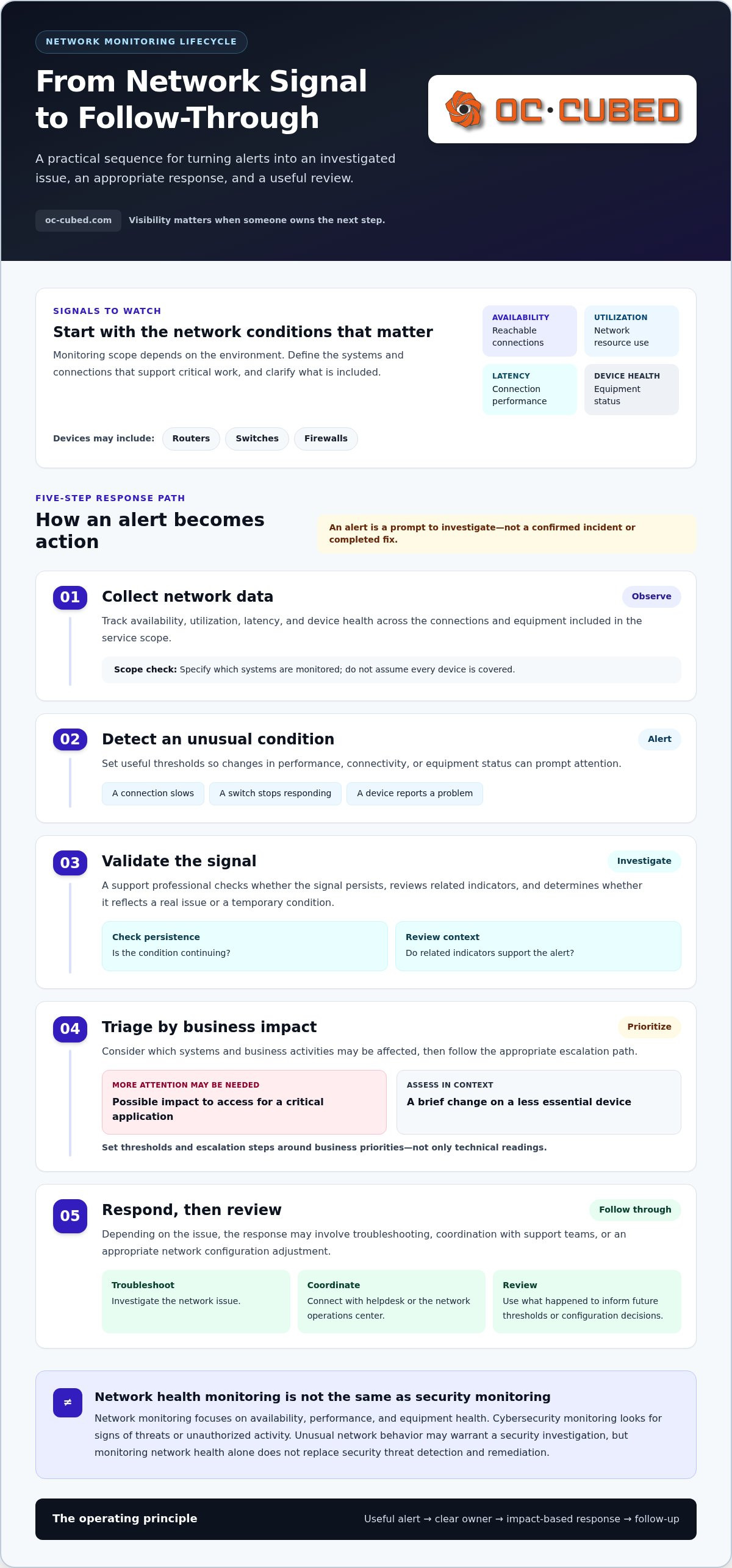
Monitoring is most useful when a signal leads to a considered next step. A practical lifecycle moves from collecting network data to detecting unusual conditions, assessing business impact, responding through the appropriate support process, and reviewing what happened. The monitoring-to-response lifecycle turns network signals into investigated issues, appropriate action, and follow-up.
This process can shorten the time between a developing problem and its investigation. IBM describes several business benefits of network monitoring, including supporting network performance and reducing disruption. The benefit depends not only on collecting data but also on setting useful thresholds and assigning ownership of alerts.
What network components and signals can be monitored?
Monitoring commonly tracks network availability, utilization, latency, and device health. These signals can indicate whether a connection is reachable, whether network resources are under pressure, or whether equipment is behaving unusually. Routers, switches, and firewalls are examples of devices that may be included, depending on the environment and service scope.
Set coverage according to how the business operates. One team may prioritize connectivity used by essential applications; another may focus on particular network devices. Listing the systems and connections that support critical work helps clarify what monitoring should include and what falls outside the scope.
What happens after a monitoring alert?
An automated notification is a prompt to investigate, not a confirmed incident or a completed fix. A support professional can validate the signal by checking whether it persists, reviewing related indicators, and determining whether it reflects a real issue or a temporary condition.
Next comes triage. The team considers which systems or business activities may be affected, then follows the appropriate escalation path. For instance, a potential issue affecting access to a critical application may need more attention than a brief change on a less essential device. Set thresholds and escalation steps around business priorities, not just technical readings.
Response may involve troubleshooting, coordinating with the helpdesk or network operations center, or adjusting network configuration when appropriate. Monitoring can connect these activities, but an alert by itself doesn’t establish who will act. Define responsibilities and escalation steps as part of the support process. Afterward, reviewing the event can help clarify its cause and inform future thresholds or configuration decisions.
For ongoing oversight connected to network configuration and support, OC Cubed’s network monitoring services can be part of a managed IT approach.
Managed Network Monitoring vs. Monitoring Software: Which Approach Fits?
A monitoring tool can collect data and display alerts. It doesn’t automatically assign someone to review them, diagnose the cause, or make a configuration change. The practical difference between software and a managed service is ownership: who keeps monitoring useful and carries an issue forward. The right model depends on your team’s available skills, time, and need for oversight.
| Responsibility | Self-managed software | Internal monitoring | Managed service |
|---|---|---|---|
| Alert review | Your team checks notifications | Assigned staff review and prioritize alerts | Provider reviews alerts within the agreed service scope |
| Troubleshooting | Your team investigates | Internal staff investigate and coordinate fixes | Provider may investigate and coordinate with support, as defined in the service |
| Configuration | Your team maintains tool settings | Internal staff tune monitoring and network settings | Monitoring and configuration responsibilities are agreed with the provider |
| Reporting | Staff interpret available dashboards or reports | Internal staff share findings and trends | Reporting can be part of ongoing oversight |
| Ongoing maintenance | Your team maintains the tool | Staff maintain tools, processes, and coverage | Provider supports ongoing monitoring operations within the agreed scope |
When is monitoring software alone enough?
Software may suit a business with staff who have the time and technical skills to own the process. That means more than installing a dashboard. Someone needs to tune alert thresholds, maintain device configurations, review findings, and decide what deserves investigation. If those responsibilities have a clear owner and fit existing workflows, self-managed tools can provide useful visibility without outsourcing the process.
When does managed monitoring make more sense?
Managed network monitoring services can be a better fit when internal staff need help interpreting alerts or maintaining consistent oversight. The value comes from connecting monitoring with an operations process, not simply forwarding notifications. Helpdesk and NOC integration can link alerts with support coordination, while firewall and switch management can complement network oversight through related configuration work.
Security and network operations can overlap when unusual network activity needs further review, but network monitoring isn’t a substitute for cybersecurity monitoring. For a closer look at that related area, read this managed cybersecurity guide.
Choose based on the work your team can reliably own. A well-supported internal process may suit one business; another may benefit from managed oversight that connects alerts, troubleshooting, configuration, and reporting. Define responsibilities clearly so a dashboard doesn’t become the endpoint of the response.
How to Define Network Monitoring Service Requirements for Your Business
Good requirements start with business priorities, not a list of devices. Before selecting network monitoring services, identify which connections and equipment support essential work, what a disruption would affect, and who can act on an alert. This turns a broad request for “network visibility” into a practical scope with clear expectations.
Map critical systems and business impact
Start with the network components employees rely on to access essential applications, communicate, and share resources. Include relevant connections and equipment, such as routers, switches, or firewalls. Then rank these systems by the impact a failure could have. A network issue that prevents a core team from accessing a key business system may deserve a different monitoring priority from one affecting a lower-priority resource.
Next, assess your support capacity. Who understands the network configuration? Who reviews alerts? Where do recurring problems go unnoticed? The answers help show whether you need monitoring visibility alone or ongoing oversight connected to support and configuration.
Set expectations for alerts, response, and reporting
Define alert ownership before monitoring begins. Document who reviews notifications, how issues are escalated, and how support teams coordinate troubleshooting. Specify which network components are in scope and whether configuration work, such as firewall or switch management, is part of the operational need.
Separate essential outcomes from useful additions. Essential requirements may include visibility into priority connections and equipment, alert review, and a defined path for investigating issues. Set reporting and ongoing configuration requirements according to the level of oversight your business needs.
Use this checklist to capture the basics:
- Critical systems: Which connections and devices support important business operations?
- Impact: What work is interrupted if each system becomes unavailable or performs poorly?
- Coverage: Which components and performance conditions should monitoring include?
- Ownership: Who reviews alerts, investigates them, and escalates unresolved issues?
- Configuration: Which settings or network devices need ongoing management?
- Reporting: What do you need to understand about recurring issues, trends, and unresolved risks?
Keep the answers focused on decisions. A report is useful when it clarifies what keeps recurring, what remains unresolved, or where the business may need attention. With priorities documented, you can shape monitoring around operational needs instead of collecting signals without a plan.
How OC Cubed - Your trusted MSP Connects Network Monitoring With Ongoing IT Support
Monitoring is more useful when it sits within a clear support relationship. OC Cubed provides 24/7 network monitoring and configuration as part of its managed IT services, connecting ongoing network visibility with operational support. This helps businesses understand network concerns, clarify ownership, and coordinate next steps within their service scope.
What the network monitoring approach brings together
Network monitoring and configuration work alongside remote IT support and helpdesk and NOC integration. This connects oversight with a support structure, so alerts and network concerns can be considered as part of ongoing IT operations rather than left as isolated dashboard notifications. Responsibilities are defined around the service scope and the business’s priorities.
Related capabilities include firewall and switch management. These complement network monitoring by addressing the management of important network equipment while keeping responsibilities distinct. Monthly reporting gives the business a regular way to review IT operations and network concerns, helping inform decisions about recurring issues and ongoing needs.
OC Cubed’s recurring managed services retainer provides ongoing oversight rather than a one-time review. This can suit businesses that want monitoring, configuration, and support responsibilities considered together as their environment and priorities change.
A practical next step for improving network visibility
Start by listing the systems and connections your business depends on, then note where visibility or support ownership is unclear. Consider which equipment needs monitoring, who should review alerts, what configuration responsibilities matter, and what information would make monthly reporting useful. These answers form the basis of a well-defined service scope.
Clear expectations help distinguish monitoring from support and show how concerns move from detection to review and follow-up. OC Cubed’s network monitoring and configuration can be considered alongside remote support, helpdesk and NOC integration, and related network management needs. A defined scope keeps the service grounded in business priorities.
Explore OC Cubed’s managed IT services to learn more about ongoing support and network oversight.
Build More Confidence Into Your Network Operations
Effective network monitoring services do more than display alerts. They connect network visibility to clear ownership, investigation, and follow-through. The right approach depends on which systems matter most to your business and whether your team has the capacity to manage monitoring internally.
OC Cubed brings together 24/7 network monitoring and configuration with helpdesk and NOC integration. Firewall and switch management can complement that oversight, while monthly reporting helps maintain visibility into IT operations. Defining coverage, escalation, and reporting expectations gives everyone a clearer understanding of the service.
With a clear scope and support process, you can take a more informed approach to network operations and keep your team focused on the work ahead.
Frequently Asked Questions
What do network monitoring services include?
Network monitoring services typically track network availability, performance signals, and the health of selected equipment. Coverage may include routers, switches, firewalls, or important connections, depending on the business environment and service scope. Managed monitoring can connect oversight with alert review, support coordination, configuration, and reporting. The key distinction is ownership: a dashboard shows information, while a service defines how that information is reviewed and what happens next.
How do network monitoring services work?
Network monitoring services collect information from covered devices and connections, then look for conditions such as reduced availability, unusual performance, or equipment problems. When a threshold is crossed, the system can generate an alert for review. The alert is a signal to investigate, not proof of a confirmed incident or completed fix. A response process determines who validates the signal, assesses its business impact, and coordinates follow-up.
Is network monitoring the same as cybersecurity monitoring?
No. Network monitoring focuses on availability, performance, and the health of network equipment and connections. Cybersecurity monitoring looks for signs of threats or unauthorized activity. The areas can overlap: unusual network behavior may need a security review, for example. But a device appearing to operate normally doesn’t establish that it’s secure. Businesses may need both network oversight and security threat detection to address different operational risks.
Can network monitoring services prevent downtime?
Network monitoring services can help teams identify warning signs sooner, but they can’t guarantee that downtime will be prevented. An alert may reveal a weakening connection or equipment issue before users report disruption. The benefit depends on whether someone reviews the signal, confirms its significance, and takes appropriate action. Clear alert ownership and escalation processes help turn earlier visibility into an opportunity to investigate and respond.
What happens when a network monitoring service detects an issue?
An alert should be validated before it’s treated as a confirmed incident. The responsible team can check whether the condition persists, review related signals, and assess which business operations may be affected. From there, the issue can be prioritized and escalated through the support process. Follow-up may include troubleshooting, coordinating with helpdesk or network operations, or reviewing configuration. An alert alone doesn’t specify who acts.
How often should a business monitor its network?
Monitoring frequency should reflect how important network availability is to business operations, which systems are in scope, and the team’s ability to review alerts. Critical connections may call for ongoing oversight, while less essential areas may have different priorities. Businesses should also review trends and recurring concerns regularly. OC Cubed provides 24/7 network monitoring and configuration alongside ongoing IT support for businesses seeking continuous oversight.
Does a small business need managed network monitoring?
A small business may benefit from managed network monitoring if connectivity supports daily work and no internal team has the time or expertise to review alerts and troubleshoot issues. Managed support can connect network oversight with helpdesk and NOC integration instead of leaving notifications unattended. OC Cubed combines network monitoring and configuration with remote IT support and related network management, helping businesses shape ongoing oversight around operational needs.


