

A network alert may help explain why several employees suddenly can’t access a shared application, but only if that signal reaches the team handling their support requests. When helpdesk tickets and NOC alerts sit in separate workflows, users may repeat the same problem while each team works with only part of the picture. Helpdesk NOC integration connects those signals so the right people can coordinate around the same issue.
Support teams need to know who owns a problem and what has already been done, especially when a user issue may point to a network fault. A connected workflow makes that handoff clearer without adding unnecessary steps.
This article explains how helpdesk and NOC teams differ, how shared ticket context and escalation paths link user reports with infrastructure alerts, and what an integrated model should accomplish. You’ll also learn what information, ownership decisions, and communication steps to consider before planning an integration for your business.
Key Takeaways
- Define where helpdesk responsibility ends and NOC investigation begins so every issue has clear ownership.
- Use helpdesk NOC integration to connect user reports with infrastructure alerts and relevant ticket context.
- Track reassignment, recurring incidents, acknowledgment, and update consistency to see how well teams coordinate.
- Prepare a readiness checklist covering supported systems, users, recurring issues, escalation contacts, and business priorities.
- Decide who handles intake, monitoring, investigation, approvals, and user updates before connecting support workflows.
What Helpdesk NOC Integration Means for Business IT Support
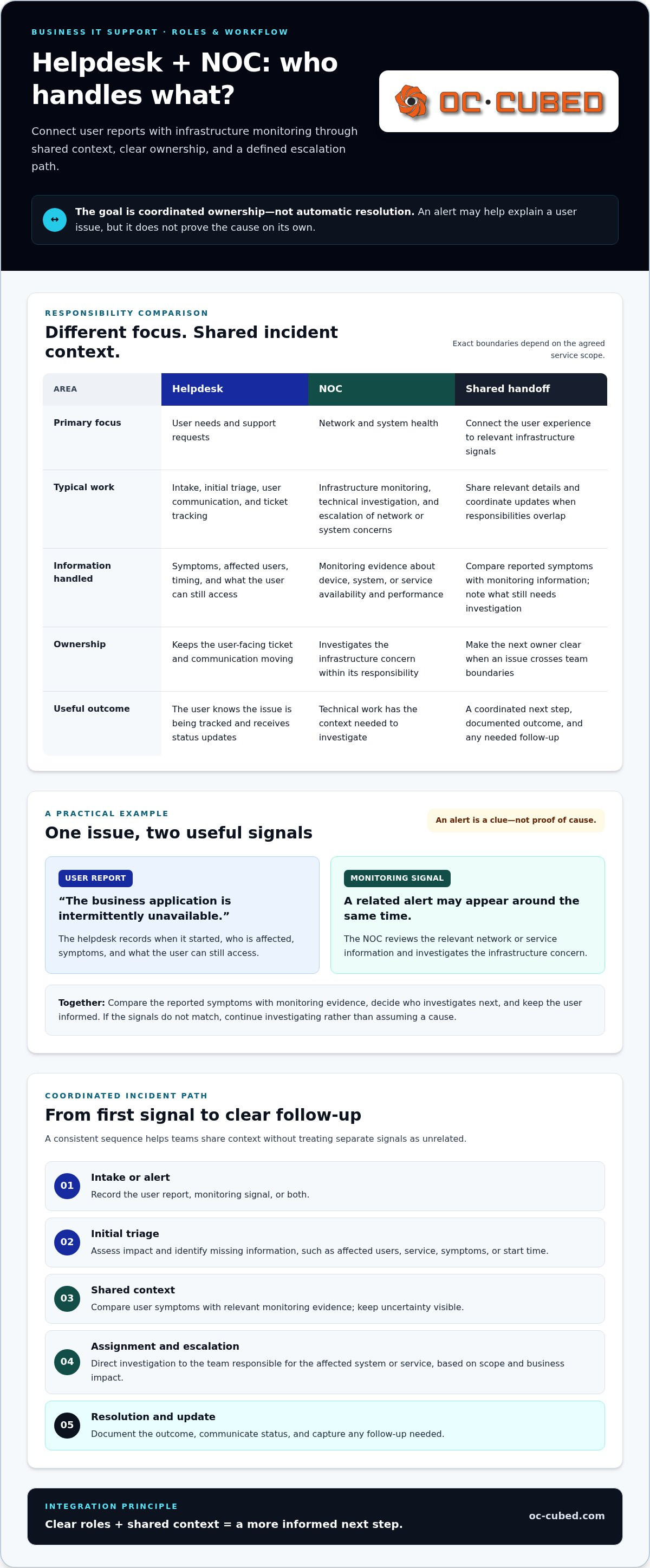
Helpdesk NOC integration connects two related parts of IT support: the team responding to user needs and the team monitoring network and system health. Instead of treating a user’s support ticket and an infrastructure alert as unrelated events, the teams share relevant information and follow defined escalation paths. That coordination clarifies who is investigating, who is communicating with affected users, and what information is still needed.
Helpdesk NOC integration is a shared support approach that connects user reports with infrastructure monitoring through common context and defined escalation. It creates a clearer path for handling issues, but it doesn’t mean every alert identifies the cause or every problem resolves automatically.
What the helpdesk handles versus what the NOC monitors
The helpdesk is the user-facing point of contact. It receives requests, records symptoms, asks clarifying questions, provides updates, and tracks support work. The NOC, or Network Operations Center, focuses on the availability and performance of network devices, systems, and services. A Network Operations Center (NOC) commonly monitors infrastructure so technical teams can identify conditions that may affect business operations.
The precise division of work depends on the agreed service scope. In practice, responsibilities may include:
- Helpdesk: intake, user communication, initial triage, and ticket tracking.
- NOC: infrastructure monitoring, technical investigation, and escalation of network or system concerns.
- Both teams: sharing relevant details and coordinating updates when an issue crosses those responsibilities.
Where the two support functions meet
Consider an employee who reports that a business application is intermittently unavailable. The helpdesk records when the problem started, who is affected, and what the user can still access. Around the same time, the NOC may see an alert related to a network device or service availability. Those signals could point to the same incident, but the alert alone doesn’t prove the cause.
With shared context, the teams can compare the user’s reported symptoms with monitoring information and decide who should investigate next. The helpdesk can keep the user informed while the NOC examines the infrastructure concern. This reduces the risk of duplicate work or conflicting explanations, while leaving room for further investigation if the signals don’t match.
The goal is coordinated ownership, not automatic resolution. Clear roles let each team contribute its expertise and keep the issue moving toward an informed next step.
How Helpdesk and NOC Integration Moves an Issue Toward Resolution
A coordinated workflow gives each issue a clear path from its first signal to follow-up. This fits within the broader practice of IT Service Management (ITSM), where organized processes help teams manage IT services and respond to incidents. In helpdesk NOC integration, the workflow connects the user’s experience with relevant monitoring evidence, while leaving room for investigation when the cause isn’t clear.
Shared incident context helps support teams make informed decisions without making users repeat themselves or treating separate signals as unrelated.
From user ticket or system alert to shared triage
The process can begin with a user report, a system alert, or both. The first task is to record what is known and identify what still needs investigation. Useful details include the affected user or group, device or service, time the issue began, symptoms, and any recent changes the user noticed.
From there, teams can follow a consistent sequence:
- Intake or alert: Record the report or monitoring signal.
- Initial triage: Assess impact and identify missing information.
- Shared context: Compare user symptoms with relevant monitoring evidence.
- Assignment and escalation: Direct investigation to the team responsible for the affected system or service.
- Resolution and update: Document the outcome, communicate status, and capture any follow-up.
For example, a user may report that a business system is responding slowly. A ticket that records when the problem began, which service is affected, and how many users are impacted gives the technical team a useful starting point. Monitoring information from the same period may help narrow the investigation, but it doesn’t establish a root cause on its own.
Escalation, resolution, and communication
Escalation should reflect the issue’s scope, business impact, and which team owns the technical investigation. If evidence points to infrastructure, the NOC can investigate that area while the helpdesk manages the user-facing thread, according to the agreed workflow.
Communication shouldn’t stop while technical work continues. The helpdesk can share a clear status update, explain what is being investigated, and provide the next update when there is meaningful information to report. Avoid promising a resolution time unless one is established for the support arrangement.
Close the incident with a concise record of what was resolved, what users should expect, and whether further action is needed. That record supports consistent communication if the issue returns and gives both teams a clearer reference for future investigation. Businesses planning this coordination can explore OC Cubed - Your trusted MSP remote IT support as part of their support approach.
How to Evaluate Whether Helpdesk NOC Integration Is Working
Look for evidence in the workflow, not a promise that integration will prevent every outage. Effective helpdesk NOC integration is visible when reports and alerts have clear ownership, useful context travels with the issue, and users receive consistent updates while technical work continues.
Signs the helpdesk and NOC are working as one process
Review a sample of recent incidents. Can you tell which team owns the next action? Is the reason for escalation recorded? Can the helpdesk see enough technical context to provide a clear user update? These checks reveal whether teams are coordinating or passing an issue between separate queues.
| Fragmented support | Coordinated support |
|---|---|
| Tickets move between teams without a clear next owner. | Each handoff identifies the responsible team and next action. |
| User reports and monitoring alerts are investigated separately. | Relevant ticket details and alert evidence are reviewed together. |
| Updates are inconsistent or unclear during investigation. | The helpdesk shares understandable status updates while technical work proceeds. |
| Similar incidents recur without a documented pattern. | Related incidents are reviewed for trends and follow-up actions. |
These are signs of process quality, not proof that integration alone prevents downtime. Some issues will still require investigation, and monitoring information may not identify a cause by itself.
Measures that reveal gaps without oversimplifying performance
Choose a small set of measures that reflects how work moves between teams. Define each measure before comparing reporting periods. For example, decide whether a “reassignment” means any change of queue or only a transfer between support teams. Define a “recurring incident” by the affected service, symptom, and time window, rather than grouping unrelated reports together.
- Ticket reassignment: Track how often ownership changes and why. Frequent transfers may point to unclear routing or escalation criteria.
- Recurring incidents: Identify repeated issues that may need deeper investigation or documented follow-up.
- Time to acknowledge: Measure how long it takes for a report or alert to receive recognition. Define the start point and whether the measure uses business-hours coverage.
- Update consistency: Review whether users receive clear status information at agreed points in the process.
Keep acknowledgment time and resolution time separate. They describe different stages, and both need consistent start and end points, scope, and business-hours definitions to support a fair comparison. Monthly reporting can help teams spot patterns, discuss handoff gaps, and agree on practical next steps. The aim is useful learning, not a single score that hides differences in issue impact or complexity.
How to Prepare Your Business for Helpdesk NOC Integration
A smooth integration starts with shared understanding, not a new tool. Before connecting workflows, define which systems and users are in scope, what business impact matters most, and how support teams should exchange information. This gives helpdesk NOC integration a practical foundation and helps surface unclear ownership early.
Information to organize before workflows are connected
Build a concise reference for the environment the teams will support. Include key systems, network devices, business-critical applications, and recurring issues. Add the user groups affected by those systems, the likely business impact of an outage, relevant escalation contacts, and preferred communication channels. Existing ticket and monitoring processes provide useful context, but preparation doesn’t depend on choosing a particular platform.
- Systems and services: List the main infrastructure, applications, and services in scope.
- Users and impact: Note which groups rely on each service and what disruption would mean for their work.
- Known issues: Record recurring incidents, common symptoms, and relevant history.
- Contacts and approvals: Identify escalation contacts and decisions that require business approval.
- Current workflow: Document how requests and alerts are handled today, including where handoffs become unclear.
For broader context on how support and monitoring fit into ongoing IT operations, see this remote IT management guide.
Define ownership, scope, and review points
Write down who owns each step, from first report to closure. For example, specify who receives tickets, reviews monitoring alerts, investigates technical issues, approves changes, and communicates status to users. This doesn’t mean every task belongs to a separate person. It means each responsibility has a clear owner and handoff.
Set boundaries before expanding the workflow. Name the supported systems, clarify what each team is responsible for, and document when business approval is needed. Start with a defined scope, then review actual handoffs after the initial operating period. Look for questions that took time to answer, repeated transfers, missing context, or unclear communication responsibilities. Use those findings to refine the process and documentation rather than adding complexity by default.
Preparation is ongoing. Business priorities, systems, and user needs can change, so keep ownership records and escalation contacts current. Regular reviews help the workflow stay useful as the environment evolves.
How OC Cubed - Your trusted MSP Connects Helpdesk Support With NOC Monitoring
OC Cubed provides helpdesk and NOC integration as part of its remote IT support for businesses. This service coordinates user support and infrastructure monitoring, giving the teams shared visibility into how a reported issue may relate to network or system conditions. The helpdesk and NOC have distinct roles: one supports users and tracks requests, while the other monitors infrastructure and investigates technical concerns.
Integrated support within broader remote IT management
Helpdesk coordination works alongside monitoring, network configuration, and managed IT maintenance. OC Cubed provides 24/7 network monitoring and configuration, while helpdesk support addresses user requests through its support workflow. Monitoring and helpdesk coordination are connected, but they are distinct services, and 24/7 network monitoring does not mean continuous helpdesk coverage.
When a user report coincides with a network or system alert, that connection can give support teams useful context. It can also clarify who owns the next step and help keep communication aligned as an issue is investigated. Integration doesn’t guarantee a particular cause or prevent every disruption. Its value is a more connected view of support work.
Related services can contribute to a broader IT management plan. These include endpoint protection, Microsoft 365 tenant maintenance, firewall and switch management, and monthly reporting. The mix of services can reflect the systems and operational priorities a business needs to support. For a wider explanation of managed service provider models, read this managed service provider guide.
A practical next step for businesses
Before discussing an integration, prepare a short summary of where support feels disconnected. Note critical systems, recurring operational issues, how users currently report problems, and where alerts or tickets seem to lose context. Include the business impact of key systems and any existing escalation or communication gaps. This gives the conversation a practical starting point.
OC Cubed provides remote IT support, helpdesk and NOC integration, network monitoring, and related managed IT services. A discussion can focus on how these services fit together for your business, with clear responsibilities for user support and technical investigation. The goal is a support approach that reflects your environment and gives the teams a more connected view of issues as they move from user report to technical investigation.
Build a More Connected Support Model
Effective helpdesk NOC integration gives user reports and infrastructure alerts a shared path, with clear ownership, useful context, and defined escalation. The helpdesk can keep users informed while the NOC investigates technical conditions. Teams can assess coordination through practical measures such as handoffs, recurring incidents, and update consistency, using agreed definitions to understand what the results show.
Preparation matters. Identify critical systems, recurring issues, business priorities, and who owns intake, investigation, approvals, and communication. OC Cubed includes helpdesk and NOC integration in its remote IT support, alongside 24/7 network monitoring and configuration, monthly reporting, and broader managed IT services. Network monitoring remains distinct from helpdesk coverage, while coordinated workflows help teams share visibility and responsibility.
Clear roles and thoughtful reporting give your business a stronger foundation for dependable IT support. Start by identifying the gaps that matter most, then build a support model around your operations.
Frequently Asked Questions
What is helpdesk NOC integration?
Helpdesk NOC integration coordinates user support with network and system monitoring through shared incident context and clear escalation paths. The helpdesk typically receives requests, records symptoms, and communicates with users. The Network Operations Center (NOC) monitors infrastructure and investigates technical conditions. When a user report and a monitoring alert may relate to the same issue, coordination helps teams share information and clarify ownership without assuming the alert proves the cause.
How do a helpdesk and a NOC work together?
A helpdesk and NOC work together by sharing relevant ticket details, monitoring evidence, and responsibility for next steps. For example, the helpdesk may record which users are affected and when an application issue began, while the NOC reviews infrastructure signals from that period. Teams use this context to guide investigation and decide whether to escalate. The helpdesk can continue communicating with users as technical work proceeds.
Does NOC integration include 24/7 helpdesk support?
Not necessarily. NOC integration describes coordination between user support and infrastructure monitoring, not the hours of helpdesk coverage. Businesses should distinguish monitoring availability from helpdesk availability when defining service scope, escalation paths, and user expectations. OC Cubed provides 24/7 network monitoring and configuration, but that does not mean its helpdesk support is available 24/7. Define coverage and communication arrangements as part of the support model.
What is the difference between NOC monitoring and helpdesk support?
NOC monitoring focuses on the health and availability of infrastructure, such as network devices, systems, and services. Helpdesk support focuses on user requests: receiving reports, documenting symptoms, triaging needs, and communicating status. Their work can overlap when user symptoms may indicate an infrastructure issue. Coordination lets each team contribute relevant information, while the agreed service scope determines who investigates and owns each next action.
Can helpdesk NOC integration reduce IT downtime?
It can support a more coordinated response, but it can’t guarantee less downtime or prevent every disruption. Shared incident context may help teams connect a user report with a relevant alert, clarify ownership, and begin investigation with better information. The impact depends on the issue, the quality of monitoring, and the agreed workflow. Evaluate whether handoffs and communication improve rather than treating integration alone as proof that downtime will fall.
What should a business prepare before integrating helpdesk and NOC services?
Prepare an inventory of key systems, network devices, business-critical applications, affected user groups, and recurring issues. Note the business impact of disruptions, escalation contacts, and communication preferences. Then document who owns ticket intake, alert review, technical investigation, approvals, and user updates. Include existing processes and tools as context, but start by agreeing on a manageable scope and resolving unclear responsibilities before expanding the workflow.
How can a business measure helpdesk NOC integration?
Track observable workflow measures, including ticket reassignment, recurring incidents, time to acknowledge, and consistency of user updates. Define each measure before comparing reporting periods. For example, agree whether reassignment counts every queue change or only transfers between teams, and specify whether acknowledgment time follows business-hours coverage. Review the measures together and use monthly reporting to identify patterns, discuss gaps, and choose practical follow-up actions.
Does helpdesk NOC integration require a specific software platform?
No specific platform is inherently required to define an integrated support process. The essential elements are shared access to relevant incident context, clear ownership, and agreed escalation and communication steps. Existing ticketing and monitoring tools may support that workflow, depending on the business’s environment and service scope. Before changing platforms, map how reports and alerts are handled today, identify where information is lost, and decide what visibility teams need.


