

What if a slow connection is more than a brief annoyance and points to a recurring network problem? Small teams rarely have time to watch every device or investigate each alert as it appears. A remote network monitoring small business plan should do more than display system status. It should help turn relevant signals into clear follow-up.
Monitoring can track device availability and network performance, but an alert does not always explain the cause or the right fix. The response process matters as much as the dashboard. Alerts need context, priorities, and a route to support, not just another notification in a crowded inbox.
This guide explains what remote network monitoring watches, what it can and cannot reveal, and which signals and response steps help keep work moving. You’ll also learn how helpdesk and NOC integration can connect alerts with follow-up, how monthly reporting can highlight recurring issues, and when managed monitoring may suit your business’s support needs.
Key Takeaways
- Learn which devices and network signals to include in a monitoring plan, starting with the systems your team relies on most.
- See how thresholds, alert routing, investigation, and documentation can turn notifications into accountable follow-up.
- Understand why remote network monitoring small business oversight depends on someone reviewing alerts, not just collecting them.
- Set priorities by defining alert categories, severity levels, escalation paths, and response records before monitoring begins.
- Explore how OC Cubed connects 24/7 network monitoring with remote IT support, helpdesk and NOC integration, and firewall and switch management.
Remote Network Monitoring for Small Business: What It Watches and Why It Matters
A dropped connection can interrupt a payment, delay access to shared files, or leave a team unable to use a key application. When a device or network fault goes unnoticed, employees may spend time working around it before anyone recognizes a recurring cause.
Remote network monitoring observes selected network devices and health signals, then surfaces changes or faults for review. For a small business, it can show what is available, what may be slowing down, and where further investigation is warranted. It does not guarantee that every outage or security threat will be prevented. Its value depends on what is monitored and how people respond to what they see.
Which network components can remote monitoring cover?
Depending on the setup, monitoring can cover firewalls, switches, servers, and network-connected endpoints such as workstations. Coverage does not automatically include every device or measure every possible condition. Build the scope around the systems the business relies on, then identify which signals would help explain a disruption.
- Availability: Is a device or service responding?
- Connectivity: Can devices communicate across the network?
- Performance: Is access unusually slow or interrupted?
- Configuration: Has a selected setting or device state changed?
These signals describe network operation, not the full story behind every problem. An unavailable server, for example, identifies an issue to investigate. It does not establish whether the cause is a device fault, a connection problem, or a change elsewhere in the environment.
What does network visibility help a small business understand?
A record of network conditions can help a team connect separate disruptions and notice that the same device, service, or dependency is involved. That pattern gives support staff a more useful starting point than a single report that “the internet is slow.” Stable access matters to everyday work because employees need dependable connections to reach business systems and shared resources.
Network monitoring and cybersecurity monitoring have different primary goals. Network monitoring focuses on availability, connectivity, and performance. Security monitoring looks for suspicious activity or signs of compromise. Some operational signals can overlap: an unexpected device change or unusual network behavior may deserve a security review, but network status alone does not confirm an attack. Remote monitoring and management (RMM) describes the broader technology used to oversee and manage devices remotely.
In practice, remote network monitoring small business teams use is most valuable when it turns network changes into questions that can be investigated. Monitoring makes conditions more visible; follow-up supplies the context and next steps.
How Remote Network Monitoring Turns Signals Into Useful Action
A signal helps only when someone can interpret it and decide what happens next. In a small business, a clear workflow keeps important issues from disappearing among routine notifications. Remote network monitoring small business teams rely on should connect observation to ownership, investigation, and a recorded outcome.
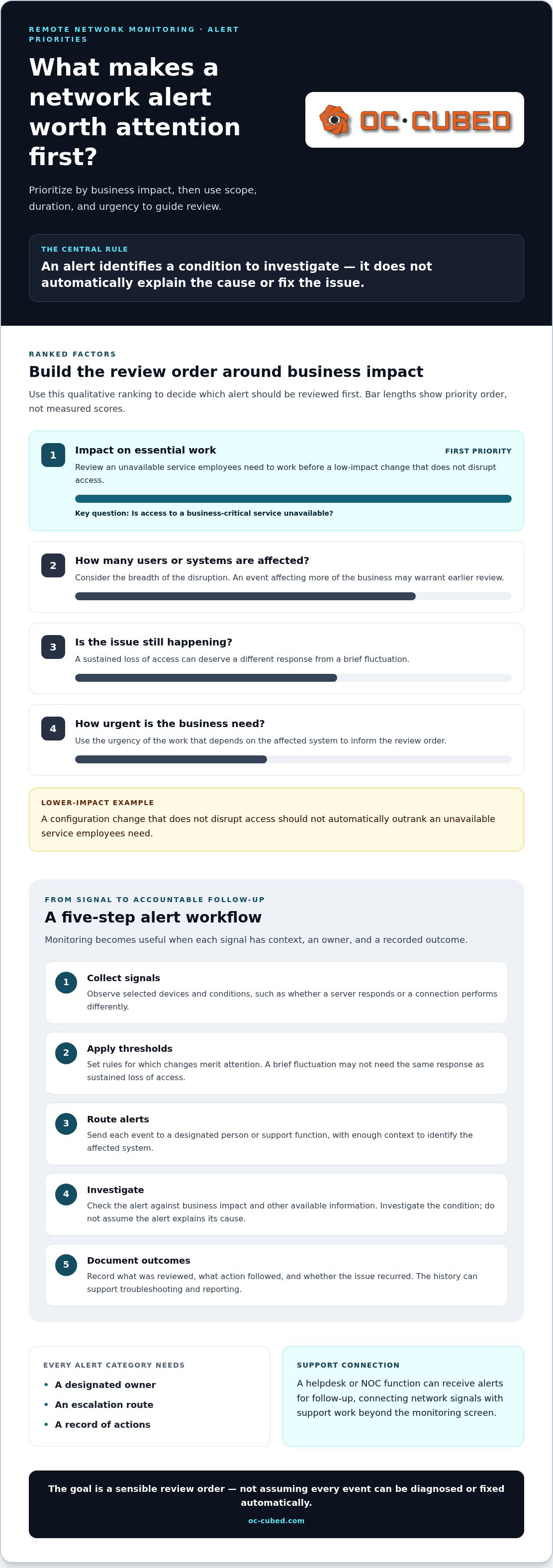
- Collect signals. Monitoring observes selected devices and network conditions, such as whether a server responds or a connection is performing differently.
- Apply thresholds. Alert rules define which changes merit attention. A brief fluctuation may not need the same response as a sustained loss of access.
- Route alerts. Send each event to a designated person or support function, with enough context to identify the affected system.
- Investigate. The owner checks the alert against business impact and other available information. An alert identifies a condition; it does not automatically explain the cause or resolve the issue.
- Document outcomes. Record what was reviewed, what action followed, and whether the issue recurred. This history can support later troubleshooting and reporting.
Thresholds help distinguish useful events from background noise. If every minor change triggers the same notification, important alerts can be harder to spot. Set rules to reflect the environment and the consequences of disruption, then adjust them as the business learns which signals matter.
Which alerts deserve attention first?
Prioritize an unavailable service employees need to work over a low-impact configuration change that does not disrupt access. Then consider how many systems or users are affected, whether the issue is ongoing, and how urgent the business need is. Alert volume alone is not a reliable measure of importance. The goal is to establish a sensible order for review, not to assume every event can be diagnosed or fixed automatically.
Who investigates and follows up on monitoring alerts?
Every alert category needs an owner, an escalation route, and a way to record actions. The owner may investigate directly or pass the event to a helpdesk or NOC function for follow-up. Helpdesk and NOC integration connects network signals with support work, giving alerts a path beyond the monitoring screen.
An alert becomes useful when a named owner is responsible for reviewing it and recording what happens next. For security-related events, network signals may prompt a separate security review. The Federal Trade Commission’s Cybersecurity for Small Business guidance offers broader context for protecting business systems. A broader view of ongoing oversight is also important when planning IT operations.
OC Cubed connects network monitoring with remote IT support and helpdesk and NOC integration. Learn how that support fits together through managed IT support.
Is Remote Network Monitoring Worth It for a Small Business?
Monitoring helps only if someone reviews alerts and decides what to do. A dashboard that no one checks can add noise without improving oversight. The value of remote network monitoring for a small business depends on whether it fits the company’s support capacity and whether there is a clear path from alert to follow-up.
Informal checks can suit a small, simple environment when someone has the time and knowledge to review issues. However, problems may be noticed only after employees report them, and recurring faults can be harder to identify without a history. Continuous monitoring can provide ongoing visibility into selected conditions, but it does not guarantee that every issue will be caught or resolved faster.
| Consideration | Informal, reactive checks | Continuous monitoring |
|---|---|---|
| Visibility | Checks happen at intervals or after a report. | Selected network signals are observed on an ongoing basis. |
| Response ownership | A staff member investigates when an issue is noticed. | Alerts can follow defined review and escalation paths. |
| Reporting | History may rely on notes or memory. | Alert and incident records can help show recurring patterns. |
| Internal effort | Staff spend time checking systems and responding as issues arise. | Monitoring can reduce manual checking, while alerts still need review. |
Monitoring may be especially relevant when internal IT capacity is limited or the same network disruptions keep returning. A business with staff who can review alerts and follow through may manage that work internally. If the team lacks time or specific expertise, managed support can connect monitoring with people responsible for investigation and ongoing IT oversight.
Monitoring tools versus managed monitoring support
A tool surfaces information. People and processes determine whether it is reviewed, prioritized, and acted on. Internal ownership brings direct familiarity with business systems. Managed support provides an ongoing structure for monitoring and follow-up. Neither approach suits every company; the decision depends on business needs, available expertise, and the level of oversight the team wants.
What monitoring can and cannot do
Monitoring can support earlier awareness of selected conditions and provide historical context for investigating recurring issues. It cannot eliminate outages, replace backups, or guarantee security. Network monitoring focuses on operational health; cyber security monitoring focuses on detecting threats and suspicious activity. These areas can inform each other, but they are not interchangeable. For a deeper look at security risks and safeguards, explore managed cybersecurity guidance.
Learn about OC Cubed’s network monitoring and IT support.
How to Assess Remote Network Monitoring Coverage Before You Begin
Start with business priorities, not a list of every device. The right coverage for remote network monitoring at a small business depends on which systems support daily work and what happens if they become unavailable. Mapping those dependencies first helps focus alerts on issues that matter.
Which systems and business priorities should be mapped?
List the devices and applications employees rely on, the people who use them, and the network services they depend on. For example, a business might identify a file server as critical because staff need it to access shared work. Another organization may rely on different systems. Avoid assuming every company has the same infrastructure or priorities.
Monitoring should fit into the wider support plan. A managed service provider can help connect device oversight with the other IT support and maintenance a business needs.
How should alerts, reporting, and ownership be defined?
Define alert categories that are meaningful to your team, such as service unavailability, sustained performance issues, or significant configuration changes. For each category, set a severity level, a review owner, a routing path, and an escalation step. Specify what to document, including the issue, its impact, actions taken, and whether it remains open.
Set a regular review cadence for recurring alerts, unresolved issues, and changes to devices or applications. Monthly reporting can bring patterns, follow-up, and open concerns into view. If the same low-value notification keeps appearing, review its threshold, routing, or relevance instead of allowing alert volume to become background noise.
Use this checklist to set initial coverage priorities:
- Essential: Identify critical devices and applications, their users, and the dependencies that support them.
- Essential: Define alert categories, severity, owners, routing, escalation, and which actions must be recorded.
- Essential: Decide how often the team reviews recurring alerts and open issues.
- Optional detail: Add lower-priority devices or signals when they provide useful context without distracting from critical events.
- Optional detail: Review coverage when systems, user needs, or business priorities change.
A practical plan is specific enough to guide attention but flexible enough to change as the business changes. Start with what could interrupt core work, then expand coverage when the added signals provide clear value.
How OC Cubed Connects Remote Network Monitoring With Ongoing IT Support
Monitoring is most useful as part of ongoing IT management, not as a dashboard left on its own. OC Cubed provides 24/7 network monitoring and configuration alongside remote IT support and helpdesk and NOC integration. This connects network oversight with support for reviewing signals and following up. Remote network monitoring small business leaders can rely on requires consistent visibility and a clear path for action.
What managed monitoring support looks like in practice
Monitoring observes selected network conditions. When an alert needs attention, helpdesk and NOC integration connects it with review and support. Firewall and switch management adds oversight of key network equipment as part of the broader service. The aim is practical follow-through: understand what the signal indicates, assess its relevance, and record or escalate the issue as appropriate.
Monthly reporting makes monitoring activity easier to review. It can summarize recurring issues and outstanding concerns, giving the business and its IT support team a shared view of patterns that may deserve attention. Monitoring supports broader IT operations, but it cannot guarantee that downtime will never occur.
When to discuss monitoring as part of managed IT
Managed monitoring may suit a business with limited internal IT capacity, recurring network issues, or a need for consistent oversight without assigning staff to check systems themselves. A managed-services retainer can combine monitoring with remote support and maintenance, linking ongoing visibility to broader IT assistance. The right fit depends on the support the business needs and how much responsibility its team can manage internally.
Before moving forward, clarify which systems matter most, who reviews material alerts, and how reporting will help your team understand recurring issues. These priorities give ongoing support a practical foundation.
OC Cubed’s remote IT support complements network monitoring and ongoing oversight.
Build a Clearer View of Your Network
Effective remote network monitoring small business teams can use starts with knowing which systems matter, what signals deserve attention, and who will respond. Monitoring improves visibility, but its value comes from the process behind it: clear alert priorities, accountable follow-up, and regular review of recurring issues.
OC Cubed connects 24/7 network monitoring and configuration with remote IT support and helpdesk and NOC integration. Monthly reporting helps make monitoring activity and recurring issues easier to review, so your team can make informed decisions about ongoing support. This approach provides oversight, not a promise that outages or threats will never occur.
If your team needs more consistent visibility or support responding to network alerts, explore how managed remote IT support can fit your business.
With clear priorities and dependable follow-through, your business can manage its network with greater confidence and keep attention on the work ahead.
Frequently Asked Questions
What is remote network monitoring for a small business?
Remote network monitoring observes selected devices and network conditions, then surfaces changes or faults for review. A remote network monitoring small business plan might track whether important equipment is available, whether connections are working, or whether performance has changed. The goal is better visibility into network health, not a guarantee against every outage or threat. Its usefulness depends on choosing relevant signals and defining how alerts will be reviewed.
How does remote network monitoring work?
Monitoring tools collect information from selected network devices and compare it with configured rules or thresholds. When a condition meets an alert rule, a notification can be routed to a designated person or support team. That person reviews the context, investigates as needed, and records what happened. For example, a server that stops responding may trigger an alert, but someone still needs to assess its business impact and determine the next step.
What does a network monitoring service monitor?
Coverage depends on the setup, but can include firewalls, switches, servers, and network-connected endpoints. Common signals include availability, connectivity, performance, and selected configuration changes. A monitoring service does not necessarily observe every device or measure every possible condition. Small businesses can begin by identifying the systems employees need for core work, then prioritizing the devices and signals that help reveal disruptions affecting those systems.
Can remote network monitoring prevent downtime?
Remote network monitoring can help a business notice selected issues and changes sooner, but it cannot prevent every cause of downtime. A power interruption, equipment failure, software issue, or other unexpected event may still disrupt service. Monitoring can provide useful information for investigation and follow-up, while alert history may help reveal repeated problems. It should support a broader IT plan, not replace backups, maintenance, or an appropriate response process.
Is remote network monitoring the same as cybersecurity monitoring?
No. Network monitoring primarily tracks operational conditions such as device availability, connection status, and performance. Cybersecurity monitoring focuses on suspicious activity and potential threats. The two areas can overlap: an unusual network change may warrant further security review, but a network alert alone does not confirm an attack. Businesses should understand which service monitors each type of signal and how relevant findings are routed for investigation.
Does a small business need 24/7 network monitoring?
It depends on the systems the business relies on, the impact of an issue outside regular work hours, and the support available to review alerts. A company with critical systems that need consistent oversight may value monitoring around the clock. Others may have different priorities. OC Cubed provides 24/7 network monitoring and configuration, connected with remote IT support and helpdesk and NOC integration.
What happens when a network monitoring system detects a problem?
The system generates an alert based on a configured condition and routes it according to the monitoring process. A designated owner reviews the affected device, the alert’s context, and its potential business impact. They can investigate, escalate for support, and record the actions taken or any unresolved concern. Monitoring identifies a signal, but it does not automatically diagnose or resolve every problem.


