

Vulnerability scanning for small businesses checks systems for known weaknesses, then helps prioritize what to fix. External scans assess internet-facing IP addresses, while internal scans look for risks within the business network. The Common Vulnerability Scoring System rates vulnerabilities on a scale from 0 to 10, helping teams compare severity and decide what needs attention first.
It’s understandable to want a clear picture of your security without adding unnecessary complexity. Vulnerability scanning for small business systems can identify known weaknesses, flag outdated or unsupported software, and help direct remediation. Ongoing monitoring can also alert you to new risks, so findings do not have to wait for a periodic review.
This guide explains how internal and external scans differ, what scanning can and cannot reveal, and how to prioritize remediation. You’ll also learn what to consider when choosing a scanning approach and how ongoing security monitoring can fit into a practical plan for a small business.
Key Takeaways
- Use remediation windows as planning guidance: critical findings within 15 days, high-severity findings within 30 days, and medium-severity findings within 90 days. These are guidelines, not rigid requirements.
- Build a clear alert workflow by assigning someone to review findings, assess business impact, and track fixes through to completion.
- Include unpatched and unsupported technology in remediation planning, since systems that aren’t updated may fail a vulnerability scan.
- External vulnerability scanning is run on average every 3 months, while the stated target is daily. Set a cadence that keeps internet-facing risks visible.
- For businesses that accept credit cards, external vulnerability scanning is one requirement of PCI self-assessment.
Vulnerability discovery and remediation prioritization
A vulnerability scan checks systems for known weaknesses and produces findings to investigate. A useful process assigns fixes to those findings instead of stopping at the report.
Scanning Tools and Approaches
The right tool covers your actual assets and produces clear, actionable findings. Look for coverage of relevant systems, understandable severity ratings, and reports that help you assign remediation. Choose based on what needs scanning, such as servers, endpoints, or network devices.
Vulnerability scanning automatically checks for known weaknesses. Penetration testing involves authorized attempts to exploit weaknesses and assess their impact. A scan might identify a potentially exposed service, while a penetration test examines whether that exposure could be used to reach sensitive data.
Before selecting a tool or service, map the systems in scope and decide who will review the results. Costs depend on scope, systems, scanning frequency, reporting, and remediation support. Request a quote to understand the cost for your needs.
Compliance Requirements
Businesses that accept credit cards should consider external vulnerability scanning as part of a broader review of their security practices. Include internet-facing systems in the compliance process and keep clear records of findings and fixes.
The European Union identifies GDPR, and the California Legislature identifies CCPA, as relevant to maintaining reasonable security procedures. These facts do not establish a universal scanning mandate for every small business. Assess which rules apply to your operations and what security measures they require.
Start by identifying the data your business handles, then map applicable obligations to security practices. For example, a business that accepts cards should account for PCI self-assessment as part of its broader vulnerability review.
Scanning Risks and Disruption Prevention
A scan sends requests to systems, and poorly scoped or aggressive testing can affect performance or trigger security alerts. Take particular care with legacy equipment and business-critical applications, as unexpected load may interrupt normal work.
Reduce disruption by defining authorized targets, coordinating with system owners, and scheduling scans during an approved maintenance window. Start with a limited scan to observe system behavior before expanding coverage. Tell the operations team when the scan will run and what source to expect.
For example, scan a test environment before a production database when both are available. Review alerts afterward to distinguish scanner activity from unrelated events. Document any service impact and adjust the next scan’s scope.
Remediation Prioritization
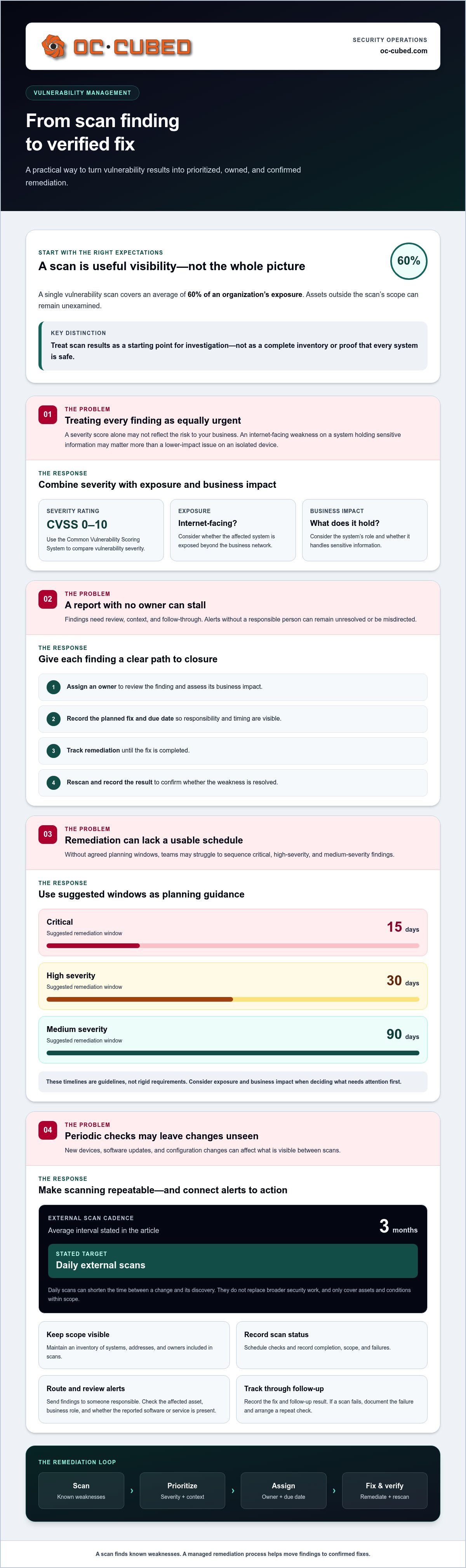
A single vulnerability scan covers an average of 60% of an organization’s exposure. Treat its results as useful visibility, not a complete inventory; assets outside the scan’s scope can remain unexamined.
The Common Vulnerability Scoring System (CVSS) rates vulnerabilities on a scale from 0 to 10. Use that rating alongside exposure and business impact: an internet-facing weakness on a system holding sensitive information may deserve attention before a lower-impact issue on an isolated device.
Suggested remediation windows are 15 days for critical vulnerabilities, 30 days for high-severity vulnerabilities, and 90 days for medium-severity vulnerabilities. These timelines are guidelines rather than rigid requirements. Assign each finding an owner, record its due date, and rescan after the fix to confirm the weakness is resolved.
Automated scanning and alerts
Automation makes vulnerability checks repeatable. A scanner checks systems for known weaknesses and produces findings for review. Scheduled checks can reveal changes after software updates, new devices, or configuration changes. Their value depends on connecting each result to someone who can assess it and coordinate a fix.
External vulnerability scans run on average every 3 months, but should run daily. Daily scans can shorten the time between a change and its discovery. They don't replace broader security work, though. A scanner only checks the assets and conditions within its scope, so an incomplete inventory can leave systems out of view.
Set up automation with a clear sequence:
- Maintain an inventory of systems, addresses, and owners included in scans.
- Schedule scans and record their completion, scope, and any failures.
- Route each alert to someone responsible for reviewing and assigning it.
- Track the finding through remediation, then record the follow-up result.
An alert needs context before it becomes a work item. A newly detected weakness on an internet-facing system may need faster review than a similar finding on an isolated test machine. Check the affected asset, its business role, and whether the reported software or service is actually present. This helps avoid misdirected effort and keeps attention on relevant findings.
Alert rules should help people act, not flood their inboxes. Group duplicate findings affecting the same system and route urgent items to a monitored queue. Keep lower-priority findings visible in a tracked list. If a scan fails, record the failure and arrange a repeat check. An empty report does not prove every system is safe.
Automation also makes changes easier to track. For example, add a new server to the asset inventory, assign an owner, and include it in scheduled scans. When an alert identifies a weakness, the owner can record the planned fix and its status. A follow-up scan can then check whether the finding remains.
Review alert patterns during regular security reviews. Repeated findings may point to a patching gap, an overlooked asset, or a configuration issue that keeps returning. Compare reports over time and document what changed, who acted, and what remains open. This creates a practical record for internal decisions and compliance work.
A consistent response path connects detection with action. If scan alerts need follow-through, consider security monitoring support to help keep findings and remediation visible.
Internal and external vulnerability scanning
Internal and external scans examine different paths into business systems. Using both can reveal weaknesses visible from the internet as well as risks inside the network.
An external vulnerability scan checks externally facing IP addresses from the internet. It assesses whether the network is locked down and open ports are secured. For example, an exposed service may reveal that a system is reachable when the business expected it to remain private.
An internal scan examines systems from inside the business network. It can identify weaknesses on devices or services that an outside scan cannot directly see. Results depend on which assets and network areas are included, so an accurate inventory matters.
Include business systems that store data, connect to the network, or provide access to other systems. At minimum, scope laptops, servers, network equipment, business mobile devices, and internet-facing addresses.
- Servers: Include systems hosting business applications, shared files, or databases.
- Laptops: Cover employee devices that access business accounts or internal resources.
- Network equipment: Include devices that manage traffic or provide network access.
- Mobile devices: Account for work phones and tablets that connect to business services.
- Internet-facing systems: List public IP addresses and services reachable from outside.
Business mobile devices face risks similar to business laptops and may be more vulnerable than PCs, according to the U.S. Government Publishing Office. Include work phones and tablets in the asset list, especially when they access business accounts or data.
Businesses that accept credit cards must certify PCI compliance, and external vulnerability scanning is one requirement of PCI self-assessment. Include relevant public-facing systems in the scan scope, then keep findings and remediation records with your compliance documentation.
Build scope in steps. First, list business-owned systems and their network locations. Next, identify which assets face the internet and which operate internally. Then assign an owner to each asset so scan results can be reviewed and acted on. For example, an inventory entry for a customer-facing server should state its business purpose and responsible team.
Compare scan coverage with the inventory after each assessment. If a new server, office network, or business device appears, add it to the appropriate scope. This review helps prevent overlooked assets from remaining outside internal or external checks.
An external vulnerability scan checks whether a business’s network is locked down and its open ports are secured. Treat the scan as one part of a broader review: confirm that the selected assets match the intended scope and record any gaps for follow-up. Connect each finding to the affected asset and its owner so the business can decide what action to take. Keep a clear record of what was examined and what remains to be addressed.
After making changes, review the affected systems again to check whether the issue has been resolved. If a result is unclear, investigate it before marking it complete. Keep internal and external findings distinct, but review them together when they concern the same asset or service. This helps teams understand which risks are visible from outside and which appear only within the network. Revisiting scope and results supports consistent scanning and makes it easier to act on findings over time.
Outdated and unsupported systems
A scan can reveal software that needs updates, but it cannot replace asset management. Systems that are not patched or updated may fail a vulnerability scan. An old server, for example, might appear in the results because it is missing a required security update.
Separate two issues in each finding: missing updates and unsupported technology. A supported operating system may need a patch, while an unsupported one has reached the end of vendor support. Record both conditions because they require different remediation plans.
Use the scan report as a starting point. Match each finding to the affected device, operating system, application, and business owner. Then verify the installed version and support status using your software inventory and vendor lifecycle information. This helps distinguish an overdue update from a system that needs replacement planning.
- Identify the asset: Match the finding to a named server, laptop, or application.
- Check update status: Confirm whether available patches are installed.
- Review support status: Determine whether the vendor still supports the system.
- Assign next steps: Record an owner and remediation plan for each result.
For example, a scan may flag an outdated application on a finance workstation. Confirm the installed version, check whether updates are available, and identify the person responsible for the workstation. If support has ended, document the risk and plan a supported replacement instead of treating another scan as the fix.
Unsupported systems can be difficult to remove immediately. A business application may depend on an older operating environment, or a device may support a critical process. Document the dependency, limit unnecessary network access, and plan to replace or isolate the system. These steps can reduce exposure while the business works through the change.
Track open findings in a central remediation record. Include the device or application, scan result, update or support status, assigned owner, and next action. For instance, mark a system as awaiting replacement rather than repeatedly closing and reopening the same finding. The record helps teams see which risks remain unresolved.
After applying updates or replacing a system, run a follow-up scan on the affected asset. Compare the new result with the earlier finding. If the weakness still appears, check whether the patch installed correctly or another component remains outdated. Keep the outcome with the remediation record so future reviews show what changed.
Automated scanning can monitor a system and identify what needs to be done to secure it. Its findings can help direct attention to security work that remains necessary. Review the results as part of the system’s security process, then use them to determine what action is needed to address the identified requirements.
How often should a small business run vulnerability scans?
External vulnerability scans run on average every 3 months, but should run daily. That cadence helps businesses notice changes to internet-facing systems sooner. Internal scanning also needs a planned schedule, shaped by business risk, system changes, and the time available to review and remediate findings.
Choose a cadence that keeps coverage current without producing reports nobody can act on. A scan schedule works best when it accounts for changes in your environment. For example, adding a server or changing a firewall configuration can alter exposure before the next routine assessment.
Use these events to review scan scope and timing:
- A new server, application, or network device enters business use.
- A major software update changes the system or its configuration.
- A firewall or internet-facing service changes its access rules.
- A scan identifies a serious weakness that needs follow-up after remediation.
Separate scheduled scans from checks triggered by changes. Scheduled scans provide a recurring view of known assets. A change-triggered scan checks whether a specific update or configuration change introduced a new weakness. For instance, after deploying a customer-facing application, include its exposed systems in the next appropriate scan.
Daily external scanning can generate findings that need review. Set a clear process for failed scans, new alerts, and remediation follow-up. An alert with no assigned owner can go unnoticed, while repeated reports without status tracking make progress hard to see. Record the affected asset, finding, responsible person, and next action.
Set internal scan timing according to the systems being assessed. A business-critical server may need closer attention after significant changes than a stable, isolated test system. The schedule should reflect each system’s exposure and business role. Document the reasoning so a later review can explain why the cadence fits.
Review the schedule when your asset inventory changes. Compare listed devices with scan coverage, then flag systems that were added, retired, or moved. If your business expands remote access or introduces a new service, update the scan scope rather than relying on an outdated inventory.
Finally, measure whether scans lead to action. Check that findings reach an owner, remediation is recorded, and follow-up scans assess completed fixes. If daily external results overwhelm the review process, improve triage and ownership instead of ignoring alerts. A useful cadence connects detection to decisions and completed work.
OC Cubed - Your trusted MSP: Remote IT Support
OC Cubed - Your trusted MSP helps businesses manage the work that follows security findings. Remote IT Support can help teams address system issues, while Security Threat Detection and Remediation supports action on identified threats. Microsoft 365 Tenant Maintenance and Endpoint Protection / Antivirus also help maintain key parts of a business technology environment.
Turn to OC Cubed when scan results need a clear response plan, or when your team needs ongoing support with security and system maintenance. Share your priorities and discuss the next steps with OC Cubed.
Make security part of the way your business operates
A scan is most useful when its findings inform everyday decisions. Assign someone to keep the asset inventory current, review results, and communicate unresolved risks. That ownership turns vulnerability scanning for a small business into an ongoing management practice instead of a report that gets filed away.
Make the next step manageable. Set a review date, identify who will own findings, and decide how your team will track work through completion. As systems and priorities change, revisit those decisions so security tasks stay connected to the way your business operates. A clear process gives your team a practical starting point and a steadier path forward.
OC Cubed can help your business discuss its IT support needs and identify a useful next step.
Take the next step with a plan that fits your business and helps your team move forward with confidence.
Frequently Asked Questions
What is vulnerability scanning, and why do small businesses need it?
Vulnerability scanning checks business technology for known security weaknesses. Vulnerability scanning for small business systems can help identify exposure when a company adopts cloud services or changes account access. For example, a review can show whether a newly added system has been included in security checks. Use results alongside staff reports and system records, since no single check reveals every weakness.
How can a small business conduct a vulnerability scan step by step?
Choose a scanner that supports the systems you need assessed. Define authorized assets and coordinate timing with the people responsible for them. Configure access and scan settings, then review the report for relevant findings. Teams can use vulnerability scanning for small business networks as part of a documented process, recording scan scope and settings so future assessments can be compared.
What should a small business do after a scan finds vulnerabilities?
Confirm that each finding applies to the named system, then assess its operational impact before making changes. Assign an owner and document the proposed fix. If work needs approval or must wait, record the reason and next review point. After making changes, retain evidence and check that normal business functions still operate. This record supports internal reviews and future security decisions.

Article by
Peter Irizarry
Peter Irizarry founded OC Cubed, LLC in 2023 to help small to mid-sized businesses stop worrying about downtime and cybersecurity threats. A frequent speaker on SMB digital transformation, Peter is passionate about translating complex IT roadmaps into plain-English business growth strategies. He resides in North Texas with his family.


