

A network outage rarely begins when users notice it. The benefits of 24/7 network monitoring include continuous visibility into infrastructure, earlier detection of developing issues, and a more proactive path to response. A network operations center (NOC) monitors infrastructure continuously, while a help desk focuses on end-user issues.
Reliable service depends on more than fixing problems after they disrupt work. Ongoing monitoring can help teams spot warning signs, understand network health, and address issues before they escalate. It also makes it easier to see how connected systems and endpoints are performing as a business changes.
Continuous monitoring can support service reliability, broader visibility, proactive incident response, and compliance work, while helping businesses understand the operational impact of downtime. To assess whether monitoring is effective, review performance measures alongside incident records and consider how a managed approach fits your team’s coverage needs. The aim is to connect monitoring data to dependable IT operations and clear follow-up.
Key Takeaways
- Use service reliability measures such as uptime and resolution time to understand how effectively monitoring supports users.
- Include cloud resources and less-obvious endpoints in your monitoring view to spot performance changes and emerging risks.
- Review alerts and system trends regularly so teams can investigate warning signs before they disrupt operations.
- Keep monitoring active during business growth and IT changes, when new systems can create visibility gaps.
- Consider managed IT support when you need ongoing oversight alongside endpoint protection and security response.
1. Customer satisfaction and service reliability
The benefits of 24/7 network monitoring include seeing service issues before users report disruption. Continuous visibility helps teams distinguish brief interruptions from recurring slowdowns. For example, if a sales team loses access to a cloud application during order entry, an incident timeline can show whether network instability matches the reported problem. That context helps technical teams investigate the cause instead of treating each complaint as an isolated event.
A 99.999% network uptime target is commonly called five nines. It describes a demanding availability goal, not a promise that every system will meet it. Businesses should assess uptime alongside the services employees and customers rely on. A network may appear available overall while a particular connection or application repeatedly slows down. Tracking availability by important service makes those user-facing disruptions easier to identify.
Uptime alone does not show how quickly a team restores service. Mean Time to Resolution, network uptime, and the ratio of proactive to reactive tickets can help assess monitoring and support operations. For example, uptime shows how a recurring connection problem affects availability, while resolution time indicates how long service takes to recover. The ticket ratio adds context about whether issues are addressed before users report them.
These measures matter because customers experience technology through everyday tasks. A delayed checkout, interrupted phone call, or unavailable appointment system can undermine confidence, even when the rest of the network is online. Monitoring records can link incidents to affected services and the duration of disruption. This helps teams prioritize by user impact, such as restoring a customer-facing system before investigating a minor delay.
To make reliability reporting useful, start with the services that directly support customers and staff. Define acceptable availability and performance for each one, then compare monitoring records with reported incidents. Look for recurring patterns rather than treating alerts in isolation. For example, repeated slowdowns during a daily reporting process may point to a capacity or configuration issue that needs investigation.
Regular NOC reports can summarize incident history, system health, and capacity trends. Reviewing them helps decision-makers see whether recurring disruptions are improving or continuing. Monitoring also supports maintenance of existing security solutions: outdated software and applications can create vulnerabilities. Monitoring does not replace updates, but alert history can help teams connect unusual network behavior with maintenance needs and prioritize follow-up.
Use these measures together rather than treating one figure as proof of reliability. If uptime is strong but resolution time remains high, investigate the response process. If reactive tickets dominate, review recurring incidents and opportunities to prevent them. This turns network records into practical decisions: protect important services, address repeat causes, and check later reports for signs of improvement.
2. Monitoring network infrastructure and unconventional endpoints
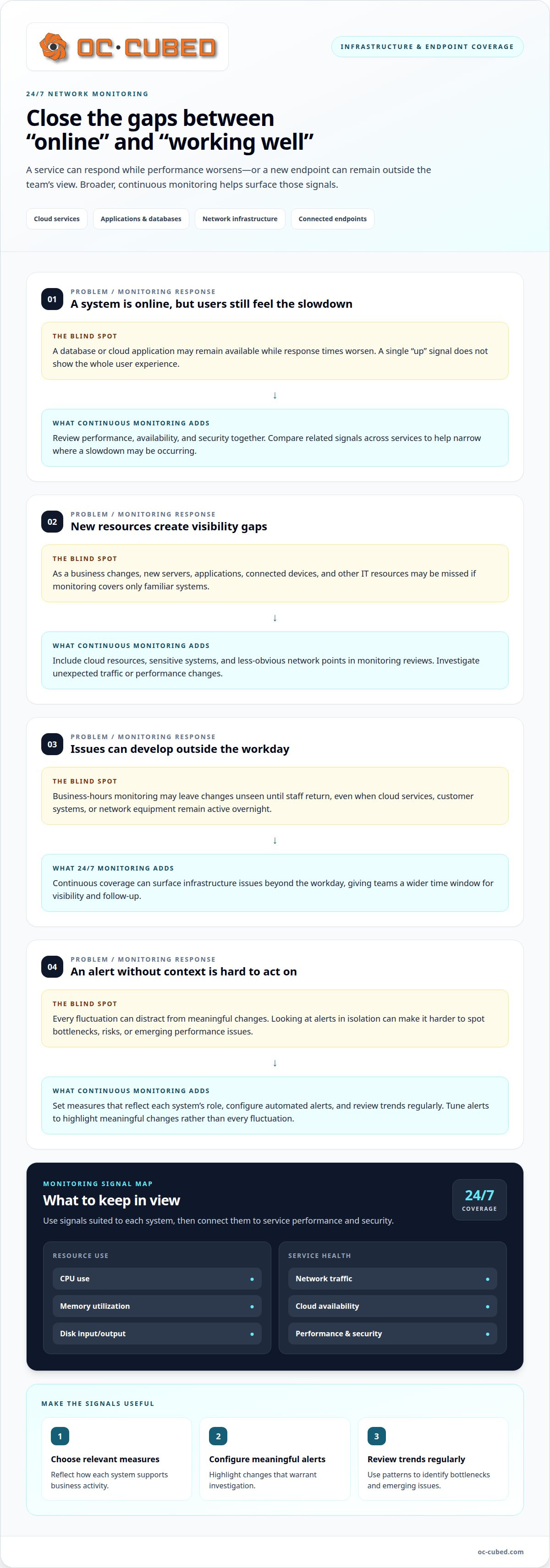
Continuous monitoring goes beyond checking whether a central network connection is active. It gives teams a broader view of infrastructure performance across connected services, helping them spot changes that may affect staff or customers. A slowdown in a cloud application, for example, could stem from network traffic, server capacity, or the application itself. Reviewing related signals helps narrow the investigation.
Cloud monitoring collects and analyzes data from cloud servers, applications, databases, and networks. Monitoring agents can report CPU use, memory utilization, network traffic, and disk input/output to a centralized platform. Teams can use these signals to identify bottlenecks, security vulnerabilities, and emerging performance issues. Reviewing resource use also helps businesses plan capacity and allocate cloud resources more efficiently.
Cloud services need monitoring for performance, availability, and security, not just whether a server responds. A database, for example, can remain online while application response times worsen for users. Reviewing trends across both services may reveal the connection. Set performance measures, configure automated alerts, and review monitoring data regularly to identify opportunities for improvement.
Less familiar endpoints matter, too. Connected devices and newly added IT resources can create blind spots if teams monitor only familiar servers and workstations. As a business grows, new servers, applications, and other resources can introduce security risks. Include sensitive systems and less obvious network points in monitoring reviews, and investigate unexpected traffic or performance changes.
How does 24/7 monitoring compare with business-hours monitoring? Continuous monitoring can surface infrastructure issues outside the workday, while business-hours monitoring may leave those changes unseen until staff return. That broader time window is useful when cloud services, customer systems, or network equipment remain active overnight.
Which network metrics should teams monitor around the clock? Track CPU use, memory utilization, network traffic, disk input/output, cloud service availability, performance, and security. Choose measures that reflect how each system supports business activity, then tune alerts to highlight meaningful changes rather than every fluctuation.
Should a business use in-house staff or a managed monitoring service? The decision depends on required coverage, available technical capacity, and how monitoring fits existing operations. In-house staff can work closely with internal systems. A managed service can provide external monitoring and integrate with a help desk.
How much does 24/7 network monitoring cost for a business? The price depends on the case and is given after a quote request, with factors including infrastructure scope, endpoints, integrations, and reporting needs.
Monitoring provides visibility, but alerts still need interpretation and a response. Poorly tuned alerts can distract teams, while unmonitored devices or incomplete data can leave gaps. Review alert rules and coverage regularly to keep signals relevant.
To implement monitoring, first map cloud services, network infrastructure, and endpoints. Next, define useful performance metrics, configure alerts, and assign responsibility for reviewing them. Regularly assess trends and adjust coverage as systems change. For a structured approach, explore network monitoring and configuration.
3. Proactive incident detection and response
How does 24/7 network monitoring reduce downtime and outages? It watches for changing conditions and alerts teams when systems show warning signs, including excessive CPU usage or bandwidth consumption. Investigating those signals early can help address issues before they develop into system failures.
Detection is only the first step. Teams need a clear response process: review the alert, identify affected systems, investigate the cause, and take corrective action. A sudden rise in bandwidth use, for example, may reflect legitimate business activity or suspicious traffic. Comparing the change with other network signals helps guide the investigation.
Consider a critical backup that fails at 2:00 a.m., outside ordinary business hours. Without continuous visibility, the failure might remain unnoticed until someone checks the backup or needs to restore data. A monitoring alert can bring the event to attention earlier, giving the responsible team a chance to investigate the cause and respond.
A separate example shows how an incident can unfold. At 3:15 a.m. Tuesday, a core switch begins experiencing intermittent hardware failure. A NOC technician identifies the alert and begins a diagnostic check within minutes, finding a failed fan that is overheating the switch. The team uses a predefined runbook to initiate failover to a redundant switch and keep the regional hub online.
An effective process depends on preparation as well as detection. A runbook should clarify the next steps for known incidents, including who reviews alerts and how teams prioritize affected services. For a switch failure, a documented failover procedure can help technicians respond consistently. After an incident, review the records and update response steps if the investigation reveals gaps.
Security threats require the same ongoing attention. Passive protection can stop many types of data breaches, but monitoring is needed to identify and respond to new threats. A security alert might show unusual access or network activity; investigation helps determine whether it reflects normal use or a potential incident. Monitoring during business growth and IT transitions can also expose security gaps as new systems are added.
Monitoring supports a proactive approach, but it does not replace sound security practices or a defined response plan. Keep existing security solutions current, assign responsibility for reviewing alerts, and connect network signals with security tools. Reviewing patterns such as repeated bandwidth spikes can help teams address recurring causes instead of responding to each alert in isolation.
Continuous monitoring is especially useful when important systems remain active beyond staffed business hours or delayed detection could disrupt operations. Connect alerts to clear investigation and escalation steps, then assess whether those steps help reduce repeat incidents. This turns monitoring data into a practical response, rather than a stream of alerts without follow-through.
4. Compliance and peace of mind
Continuous monitoring can support work to meet applicable security standards by providing ongoing visibility into network activity, system changes, and incidents that may need review. For example, an alert about unusual access to a business application can prompt investigation and documented follow-up. Monitoring supports compliance work, but it does not replace the policies and controls required by a standard.
Useful records make follow-up easier to explain. A monitoring platform can preserve alerts, timestamps, affected systems, and response notes for later review. Teams can connect an event to its investigation and response rather than relying on scattered recollections. Reviewing the records can also reveal recurring gaps, such as alerts that repeatedly go unassigned or systems missing from the monitoring scope.
Georgia’s Data Breach Law is one example of a state law relevant to data-breach concerns. Monitoring can help a business identify suspicious activity and build an incident timeline for internal review. The timeline might show when an alert appeared, which system it involved, and what response followed. This supports an organized process without implying that monitoring alone satisfies a legal requirement.
Build a compliance-focused monitoring process around the systems and data your business needs to protect. First, identify critical services and the security standards or policies that apply. Then define which events need review, who receives alerts, and where investigation records belong. Clear ownership helps prevent important notifications from sitting in an unattended inbox.
Response documentation should capture decisions as well as technical details. If an alert reveals unexpected access to a sensitive system, record the system involved, the investigation, and the action taken. If the alert proves harmless, document that finding as well. Consistent records help teams distinguish resolved events from open issues during later internal reviews.
Monitoring also supports peace of mind by making security oversight part of regular operations. A business can review incident records alongside its system changes, then identify where controls or processes need attention. For example, adding a new application should prompt a review of whether its activity appears in monitoring and whether alerts reach the right team.
Keep the process focused. Monitor relevant business systems, limit access to people who need it, and review alert rules as infrastructure changes. These steps help maintain useful visibility without treating every notification as proof of a security incident. A consistent review cycle gives leadership a clearer view of open risks, completed actions, and areas that need follow-through.
Compliance confidence comes from combining visibility with accountable action. Continuous alerts, clear ownership, and usable incident records give teams a stronger basis for reviewing security activity. When a business can trace an event from detection through response, it is better prepared to explain how monitoring supports its wider security controls.
5. Downtime-related cost avoidance
Downtime affects more than network availability. A disconnected order system can pause transactions, delay employee work, and create extra support tasks. A missed cloud backup or stalled payment process may also require follow-up after service returns. Monitoring helps teams identify disruptions and their scope, providing a clearer basis for prioritizing response and limiting operational knock-on effects.
To understand business impact, map critical services to the work they support. For example, connect a customer portal to sales and service workflows, then document which teams rely on it. During an outage, this map helps responders focus on systems with the greatest operational effect rather than treating every alert as equally urgent.
Building a private 24/7 network operations center requires at least 10-12 full-time employees to cover shifts, including weekends and holidays. That staffing requirement is one part of the internal operating model. Businesses also need to account for monitoring tools, training, shift handoffs, and the processes that turn alerts into investigation and action.
A managed approach changes how monitoring work is organized. Instead of building every monitoring function internally, a business can assess whether an external service fits its infrastructure and support model. Compare coverage needs, alert ownership, escalation procedures, reporting, and integration with existing IT operations.
Build a practical downtime assessment from operational details, not assumed industry averages. Record which services are affected, how many teams depend on them, what work stops, and which manual steps restore operations. If a customer portal is delayed, for example, note whether staff can process requests another way and what follow-up work accumulates while it is unavailable.
Monitoring records can make that assessment more useful over time. Compare incident timelines with affected services and recurring performance changes. If the same application repeatedly slows during an important workflow, investigate the cause and prioritize corrective work. This shifts attention from managing symptoms repeatedly to reducing the risk of another disruption.
Capacity planning can also help avoid unnecessary costs. Reviewing resource use helps teams identify when cloud resources need adjustment and when existing capacity is underused. Businesses adding applications or expanding operations can use these trends to plan infrastructure around actual demand, rather than reacting only after performance problems affect staff or customers.
Assess the process through incident records, response actions, and recurring disruption patterns. If alerts are detected but remain unresolved, clarify ownership and escalation steps. If the same issue returns, review the corrective action and monitoring coverage. These reviews connect operational decisions with service continuity without assuming monitoring prevents every outage.
OC Cubed - Your trusted MSP: Remote IT Support
OC Cubed - Your trusted MSP helps businesses manage everyday IT needs through Remote IT Support and Microsoft 365 Tenant Maintenance. When monitoring identifies a concern that needs investigation, remote support can help address the related IT issue and keep work moving.
Security Threat Detection and Remediation, Endpoint Protection/Antivirus, and Email Security with Proofpoint support a broader approach to protecting business systems. These services complement monitoring by helping teams address security concerns and manage endpoint risks. Together, they provide practical support for maintaining secure, reliable operations.
Contact OC Cubed, your managed IT support partner, to discuss your business’s IT support needs.
Turn Network Visibility Into a Practical Next Step
The benefits of 24/7 network monitoring matter most when alerts lead to decisions that reflect business priorities. Treat monitoring as an operating practice, not just a technical feed. Decide who owns follow-up, how unresolved concerns are escalated, and how findings inform future IT planning.
Start with a focused review of how your team uses monitoring information. Identify where decisions slow down, which reports are useful, and whether responsibilities remain clear as systems change. A consistent review process connects technical oversight with day-to-day business needs without adding complexity for its own sake.
OC Cubed provides ongoing IT support for businesses that need a reliable partner. Discuss your organization’s priorities and operating needs with the team to determine a practical next step.
Thoughtful planning creates a stronger foundation for dependable service and confident growth.
Frequently Asked Questions
What Is a 24/7 Network Operations Center?
A 24/7 network operations center (NOC) is a team that monitors network infrastructure continuously and coordinates responses to technical alerts. It focuses on the health of systems such as network equipment, servers, and cloud services. A help desk, by contrast, handles user-reported issues like trouble accessing a work application. For example, a NOC may spot a connection fault while the help desk assists affected employees.
What are the main benefits of 24/7 network monitoring?
The benefits of 24/7 network monitoring include broader visibility, earlier awareness of developing issues, and better information for planning IT operations. Teams can review trends across systems, prioritize alerts by business impact, and identify resource needs as services change. For example, if a business adds a customer portal, monitoring can help its team assess the portal’s performance and network demand as usage evolves.
How does continuous network monitoring improve cybersecurity and threat detection?
Continuous network monitoring helps teams notice unusual activity that may warrant investigation, including unexpected traffic or access patterns. It can show which systems and services were involved, helping responders decide what to examine next. For example, an alert about unusual activity near a sensitive application can prompt a review of related access records. Monitoring complements security tools and response procedures; it does not replace them.
How does 24/7 monitoring help meet compliance requirements?
Monitoring can support compliance work by creating records of system activity, alerts, investigations, and follow-up actions. A business can map relevant monitoring activities to applicable security standards and assign responsibility for reviewing records. For example, documenting who assessed an alert and what action followed can make internal reviews more organized. Monitoring supports compliance efforts, but does not by itself establish that a business meets every requirement.

Article by
Peter Irizarry
Peter Irizarry founded OC Cubed, LLC in 2023 to help small to mid-sized businesses stop worrying about downtime and cybersecurity threats. A frequent speaker on SMB digital transformation, Peter is passionate about translating complex IT roadmaps into plain-English business growth strategies. He resides in North Texas with his family.


