

The option that seems cheaper today can become more disruptive as your business grows. Proactive vs reactive IT support comes down to prevention versus response: proactive support monitors and maintains systems to address warning signs early, while reactive support fixes problems after they occur. Reactive support may cost less initially, but recurring issues and downtime can add costs over time.
It makes sense to compare support costs and response times. But reliability, lost work, security needs, and the ability to scale also affect which approach fits your business.
This comparison explains how the two models affect downtime, incident response, and spending, then offers a practical guide for growing businesses. Learn when reactive support may be sufficient, when proactive maintenance can help reduce disruption, and how a balanced approach can support daily operations and future growth.
Key Takeaways
- Proactive support focuses on monitoring and maintenance to catch potential problems early; reactive support addresses issues after they disrupt work.
- Compare support approaches by weighing downtime, recurring incidents, security needs, and the resources required to respond.
- Reactive support may suit a small, simple IT environment, while growing operations often benefit from a plan that includes ongoing prevention.
- Clear incident handling helps resolve reported problems and identify causes that could lead to repeat disruptions.
- Remote support, Microsoft 365 maintenance, threat detection, and endpoint protection can help businesses strengthen day-to-day IT management.
What is the Difference Between Reactive and Proactive IT Support?
The difference is when IT work begins. Reactive support starts after someone reports a problem, such as a failed login or unavailable shared drive. Proactive support uses monitoring, scheduled maintenance, and security measures to spot risks and address them earlier. In practice, the proactive vs reactive IT support decision shapes how a business handles warning signs, system upkeep, and reported incidents.
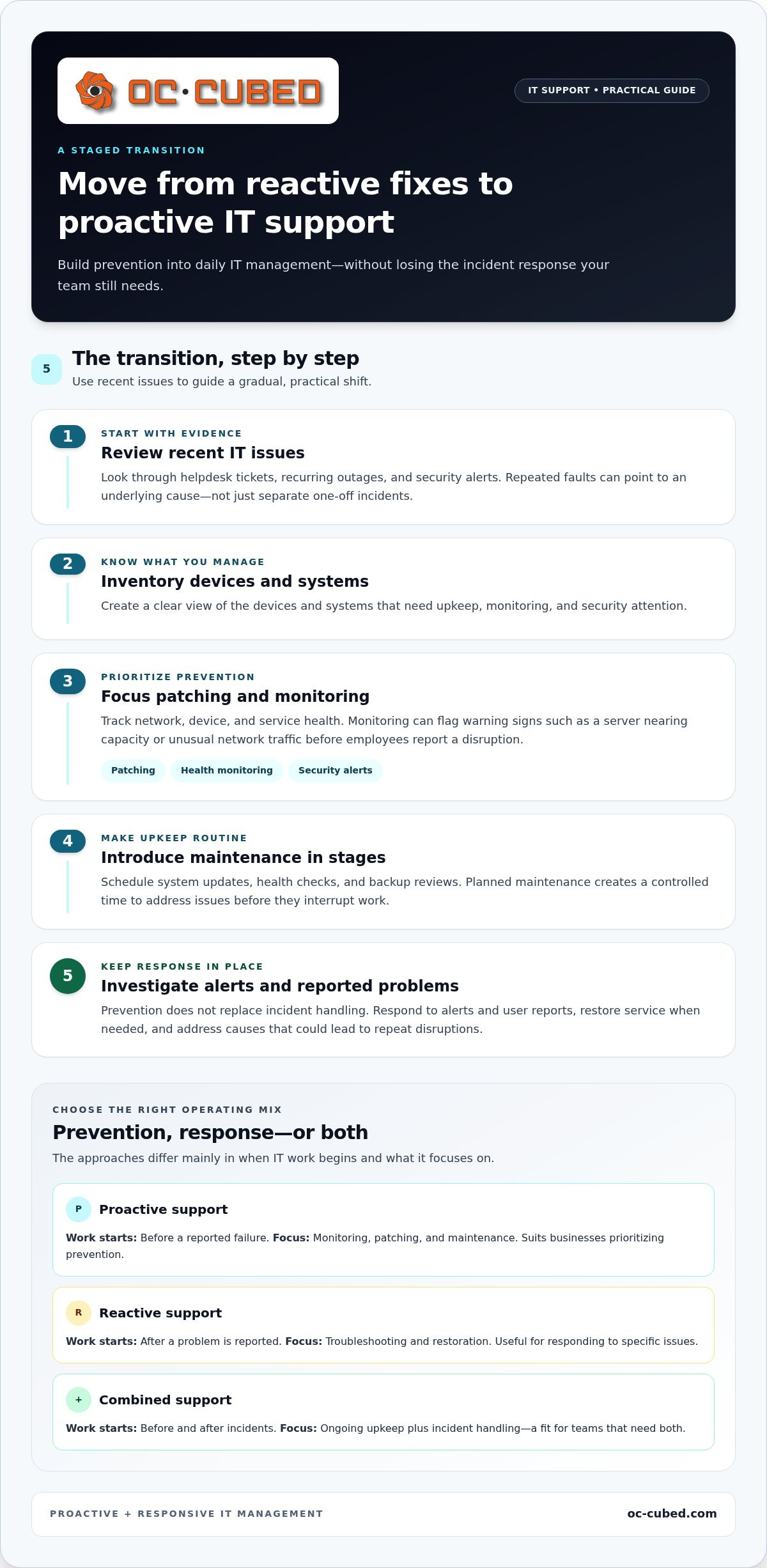
To make the transition, review recent helpdesk tickets, recurring outages, and security alerts. Then inventory your devices and systems, prioritize patching and monitoring, and introduce preventive maintenance in stages. Keep incident response in place throughout, so reported problems still receive attention as prevention improves.
Proactive monitoring tracks the health of networks, devices, and services. Tools can flag a server nearing capacity or unusual network traffic before employees report a disruption. A maintenance schedule can cover system updates, health checks, and backup reviews. Around-the-clock monitoring can help identify warning signs outside normal work hours, while planned maintenance provides a controlled time to address them.
Security monitoring adds another layer of prevention. An alert about unusual network traffic, for example, can prompt an investigation before a suspected threat becomes a wider incident. Patch management helps keep software flaws from going unaddressed, while threat detection draws attention to suspicious activity. These steps work together: monitoring surfaces a concern, security review assesses it, and remediation addresses the underlying issue.
Endpoint protection focuses on employee devices, where outdated software or malware can expose business systems. A practical routine pairs endpoint protection with patching and checks that devices remain visible to monitoring. Digital employee experience monitoring adds the user’s perspective: repeated login delays, application errors, or network interruptions can reveal friction before complaints pile up. If several employees report slow access to the same application, for example, the cause may be a shared network or service issue.
- Monitor: Track network, device, and service health for warning signs.
- Maintain: Schedule updates and routine checks instead of waiting for a failure.
- Respond: Investigate alerts and user reports, then address the cause.
| Support approach | When work starts | Typical focus | Best fit |
|---|---|---|---|
| Proactive | Before a reported failure | Monitoring, patching, maintenance | Businesses prioritizing prevention |
| Reactive | After a problem is reported | Troubleshooting and restoration | Specific issues needing a response |
| Combined | Before and after incidents | Prevention plus response | Teams needing both ongoing upkeep and incident handling |
Choose based on whether your main need is preventing recurring issues, resolving reported incidents, or managing both with a combined approach.
Reliability, downtime, and cost considerations
Compare support by its effect on service continuity, employee productivity, and spending over time. The right choice depends on how downtime affects your business goals and client commitments.
Early Issue Detection and Downtime
Early detection gives IT teams time to address warning signs before they interrupt work. Monitoring might flag declining system performance, for example, giving technicians time to investigate before employees lose access to a key application. Break-fix support, by contrast, starts after a fault disrupts service. Proactive support shifts attention from restoring service to reducing the risk of disruption.
That doesn’t mean every alert will become an outage or every outage can be prevented. The practical value is earlier visibility: teams can prioritize a developing issue, plan maintenance, and limit its effect on connected systems. Compare incident records over time to identify recurring slowdowns or faults that disrupt the same workflow.
System Reliability and Support Tickets
Reliable systems can mean fewer interruptions for employees and fewer support tickets about recurring failures. A pattern of tickets involving one application, network connection, or device may point to an underlying reliability problem, not just isolated user errors. Proactive review looks for the shared cause; reactive support focuses first on restoring service for the affected user.
Lakeside Software’s survey found that 58% of IT staff identified reducing technical issue resolution time as a key priority. Ticket volume alone doesn’t show whether reliability is improving. Track repeat incidents, resolution time, affected employees, and downtime together. If the same fault keeps returning, investigate its root cause rather than closing each ticket as a separate event.
Downtime and Cost Efficiency
Proactive support has ongoing maintenance and monitoring costs, while break-fix expenses arise when problems need attention. The price depends on the case and is given after a quote request; scope, device count, monitoring coverage, and security needs affect the cost. Compare these spending patterns with downtime, repeat repairs, employee productivity, and the work required to restore service.
Deloitte reports that predictive maintenance can save up to 40% compared with reactive strategies. That finding concerns predictive maintenance, not every proactive IT support plan. For a useful comparison, review your own incident history: identify repeated faults, the time employees lose, and the effort required to resolve each incident. Those factors show where prevention may improve cost efficiency.
Use a consistent review process to connect reliability with business impact. Record each incident’s cause, duration, affected services, and whether it has happened before. Then compare periods with recurring faults against periods after corrective maintenance. This gives decision-makers a clearer view than a single support invoice, because downtime can affect productivity and client service beyond the direct repair work.
Organizations with little tolerance for unexpected downtime may value prevention more. A small operation with simple systems may accept occasional interruptions and handle issues as they arise. Key factors include the importance of affected systems, the frequency of recurring problems, and the effect of disrupted work on business goals. Set priorities around those operational needs, then review whether your support approach is reducing repeat incidents.
Reactive IT support and incident response
Reactive IT support typically includes triaging reported issues, troubleshooting, diagnostics, restoration, and follow-up to identify causes. If employees can’t access a shared drive, for example, support investigates the connection, restores access, and records the incident for review.
A clear response process helps restore operational stability. First, record the affected service, users, symptoms, and when the issue began. Next, assess the impact and prioritize work that blocks essential business tasks. Then investigate likely causes, apply a fix or workaround, and confirm that employees can resume the affected work.
Diagnosis should distinguish the visible symptom from the underlying fault. If a team loses access to a business application, the cause could be connectivity, account permissions, or the application itself. Testing each possibility in a controlled order helps technicians resolve the actual problem instead of repeatedly applying temporary fixes.
Incident management continues after service is restored. Record what happened, which systems were affected, what action restored service, and whether the issue recurred. A root cause review can reveal a needed configuration change or maintenance task. This follow-up turns a disruption into information that can improve future operations.
Common reactive support activities include:
- Triage: Gather symptoms and determine business impact.
- Diagnostics: Test the systems involved and isolate the cause.
- Resolution: Apply a repair or workaround, then verify service.
- Follow-up: Document the incident and identify repeat-risk factors.
Automation can help with defined incidents, such as restarting a stopped service after a specific alert. It should follow documented conditions and escalation rules. If the action fails, or evidence points to a security incident, the process should route the case for human investigation instead of repeating the same action without review.
A network interruption, for example, may affect one employee or an entire office. Support should establish the scope before choosing a remedy. Restoring one device won’t resolve a shared network fault. After recovery, reviewing related tickets can show whether the event was isolated or part of a recurring pattern.
Reactive support is useful for unforeseen faults, but response quality depends on accurate incident records and a repeatable process. Track the affected service, resolution, and recurrence for each case. Those details help teams resolve current issues and decide whether a lasting change, workaround, or further investigation is needed.
Break-fix versus proactive IT support
Break-fix and proactive support differ in when work begins and how systems are maintained. Compare them against your infrastructure, software needs, and tolerance for interruptions.
Reactive Break-Fix Support
Reactive break-fix support starts after a fault appears or someone reports a problem. If a workstation can’t open business software, for example, support investigates and restores access. Between service calls, no one may be checking for developing issues, so a fault can go unnoticed until it affects users.
This model can suit a small, simple infrastructure with few critical systems and manageable interruptions. The response addresses the specific issue rather than following routine checks. However, a business that relies on one shared application may face wider disruption when it fails. Fit depends on the impact of an outage, not just the size of the technology environment.
Proactive IT Support
Proactive IT support schedules maintenance and monitors systems to identify concerns before they become user-facing failures. A technician might investigate recurring slow performance before employees lose access to a key application. Unlike break-fix support, this approach includes planned upkeep between incidents, not just restoration after a fault.
This approach is useful when software, devices, and network infrastructure interact in ways that affect daily operations. Regular reviews can uncover recurring performance issues or maintenance needs. Prevention doesn’t remove the need for incident response; it adds planned work intended to reduce avoidable failures. This combination can suit organizations where interruptions affect client commitments or business goals.
Use your incident history to assess which model fits. Group service tickets by affected system and cause, then identify recurring problems. If a printer issue affects one person, a targeted repair may be enough. If repeated software faults interrupt several teams, examine shared infrastructure and maintenance routines rather than treating each report as unrelated.
Consider what happens between incidents, too. With break-fix support, employees may be the first to notice a system problem. Proactive support adds scheduled monitoring and maintenance, allowing IT teams to act on warning signs sooner. The choice depends on the value of ongoing upkeep compared with the disruption risk your organization accepts.
A combined approach can retain break-fix response while adding prevention for the systems that matter most. Start by identifying critical applications, recurring faults, and the effects of downtime. Apply planned maintenance to the highest-impact areas first, then review whether performance improves and incidents recur less often. This helps businesses with limited resources focus prevention where it offers the clearest operational value.
Proactive support benefits for growing businesses
Growth adds users, devices, applications, and dependencies to an IT environment. Proactive support helps businesses plan for that added complexity rather than letting each new demand become an urgent repair.
Capacity planning is one practical benefit. As storage needs rise, a proactive review can identify when existing capacity may become a constraint. The business can plan an upgrade around its workload and growth plans instead of reacting after employees struggle to save or access files. The same review can consider whether new teams need more accounts, devices, or network resources.
Cybersecurity also changes as a business grows. More accounts and endpoints create more areas to manage, so regular reviews of access, software updates, and security alerts help keep protective measures in view. Verizon’s 2026 Data Breach Investigations Report found that 31% of the breaches it studied began with attackers exploiting software flaws. A patching process helps organizations address known flaws instead of leaving updates unnoticed.
Preparation matters when an incident disrupts operations. A business continuity and disaster recovery plan sets out how teams will keep essential work moving and restore systems after a serious interruption. A growing firm, for example, can identify which files and applications employees need first, assign responsibilities, and test whether recovery steps work. These measures can reduce confusion during a disruption.
Proactive support can also connect technology decisions with business goals. A provider can review recurring incidents, planned hiring, and upcoming projects to identify IT needs before they block delivery. If a company is adding a new team, planning account access and device capacity early can reduce setup friction. Lakeside’s research found that 72% of surveyed IT staff considered proactive incident resolution before incidents begin among the most valuable capabilities for automating IT operations.
Fewer avoidable IT interruptions give employees more time for their core work. Digital experience monitoring can help identify recurring application slowdowns or login problems affecting a team. The value is not simply a smaller ticket queue. It is identifying friction that disrupts daily work and addressing its cause before the same issue affects more people.
To make the approach practical, growing businesses can:
- Review incident patterns and prioritize systems that support essential work.
- Plan capacity around hiring, storage demand, and new applications.
- Schedule patching, access reviews, and recovery-plan tests.
- Track whether recurring issues and employee disruptions decline.
OC Cubed - Your trusted MSP: Remote IT Support
OC Cubed - Your trusted MSP helps businesses manage IT through remote support and ongoing maintenance. If recurring issues, security concerns, or growing Microsoft 365 needs are stretching internal resources, its services can provide practical support for those demands.
Remote IT Support helps address reported technology problems, while Microsoft 365 Tenant Maintenance supports the upkeep of your Microsoft 365 environment. Security Threat Detection and Remediation focuses on identifying and addressing security concerns, and Endpoint Protection / Antivirus helps protect business devices. Together, these services connect day-to-day assistance with preventive IT measures.
Consider reaching out when your team needs help balancing incident response with routine maintenance and security. Contact OC Cubed to discuss your business’s IT support needs.
Set a Support Direction That Can Grow
Choosing between proactive and reactive IT support is an opportunity to set priorities, not just select a response model. Start by identifying which systems have the greatest effect on daily work, then decide where prevention matters most. A growing business can introduce monitoring and maintenance for those systems while keeping a clear process for reported incidents.
OC Cubed - Your trusted MSP can support that next step with Remote IT Support, Microsoft 365 Tenant Maintenance, and Security Threat Detection and Remediation. These services can help connect day-to-day issue resolution with ongoing upkeep and security attention. Consider the approach that fits your current workload and growth plans, then define what you want IT support to improve.
A clear support plan gives your team a practical foundation for growing with confidence.
Frequently Asked Questions
What is Proactive Managed Services?
Proactive managed services provide ongoing oversight of a business’s technology instead of limiting work to individual support requests. The arrangement can include maintenance planning, security review, and guidance on upcoming technology changes. A business preparing to onboard a new team, for example, can plan device setup and account access in advance so employees have the tools and permissions their roles require.
What is proactive IT support?
Proactive IT support addresses technology needs before they become urgent problems. For example, reviewing employee access when someone changes roles and updating permissions to match their new responsibilities gives IT teams a structured way to manage change. Businesses can also plan software upkeep around application needs, rather than waiting for employees to encounter access or performance problems.
What is reactive IT support?
Reactive IT support responds after someone reports an issue or a system fails. If an employee can’t access a business application, for example, support can investigate the error and restore access. This model focuses on the reported fault. It can fit an isolated situation, such as one user’s account lockout, that doesn’t indicate a wider technology concern.
What are the main differences between proactive and reactive IT support?
The main difference is timing: proactive work is planned around upkeep and anticipated needs, while reactive work begins with a reported incident. Choosing between proactive vs reactive IT support depends on what matters most to your operations. Before a software launch, preparation might include confirming user access and device readiness; incident response addresses access problems employees encounter after launch.
What services are included in proactive IT support?
Proactive support may include scheduled maintenance, system monitoring, software patch management, security reviews, backup checks, and capacity planning. The mix should reflect the organization’s systems and priorities. Before adopting a new business application, for example, teams can plan user access, prepare devices, and schedule a post-launch review to identify issues affecting employees’ workflows.
What are the benefits and drawbacks of proactive IT support?
Planned support gives a business time to coordinate maintenance, prepare for technology changes, and review recurring concerns. It also requires consistent attention and coordination, including work that may not follow an employee complaint. To assess the tradeoff, compare the effort spent on planned upkeep with the operational impact of disruptions and repeated troubleshooting.
What are the risks and costs of relying on reactive IT support?
With reactive-only support, a developing fault may go unnoticed until it interrupts work. This can lead to repeated troubleshooting, urgent repairs, and delays for employees or customers. Spending can also vary with the frequency and severity of incidents. Reviewing past tickets by cause, affected workflows, and recurrence helps reveal where a one-time repair may be masking a broader support need.
Which businesses benefit most from proactive IT support?
Proactive vs reactive IT support matters most for businesses facing change or relying on technology for essential work. A growing firm, for example, may need to coordinate account access, devices, and application capacity as it hires. Organizations with limited internal IT resources can also benefit from planned oversight, especially when technology tasks compete with employees’ primary responsibilities.

Article by
Peter Irizarry
Peter Irizarry founded OC Cubed, LLC in 2023 to help small to mid-sized businesses stop worrying about downtime and cybersecurity threats. A frequent speaker on SMB digital transformation, Peter is passionate about translating complex IT roadmaps into plain-English business growth strategies. He resides in North Texas with his family.


