

Switching IT providers has no universal timeline. The handover depends on your contract, the systems and access that need to transfer, and how ready both sides are to cooperate. If you're unhappy with your current IT provider, reduce disruption by reviewing the agreement and planning the transition before ending support.
It’s reasonable to worry about hidden costs, lost access, or a gap in IT coverage. A difficult handover can complicate a switch, but a clear inventory of systems, accounts, security tools, and open projects gives the process structure. Your contract’s notice terms and the condition of your IT environment also shape what needs to happen and when.
This guide explains how to assess your provider, communicate expectations, review costs and contract terms, and prepare for a challenging handover. You’ll also learn what affects the switching timeline and how to plan the next steps so your business can move to more reliable support with control.
Key Takeaways
- Spot whether your provider is resolving issues proactively or simply passing alerts back to your team.
- Set clear expectations for communication, support, security, and the outcomes your business needs before deciding to switch.
- Prepare for a difficult handover by organizing system access, records, and open work so the transition stays controlled.
- Compare contract terms and service scope against your actual IT needs to understand what your current budget covers.
- Assess any contract buyout by reviewing the agreement, remaining obligations, and transition plan before committing to a change.
Warning signs of an underperforming managed service provider
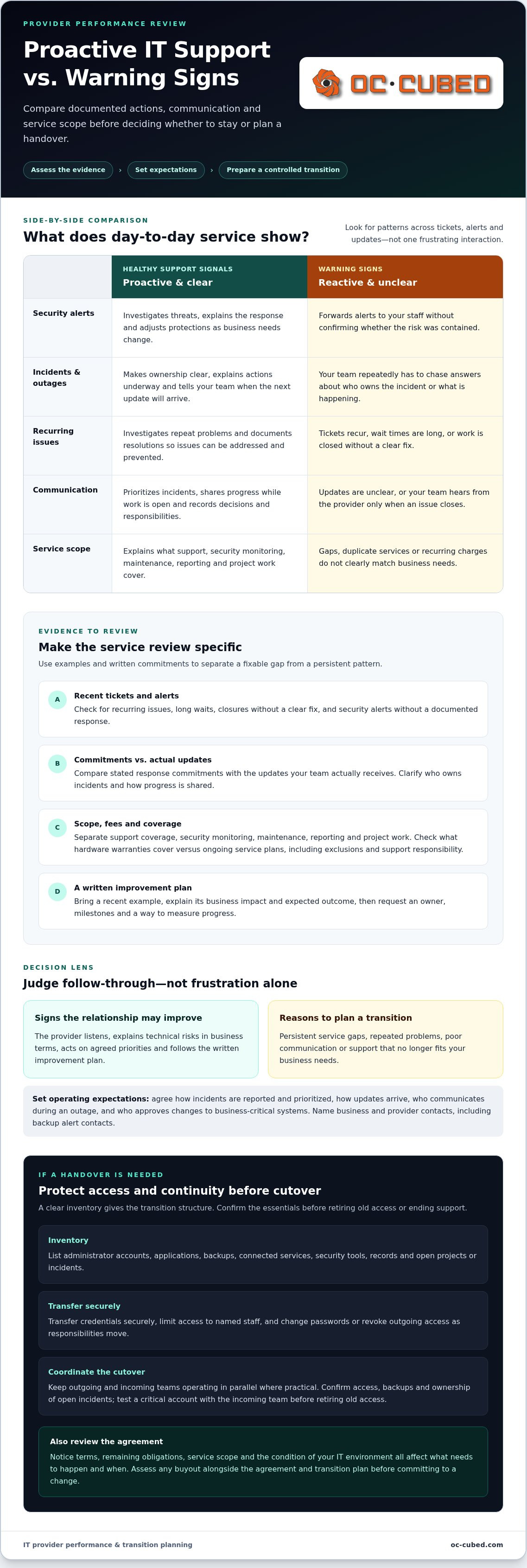
Repeated outages, unresolved tickets, and unclear ownership can signal weak IT support. One warning sign is a provider that forwards security alerts to your staff without investigating or resolving them. A proactive partner should assess threats, explain the response, and adjust protections as business needs change. For example, if alerts keep arriving but nobody confirms whether the risk was contained, request a documented response process.
Look for patterns, not one frustrating interaction. Review recent tickets for recurring issues, long waits, and closures without a clear fix. Compare the provider’s stated response commitments with actual updates. If a network disruption happens, your team should know who owns the incident, what actions are underway, and when the next update will arrive. Repeatedly chasing those answers is a service-quality concern.
What questions should I ask a prospective IT provider? Ask how it handles alerts, prioritizes incidents, communicates progress, and documents resolutions. Also ask how its service scope fits your systems, security needs, and business plans.
- Who responds when a security alert appears?
- How are recurring issues investigated and prevented?
- What will your team receive in monthly service reports?
Discuss service quality and price by comparing the work included, not just the total fee. List support coverage, security monitoring, maintenance tasks, reporting, and project work in separate categories. Then identify gaps, duplicate services, or recurring charges that don’t match business needs. A provider should explain what each service covers and how changes in scope affect the agreement.
Compare prospective providers using the same service requirements and evidence. Patient reviews don’t apply to IT services; look instead for relevant client reviews that describe communication, issue resolution, and follow-through. Treat reviews as one input alongside a written service scope and sample reporting. For security systems, distinguish a hardware warranty from an ongoing service plan. Review what each covers, its exclusions, and who handles support when a device fails.
How can I protect passwords, data, and system access during an IT provider transition? Inventory administrator accounts, applications, backups, and connected services before cutover. Transfer credentials securely, limit access to named staff, and change passwords or revoke outgoing access when responsibilities move.
What risks should I consider when changing IT providers? Access gaps, missing records, unresolved security issues, and interrupted support can complicate a transition. Keep the outgoing and incoming teams operating in parallel where practical, then schedule cutover after confirming access, backups, and responsibility for open incidents. For example, test a critical account with the incoming team before retiring the old access.
Communicating expectations and deciding whether to switch providers
If you’re unhappy with your current IT provider, start with a specific service review. Choose recent examples, such as a recurring login failure or an unanswered security alert. Explain the business impact, the outcome you expected, and what happened instead. Ask for a written improvement plan with an owner, milestones, and a way to measure progress. This gives both sides a clear basis for deciding whether the relationship can improve.
Set expectations in operational terms. Define how your team reports incidents, how the provider prioritizes them, and how updates will arrive. Agree on who communicates during a network outage and who approves changes to business-critical systems. For example, your team may expect progress updates while an issue remains open, rather than hearing only when it closes. Record these expectations in service documentation so staff and provider teams can follow the same process.
Trust depends on clear explanations and follow-through. The audiologist-patient relationship offers a useful communication model: people need to feel heard, understand the information they receive, and have a chance to clarify concerns. Apply that principle to IT discussions. Ask the provider to explain technical risks in business terms, then summarize decisions and responsibilities in writing. If concerns are dismissed or answers remain unclear, raise the gap directly and document the response.
Keep communication open during any improvement period. Name a business contact and a provider contact, then schedule regular reviews around active issues and agreed actions. A short agenda can cover open incidents, repeated problems, upcoming changes, and decisions needed from your team. Share business changes too, such as a new location or application rollout, because support expectations may need to adapt.
Build backup alarm communications into the escalation plan. Specify who receives security and system alerts, which channel is used if the primary contact doesn’t respond, and who takes ownership after escalation. Test the contact path with a planned notification. A firewall or switch issue, for example, should not depend on one employee noticing an email while away from their desk. Clear backup contacts make alert handling more dependable.
Decide whether to switch by reviewing evidence, not frustration alone. Compare the written improvement plan with actual follow-through, recurring problems, communication quality, and whether support still fits your business needs. If you’re considering changes to network controls, firewall and switch management can be part of that review. A provider that listens, explains decisions, and acts on agreed priorities may be able to reset the relationship. Persistent gaps point toward planning a transition.
Handling an uncooperative outgoing provider
A difficult handover needs structure, not a heated exchange. Keep every request factual and written. Name the system, record, or access item needed, its business purpose, and the requested delivery date. For example, request the current network diagram and administrator account transfer as separate items. Save replies and note unresolved requests in one transition log. This creates a usable record and helps the incoming team identify gaps.
Start with the agreement and transition plan. Find the terms covering notice, data access, equipment, documentation, and work at termination. Assign one person to coordinate requests and another to approve access changes. If the outgoing provider disputes a request, quote the relevant contract language and ask for its position in writing. Keep discussions focused on specific deliverables rather than blame. A written record helps your team track what remains outstanding.
Build a handover inventory before requesting files. Include business systems, user accounts, domains, network settings, security tools, backups, licenses, vendor contacts, and open tickets. Mark each item as received, tested, or missing. For example, a backup file is not enough if nobody can confirm its date or restore process. Ask the outgoing team to identify dependencies and recent changes, then have the incoming team compare those details against the live environment.
- Access: List administrator accounts, account owners, and recovery methods.
- Documentation: Request current diagrams, configurations, and support records.
- Security: Record active alerts, open incidents, and protection settings.
- Operations: Identify scheduled maintenance, renewals, and unresolved work.
Protect credentials during transfer. Avoid sending passwords in ordinary email or placing them in an unprotected document. Use a secure transfer method agreed by the authorized parties, and limit access to named staff. Once responsibility moves, change credentials the former provider knew and revoke access that is no longer needed. Keep a record of each change, including the account affected and the person who approved it.
Prevent a support gap by agreeing on a cutover sequence. Keep critical systems under active oversight until the incoming team has tested access, reviewed backups, and accepted responsibility for open issues. If the outgoing provider refuses to cooperate, prioritize essential access and records, document the impact, and escalate through the contract’s named contacts. Avoid deleting tools or accounts before dependencies are understood. A rushed shutdown can remove information the new team needs.
Remain professional even when progress stalls. A calm message can state the outstanding item, its effect, and the next action needed. For instance: “The incoming team cannot validate the backup without the latest job record.” If your team is satisfied with some parts of the service, preserve those details in the transition notes. Clear evidence helps separate useful work from handover problems and keeps the change focused on continuity.
Reviewing the maintenance budget, contract, and expectations
Start with a clear picture of what the maintenance budget pays for. Separate recurring support from projects, hardware, software subscriptions, and one-time remediation. Then compare each line with work actually delivered. For example, if an invoice includes account maintenance, check whether those tasks appear in service reports. This review shows whether costs reflect useful coverage, overlapping services, or work your team handles itself.
Next, read the contract alongside recent invoices and service records. Note the service scope, billing method, renewal terms, notice requirements, and responsibilities at termination. Record the exact clause and page for each item. A renewal date may affect the sequence of a transition, while a termination section may describe how data or equipment is handled. Keep interpretation grounded in the written agreement, not verbal assurances.
Build a practical comparison before considering a replacement. Match each current service to a business need, then mark it as essential, optional, duplicated, or missing. Use the same categories to assess another proposed scope. For example, list user support, system maintenance, security work, reporting, and project assistance separately. A lower total can still leave a critical task uncovered, while a higher total may include work already handled elsewhere.
- Scope: Identify exactly which systems and tasks the agreement covers.
- Frequency: Record whether maintenance is ongoing, scheduled, or triggered by requests.
- Ownership: Note who approves changes and who performs each task.
- Exclusions: Flag work billed separately or assigned to your employees.
- Evidence: Compare invoices with tickets, reports, and completed work.
Set expectations for the next review period in measurable terms. Instead of requesting “better support,” define what updates your team needs during an open incident and what information reports should contain. If Microsoft 365 account maintenance is part of the scope, specify which administrative tasks and changes the service covers. Write down who approves those changes and how completed work will be recorded. Clear boundaries reduce disputes over whether a task was included.
Finally, connect the budget review to the decision about staying or switching. Ask the current provider to explain discrepancies between the contract, invoice, and delivered work. Request a revised scope if your needs have changed, then compare that response against documented priorities. For a possible transition, include contract timing, data transfer, overlapping support, and outstanding projects in your planning. The result is a decision based on obligations and business needs, not the headline fee alone.
Contract buyout assistance
A contract buyout may let a business leave before its current agreement ends. It isn’t automatically available, and the contract’s wording matters. Review the termination, renewal, payment, and transition clauses together. Look for a stated buyout formula, remaining obligations, early termination terms, and any conditions tied to notice. Don’t treat an informal conversation as a change to the written agreement. Keep a copy of the signed contract and amendments for comparison.
First, identify the exact agreement covering managed services. A business may have separate terms for support, software, equipment, or security tools. Match each agreement to its provider, service, renewal date, and cancellation process. This prevents an apparent buyout from leaving another service active. If the wording refers to an order form or statement of work, review that document too. Record unclear clauses, then request written explanations from the party responsible for the agreement.
Next, ask for a written buyout breakdown based on the contract. It should identify the clause used, remaining services, outstanding invoices, and any transition work included. Compare that breakdown with your own records and the agreement. For example, if the proposed amount includes a service that has already ended, ask for the relevant dates and supporting terms. Avoid relying on a verbal estimate. A clear calculation lets decision-makers compare the obligation with the cost and operational impact of staying.
Build a decision worksheet before accepting terms. Include the proposed buyout, ongoing payments if you remain, transition expenses, overlapping support, and any work needed to prepare systems for handover. These factors vary with the contract, service scope, timing, and condition of the IT environment. Don’t assume an early exit costs less overall. A lower immediate obligation could still create extra transition work or leave a service gap.
- Agreement: Identify the controlling contract and related documents.
- Calculation: Match each requested charge to a written clause.
- Timing: Compare notice requirements with renewal and handover dates.
- Continuity: Include access, support coverage, and open work in the plan.
- Approval: Keep the final terms and authorization in writing.
Before agreeing, confirm what happens after payment. Clarify the end date, remaining support responsibilities, data and account access, and the process for transferring records. Ask how disputed invoice items will be handled and whether the buyout changes other services. Keep the response with your contract file. If terms change, ask for a revised written agreement before relying on them. This keeps the financial decision connected to a workable transition plan.
OC Cubed - Your trusted MSP: Remote IT Support
OC Cubed - Your trusted MSP can help businesses seeking consistent remote support and clearer IT oversight. Turn to OC Cubed - Your trusted MSP when unresolved support needs, security concerns, or Microsoft 365 maintenance gaps are affecting daily work. Remote IT Support helps address routine technology issues without requiring on-site staffing.
For a transition or ongoing support plan, relevant services include Microsoft 365 Tenant Maintenance, Security Threat Detection and Remediation, Endpoint Protection / Antivirus, and Email Security with Proofpoint. These offerings support account upkeep, threat response, endpoint protection, and email security. The right mix depends on your systems and business requirements.
Contact OC Cubed - Your trusted MSP to discuss your IT support needs and next steps.
Make your next IT decision with confidence
Being unhappy with your current IT provider doesn’t mean your next move has to be rushed. Treat the transition as a chance to align technology support with how your business works now and where it plans to go. Define the outcomes your team needs, assign someone to oversee the change, and keep the decision focused on stable operations.
OC Cubed - Your trusted MSP offers Remote IT Support, Microsoft 365 Tenant Maintenance, and Security Threat Detection and Remediation. These services can support businesses seeking responsive help, maintained Microsoft 365 environments, and attention to security threats as they plan their next steps.
Choose a support relationship that gives your business clearer ownership and room to focus on its work. A thoughtful transition can be the start of a more controlled path forward.
Take the next step when you’re ready to move toward IT support that fits your business.
Frequently Asked Questions
How long does it take to switch?
There’s no fixed switching timeline. It depends on contract notice terms, system complexity, and handover readiness. A business using cloud accounts and well-maintained records may have fewer transfer tasks than one relying on undocumented network settings or shared administrator credentials. Map each dependency, assign an owner, and schedule cutover only after access and key services are tested. The transition plan, not a generic estimate, should set the sequence.
What are common signs it’s time to replace an IT provider?
Consider replacing a provider when recurring issues remain unresolved, communication repeatedly breaks down, or support no longer matches business needs. For example, if your staff repeatedly reports the same email outage without a lasting fix, record each incident and its impact. Then assess whether the provider explains causes, assigns ownership, and follows through on improvements. A pattern across incidents is more useful than judging the relationship by one difficult ticket.
How do I evaluate and compare managed IT service providers?
Compare providers against one written scope that reflects your environment. Include user support, security responsibilities, network maintenance, cloud administration, reporting, and project work. Ask each provider to explain how it handles a scenario such as a compromised employee account, then compare the response process and communication. Also assess whether the proposed service can scale with planned business changes. This keeps the comparison focused on outcomes and coverage, not sales language alone.
How do I switch IT providers without disrupting business operations?
Protect day-to-day work by sequencing the change around business-critical systems. Identify essential applications, key users, and periods when downtime would cause the greatest disruption. Transfer and test access to core services before changing account ownership or removing existing tools. For example, confirm that staff can sign in and retrieve shared files under the new support arrangement. Keep a named internal decision-maker available during cutover to resolve approvals quickly.
What should an IT provider transition and offboarding checklist include?
Include a system inventory, account ownership, administrator access, domain and vendor records, backup details, open incidents, scheduled changes, and renewal information. Add the person responsible for receiving and validating each item. For example, record whether a network diagram reflects the current configuration, not simply whether a file was delivered. Track access changes separately, including who approved them and which former accounts were disabled after handover.
What contract terms and cancellation rules should I review before switching providers?
Review the signed agreement, amendments, order forms, and statements of work together. Note renewal and notice provisions, termination conditions, payment obligations, service scope, data handling, and transition responsibilities. Then compare those terms with the proposed change date and any active services tied to separate agreements. For example, ending support may not automatically end a software subscription. Keep written records of notices, acknowledgments, and any agreed changes to the original terms.
How do I verify a new IT provider’s security, certifications, references, and service levels?
Request evidence relevant to the work the provider will perform. Ask for its security procedures, incident communication process, and documentation of any certifications it claims. Speak with references whose systems or support needs resemble yours, and ask about follow-through, clarity, and problem handling. Review service-level terms for covered services, measurement methods, reporting, and escalation steps. Compare those details with your operational priorities rather than relying on general assurances of strong security.

Article by
Peter Irizarry
Peter Irizarry founded OC Cubed, LLC in 2023 to help small to mid-sized businesses stop worrying about downtime and cybersecurity threats. A frequent speaker on SMB digital transformation, Peter is passionate about translating complex IT roadmaps into plain-English business growth strategies. He resides in North Texas with his family.


