

A useful IT budget connects technology spending to the business goals it supports. IT budgeting and forecasting services help teams plan for hardware, software, infrastructure, staffing, and other IT costs, then update expectations as conditions change. A budget sets the spending plan; a forecast shows what the organization currently expects.
Technology spending can seem straightforward to plan until priorities shift, costs change, or a project takes a different path. Rather than treating the annual budget as fixed, use regular forecasting and clear assumptions to see how spending is tracking and where decisions may need to change.
This guide explains what IT budgeting involves, how budgets differ from forecasts and projections, and how scenario planning and service levels can support better financial decisions. You’ll also see what to include in the process, which information helps keep plans useful, and how different levels of support can shape the work. The goal is a clearer view of technology costs and a more reliable way to connect spending decisions with business priorities.
Key Takeaways
- Build technology spending plans around business goals, with clear assumptions and input from the teams responsible for the costs.
- Compare actual results with the budget, investigate variances, and use what you learn to improve future planning.
- Keep the terms distinct: a budget sets the spending plan, a forecast reflects what’s expected, and a projection models a specific scenario.
- Use scenario planning to examine how changing costs, demand, or priorities could affect IT decisions before committing resources.
- Choose a level of budgeting and forecasting support that fits your planning needs, then review and update assumptions regularly.
Budget performance and variance monitoring
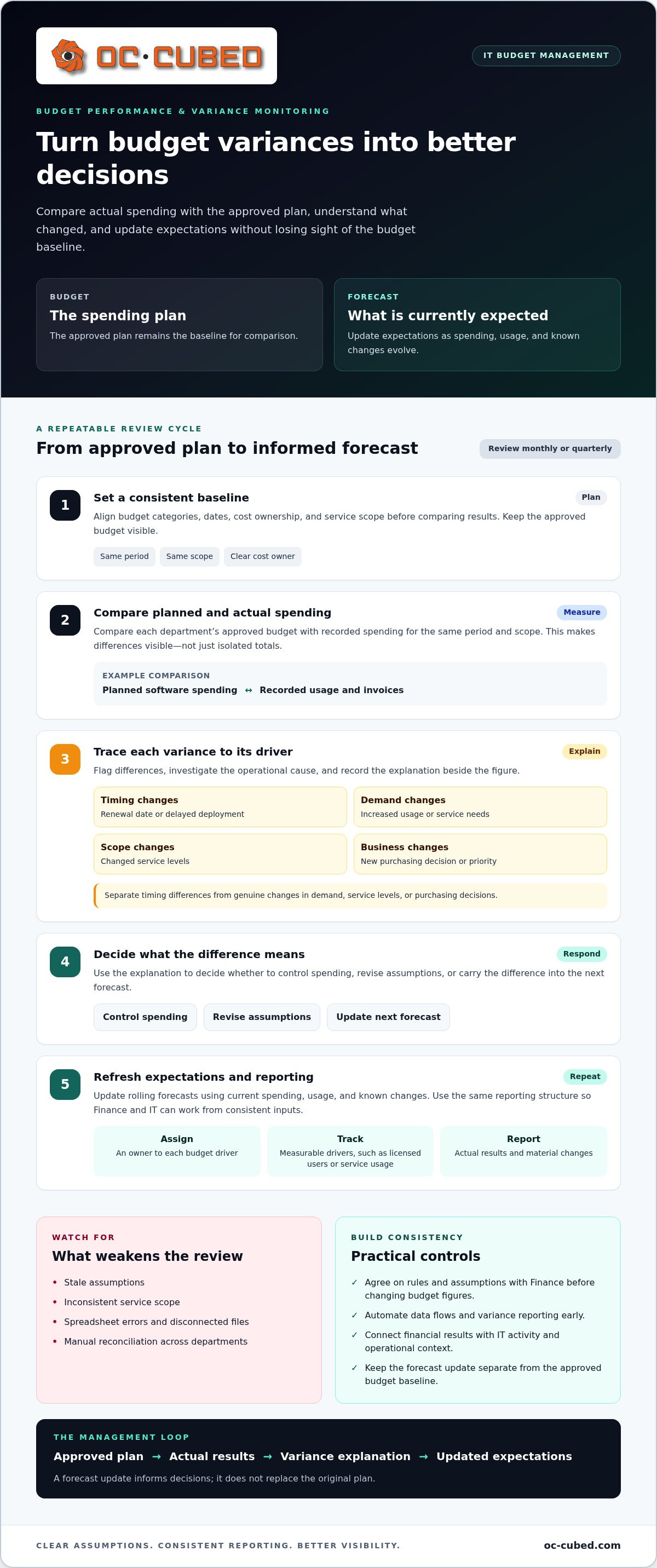
Traditional IT planning typically happens once a year, while rolling forecasts are updated throughout the year. Comparing actual spending with the approved plan helps teams spot changes early and account for them in future decisions.
IT budgeting services can bring structured analysis and reporting to a process led by internal teams. In-house leaders provide priorities, assumptions, and department context; the right support helps connect financial results with IT activity.
Common risks include stale assumptions, inconsistent service scope, and spreadsheet errors. Agree with Finance on rules and assumptions before changing budget figures, then automate data flows and variance reporting early to reduce manual reconciliation.
Budget Comparisons and Variance Analysis
Compare each department’s approved budget with actual spending for the same period and scope. Variance analysis shows where results differ and provides a basis for learning from past performance and setting future goals. For example, compare planned software spending with recorded usage and invoices. Separate timing differences from changes in demand, service levels, or purchasing decisions.
Variance Identification and Explanations
Start with a consistent report that aligns budget categories, dates, and cost ownership. Flag variances and trace each one to its operational driver, such as a renewal date, increased usage, delayed deployment, or changed business priority. Record the reason beside the figure. That context helps leaders decide whether to control spending, revise assumptions, or carry the difference into the next forecast.
Rolling forecasts make variance monitoring an ongoing management task rather than an annual review. Update expectations monthly or quarterly using current spending, usage, and known changes. For cloud services, usage trends help teams track costs and adjust spending to support business goals. Keep the approved budget visible as the baseline; a forecast update doesn’t replace the original plan.
- Assign a clear owner to each budget driver.
- Use measurable drivers, such as licensed users or service usage.
- Review actual results and explain material changes in reporting.
Spreadsheets can support early comparisons, but disconnected files make reconciliation harder as departments add data. Automating data flows and variance reporting helps Finance and IT work from consistent inputs. Network Monitoring and Configuration provides operational context for technology spending, while monthly reporting presents performance and variances in a repeatable format.
Budget performance monitoring compares actual results with the budget and reports variances. Keep the review focused on the relationship between the approved plan and recorded results, so exceptions remain visible. This creates a consistent way to see where performance differs from plan and focus attention on variances, not isolated totals.
Differences between budgets, forecasts, and projections
A budget sets the planned use of resources; a forecast describes expected results under current conditions. A projection models what could happen under a specific scenario.
Scenario Analysis and Trend Projections
Trend projections use historical results and current operating information to estimate likely outcomes. Scenario analysis changes an assumption, such as user growth or a delayed rollout, to show how it could affect spending. Keep the baseline forecast separate from each scenario. This helps accounting and IT leaders see which assumptions shape financial decisions.
For example, compare a stable staffing plan with a scenario in which a product launch increases demand for support. The forecast reflects expected workload under current plans; the projection shows the potential impact of the launch. Review the assumptions behind each version, including timing, service scope, and usage. This detail helps decision-makers judge whether an investment fits business priorities.
Agile project and product budgeting applies the same discipline in shorter work cycles. Teams divide a project into smaller components, review spending as work progresses, and adjust allocations based on stakeholder and team feedback. For a software rollout, leaders might reassess funding after each delivery stage instead of treating the initial estimate as fixed. This keeps the budget connected to progress and changing requirements.
Dedicated project management supports this process by coordinating scope, timing, ownership, and financial assumptions. A project manager can connect technical milestones with the forecast, flag dependencies, and document changes before they affect spending. For example, a delayed hardware delivery may shift implementation work into a later period. Clear project records help finance teams distinguish a timing change from a genuine increase in expected costs.
OPEX and CAPEX Planning
OPEX and CAPEX projections separate recurring operating expenses from capital investment planning. IT budgeting tools should account for both, so teams can assess ongoing service costs alongside major equipment or infrastructure purchases. For each line, record the cost driver, expected timing, and responsible department. This gives leaders a clearer view of how purchases and recurring commitments affect the plan.
Cloud, software, and infrastructure forecasts use historical data and current trends to estimate future costs and usage. A cloud forecast should connect usage assumptions with expected spending, while software planning accounts for subscriptions and renewals. Infrastructure projections should reflect planned equipment needs and project timing. Reviewing these assumptions together helps teams estimate the financial effect of growth or a changed technology plan.
- Keep budgets, forecasts, and scenario projections as distinct planning views.
- Record the assumptions behind each forecast and project estimate.
- Review OPEX and CAPEX together before approving technology commitments.
For projects involving network or infrastructure changes, network and infrastructure planning can help connect technical scope with financial assumptions.
What-if scenario planning and sensitivity analysis
An IT budget is shaped by business goals, technology priorities, expected usage, staffing, and operating costs. Scenario planning tests how changes in these drivers could affect resources, cash flow, and investment decisions.
To build a useful scenario, start with the current plan and change one assumption at a time. For example, model higher cloud usage, cost inflation, or customer churn, then compare the results with the baseline. Sensitivity analysis shows which variable has the greatest effect on expenses. This helps leaders focus on the assumptions most likely to change a decision.
Historical spending provides context, but it shouldn’t dictate the next plan. Pair past usage and expenses with current business priorities. Compare expected demand with available capacity, then allocate resources to services and projects that support agreed objectives. A scenario can show what happens if a proposed upgrade moves ahead or waits until a later planning cycle.
Cash flow forecasting connects planned IT spending with expected cash availability. It helps leaders see whether the timing of a major purchase could constrain liquidity or compete with another commitment. If the forecast indicates a shortfall, decision-makers can reconsider timing, adjust spending, or accelerate collections. Cash flow projections also support planning for expansion and other significant financial commitments.
Operational planning links day-to-day spending with measurable outcomes. Choose 5-7 dashboard metrics tied directly to strategic goals, such as service usage, project progress, or system availability. Use accurate data from integrated systems and review the measures consistently. A metric should inform a decision: if usage rises without corresponding business value, reassess the resource allocation or underlying assumption.
Methods and tools include scenario models, sensitivity analysis, historical data, and budgeting systems that combine financial, operational, usage, and cost-model data. Spreadsheets can organize assumptions, while automated data flows reduce manual consolidation and support repeatable analysis.
To measure ROI, compare an investment’s intended business benefits with its actual outcomes. Define the expected benefit before approval, then track relevant measures such as operating efficiency, project delivery, or avoided costs. Capital investment planning also weighs risk and expected return for equipment and long-term projects. Review results against the original assumptions to assess whether the investment delivered its intended value.
Use scenario results to guide, not replace, operational judgment. Finance and IT should agree on assumptions and service scope before revising budget figures. This shared process keeps resource choices connected to business priorities and gives leaders a clear basis for adjusting plans.
Scenario modeling and rolling forecasts
Scenario models show how changing assumptions could affect IT spending and business priorities. Rolling forecasts refresh expectations as actual results and strategic needs change.
Scenario Modeling
Build each model from a clear baseline, then adjust one driver at a time. For example, test higher cost inflation, customer churn, or revenue growth. Compare the effect on spending, resource needs, and expected outcomes. Best-case, worst-case, and expected scenarios help leaders assess choices without mistaking possibilities for the current forecast.
Effective scenario modeling connects financial assumptions to operational capabilities. A cloud expansion scenario, for instance, can change expected usage and capacity requirements. Document the assumption, its owner, and the decision it informs. IT and Finance can then assess whether a proposed change supports strategic goals or shifts resources away from a higher priority.
Use sensitivity analysis to find which assumptions have the greatest effect on a decision. A team evaluating an infrastructure investment could vary usage growth and cost inflation, then compare the resulting spending plans. Scenario planning also lets leaders stress-test major commitments before approval. Focus the model on changes that could alter the decision, rather than adding variables without a clear purpose.
- Set a baseline using current plans and assumptions.
- Change relevant drivers, such as usage or cost inflation.
- Compare outcomes and record the decisions each scenario supports.
Rolling Forecast Updates
A rolling forecast updates expectations monthly or quarterly instead of relying only on annual planning. Each update incorporates recent results, known changes, and revised assumptions. For example, a project delay can shift expected spending into a later period. Keep the approved budget separate so leadership can compare the original plan with the updated outlook.
Set a regular review schedule and assign ownership for each forecast input. Department leads can own operational assumptions, while Finance and IT align on scope and planning rules. Clear ownership helps teams explain changes and keeps forecast updates tied to real business activity.
Use tools that bring financial, operational, usage, and cost-model data together. A consistent model makes it easier to compare scenarios across updates. Communicate changes clearly, including what changed, why, and which strategic decisions may follow.
Scenario models and rolling forecasts work best together. The rolling forecast reflects the latest expected path; scenario analysis tests alternatives when conditions shift. Reviewing both gives leadership a practical basis for adjusting IT priorities while keeping resources aligned with business objectives.
Three budgeting and forecasting service levels
There’s no single standard for three budgeting and forecasting service levels. A practical comparison starts with how much planning support a team needs, how often it updates assumptions, and how far ahead it plans.
Foundational support establishes a clear baseline for one stable IT service. The team defines scope, cost drivers, and ownership, then organizes financial and usage data into a usable plan. For example, end-user computing can be a starting point when device counts and support needs are tracked consistently. This level suits teams that need a defined planning method before expanding it across departments.
Ongoing support adds regular performance reviews and forecast updates. IT and Finance review assumptions together, compare current information with the plan, and adjust as business needs change. Monthly or quarterly updates can reflect shifts in revenue expectations, usage, or project timing. This proactive process helps leaders identify emerging pressure and discuss options before the next annual planning cycle.
Complete support includes a budget and forecast one year out. That longer view can help leadership connect planned IT spending with business priorities and upcoming commitments. It should make assumptions visible, clarify which department owns each input, and show how changes affect the outlook. Teams can then use the forecast to coordinate financial planning with operational decisions.
Compare service levels by scope, review rhythm, data needs, and outputs. Ask what decisions each level supports: setting a baseline, monitoring current performance, or planning further ahead. Also consider whether Finance and IT can provide reliable cost, usage, and operational inputs. If those inputs are fragmented, start with a well-defined service and establish consistent reporting before expanding the process.
- Choose foundational support to establish a repeatable baseline.
- Choose ongoing support when assumptions need regular review.
- Choose complete support when leadership needs a budget and forecast one year out.
In the United States, consulting costs depend on scope, data readiness, reporting cadence, and forecast horizon; a quote sets the price for the defined work.
Choose the service level that matches the decisions your team needs to make now. Revisit that choice as the business adds services, changes priorities, or needs more frequent planning. A clear scope keeps the work focused on useful outcomes instead of adding reporting without a decision behind it.
For Complete, both the budget and forecast extend one year out, giving leaders a shared horizon to consider upcoming commitments alongside current assumptions.
OC Cubed - Your trusted MSP: Remote IT Support
OC Cubed - Your trusted MSP provides Remote IT Support for businesses that need dependable help managing day-to-day technology. When IT operations, security needs, or Microsoft 365 maintenance take attention away from planning, practical support can help teams keep those responsibilities organized.
Microsoft 365 Tenant Maintenance supports the ongoing management of a core business platform. Security Threat Detection and Remediation, Endpoint Protection / Antivirus, and Email Security with Proofpoint address different parts of a business’s security needs. These services can help leaders understand the operational work behind their IT environment as they review priorities and resource plans.
If your team needs remote IT support or help maintaining its technology environment, contact OC Cubed - Your trusted MSP, or visit oc-cubed.com.
Turn your IT plan into a clear next step
A useful financial plan depends on operational information that stays connected to leadership decisions. Assign an owner to each assumption, define how updates reach Finance, and make review part of the organization’s planning rhythm. This allows changing technology needs to inform decisions rather than arrive as surprises.
IT budgeting and forecasting services can support that process, but sound planning also depends on a well-managed IT environment. OC Cubed - Your trusted MSP provides Remote IT Support, Microsoft 365 Tenant Maintenance, and Security Threat Detection and Remediation. These services help businesses manage everyday support, platform upkeep, and security needs alongside their financial planning.
Choose a practical next step: identify the IT issue that most affects your team’s ability to plan, then connect it to a clear owner and business priority. A focused start gives your team a stronger foundation for future decisions.
Steady planning and dependable IT support can help your business move forward with greater clarity.
Frequently Asked Questions
What is IT Budgeting?
IT budgeting plans how an organization will fund technology needs and manage related expenses. It can include planned renewals, equipment replacement, software, infrastructure, and staffing. Start by listing upcoming commitments, such as a software renewal or device replacement cycle, and connecting each item to its business purpose. This helps decision-makers distinguish essential operating needs from requests that can wait.
What is a rolling forecast in IT?
A rolling forecast is an updated view of expected IT spending that incorporates new information as the year progresses. Rather than ending at the original budget period, it extends the outlook with each update. For example, a postponed system upgrade can change the expected timing of related expenses. The revised forecast shows how that shift affects later plans without rewriting the original budget.
What do IT budgeting and forecasting services include?
IT budgeting and forecasting services can organize financial, operational, usage, and cost-model information into a planning process. The work may include documenting assumptions, identifying cost drivers, assessing planned technology investments, and preparing reports for decision-makers. For example, teams can link a software renewal to its department, business purpose, and expected usage. The scope should match the organization’s decisions, not add reporting without a clear use.
How often should an organization update its IT budget forecast?
Organizations can update IT forecasts monthly or quarterly, depending on how quickly spending and priorities change. Monthly reviews can suit teams tracking active projects or changing service usage; quarterly reviews may fit steadier plans. Revisit assumptions sooner after a major change, such as a delayed deployment, new business initiative, or renewal adjustment. Keep the approved budget available as a reference when comparing revised expectations.
What steps are involved in creating an IT budget and forecast?
Start by defining business goals and the technology priorities that support them. Gather financial, operational, usage, and cost information, then document assumptions with Finance and department owners. Build a forecast from those inputs and use it to shape the spending plan. Next, compare actual activity with expectations, explain significant changes, and revise the forecast regularly. Clear ownership makes each update easier to act on.

Article by
Peter Irizarry
Peter Irizarry founded OC Cubed, LLC in 2023 to help small to mid-sized businesses stop worrying about downtime and cybersecurity threats. A frequent speaker on SMB digital transformation, Peter is passionate about translating complex IT roadmaps into plain-English business growth strategies. He resides in North Texas with his family.


