

A disruption tests more than your technology. ISO 22301:2019 defines business continuity as an organization’s capability to keep delivering products and services within acceptable time frames and at predefined capacity during a disruption. Business continuity planning for IT connects that goal to the systems and data essential to keeping work moving.
Backups and recovery are important, but technology is only one part of business continuity planning IT. People, facilities, vendors, and communication methods can all determine whether essential work continues when normal operations are interrupted.
This article explains how business continuity differs from disaster recovery, how a business impact analysis helps prioritize functions and threats, and what to include in a practical plan. It also covers how testing, employee training, and regular reviews help keep the plan useful as operations change.
Key Takeaways
- Use a vulnerability assessment and business impact analysis to connect potential threats with the business functions and systems they could disrupt.
- Set recovery priorities by documenting acceptable downtime and identifying when each critical function needs to be restored.
- Plan for people, vendors, facilities, and communications as well as technology, so the response can continue when normal channels are unavailable.
- Keep continuity and disaster recovery aligned: one supports operations broadly, while the other focuses on restoring IT infrastructure and business systems.
- Practice the plan with employees, test recovery capabilities, and review it regularly so responsibilities and procedures stay relevant.
What is business continuity?
Business continuity is an organization’s ability to keep delivering products and services during disruption, within acceptable time frames and at predefined capacity. ISO 22301:2019 defines this capability; vulnerability assessment and business impact analysis help turn it into practical priorities. Business continuity planning IT leaders develop should connect those findings to operational decisions.
Vulnerability Assessment and Business Impact Analysis
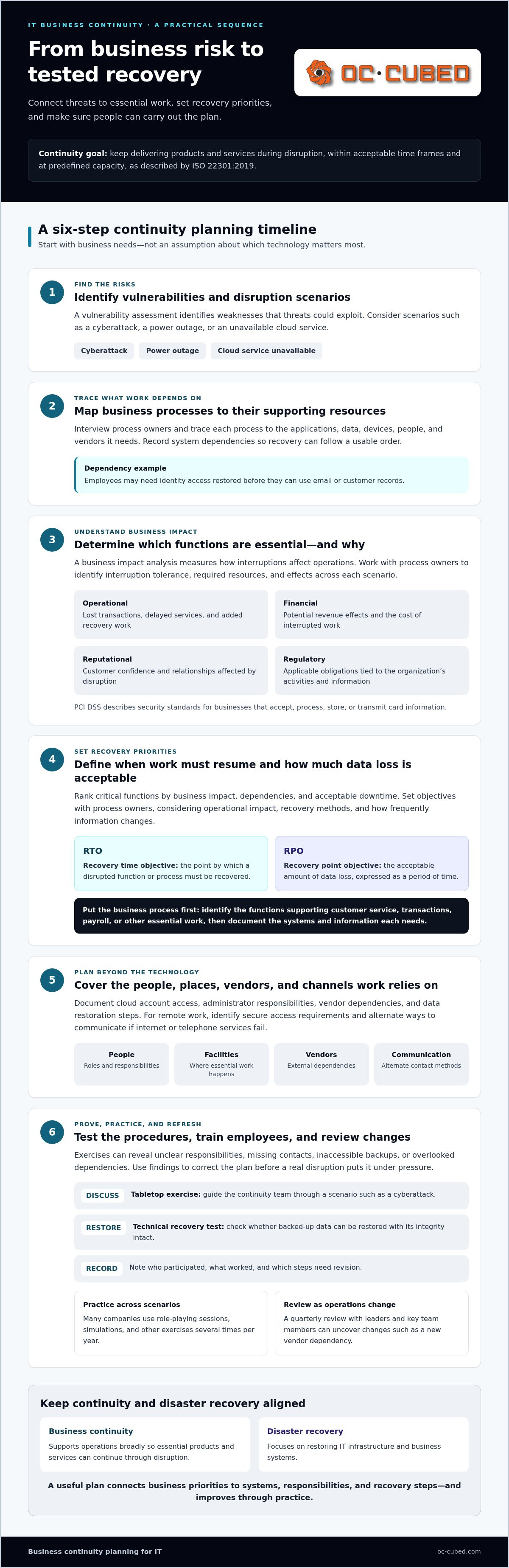
A vulnerability assessment identifies weaknesses that threats could exploit, while a business impact analysis measures how interruptions affect operations. Together, they show which risks matter most and where safeguards can reduce harm. For IT systems, trace each business process to its applications, data, devices, people, and vendors. Then consider scenarios such as a cyberattack, power outage, or unavailable cloud service.
To conduct an IT business impact analysis, interview process owners, map system dependencies, and record operational, financial, reputational, and regulatory effects. Identify how long each process can tolerate interruption and what resources it needs to resume. In the United States, ISO 22301 provides a framework for a documented business continuity management system. FEMA also provides an operational and financial impact worksheet for continuity analysis.
Critical IT Functions and Recovery Priorities
A critical IT function is a system or service whose disruption prevents an important business process from operating. The analysis helps rank functions by business impact, dependencies, and acceptable downtime. For example, an organization may need identity access before employees can use email or customer records. Restoring systems in dependency order helps avoid recovering a tool that remains unusable.
Set priorities with process owners, not technology teams alone. Record which functions support customer service, transactions, payroll, or other essential work. Then document the systems and information each function requires. This ensures recovery priorities reflect real operational consequences, rather than assumptions about which application seems most important. Business continuity planning IT teams maintain should link every system to the business process it supports.
Financial, Reputational, and Regulatory Impacts
A disruption can affect revenue, customer confidence, and an organization’s ability to meet applicable obligations. A payment outage, for example, may interrupt sales, delay customers, and leave staff handling work manually. Data loss or a prolonged service interruption can also damage trust, particularly when customers depend on timely access to information.
Assess these impacts by scenario and business function. Identify lost transactions, added recovery work, delayed services, and possible effects on customer relationships. Regulatory considerations depend on the organization’s activities and information; PCI DSS describes security standards for businesses that accept, process, store, or transmit card information. For small and midsize businesses, the price depends on the case and is given after a quote request; cost factors include scope, system complexity, recovery requirements, and available internal resources.
Recovery Objectives and IT Continuity Practices
A recovery time objective (RTO) is the point by which a disrupted function or process must be recovered. A recovery point objective (RPO) sets the acceptable amount of data loss, expressed as a period of time. Set both with process owners, weighing operational impact, available recovery methods, and how frequently information changes.
For cloud services, document account access, administrator responsibilities, vendor dependencies, and the steps for restoring needed data. For remote work, identify secure access requirements and alternate communication methods in case internet or telephone services fail. Test these arrangements in realistic exercises. Objectives are useful only when employees can follow the recovery steps and the systems support them.
Plan testing, employee training, and review
A continuity plan needs practice, review, and updates to remain useful as operations change. Testing checks whether procedures work, while training prepares people to carry them out.
Testing and Validating Continuity Plans
Testing and validating a continuity plan means exercising its procedures and checking whether recovery steps work as intended. Practice can reveal unclear responsibilities, missing contacts, inaccessible backups, or overlooked dependencies. These findings give the organization specific corrections to make before a real disruption puts the plan under pressure.
Use different exercises to test different assumptions. A tabletop discussion can guide a continuity team through a cyberattack scenario, while a technical recovery test can check whether backed-up data can be restored with its integrity intact. Test backup systems and data integrity, then record who participated, what worked, and which steps need revision.
Test plans repeatedly across different risk scenarios rather than relying on one successful exercise. Many companies use role-playing sessions, simulations, and other exercises several times per year. Ready.gov provides a situation manual and resources for planning and evaluating tests. Use exercise results to improve the plan, not as proof that every procedure will work.
Reviewing and Refining Plans
Reviewing and refining a continuity plan means checking its procedures, contacts, and assumptions against current operations. A quarterly review with leaders and key team members responsible for execution can uncover changes that affect a response. For example, a new vendor dependency or a change in staff responsibilities may call for updated recovery instructions.
Set a review schedule and assign responsibility for keeping each section current. Check contact details, decision-making roles, backup locations, system dependencies, and communication alternatives. A yearly review can provide a broader assessment, while quarterly reviews help teams address operational changes sooner. Record revisions so employees know which version to follow.
Training turns written procedures into actions employees can perform under pressure. Train continuity teams on their roles, and make the plan known across the organization, including to staff outside the response team. Annual data security and emergency-procedure training for all staff can reinforce how to report an incident and follow instructions. Tabletop exercises also let employees practice decisions and communication before an actual event.
After each exercise, review feedback with the people who carried out the work. Update unclear steps, then test the changes in a later exercise. For support with technical recovery readiness, explore IT support for business continuity.
Business continuity and disaster recovery differences
Business continuity planning covers how an organization maintains essential operations during a disruption. Disaster recovery focuses on restoring IT infrastructure and business systems, supporting the broader continuity effort.
Continuity Plans and Recovery Plans
A business continuity plan sets out how people, processes, facilities, vendors, and technology support essential operations through a disruption. A disaster recovery plan focuses on bringing affected IT infrastructure and business systems back into service. The distinction matters because restoring a server alone may not restart a business process if staff, suppliers, or communication channels remain unavailable.
Consider an organization whose order system becomes unavailable after a cyberattack. Its disaster recovery plan may guide the restoration of the system and its data from backup. The continuity plan also addresses how staff handle urgent orders, communicate with customers, and coordinate with relevant vendors during recovery. One plan focuses on IT restoration; the other connects that work to ongoing operations.
Disaster recovery may form part of a broader business continuity plan. Treating the plans as separate but connected documents helps teams assign responsibilities without leaving gaps. The IT team can own system restoration steps, while business leaders define which services continue and how staff manage them. Both plans should use consistent priorities and clear handoffs.
ISO 22301 provides a framework for a documented business continuity management system. It can help an organization structure its broader approach, while its disaster recovery plan describes technology-focused recovery measures. The right relationship is practical: IT recovery supports the business functions that continuity planning has identified as essential.
Emergency Response and Crisis Management
Emergency response covers immediate actions to address a threat and protect people, facilities, or information. Crisis management coordinates decisions and communications as leaders assess the event. Recovery then works to restore affected operations. Connecting these activities helps employees understand what to do first and who has authority to make decisions.
For example, during a building power outage, emergency procedures may direct staff to leave the affected area. Crisis managers can decide which services need alternate arrangements, while IT teams assess system availability and begin relevant recovery steps. A continuity plan connects these actions to business priorities, rather than treating the outage as only a facilities or technology issue.
Clear roles reduce confusion during a fast-moving incident. The plan should identify decision-makers, assign responsibilities, and name alternate personnel in case primary responders are unavailable. It should also explain how teams share status updates if usual telephone or internet channels fail. These details support coordinated emergency response, crisis management, and recovery.
Once the immediate threat is controlled, recovery moves from temporary workarounds toward stable operations. Teams can confirm which systems and services are available, communicate changes to affected employees, and resume processes in a deliberate order. Linking emergency actions to continuity and disaster recovery procedures gives the organization a shared path from response to restored business activity.
Identifying critical business functions and threats
Critical functions are the activities an organization must sustain to serve customers and operate effectively. For cybersecurity incidents and ransomware, an IT continuity plan should identify who declares an incident, how affected systems are isolated, how teams communicate, and which services must be restored first.
Identifying Critical Business Functions
Identifying critical business functions means determining which activities would have the greatest operational impact if interrupted. This helps leaders direct limited recovery resources toward work that keeps the organization functioning. A customer support team, for example, may need customer records and communication tools, while finance may depend on payment and accounting systems.
Start with business processes, not just a technology inventory. Ask each process owner what work must continue, which tools and information it depends on, and what happens if those resources become unavailable. Then trace dependencies across teams. An order process might rely on staff, an online service, a payment provider, and access to inventory data.
Compare the impact of interruption across customer service, sales, internal operations, and other business functions. Note which activities support other critical work. If identity access fails, for instance, employees may lose access to several applications at once. Mapping this connection reveals a shared dependency that could affect multiple functions.
Include people and external dependencies in the assessment. A function may depend on a particular role, vendor, facility, or alternate communication channel. Documenting these links helps the organization distinguish a genuinely critical process from a system that is merely familiar or frequently used.
Threat Identification and Risk Assessment
Threat identification lists events that could interrupt critical functions; risk assessment considers their likelihood and operational impact. This matters because a natural disaster, power outage, cyberattack, public health emergency, or supply chain issue can affect different dependencies and require different safeguards.
Assess each threat against the functions and resources already mapped. For a ransomware scenario, consider whether the attack could block access to files, applications, or administrative accounts. Identify which business processes would stop, how teams would communicate, and what alternatives could keep essential work moving.
Prioritize risks by considering potential consequences, the organization’s exposure, and existing safeguards. A threat affecting one nonessential tool may rank below one that could disable shared access across several functions. Record the reasoning so leaders understand why one mitigation takes priority over another.
Mitigation should address the specific weakness or dependency identified. An organization might improve access controls, strengthen backup practices, or clarify incident reporting and response responsibilities. For email-based threats, Email Security with Proofpoint can help address email security risks, while Security Threat Detection and Remediation supports threat response. Reassess risk after safeguards change, since a new vendor, system, or process can alter exposure.
Business continuity planning
A business continuity plan documents how an organization will respond to interruptions and sustain essential work. Its IT elements connect business priorities to the systems, people, data, vendors, and recovery actions needed to keep operations moving.
Key components include a business impact analysis, prioritized recovery measures, assigned continuity-team roles, emergency contacts, and training and exercises. For IT, include system and data dependencies, backup locations, acceptable downtime, alternate communications, and procedures for restoring critical services.
According to the Federal Emergency Management Agency, business continuity training presents a six-step planning process: prepare to create a plan, define objectives, identify and prioritize risks and impacts, develop strategies, define teams and tasks, and test the plan. These steps connect risk analysis to practical decisions. Objectives clarify what the organization must maintain; assigned tasks show who will carry out each strategy.
Turn these components into usable documents, not a general statement of intent. For each critical process, record its owner, the systems and vendors it depends on, and the consequences of interruption. Then describe how the team will respond if a dependency fails. A payment process, for example, may need a documented alternate workflow while its supporting system is restored.
- Decision structure: Name primary decision-makers and alternate personnel if they cannot respond.
- Operational responsibilities: Assign who communicates with employees, vendors, and customers during an interruption.
- IT recovery measures: Document system restoration steps, backup-data locations, and recovery priorities.
- Communication alternatives: Specify how teams share instructions if telephone or internet service is unavailable.
- Practice and maintenance: Set expectations for training, testing, and keeping procedures current.
Keep these details connected. A contact list is useful only if the assigned responder can access it during an outage. A backup location matters only if the team knows what data it contains and how it supports recovery. Clear links between responsibilities, resources, and processes help employees act without relying on one person’s memory.
Make the plan usable under pressure. Store accessible copies of essential procedures, identify who can approve alternate work arrangements, and explain how leaders will share status updates. Include vendors whose services support critical operations, along with the contact information needed to coordinate contingency actions. The plan should reflect actual dependencies, not just the organization’s internal systems.
Finally, connect planning to implementation. Assign an owner to each action, record unresolved gaps, and use exercises to check whether instructions work. Changes to systems, personnel, or suppliers can alter dependencies, so update relevant procedures when operations change. A continuity plan becomes operational when people can find it, understand their roles, and follow its recovery measures.
OC Cubed - Your trusted MSP: Remote IT Support
OC Cubed - Your trusted MSP helps businesses support continuity through Remote IT Support and practical IT protection. Turn to the team when you need help maintaining access to essential systems, reducing security risks, or keeping Microsoft 365 operations maintained.
Security Threat Detection and Remediation can support your response to threats, while Endpoint Protection / Antivirus helps protect business devices. These services complement your continuity plan by addressing key parts of your IT environment. They work alongside clear recovery priorities, tested procedures, and assigned responsibilities.
For IT support that fits your business operations, contact OC Cubed, your managed IT provider, or visit oc-cubed.com.
Make Continuity Part of How You Operate
Business continuity planning for IT works best as an ongoing operating discipline, not a document completed and forgotten. As systems, suppliers, and responsibilities change, revisit the assumptions behind your response and make continuity part of decisions about new tools and processes.
A practical next move is to assign an owner to track continuity actions and bring unresolved risks to leadership. That keeps decisions connected to business priorities. OC Cubed - Your trusted MSP offers Remote IT Support, Microsoft 365 Tenant Maintenance, and Security Threat Detection and Remediation to support the IT environment behind those plans.
With the right support, your team can focus on keeping essential work moving and adapting as the business changes.
Build on your plan and keep moving forward with confidence.
Frequently Asked Questions
What is IT business continuity planning and how does it differ from disaster recovery?
IT business continuity planning prepares an organization to sustain essential work when technology is disrupted; disaster recovery focuses on restoring affected IT systems. For example, if a payroll application becomes unavailable, continuity measures can help the payroll team manage deadlines and communicate with employees while recovery work restores access. This distinction helps leaders plan both to keep work moving and to bring technology back online.
How do you create an IT business continuity plan step by step?
Start by selecting a plan owner and involving the people who manage important business processes. Gather their priorities, dependencies, and response procedures, then assign decision-making and communication responsibilities. Next, document the actions teams will take during a disruption and make the instructions accessible to responders. For example, specify who can authorize temporary workarounds and how staff will receive updates if their usual collaboration system is unavailable.
What are common IT continuity risks and how can organizations reduce them?
Common risks include cyberattacks, power outages, damaged equipment, cloud-service interruptions, and vendor failures. Reduce exposure by applying safeguards to the systems and dependencies that support essential work. For example, limit administrative access to authorized roles, maintain backups, and document how teams will operate if a cloud application is inaccessible. Clear incident reporting procedures also help employees raise concerns promptly and give response teams a defined starting point.
How often should an IT business continuity plan be tested and updated?
Review the plan at least quarterly with leaders and key team members responsible for carrying it out, and update it when operations, systems, or vendors change. Exercise the plan several times per year to expose practical gaps. For example, a staff departure may leave a response task without an assigned owner, while a new cloud tool may change system dependencies. Record revisions so teams know which procedures are current.
What are IT business continuity plan testing methods and exercises?
Useful methods include tabletop discussions, role-playing, simulations, and technical recovery tests. A tabletop exercise can ask a response team what to do after a suspected ransomware incident, without changing live systems. A technical test can check whether a selected backup can be restored and accessed by the right staff. After each exercise, record decisions, delays, and unclear instructions, then assign owners to address the findings.

Article by
Peter Irizarry
Peter Irizarry founded OC Cubed, LLC in 2023 to help small to mid-sized businesses stop worrying about downtime and cybersecurity threats. A frequent speaker on SMB digital transformation, Peter is passionate about translating complex IT roadmaps into plain-English business growth strategies. He resides in North Texas with his family.


