

Repeated security failures, serious misconduct, missed commitments, or technology that no longer supports your business can mean it is time to end an IT support relationship. The clearest reasons to fire your IT company are persistent problems that leave important risks unresolved, especially after you have raised your concerns and given the provider an opportunity to respond.
It is reasonable to expect dependable support and clear communication. A single mistake may warrant a conversation, but recurring problems can affect security, productivity, and your ability to plan with confidence.
This article covers warning signs involving security, conduct, service performance, and technology. It also explains how to document concerns, protect access to business systems, and prepare for a transition, so you can make a deliberate decision rather than rush it.
Key Takeaways
- Look for recurring security gaps, unsafe conduct, or mishandled confidential information that put the business at risk.
- Separate a one-time service failure from a pattern of missed commitments, and compare actual support with the agreement.
- Document performance concerns and whether expectations, feedback, and a reasonable chance to improve were provided.
- Plan the transition carefully, including system access, records, and continuity of essential IT support.
- Assess whether your IT support can keep pace with changing technology and the business goals it needs to serve.
Business risks involving security, safety, and reputation
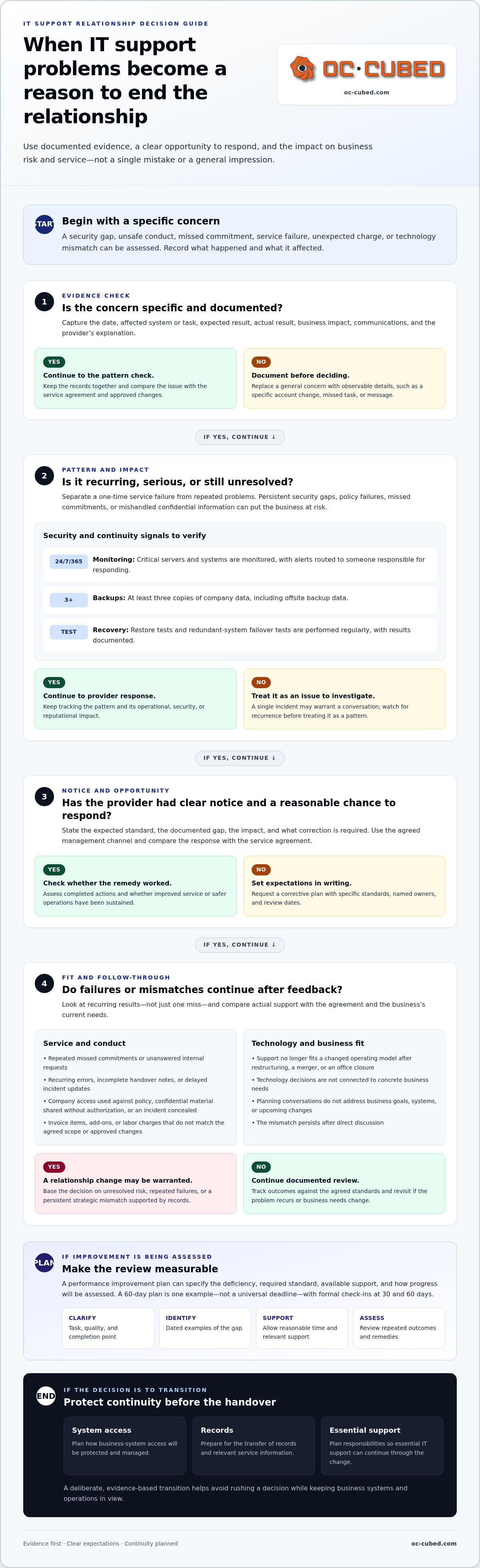
Security gaps, unsafe behavior, or mishandled company information can expose a business to operational and reputational harm. A provider that repeatedly ignores documented policies, leaves known risks unresolved, or cannot explain its response may no longer be dependable. Investigate a single incident, but a continuing pattern after clear notice can become one of the reasons to fire your IT company.
Look for specific evidence, not just a general sense that systems are unsafe. Record the date, affected system, business impact, and provider’s explanation. Security Threat Detection and Remediation and Email Security with Proofpoint are examples of services that address threat and email risks.
- Monitoring: Critical servers and systems should be monitored 24/7/365, with alerts routed to someone responsible for responding.
- Backups: Keep at least three backups of company data, including offsite backup data, so one incident does not erase every copy.
- Restore tests: Test backup restores regularly and document whether each test succeeds. A backup that cannot be restored does not provide usable recovery.
- Failover: Test redundant systems and failover regularly. A written test result can reveal whether the backup environment works as expected.
Conduct can also create security and reputational risks. If a provider uses company access in ways that violate policies, shares confidential material without authorization, or conceals an incident, preserve relevant records and limit access as appropriate. Focus on observable behavior, such as a specific account change or message, rather than assumptions about intent.
Warning signs of hidden fees or unexpected charges include invoice items that do not match the agreed scope, recurring add-ons that were not clearly explained, and extra labor charges without a description of the work. Compare each charge with the contract, service records, and approved changes, then document discrepancies in writing.
A job elimination or restructuring can also change what the business needs from IT. If a merger, office closure, or reduced headcount changes the systems in use, compare the current support arrangement with the new operating model. The relationship may need to end or change when its scope no longer fits the organization’s actual needs.
Technology strategy matters, too. Schedule regular planning conversations about business goals, systems, and upcoming changes. If the provider cannot connect technology decisions to a concrete business need, such as secure remote access or system consolidation, document the gap and its impact. Base the decision to end the relationship on evidence: unresolved risk, repeated policy failures, or a strategic mismatch that persists after direct discussion.
Poor work performance and performance improvement plans
Compare the provider’s recurring fee with the full cost of in-house staffing or switching providers. Include recruiting, training, management, tools, coverage, and transition work. The best comparison weighs the full scope against the business outcomes delivered.
Performance Deficiencies and Job Standards
A performance deficiency is a gap between agreed standards and documented results. Clear standards help distinguish a missed target from a vague impression of poor performance.
For example, record the expected completion date for a network change, the actual date, and its business impact. A documented example of a monthly quota missed by 40% in Q1 shows how a specific gap can be described. For an IT provider, define measurable outcomes such as accurate configuration records, completed maintenance, and timely incident updates.
IT Staff Performance Issues
IT staff performance issues include recurring problems with assigned duties, communication, attendance, or following company policies. Unresolved gaps can delay projects and leave employees without the support they need to work.
Examples include repeated errors in firewall changes, unanswered internal requests, or incomplete handover notes. Before firing an employee, document each incident and consider causes such as inadequate training or unclear instructions. For provider staff, track recurring problems and their effect on service, then raise them through the agreed management channel.
A performance improvement plan turns a concern into written expectations and review points. It should identify the specific deficiency, the required standard, available support, and how progress will be assessed. A 60-day plan is one example, not a universal deadline. Formal check-ins at 30 and 60 days can show whether progress is sustained or short-lived.
Keep records as problems occur. A useful log includes the date, task, expected and actual results, communications, and operational impact. Share examples with the responsible manager and request a corrective plan with named owners and review dates. For a provider, compare its response with the service agreement and record whether agreed remedies were completed.
- Clarify the standard: Specify the expected task, quality, and completion point.
- Identify the gap: Use dated examples rather than general descriptions.
- Allow improvement: Set reasonable review points and provide relevant training or support.
- Assess the pattern: Consider repeated outcomes, not one isolated mistake.
Cost comparisons should include transition effort as well as service delivery. An in-house employee may require recruiting, onboarding, tools, and management; changing providers can involve transferring records, access, and responsibilities. Compare these factors with the work actually covered. If infrastructure tasks are central to the gap, firewall and switch management is one relevant service to consider.
Preparing for and communicating a termination
A controlled transition protects access, records, and daily work. Start by reviewing the contract, identifying a replacement plan, and documenting responsibilities.
Communication and Collaboration Problems
Communication and collaboration problems involve repeated failures to share useful updates, coordinate work, or respond through agreed channels. They matter when unanswered helpdesk requests or unclear handoffs delay decisions and reduce productivity.
Keep a dated record of each complaint, the issue raised, and its business impact. For example, note when a blocked employee request delayed a scheduled project, then record the provider’s response. This creates a clear basis for discussing a transition instead of relying on general frustration.
Before termination, name an internal owner for business decisions and a technical contact for open work. List active projects, unresolved incidents, and the person responsible for each handoff. Tell employees who rely on support about the change, including where to direct urgent requests during the transition.
Contract Terms and Notice Periods
Contract terms and notice periods define how either party can end the relationship and what happens afterward. Reviewing them early helps prevent missed deadlines, unexpected obligations, and gaps in support.
Check the termination clause, renewal language, required notice method, and any exit or transition assistance terms. Review ownership and return of company data, documentation, credentials, equipment, and third-party accounts, too. Some U.S. states require employers to explain an employee’s termination reason; vendor contracts are separate, so follow the agreement’s wording and applicable requirements.
To switch providers without disrupting operations, build a transition schedule around business-critical systems. Identify the incoming support owner, open tickets, scheduled changes, key contacts, and essential access. Agree on the order for transferring responsibilities, then track each handoff to completion before closing the old support channel.
Transfer data through approved secure channels, not ordinary email or shared documents. Inventory passwords, administrator accounts, backup locations, recovery instructions, network diagrams, and system records. Control the credential handoff, limit access to authorized recipients, and rotate passwords after the transition. Confirm that the new provider can access required backups and documentation before changing system ownership.
Keep communication factual and concise. State the decision, effective date under the contract, transition responsibilities, and process for outstanding work. Retain written notices and acknowledgments. If a provider disputes a complaint, respond with dated examples and specific service impacts rather than personal judgments.
Protect continuity by assigning an owner to each operational task. Confirm who handles support requests, approves system changes, and communicates incidents during the handover. A written checklist can reveal missing records or access before they interrupt work. Close the relationship only after essential responsibilities have moved and business users know where to get help.
Adaptability to changing technology
An IT relationship must keep pace as systems, work patterns, and business needs change. A provider that cannot adjust its approach may leave employees relying on outdated processes, even when the technology still works. The goal is not to adopt every new tool, but to recognize when a change affects security, compatibility, support, or business operations.
Consider a company moving more work to cloud applications while its support model still assumes employees work from one office. Access, device management, and support procedures may need to change together. If the provider dismisses these needs or cannot explain a practical way forward, document the business impact and the response you requested. A repeated inability to adapt can weaken the relationship.
The old model of hiring one IT technician for every 20-30 people no longer works. Businesses need support that can respond to changing systems and demands, rather than depending on a fixed staffing ratio. The right approach depends on the organization’s technology, operating model, and support needs. A small firm with cloud-based workflows may need a different mix of expertise than a company running specialized systems.
Adaptability also means routine technology upkeep. Regularly install Microsoft updates on Windows computers to address known issues and keep systems current. If updates repeatedly go unaddressed, ask why, which devices are affected, and what the maintenance plan is. A pattern of ignored updates may point to broader problems with planning or follow-through, especially when employees report the same issue across multiple computers.
Business priorities change, too. A new location, acquisition, remote-work policy, or software rollout can alter support requirements. IT support should meet regularly with business leaders to discuss goals and technology needs. These conversations help determine whether current systems still fit the work, what needs to change, and who will manage it. Without that connection, technology decisions can fall behind operational needs.
Use practical signs to assess whether the provider can adapt:
- Change planning: For a new application, identify compatibility needs, affected users, and the support plan before launch.
- Clear explanations: Ask for plain-language reasons when a requested change is delayed or declined.
- Follow-through: Record agreed actions and compare completed work with the stated plan.
- Business alignment: Tie technology recommendations to a specific goal, such as supporting remote access or a new workflow.
Adaptability involves conduct as well as technical knowledge. A provider may need time to assess a new platform, but should communicate what it is evaluating and how the decision affects the business. When technology changes, the provider should help clarify the impact, identify practical next steps, and explain trade-offs. Persistent resistance, unclear ownership, or recommendations disconnected from business needs can be reasons to reconsider the arrangement.
What are signs an IT provider is not meeting its service level agreement?
An SLA sets measurable expectations for support, monitoring, maintenance, and communication. Warning signs include missed response commitments, repeatedly unresolved tickets, incomplete reports, and work outside agreed procedures. Compare service records with the specific terms in your agreement, not assumptions about what support should include.
Response time is one clear measure. A support team should respond within 15 minutes or fewer when contacted for support. Check the SLA’s definition of response: an automated ticket acknowledgment may not mean a technician has reviewed the issue. For example, compare the time you reported a network outage with the time a support person began addressing it.
Response and resolution are different measures. A provider may acknowledge a ticket promptly but leave the underlying issue unresolved. Review ticket histories for repeated closures followed by reopened requests, recurring fixes for the same problem, or updates that do not explain the next action. If an employee reports the same email access failure several times, it may be a persistent issue rather than separate incidents.
Check whether the SLA defines priority levels and how support handles each one. A company-wide outage should not be treated like a routine software installation request. Compare the assigned priority with the business impact, then record any mismatch. Look for clear ownership, progress updates, and escalation when the first response does not restore service.
Use a simple review process to determine whether missed service is a pattern:
- Collect records: Save ticket numbers, report times, responses, status changes, and closure notes.
- Match terms: Compare each ticket with the SLA’s response, escalation, and reporting commitments.
- Describe impact: Note examples such as delayed payroll processing or interrupted customer service.
- Request correction: Send the provider a concise summary and ask for a written plan addressing each recurring gap.
Monthly reporting can make performance easier to assess. Compare the report with your ticket records and look for missing incidents, unclear categories, or totals that do not match employee experience. If the report shows completed work but users still face the same disruption, ask how completion was defined and what follow-up remains.
An SLA review should also determine whether expectations are practical and still fit the business. A new application, remote-work arrangement, or change in operating hours may alter support needs. Document the revised requirement and discuss whether the agreement needs adjustment. If missed commitments continue after clear discussion and a reasonable correction period, repeated failure may justify ending the relationship.
OC Cubed - Your trusted MSP: Remote IT Support
OC Cubed provides Remote IT Support for businesses that need dependable help with everyday technology and ongoing system concerns. If you are reviewing your provider because support gaps, security concerns, or poor follow-through are affecting work, start by defining what your IT support needs to deliver.
OC Cubed’s services include Microsoft 365 Tenant Maintenance, Endpoint Protection / Antivirus, and Security Threat Detection and Remediation. These offerings address common needs such as maintaining Microsoft 365 environments, protecting endpoints, and responding to security threats. The right fit depends on the support and protection your business needs.
Contact OC Cubed or visit oc-cubed.com to discuss your IT support needs.
Make Your Next IT Decision With Confidence
Deciding whether to end an IT relationship is also an opportunity to define what better support should look like. The reasons to fire your IT company matter most when they reveal a persistent gap between the support your business needs and the work being delivered. Use that insight to set clear priorities for what comes next, such as stronger security oversight, dependable user support, or technology planning aligned with business goals.
OC Cubed offers Remote IT Support, Microsoft 365 Tenant Maintenance, and Security Threat Detection and Remediation. These services can help businesses seeking practical support for daily technology needs, Microsoft 365 administration, or security concerns. A considered transition can give your team a clearer foundation for managing technology and focusing on business priorities.
Take the next step with a clear view of your needs and a plan for moving forward.
Frequently Asked Questions
Is It Time to Fire Your IT Support?
It may be time to end the relationship when recurring problems continue after you have raised them clearly and agreed on corrective actions. For example, if a planned system change repeatedly stalls and the provider cannot clarify ownership or next steps, assess the business impact and its response pattern. A single mistake may call for discussion; persistent failures that leave important needs unmet warrant a closer review.
What are the most common reasons businesses fire their IT company?
Common reasons to fire your IT company include unresolved security concerns, repeated service failures, poor communication, and support that no longer fits business needs. A provider may also fall short if it cannot explain how its work supports a new operating model, such as a shift to cloud-based workflows. Assess the pattern and its impact rather than treating one frustrating interaction as proof that the entire relationship has failed.
How do poor response times and unresolved IT issues affect business operations?
Poor response and unresolved issues interrupt work that depends on technology. If a shared system becomes unavailable, employees may be unable to complete customer orders, access records, or coordinate a project. Repeated workarounds can also create inconsistent information, such as updates saved in separate files. Track which tasks are affected and how disruption spreads across teams. That evidence can show whether support problems are harming operations.
How can you tell if your IT company has inadequate cybersecurity practices?
Look for gaps in visibility and accountability, such as security alerts with no clear follow-up, unexplained administrator access, or unclear ownership of incident response. For example, if staff report a suspicious message but no one can explain how it was reviewed, ask for a clear account of what happened and the outcome. Repeated unanswered security questions or inconsistent records can indicate that protection processes need closer scrutiny.
What risks can arise when terminating an IT services contract, and how can they be reduced?
Termination can lead to service gaps, lost access, incomplete records, or disagreements about transition duties. Reduce these risks by identifying which systems, accounts, subscriptions, and records depend on the outgoing provider. Assign an internal owner to track each handoff, confirm who controls essential business accounts, and schedule the transition around critical work. Keep written records of notices, agreed responsibilities, and completed transfers so open tasks remain visible.

Article by
Peter Irizarry
Peter Irizarry founded OC Cubed, LLC in 2023 to help small to mid-sized businesses stop worrying about downtime and cybersecurity threats. A frequent speaker on SMB digital transformation, Peter is passionate about translating complex IT roadmaps into plain-English business growth strategies. He resides in North Texas with his family.


