

Employee mistakes are best addressed with practical safeguards, not training alone. A practical approach to preventing employees from causing data breaches combines mandatory security training during onboarding, ongoing learning, and quarterly refreshers with stronger authentication, access limits, and device protection. No single control covers every risk.
Staff need clear guidance on phishing, device security, and safe data sharing. They also need safeguards that make risky actions harder, such as multi-factor authentication and access limited to each role’s needs.
This article explains why employee-related breaches happen and how layered controls can reduce exposure. You’ll learn how to make security training relevant, strengthen account and privileged access, and use data loss prevention and endpoint protection to help guard sensitive information as employees work.
Key Takeaways
- Make security training ongoing and role-specific, with refreshers that reinforce safe handling of messages, devices, and data.
- Reduce both accidental mistakes and insider risks by making reporting concerns straightforward and reviewing how sensitive information is handled.
- Use multi-factor authentication alongside strong password practices to add protection when accounts are targeted.
- Limit access to the information and privileges each role needs, and review privileged access as responsibilities change.
- Pair data loss prevention with endpoint protection to help control how sensitive data moves and protect the devices employees use.
1. How Frequently Should Employers Conduct Data Security Training for Staff?
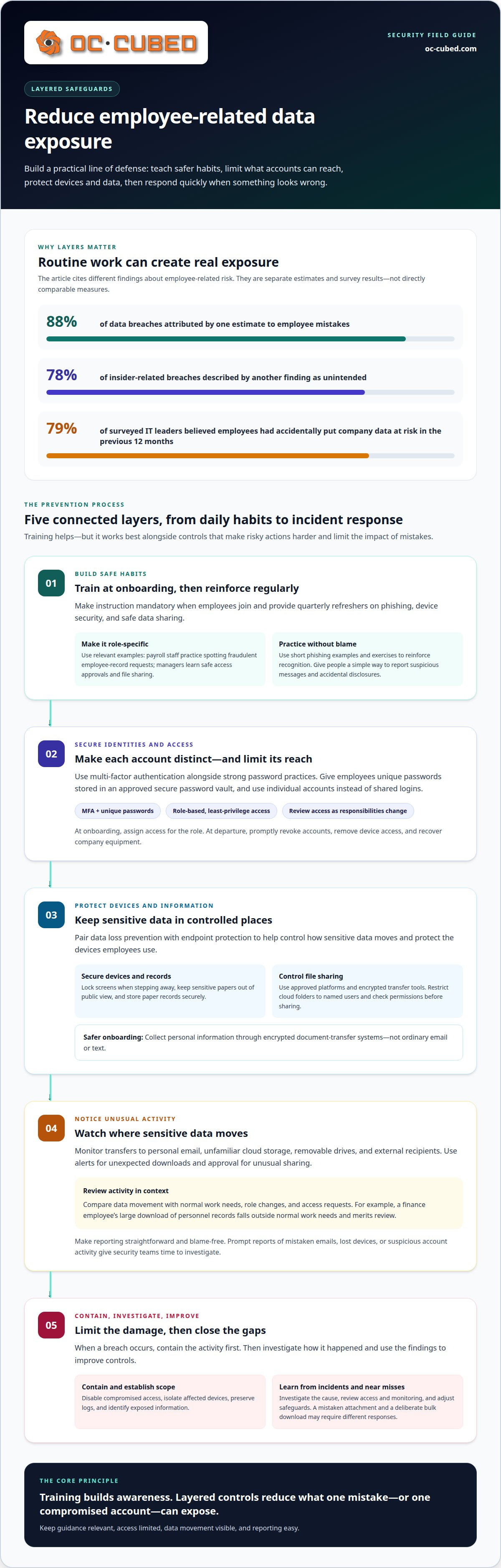
Make security training ongoing, not a one-time onboarding task. Give employees mandatory instruction when they join, then provide quarterly refreshers on phishing, device security, and proper data sharing. Regular refreshers reinforce controls and address changing risks, rather than treating training as a once-a-year checkbox.
Tailor each session to the employee’s role. A payroll specialist needs practice recognizing fraudulent requests for employee records; a manager needs guidance on approving access and sharing files. Use short examples, such as a phishing email asking staff to reset a password, and ask employees to identify warning signs. Assess responses and direct follow-up training to areas where individuals need more practice.
Train staff to report suspicious messages and accidental disclosures promptly. A simple reporting route helps employees raise a concern without first deciding whether an event qualifies as a breach. Include practical actions: don’t reply to unexpected requests, don’t open unfamiliar attachments, and report a message that imitates a manager or supplier. Use phishing exercises to reinforce recognition, not to shame staff who make mistakes.
Protect credentials with unique passwords and an approved secure password vault. Employees should use a different password for every account; shared logins make it harder to identify who accessed a system. Address credential sharing with individual accounts, clear rules, and prompt access reviews. Least-privilege permissions also limit what a compromised account can reach.
Training should cover physical security, too. Require staff to lock screens when stepping away, keep sensitive documents out of public view, and store paper records securely. During onboarding, collect personal information through encrypted document-transfer systems rather than ordinary email or text. Store records only in approved platforms, restrict access, and review sharing settings to prevent accidental exposure through misconfigured cloud folders.
Secure onboarding and offboarding need defined steps. At onboarding, assign role-based access and explain how to handle employee and customer data. At departure, promptly revoke accounts, remove access from devices, and recover company equipment. The Cyber Incident Reporting for Critical Infrastructure Act is identified by U.S. Congress as a 2022 U.S. federal law; according to the Cybersecurity and Infrastructure Security Agency, it requires U.S. companies to report cybersecurity incidents within 72 hours.
U.S. data-protection requirements depend on the information and business context. Examples include the California Consumer Privacy Act, the New York SHIELD Act, and, where applicable, HIPAA or the Fair Credit Reporting Act. The SHIELD Act requires reasonable technical and procedural safeguards.
Prevent accidental sharing by restricting cloud folders to named users, checking permissions before sharing, and using encrypted transfer tools for sensitive files. Routine access reviews can catch broad or outdated permissions before they expose records.
Prevent accidental sharing by restricting cloud folders to named users, checking permissions before sharing, and using encrypted transfer tools for sensitive files. Routine access reviews can catch broad or outdated permissions before they expose records.
2. What's Behind Most Employee Data Breaches?
Employee-related breaches can start with an ordinary task. A worker sends a spreadsheet to the wrong recipient, uploads a file to an open folder, or leaves a work session unattended. One estimate attributes 88% of data breaches to employee mistakes, while another says 78% of insider-related breaches are unintended. These figures describe different findings, but both point to a practical risk: routine activity can expose data without malicious intent.
Negligence can increase that risk. An employee might ignore a software warning, reuse a work process after their role changes, or store company records in an unapproved location. In one survey covering the previous 12 months, 79% of surveyed IT leaders believed employees had accidentally put company data at risk. Clear handling rules help, but organizations also need controls that limit what one mistake can expose.
Monitoring data movement can help identify exposure early. Track transfers to personal email, unfamiliar cloud storage, removable drives, and external recipients. Set controls for sensitive files, including approval for unusual sharing and alerts for unexpected downloads. Review logs alongside role changes and access requests. For example, review a finance employee’s large download of personnel records because it falls outside normal work needs.
Human context matters. A rushed employee may send a file to the wrong colleague, while a malicious actor may use a familiar account to hide deliberate copying. Give staff a blame-free way to report mistaken emails, lost devices, or suspicious account activity. Prompt reporting gives security teams time to contain access, preserve records, and determine which data may be affected. Delayed discovery can make even a small exposure harder to investigate.
Prevention improves when organizations examine how work actually happens. Compare normal access patterns with sensitive data movement, review exceptions, and adjust permissions when responsibilities change. Use incidents and near misses to improve controls. A mistaken attachment and a deliberate bulk download require different responses, but both can reveal gaps in monitoring, access rules, or reporting processes.
After an employee-related breach, contain the activity first: disable compromised access, isolate affected devices, preserve logs, and identify exposed information. Then investigate the cause, involve the appropriate response team, and follow applicable notification requirements. Keep the response focused on facts, not blame, so staff continue reporting concerns. A structured approach to insider threat monitoring can help organizations detect unusual activity and coordinate remediation.
Start with a password policy employees can follow. Require a different password for each account and provide an approved password manager so staff don’t reuse or casually store credentials. A password written near a workstation or saved in an unprotected computer file may be found by someone with access to that device. A secure vault keeps credentials organized without relying on memory or shared spreadsheets.
3. Are Passwords and MFA Enough to Stop Data Breaches?
Passwords and multi-factor authentication (MFA) strengthen account security, but they aren’t a complete data-protection plan. MFA asks users to prove identity with another factor, such as an approval prompt or a code, after entering a password. Microsoft research states that MFA can block over 99.9% of account compromise attacks. That protection matters, but it doesn’t prevent every way information can be exposed.
Apply MFA to important accounts, including email, cloud services, and administrative access. Email deserves attention because password-reset messages for other systems may arrive there. A second factor should verify identity in a different way, rather than repeat the password. If an employee receives an unexpected sign-in prompt, they should deny it and report the activity.
Set a minimum length as one part of the policy. A 10-character minimum is one example, not a universal rule for every account. Length alone doesn’t make a password safe if it’s reused, easy to guess, or shared with coworkers. Tell staff not to use company passwords for personal accounts, and never send credentials through ordinary email or chat.
Policies also need a clear response to account changes. Revoke access when someone leaves or changes roles, and update credentials if a password may have been exposed. Review recovery methods and account owners so former employees don’t retain a route into company systems. For shared work, assign individual accounts instead of passing one password between staff.
MFA can’t protect a file an authorized employee sends to the wrong recipient. It also doesn’t remove vulnerabilities from outdated software or prevent someone from approving a fraudulent request. Pair account controls with role-based permissions, secure file-sharing settings, and timely software updates. An employee may authenticate correctly but still expose a sensitive spreadsheet through an overly broad sharing link.
Make the rules practical. Explain how to create unique credentials, store them in the approved vault, respond to unexpected authentication requests, and report suspected compromise. Then review access and sign-in activity for unusual patterns. Strong passwords and MFA reduce account risk; staff guidance and other controls address gaps those tools can’t cover.
Least privilege means giving each employee only the data and permissions their job requires. A payroll specialist may need access to payroll records, but not firewall settings or network administration tools. This approach limits the damage if an account is misused, compromised, or accessed by a malicious insider. Require users to authenticate when accessing sensitive resources, and grant broader permissions only when a task requires them.
4. Least privilege and privileged-account access
Review access whenever responsibilities change and periodically for all sensitive permissions. Ask each account owner to confirm that privileged access is still needed, and remove permissions that no longer match the person’s role. For example, if a technician moves into a non-administrative role, their ability to change network settings should end with that responsibility.
Privileged accounts deserve tighter controls than everyday user accounts. Research by Thycotic found that 40% of organizations used the same security for privileged accounts as for standard accounts, while 50% did not audit privileged accounts. Research by Centrify found that 74% of data breaches start with privileged credential abuse. These findings underline why organizations should separate administrator accounts from routine accounts and review their use.
Employee offboarding needs a defined sequence. Disable the departing employee’s accounts, revoke remote access, change shared credentials, and remove company information from authorized devices. Include cloud platforms, email, and network infrastructure in the access review. A missed account can remain a route into sensitive systems after an employee has left.
Personal devices add another access path. Whenever possible, restrict sensitive employee data to managed, company-issued devices. If employees use personal devices for work, require encryption, current updates and patches, lost-device reporting, and remote wiping. These controls reduce exposure if a phone or laptop is lost, but they also need clear ownership and enforcement.
Software updates are part of access security because unpatched vulnerabilities can give attackers another way into systems. Keep operating systems and business applications current, especially on devices used to access sensitive files. Combine updates with role-based permissions and authentication. Network monitoring can help identify unexpected access or unusual infrastructure changes, such as an account attempting administrative actions outside its normal duties.
Software updates are part of access security because unpatched vulnerabilities can provide attackers another way into systems. Keep operating systems and business applications current, especially on devices used to reach sensitive files. Combine updates with role-based permissions and authentication. Network monitoring can help identify unexpected access or unusual changes to infrastructure, such as an account attempting administrative actions outside its normal duties.
Start by identifying sensitive information, such as employee records, customer details, and financial documents. Then apply policies to how staff use and move those files. For example, a DLP rule can prevent a spreadsheet containing personal data from leaving through an unapproved email or storage service. Clear exceptions help employees do legitimate work without weakening safeguards for every file.
5. Data loss prevention and endpoint protection
Data loss prevention (DLP) helps enforce rules for sensitive information in use, at rest, and in motion. It can block a payroll file from being emailed to a personal account, copied to a USB drive, or uploaded to personal cloud storage. These controls address accidental sharing and unauthorized transfers. The key is to define which information needs protection and which destinations are approved for business use.
Consider the full path of a document. A file can be stored securely but exposed when someone downloads it to a laptop, attaches it to an email, or copies it onto removable media. DLP controls can monitor these actions and block transfers that violate policy. Reviewing alerts and exceptions helps distinguish normal activity from risky movement, such as repeated attempts to send a restricted file externally.
Endpoint protection covers devices employees use, including laptops and mobile phones. It helps protect endpoints from malware and other threats that could compromise data. A compromised laptop, for instance, may expose files available on that device. Protect devices that access company information, alongside rules for storing, sharing, and transferring that information.
Neither control replaces the other. Endpoint protection focuses on device risks; DLP focuses on how information is handled and transferred. Together, they address different routes to exposure. If a device encounters malware, endpoint protection helps guard it. If an employee attempts to send a sensitive file to personal storage, DLP can enforce the organization’s sharing policy.
Configure safeguards around actual workflows. Identify sensitive data, map approved destinations, and set rules for email, removable drives, and cloud uploads. Test those rules with legitimate tasks, such as sending a customer document to an authorized colleague. Review blocked actions and permitted exceptions, then adjust controls when work processes change. This keeps safeguards useful without treating every transfer as a threat.
A practical approach to preventing employees from causing data breaches combines DLP policies with endpoint protection, clear handling rules, and alert review. For organizations focused on preventing employees from causing data breaches, these layers help limit exposure from unsafe transfers, employee mistakes, and malware on work devices.
This support is useful when security policies are difficult to maintain, alerts need attention, or staff need reliable IT assistance to work safely. The right mix depends on your systems, data, and existing controls. A focused review can identify where stronger protection or better management would make the most difference.
OC Cubed - Your trusted MSP
OC Cubed - Your trusted MSP helps businesses bring practical security controls together. When employee activity, device risks, or Microsoft 365 settings need consistent oversight, its security support can help identify threats and address them. Security Threat Detection and Remediation helps respond to suspicious activity, while Endpoint Protection / Antivirus helps protect employee devices. Microsoft 365 Tenant Maintenance supports the secure management of your working environment.
This support is useful when security policies are difficult to maintain, alerts need attention, or staff need reliable IT assistance to work safely. The right mix depends on your systems, data, and existing controls. A clear review can help identify where stronger protection or better management would make the most difference.
Contact OC Cubed - Your trusted MSP to discuss your organization’s security needs.
Build a Security Approach Your Team Can Sustain
Strong protection grows from controls that fit everyday work. Keep improving how your organization handles access, suspicious activity, and sensitive information. Review incidents and near misses for practical lessons, then adjust processes as teams, systems, and responsibilities change. This steady cycle makes preventing employees from causing data breaches part of how the business operates, rather than a separate project that fades after rollout.
OC Cubed - Your trusted MSP can support this work through Remote IT Support, Microsoft 365 Tenant Maintenance, and Security Threat Detection and Remediation. These services can help businesses maintain their systems, address security concerns, and keep protective measures aligned with operational needs.
Take the next step toward a more controlled, resilient environment for your team and your business.
Frequently Asked Questions
What's Behind Most Employee Data Breaches?
No. Passwords and multi-factor authentication help protect accounts, but they cannot prevent every exposure. An authenticated employee can still share a file with the wrong recipient, and malware can affect an endpoint. For example, a valid login might access a folder with overly broad permissions. Combine account security with restricted file access, endpoint safeguards, and procedures for reporting unexpected prompts or accidental disclosures.
Are Passwords and MFA Enough to Stop Data Breaches?
Use several controls that address different paths to exposure. For example, limit access to sensitive folders, protect devices, and restrict transfers to personal email or storage. Make it easy for employees to report suspicious messages and mistakes promptly. Review near misses, such as a blocked external file share, to identify weak points in workflows. Update procedures when teams change how they collect, store, or send information.
How Can Companies Prevent Security Breaches?
Provide mandatory training during onboarding and continue it with quarterly refreshers. Add focused instruction when employees adopt a new system or process. For example, staff who begin sending customer files through a new platform need guidance on approved sharing settings. Use exercises relevant to each role, then address common errors with practical examples. Short, timely reminders can reinforce lessons between formal sessions.
How Frequently Should Employers Conduct Data Security Training for Staff?
Choose controls that cover identity, devices, and information movement rather than relying on one tool. A practical foundation includes multi-factor authentication, role-based access, endpoint protection, and data loss prevention. Add email safeguards and activity monitoring where they fit your environment. For example, a rule can flag an unusual attempt to transfer a sensitive file, while device protection addresses malware risks. Align settings with real business workflows.
What Is the Right Tech Stack for Reducing Human Risk?
Collect only information needed for a business purpose, and store it in approved systems with limited access. Use encrypted document-transfer platforms for sensitive onboarding records instead of ordinary email or text. Set retention and deletion procedures so old files don’t accumulate in shared folders. For example, restrict employee records to the staff responsible for handling them, and review permissions when job duties change.
What Steps Can Employers Take to Ensure Employee Data Protection?
Collect only information needed for a business purpose, and store it in approved systems with limited access. Use encrypted document-transfer platforms for sensitive onboarding records instead of ordinary email or text. Set retention and deletion procedures so old files don’t accumulate across shared folders. For example, restrict employee records to the staff responsible for handling them, and review those permissions when job duties change.
What Is the Best Method to Safeguard Customer Data Privacy?
Common paths include sending a file to the wrong recipient, responding to phishing, using unsafe storage, leaving a device unattended, or sharing credentials. A mistaken cloud-folder setting can also expose records beyond the intended team. Malicious insiders may misuse legitimate access to copy or disclose information. Reviewing email, account, and file-sharing activity can help identify how information moved and which safeguards need adjustment.
What Are the Most Common Ways Employees Cause Data Breaches?
Common paths include sending a file to the wrong recipient, responding to phishing, using unsafe storage, leaving a device unattended, or sharing credentials. A mistaken cloud-folder setting can also expose records beyond the intended team. Malicious insiders may misuse legitimate access to copy or disclose information. Reviewing email, account, and file-sharing activity can help identify how information moved and which safeguards need adjustment.

Article by
Peter Irizarry
Peter Irizarry founded OC Cubed, LLC in 2023 to help small to mid-sized businesses stop worrying about downtime and cybersecurity threats. A frequent speaker on SMB digital transformation, Peter is passionate about translating complex IT roadmaps into plain-English business growth strategies. He resides in North Texas with his family.


