

A password alone can’t prove business data is secure. To know if business data is secure, review the safeguards protecting it, who can access it, and how the business would detect and respond to a threat. Security depends on layers working together, from multifactor authentication and encryption to reliable backups and up-to-date software.
It’s reasonable to want clear evidence that sensitive information is protected, not just a list of security tools. This guide explains which protections to assess and how to spot gaps that could put company or customer data at risk. You’ll review access controls, employee and insider risks, third-party software, and shadow AI, along with security audits and incident response planning. The goal is a practical picture of what’s working, what needs attention, and how to strengthen your organization’s defenses.
Key Takeaways
- Use multifactor authentication and unique passwords to strengthen protection around sensitive accounts.
- Assess whether stored data and communications are encrypted, and whether access is limited to people who need it.
- Map where business data lives, review security controls, and prepare a clear plan for responding to incidents.
- Include third-party software and suppliers in security reviews, including their update and data-access practices.
- Watch for insider risks and unsanctioned AI tools by reviewing permissions and how employees handle sensitive information.
1. Multi-factor authentication
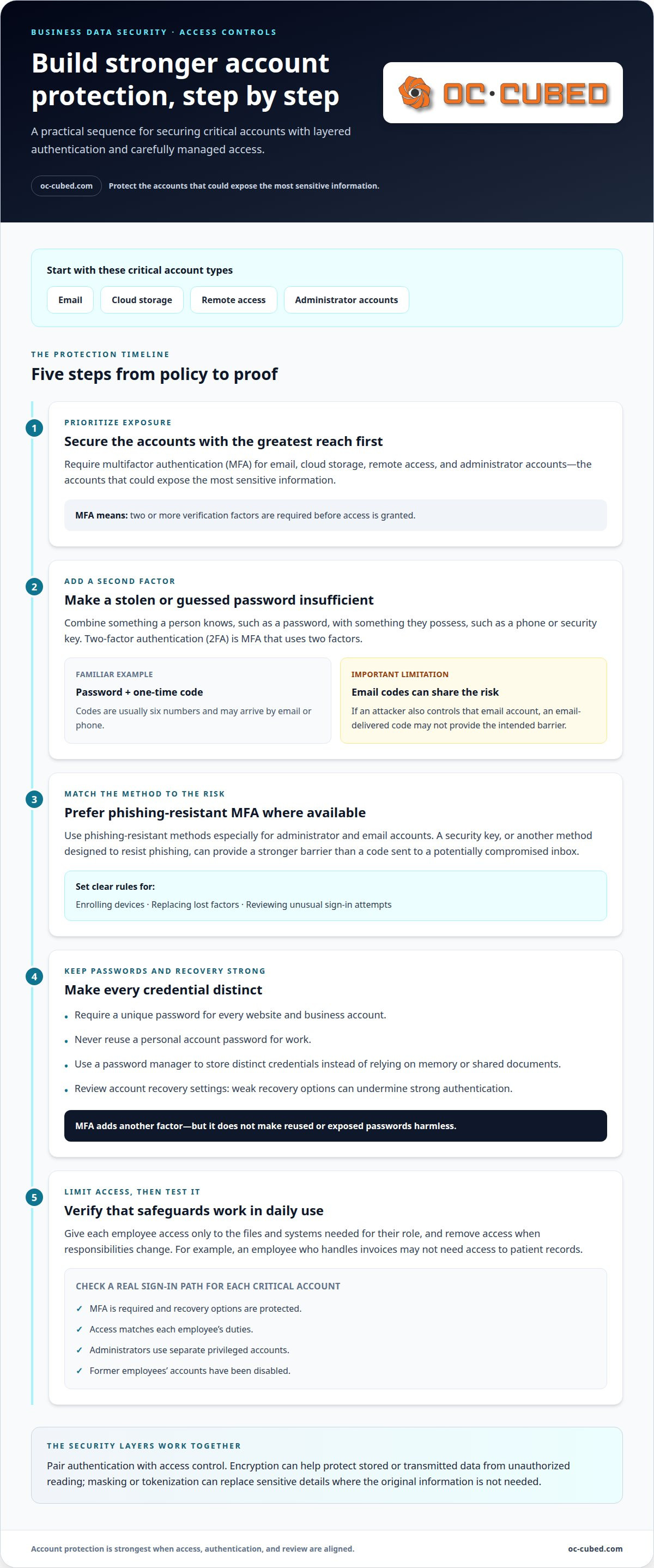
Start with the accounts that could expose the most sensitive information. Require multi-factor authentication (MFA) for email, cloud storage, remote access, and administrator accounts. MFA requires two or more verification factors before access is granted. Factors can include something a person knows, such as a password, and something they possess, such as a phone or security key.
Two-factor authentication (2FA) is a form of MFA that uses two factors. A password plus a one-time code is one familiar example. These codes are usually six numbers and may arrive by email or phone. A second factor can block access when an attacker has only guessed or stolen a password, but email-based codes are vulnerable if the attacker also controls that email account.
Choose authentication methods with the risk in mind. Use phishing-resistant MFA where available, especially for administrator and email accounts. A security key or another method designed to resist phishing can provide a stronger barrier than a code delivered to a potentially compromised inbox. Set clear policies for enrolling devices, replacing lost factors, and reviewing unusual sign-in attempts.
Password policies still matter. Require a unique password for every website and business account, and never reuse a personal account password for work. A password manager can help employees store distinct credentials without relying on memory or shared documents. MFA adds another factor, but it doesn’t make reused or exposed passwords harmless. Review account recovery settings, too, because weak recovery options can undermine strong authentication.
Pair authentication with access control. Give each employee access only to the files and systems needed for their role, then remove access when responsibilities change. For example, a staff member who handles invoices may not need access to patient records. Encryption helps protect stored or transmitted data from unauthorized reading, while masking or tokenization can replace sensitive details in environments that don’t need the original information.
Compliance can carry serious consequences. According to the European Union, the GDPR can impose a fine of 4% of a company's annual turnover or €20 million, whichever is higher. The U.S. Department of Health and Human Services states that HIPAA compliance failures can result in fines of up to $50,000 per offense. In the United States, HIPAA protects the privacy of patients’ health information, so access safeguards matter for organizations handling that data.
To assess your controls, test a real sign-in path for each critical account. Confirm that MFA is required, recovery options are protected, and access matches each employee’s duties. Check whether administrators use separate privileged accounts and whether former employees’ accounts have been disabled. These practical checks show whether authentication policies work in daily use, not just on paper.
2. What Is Data Security?
In the United States, relevant privacy and security rules depend on the data a business handles and its activities. HIPAA protects patients’ health information, the California Consumer Privacy Act (CCPA) governs certain consumer data practices, and PCI DSS sets requirements for businesses that process credit card payments.
Encryption makes data unreadable without the key needed to decrypt it. Apply it both at rest, while files sit on servers or devices, and in transit, as information moves between systems. For example, encrypt a customer record stored in a database and its transfer to an authorized application.
For web connections, HTTPS helps create a secure connection between a user’s device and a website. Use current transport encryption, such as TLS 1.2 or above, for websites, account portals, and other services that transmit sensitive information. Check that encryption covers the full connection, not only the sign-in page.
Stored information needs protection, too. Encryption can protect databases, laptops, phones, and removable drives if a device is lost or accessed without permission. AES-256 is one cited method for protecting sensitive customer information. A screen lock alone doesn’t encrypt the files on a device, so treat device encryption as a separate safeguard.
Email requires careful attention because messages may contain invoices, account details, or personal information. Use secure email settings and portals that protect communications in transit. For example, a customer sharing a document through an authenticated portal should use an encrypted connection from sign-in through file transfer.
Encryption works alongside access controls. Limit access to original records, and use masking or tokenization when a system needs a substitute rather than real customer details. A test environment, for instance, can use masked names and account numbers instead of production data. This reduces exposure if that environment is breached.
Backups need protection as well. The 3-2-1 backup rule recommends three copies of business data, two types of media, and one copy offsite or in the cloud. Encrypt backup files and restrict who can restore them. Otherwise, a stolen backup could expose information even when the active database is protected.
To assess coverage, trace one sensitive record from collection to deletion. Note where it is stored, which devices handle it, and how each transfer is encrypted. Then confirm that backup copies receive similar protection. Security threat detection and remediation can help identify suspicious access or gaps that need attention; security threat detection and remediation supports that review.
3. Security audits and incident response planning
If you’re asking how to know if business data is secure, start by mapping systems, information, permissions, and safeguards. Compare those controls with business risks and applicable requirements, then assign an owner to each gap. A useful assessment identifies practical weaknesses, such as unmonitored accounts or missing response procedures, and records what needs to change.
Begin the review with a data audit. Identify what customer and employee information the business collects, where it’s stored, who can access it, and how long it’s needed. Remove information that no longer serves a business or legal purpose. Trace a customer record from collection through storage, sharing, backup, and deletion. This can reveal unnecessary copies or access points that a basic system inventory misses.
Updated California Consumer Privacy Act regulations expand business obligations starting January 1, 2026, including cybersecurity audits, risk assessments, and rules for automated decision-making technology, according to the California Privacy Protection Agency. Businesses handling personal information should connect their data practices and audit findings to applicable obligations. Document what the review covered and which changes followed.
Security audits and penetration testing serve different purposes. An audit reviews policies, configurations, permissions, and evidence of how safeguards operate. A penetration test searches for exploitable weaknesses within a defined environment. Record the systems tested, findings, severity, and remediation owner. Keep audit trails of sign-ins, permission changes, administrative actions, and security alerts. These records support investigations into unusual activity.
There isn’t one data breach reporting requirement that applies to every U.S. business. Requirements depend on the information involved, the business’s activities, and relevant state or sector rules. A response plan should name who assesses an incident, preserves evidence, coordinates communications, and determines which notification steps apply.
The cost of a business cybersecurity assessment depends on its scope, system complexity, testing depth, and compliance needs. The price is provided after a quote request.
To determine how to know if business data is secure in practice, assess both controls and response readiness. Write a plan for containment, investigation, communication, and recovery, then assign responsibilities to employees and leadership. CISA recommends including relevant stakeholders, such as leadership and legal counsel, alongside technical personnel in incident response drills. Review and exercise the plan at least annually. A tabletop exercise can walk through a targeted phishing incident and test escalation, decisions, and recordkeeping.
After an audit or exercise, track each finding through resolution. Monthly reporting can help decision-makers see risks, actions, and unresolved issues. Set a low threshold for reporting suspicious activity, including blocked attacks or unusual system behavior. This creates a clearer view of how safeguards perform and what needs attention next.
4. Third-party software provider security
A business’s security can depend on applications and suppliers beyond its direct control. Start by listing software providers that store sensitive information, connect to the network, or handle business communications. For each application, identify the data it can access, the accounts that can administer it, and the business process that would be affected if it became unavailable.
Review each provider’s security practices before granting access. Ask how it protects stored and transmitted data, manages user permissions, and handles security incidents. Find out whether it conducts regular security audits and supports a clear process for reporting vulnerabilities. Vague security practices or a difficult bug-reporting process create a visibility gap that deserves attention.
Third-party access can create a path into business systems. The successful attack on Target came through an HVAC company, illustrating why suppliers with network access matter even when their work seems unrelated to data. Limit each supplier account to the systems and information needed for its role. Review permissions when the work changes, and remove access when the relationship ends.
Updates matter across computers, phones, operating systems, servers, and regularly used software. Security patches address known weaknesses, so delayed updates can leave systems exposed. WannaCry affected over 300,000 computers globally, with neglected Windows system updates cited as a major cause. Set a consistent process to identify available updates, assess their impact, and apply them across business devices and servers.
Patch management helps keep updates consistent across a larger network. Maintain an inventory of operating systems, applications, and server software, then track which versions need attention. Assign responsibility for deployment and record exceptions, such as an update delayed because it conflicts with a critical application. Revisit each exception so a temporary delay doesn’t become an overlooked gap.
Review provider and supplier access as part of ongoing security work. Confirm that named accounts belong to current users, permissions match business needs, and passwords aren’t shared across services. When an application connects to email or file storage, examine what information it can reach and whether that connection is still necessary. These checks help limit the impact of a compromised vendor account.
Use a change process for updates that could affect essential business systems. Test a patch in a controlled environment when practical, schedule deployment to reduce disruption, and keep a recovery plan for affected services. Track update status and unresolved issues in a central record. This gives you a clear view of which systems are current, which need action, and where supplier coordination is required.
5. Data security threats, including insider risk and shadow AI
A security threat doesn’t always begin with an outside attack. Employees, contractors, or compromised accounts can expose sensitive information through mistakes, misuse, or access that remains after duties change. A worker might send a spreadsheet of customer records to the wrong recipient, while a stolen employee account could let an attacker search shared files. Consider who can reach records and how their actions are monitored.
Insider risk includes both intentional actions and unintentional errors. In the 2025 Data Security Report, 77% of surveyed organizations experienced an insider-driven data loss incident. That finding makes routine access reviews and clear reporting paths important parts of risk management. Review who can export records, share files externally, or change account settings. Also ensure employees know how to report a mistaken disclosure or unusual account activity promptly.
Shadow AI creates another route for information to leave approved systems. Employees may paste customer details, internal documents, or business plans into an AI tool without understanding how it handles submitted data. Treat unsanctioned AI use as a data-handling risk, not simply a software inventory issue.
Set a clear policy for AI use. Define which tools employees may use, what information must never be entered, and how approved use is reviewed. For example, staff drafting a public-facing announcement should remove customer names, account details, and confidential figures before using an AI application. Provide an approved route for employees who need AI assistance, so the policy offers a workable alternative to unreviewed tools.
Access controls remain central to limiting AI-related exposure. IBM’s 2025 Cost of a Data Breach Report says 97% of AI-related breaches occurred where proper access controls were missing. Apply permissions to the data itself, not only to the device or network used to reach it. Restrict sensitive records to authorized roles, and review application connections that can retrieve or process company information.
Look for warning signs in everyday workflows. Unexpected bulk downloads, unusual sharing activity, or a former employee’s active account can point to a developing problem. Establish a simple process for employees to report suspicious messages, accidental disclosures, or unfamiliar AI tools. Security teams can then investigate, limit access where needed, and preserve relevant records for incident review.
The goal isn’t to block every new tool or treat every employee as a threat. It’s to make data handling visible, set usable boundaries, and respond consistently when behavior falls outside them. Strengthen detection and response for data security threats.
OC Cubed - Your trusted MSP
OC Cubed - Your trusted MSP helps businesses turn security findings into practical protections across their IT environment. When access controls, device protection, or suspicious activity need attention, its Security Threat Detection and Remediation and Endpoint Protection / Antivirus offerings support a more structured response.
For organizations that rely on Microsoft 365, tenant maintenance can help keep account settings and business systems managed. Remote IT Support also gives teams a path to resolve technical issues that affect secure access and everyday work. These services are most useful when internal teams need ongoing support to manage risks, address gaps, or maintain consistent safeguards.
Security depends on how well protections fit the business’s systems, data, and workflows. Contact OC Cubed - Your trusted MSP to discuss your business’s IT security needs.
Turn security findings into steady progress
Knowing whether business data is secure means treating security as an ongoing business practice, not a one-time review. Give each finding an owner, set a practical priority, and track whether the change addressed the underlying risk. Revisit that work when your systems, staff responsibilities, or data use changes. This keeps security decisions connected to how your organization operates.
OC Cubed - Your trusted MSP can help businesses maintain that ongoing focus through Remote IT Support, Microsoft 365 Tenant Maintenance, and Security Threat Detection and Remediation. These services can support teams that need help managing technical issues, maintaining their environment, or responding to security concerns. A clear conversation about your current setup and priorities is a practical next step.
Take the next step with a clearer view of your risks and a plan for improving protection over time.
Frequently Asked Questions
What Is Data Security?
Data security is the set of safeguards that controls how information is accessed, used, stored, and shared. It applies to paper records as well as digital files. For example, a business can protect a payroll spreadsheet by limiting access to authorized staff, keeping a record of changes, and securely disposing of outdated copies. The right safeguards depend on the information’s sensitivity and how the business uses it.
What is sensitive data?
Sensitive data is information that could harm a person or business if exposed or misused. Examples include Social Security numbers, health records, bank details, account credentials, and confidential business plans. Context matters: a customer’s name may be low risk on its own, but more sensitive when combined with account or payment information. Classifying data helps teams apply stronger protections to records that need them.
What are the signs that a business’s data is secure?
Look for evidence that safeguards work consistently, not just written policies. For example, access reviews should show who approved permissions, and security logs should support investigations of unexpected activity. Employees should know how to report suspicious messages, while business leaders should understand unresolved risks. A useful sign is a documented process for correcting weaknesses and tracking whether fixes remain effective as systems and responsibilities change.
What security controls should businesses use to protect sensitive data?
Choose controls based on the data, where it’s stored, and how employees use it. Data loss prevention tools can monitor data flows and block unauthorized transfers. Mobile device management can control which devices may access particular information. A separate guest Wi-Fi network can keep visitor connections apart from business systems. Combine these measures with staff training and clear rules for handling records, so protections cover both technology and everyday behavior.
What are common cybersecurity risks for small businesses?
Common risks include phishing messages, stolen credentials, unpatched software, excessive employee permissions, and mistakes that expose records. Attackers may also target smaller businesses as a route to suppliers or larger partners. Unsanctioned AI tools create another risk when staff enter sensitive information without approval. Consider how each threat could affect a real workflow, such as an invoice payment, customer inquiry, or shared project file.
What cybersecurity certifications and audits demonstrate data security?
ISO 27001 is an international standard for establishing, implementing, maintaining, and improving information security management systems. A certification or audit can provide evidence about a defined scope and period, but it doesn’t prove that every system or risk is covered. Review what systems, locations, and processes the assessment includes, along with any findings and corrective actions. Match that evidence to the vendor’s specific role in handling your data.

Article by
Peter Irizarry
Peter Irizarry founded OC Cubed, LLC in 2023 to help small to mid-sized businesses stop worrying about downtime and cybersecurity threats. A frequent speaker on SMB digital transformation, Peter is passionate about translating complex IT roadmaps into plain-English business growth strategies. He resides in North Texas with his family.


