

A message that passes a filter isn’t necessarily safe. Email filtering vs advanced threat protection comes down to what each layer can detect: basic filtering screens for known spam, malware signatures, and links to known malicious domains, while advanced threat protection can identify targeted, evasive, or emerging threats. Neither label alone tells you how much protection a system provides.
It’s reasonable to expect email security to stop suspicious messages before they reach your inbox. Advanced protection may also analyze links when clicked, identify impersonation patterns, examine suspicious attachments in a sandbox, and help remove malicious messages after delivery.
This guide explains what each layer can detect, where traditional filtering falls short, and how secure email gateways (SEGs) compare with integrated cloud email security (ICES). You’ll also see how the options work together, helping you identify which protections address your organization’s risks and where additional detection may help.
Key Takeaways
- Separate routine spam screening from protection designed to spot targeted, evasive, or newly emerging email threats.
- Consider how link analysis, attachment inspection, impersonation detection, and post-delivery response address different risks.
- Compare secure email gateways and integrated cloud email security by where they operate and how they fit your email environment.
- Use the comparison criteria to identify where your existing controls may leave detection gaps.
- When email threats need ongoing attention, security threat detection and remediation can help connect protection to a coordinated response.
What Is Advanced Threat Protection for Email?
Advanced threat protection adds targeted detection to routine email security. It looks for phishing, malware, impersonation, and business email compromise that basic filters may miss. Deloitte research states that 91% of successful cyberattacks begin with a phishing email. That makes sender identity and message behavior important parts of a layered defense.
Consider a message that appears to come from a company executive and asks finance to change payment details. A filter may allow it if the sender and link have no known bad reputation. Advanced protection can analyze impersonation patterns and unusual behavior, such as an unexpected request or a sender acting differently. Those signals can help identify business email compromise before a transfer is made.
Phishing detection also examines context, not just familiar malicious links. A message might use a new domain, imitate a supplier, or contain a link that changes destination. Advanced tools can assess links when users click them and sandbox suspicious attachments. Sandboxing runs a file in an isolated environment to observe whether it behaves like malware.
These controls support prevention and response, but they don’t replace sound account security. For example, a mailbox with a compromised password may send convincing messages to coworkers. Detection can flag unusual internal email behavior and help identify lateral phishing. Response may include removing malicious messages from inboxes after delivery to limit further exposure.
Privacy obligations also matter when organizations handle personal data. According to the European Union, the GDPR allows fines of up to 4% of global annual turnover. The European Union states that GDPR Article 32 requires controllers and processors to implement technical measures appropriate to ensure ongoing confidentiality, integrity, availability, and resilience of processing systems.
| Option | Detection focus | Typical role |
|---|---|---|
| Basic spam filtering | Known spam senders and signatures | Routine screening |
| Secure email gateway | Messages passing through a gateway | Perimeter email defense |
| Advanced threat protection | Impersonation, suspicious behavior, and novel threats | Targeted detection and response |
| Integrated cloud email security | Cloud mailbox activity and post-delivery threats | Additional protection for hosted email |
Small businesses can use the same risk-based approach as larger organizations. Start by identifying high-impact email activity, such as invoice payments, payroll changes, and access to customer records. Then assess whether current controls examine suspicious attachments, impersonation, and messages already delivered. The right protection depends on the email platform, the sensitivity of business data, and the consequences of a missed attack.
For a small business, advanced email security is most useful when ordinary filtering leaves specific detection gaps. A cloud mailbox, for example, may need protection that can inspect messages after delivery and help remove threats. A layered setup connects filtering, account safeguards, and response procedures, so staff know how to report suspicious messages and security teams can act.
Advanced threat protection as a specialized detection layer
Advanced threat protection adds context-focused detection alongside routine message screening. It evaluates identity, behavior, and message content to identify attacks that don’t match known signatures.
Specialized Threat Detection
This layer is designed to catch targeted attacks, including impersonation and compromised-account activity. Unlike controls focused mainly on known senders or malicious files, it can assess whether a message fits the sender’s usual behavior and communication patterns.
Email authentication adds another signal. Technologies such as DMARC help receiving systems assess whether a message is authorized to use a domain. Authentication can make spoofing harder, but it doesn’t prove that a legitimate account hasn’t been taken over. Detection therefore needs to consider both domain identity and message behavior.
For example, a real employee’s account might send an unusual payment request to a colleague. Authentication may pass because the message comes from the employee’s actual account. Behavioral analysis can still flag unexpected language, recipients, or activity. Security teams can then examine the message and decide whether to contain it or begin remediation.
Impersonation detection also looks beyond the display name. A message may imitate a senior leader while using a lookalike domain, altered reply address, or unfamiliar writing pattern. Combining those clues helps distinguish a suspicious request from ordinary business communication. Organizations can prioritize review when messages involve sensitive actions, such as changing payment instructions or sharing account credentials.
Detection Accuracy and Independent Testing
Machine learning research reports accuracy rates exceeding 97% across multiple phishing detection categories, including URL, email, and website-based attacks. That figure describes research results, not a guaranteed outcome for every organization or protection product. Different message samples, user behavior, and system settings can affect performance.
Independent testing is useful when it explains how detection was measured. Look for the test sample, threat categories, false-positive handling, and whether the results reflect current attacks. A single accuracy figure can hide missed impersonation attempts or legitimate messages that were incorrectly blocked.
Compare results across distinct attack types. A test focused on malicious URLs may say little about compromised accounts or executive impersonation. Review whether the evaluation includes messages with clean links, familiar senders, and unusual requests. Those cases show whether detection looks beyond known indicators.
Operational results matter too. A useful evaluation considers how quickly a suspicious message is surfaced, what evidence analysts receive, and whether remediation can reach messages already delivered. For instance, teams should distinguish a blocked message from one that reached an inbox before detection. That difference affects investigation and response.
Organizations can assess the layer by mapping each control to a threat: authentication for domain spoofing, behavioral signals for compromised accounts, and content analysis for deceptive requests. For focused support with email threat detection and remediation, connect detection findings to a clear response process.
Limitations of traditional spam filtering
Traditional email filtering reliably reduces known spam and familiar malware, but it can miss new or deceptive attacks. The risks include malicious messages reaching inboxes, legitimate messages being quarantined, and teams mistaking filtering for complete prevention.
Baseline filters commonly use sender reputation, known malware signatures, and links to recognized malicious domains. These methods work well when a threat matches a known pattern. A newly registered domain, altered attachment, or message from a compromised legitimate account may not match those indicators, leaving the filter with less evidence to act on.
That creates a gap between routine spam control and targeted attack detection. For example, an attacker can send a realistic invoice from a hijacked supplier account. The sender may have a clean reputation, and the message may contain no known malicious link. A filter focused on known indicators can let it through, even though the payment request is fraudulent.
Threat data illustrates why filtering alone has limits. Verizon’s 2024 Data Breach Investigations Report states that 94% of malware is delivered via email. Trend Micro reported a 27% year-over-year increase in high-risk email threat detections that bypassed native Microsoft 365 and Google Workspace defenses in 2024. Those findings underline the need to consider threats that pass default controls.
Spam filtering also involves operational tradeoffs. A filter that blocks too broadly can quarantine an expected customer message or an invoice from a new vendor. Staff then spend time reviewing quarantines and restoring legitimate messages. A filter set too loosely can let more unwanted or risky messages through, increasing employees’ review workload.
Advanced threat protection addresses additional signals, but it has limits too. Detection depends on the available evidence from messages, links, attachments, and behavior. A short, text-only message requesting an urgent payment may offer little technical evidence, while a suspicious link can change after initial inspection. No single detection method covers every tactic.
For practical prevention, treat filtering as one control in a broader process. Pair routine screening with account safeguards, clear payment-change procedures, and a way to report suspicious messages. When a message reaches an inbox, staff should pause before opening attachments or following unexpected instructions. Security teams can then investigate the sender, domain, and request context instead of relying on the filter’s decision alone.
In short, filters are strongest against recognizable spam and known threats. Their main weakness is context: a message can look technically ordinary while making an unusual request. Advanced detection adds behavioral and impersonation analysis, while review and response procedures help address what either layer misses.
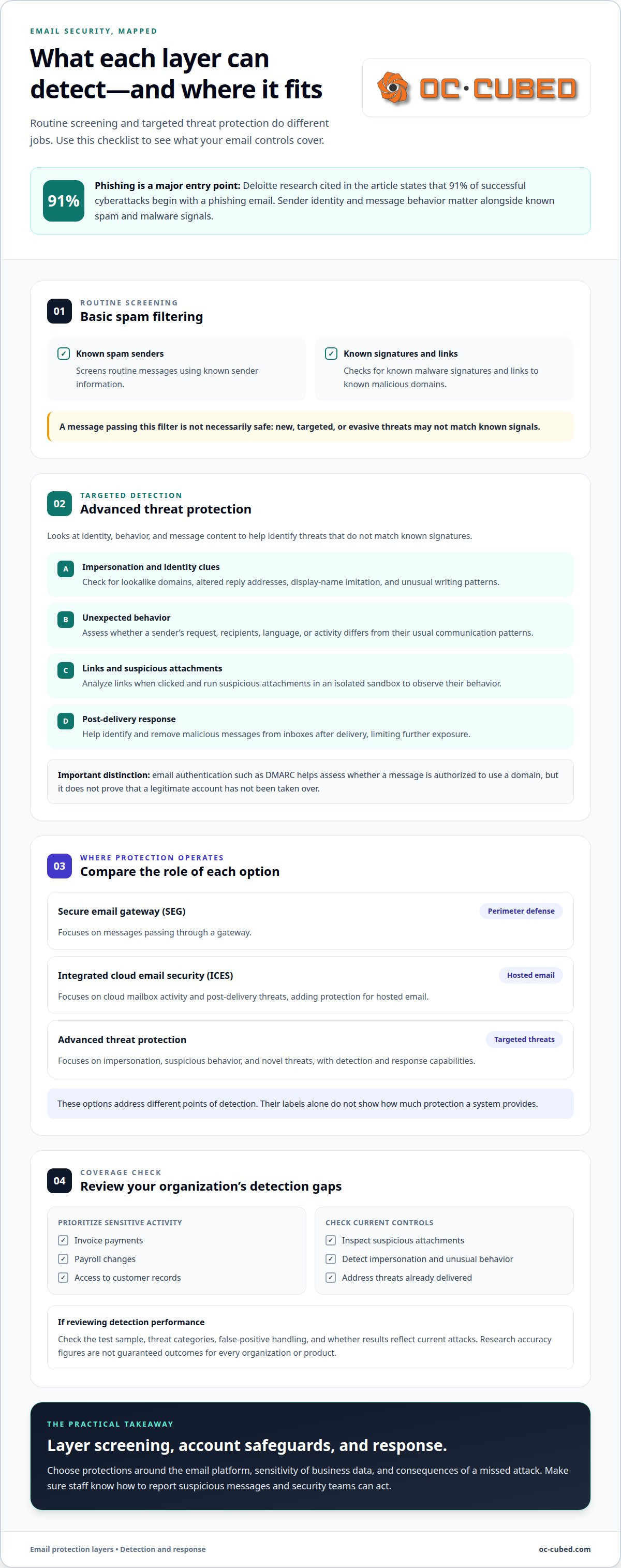
Advanced Threat Protection capabilities
Advanced Threat Protection can detect targeted phishing, impersonation, suspicious attachments, and compromised-account activity that standard filters may miss. Its added value comes from analyzing links, behavior, and messages after delivery, not just screening for known threats.
Link analysis can continue after a message reaches the inbox. Some protections inspect a URL when a user clicks it, which can catch a link that appeared harmless on delivery but later leads somewhere malicious. URL rewriting can route the click through a security check. This matters when an attacker changes a destination after sending a message.
Attachment analysis offers another detection path. Sandboxing opens a suspicious file in an isolated environment, helping identify behavior associated with malware, including zero-day threats without established signatures. For example, an attachment that appears to be an ordinary invoice can be examined before it reaches a user. The file’s observed behavior informs the detection decision.
Impersonation controls assess whether a sender or message resembles a trusted person or organization. A message may use a familiar executive’s name while coming from a deceptive address. Behavioral analysis adds context, such as an unusual request or communication pattern. These signals help security teams scrutinize payment instructions and requests for sensitive information.
Protection can also look inside an organization’s email environment. If an employee account is compromised, an attacker may send convincing messages to coworkers. Scanning internal email traffic can identify lateral phishing, where a compromised account is used to target other people in the organization. This extends detection beyond messages arriving from outside.
Delivery isn’t always the end of the response window. Advanced email protection can identify threats after delivery and support coordinated remediation, including retracting malicious messages from inboxes. Quarantine or removal can limit further exposure while the security team investigates affected accounts, recipients, and message activity.
Cloud services such as Microsoft 365 and Google Workspace can use API-based protection alongside gateway controls. An API-based layer can inspect activity within the cloud mailbox environment, including messages that have already arrived. A gateway-only tool primarily evaluates mail as it passes through its route, so the coverage point differs.
These capabilities work best as distinct checks, not as one broad “safe” verdict. For a suspicious Microsoft 365 message, protection might analyze the sender, inspect its link at click time, and then remove it if later analysis identifies a threat. Each stage addresses a different opportunity to detect or contain harm.
When comparing tools, focus on four practical capabilities: post-delivery inspection, click-time link analysis, impersonation detection, and removal of malicious messages from inboxes. These checks show whether protection can respond beyond the initial filtering decision and help contain an attack across the email environment.
How does basic email filtering differ from advanced threat protection?
Basic filtering and advanced threat protection serve different purposes. A basic filter screens messages using known spam patterns, sender reputation, malware signatures, and malicious domains. Advanced protection adds context by analyzing behavior, impersonation clues, suspicious links, and threats that appear after delivery. Comparing email filtering vs advanced threat protection clarifies what evidence each layer can examine.
For example, a filter can block a message from a sender already associated with spam. It can also recognize a malware signature in an attachment. But a new file, unfamiliar domain, or compromised Microsoft 365 account may not match known indicators. Advanced protection can examine whether the message behaves like a threat, even when its sender appears familiar.
Detection timing is another dividing line. Traditional filtering usually evaluates mail during delivery. Advanced tools may inspect a URL when a user clicks it, analyze messages inside a cloud mailbox, and find malicious email after it arrives. If later analysis identifies a threat, coordinated remediation may quarantine or retract the message. This is another practical distinction in email filtering vs advanced threat protection.
Secure email gateways and integrated cloud email security differ by where they inspect traffic. A secure email gateway evaluates messages as they pass through a gateway. Integrated cloud email security can use API-based access to examine activity in services such as Microsoft 365 or Google Workspace. The best fit depends on where mail is hosted and which inspection gaps matter.
Use these four options as a practical decision guide:
- Basic filtering: Choose it for routine screening of spam, known senders, and familiar malware.
- Gateway protection: Consider it when centralized inspection before delivery fits your mail routing.
- Cloud-integrated protection: Consider it when you need visibility inside a hosted mailbox, including after delivery.
- Layered protection: Combine controls when threats require both known-pattern screening and behavioral analysis.
Then map each option to a real risk. If unwanted bulk mail is the main issue, basic filtering addresses that need. If an executive could be impersonated, examine whether detection evaluates sender identity and message behavior. If malicious links can change after delivery, click-time analysis may add a useful check. If employees report suspicious messages late, post-delivery detection and remediation become more relevant.
For small organizations, the decision doesn’t have to start with the most complex setup. Begin with your email platform, sensitive workflows, and the likely impact of a missed message. A business using cloud email may prioritize mailbox-level visibility, while a team with strict routing needs may value gateway inspection. The goal is coverage matched to risk, not overlapping tools without a clear purpose.
Compare protection by detection point, threat evidence, and response action. This clarifies the differences and shows where another layer could close a practical gap.
OC Cubed - Your trusted MSP: Security Threat Detection and Remediation
OC Cubed - Your trusted MSP helps organizations strengthen email defenses and respond to security concerns through Security Threat Detection and Remediation. This support is relevant when routine filtering leaves questions about suspicious messages, possible account compromise, or how to coordinate remediation.
Email Security with Proofpoint and Endpoint Protection / Antivirus can support a broader security approach, while Remote IT Support helps address related IT needs. The right next step depends on the gaps you’ve identified, such as limited visibility into email threats or uncertainty about response processes. OC Cubed can help connect those needs to practical security support.
Contact OC Cubed - Your trusted MSP to discuss your email security needs.
Make Email Security a Deliberate Next Step
A practical email filtering vs advanced threat protection decision should reflect how your organization works, not just which features appear on a product list. Identify who handles suspicious messages, how security concerns reach the right person, and what happens when a routine review uncovers a possible threat. Clear ownership turns security controls into a working process.
As your email environment changes, revisit whether its protections and support still match your needs. Microsoft 365 Tenant Maintenance can help keep the environment managed, while a broader review can connect technical settings with day-to-day security priorities. Start with the concerns that matter most to your team, then choose a sensible next step.
A thoughtful, well-managed approach can give your team a clearer path forward.
Frequently Asked Questions
How Much Risk do Advanced Threats Really Represent?
The risk depends on what email can access and what a successful attack could change. A compromised finance mailbox, for example, could expose payment conversations or support fraudulent instructions. A staff account with limited access presents a different impact. Consider sensitive workflows, account permissions, and how quickly unusual activity reaches someone who can respond. This helps prioritize protection without treating every suspicious message as equally dangerous.
How to Implement an Advanced Threat Defense?
Build the defense around your email platform and the actions attackers could exploit. A practical rollout follows these steps:
- Map important mailboxes, payment workflows, and sensitive information.
- Enable suitable filtering and advanced inspection for your email environment.
- Set a process for reporting suspicious messages and escalating unusual activity.
- Review detection and response outcomes, then adjust controls when gaps emerge.
For example, a finance team can define how staff report unexpected bank-detail changes.
What Are Common Types of Advanced Threat Attacks?
Common email-based threats include credential phishing, executive impersonation, malicious attachments, and business email compromise. A credential lure might imitate a cloud sign-in notice. An attachment may pose as a purchase order, while an impersonation message may request a confidential document. Business email compromise can involve real or spoofed accounts and pressure recipients to change payment details. The shared risk is a message that persuades someone to act.
What Is Email Filtering?
Email filtering is a set of controls that evaluates incoming or outgoing messages against security and delivery rules. An administrator might block a known malicious sender, quarantine a message containing a suspicious attachment, or route a message based on its characteristics. Filtering can also help manage unwanted bulk mail. Results depend on the rules and signals applied, so organizations should consider how quarantined business messages are reviewed.
What Is Spam Filtering?
Spam filtering is the part of email protection focused on unwanted or deceptive bulk messages. It can use sender reputation, message patterns, and known indicators to sort likely spam from ordinary correspondence. For example, repeated promotional messages from an unfamiliar sender may go to a junk folder. Spam filtering reduces inbox clutter, but a targeted message sent to one employee may not resemble bulk spam.
What is email filtering and how does it work?
Email filtering processes messages using configured rules and detection signals. Depending on the system, it may assess sender details, message content, attachment types, or links, then allow, block, quarantine, or route the email. For example, a rule can send a message with a suspicious attachment for review rather than deliver it directly. Administrators tune policies to balance risk reduction with access to legitimate business correspondence.
What is advanced threat protection (ATP) for email?
Advanced threat protection (ATP) is a set of email security capabilities designed to identify targeted or evasive threats using more context than routine screening. It can support analysis of impersonation, suspicious behavior, links, and attachments. For example, an ATP control may flag an unexpected request using an executive’s display name, even when the message doesn’t contain a familiar malicious file. Its role is to add detection and response options.
What detection techniques do email filtering and ATP use?
Email filtering commonly uses sender reputation, rules, and signature-based scanning to identify familiar spam or malware. ATP can add behavioral analysis, impersonation detection, link inspection, and attachment sandboxing. For example, reputation checks may flag a known malicious domain, while behavioral analysis may flag an unusual request from a trusted account. These techniques provide different evidence, so layered controls can address threats that one method may not recognize.

Article by
Peter Irizarry
Peter Irizarry founded OC Cubed, LLC in 2023 to help small to mid-sized businesses stop worrying about downtime and cybersecurity threats. A frequent speaker on SMB digital transformation, Peter is passionate about translating complex IT roadmaps into plain-English business growth strategies. He resides in North Texas with his family.


