

A firewall can block unwanted traffic and still leave a business network vulnerable to avoidable disruption if its settings aren’t coordinated with the switches that carry traffic across the office. That’s why managed firewall and switch management works best as a connected operation, not a set of isolated device tasks.
Businesses need both security and reliable access to the systems employees depend on. A configuration change made without considering the wider network can create a security gap, interrupt connectivity, or leave teams unsure who should respond. Ongoing management keeps device settings, monitoring, and escalation aligned.
This article explains what routine firewall and switch oversight should cover, how to coordinate changes, and what reporting can help you track. You’ll also learn how managed support brings monitoring, configuration management, and security oversight together to reduce network risk and help prevent avoidable interruptions. The goal is a network that’s easier to understand, maintain, and rely on.
Key Takeaways
- Managed firewall and switch management brings security and connectivity oversight together, rather than treating each device as a separate task.
- Use a clear operational cycle to assess, approve, implement, and document network changes.
- Compare ongoing support by its monitoring, configuration control, documentation, escalation, and reporting practices.
- Set expectations around network scope, internal ownership, and business needs to clarify who handles each responsibility.
- Coordinated support can connect network oversight with helpdesk and NOC integration, security response, and monthly reporting.
What Managed Firewall and Switch Management Means for Business Networks
Managed firewall and switch management is the ongoing oversight of the devices and settings that protect network traffic and keep business devices connected. It brings two related responsibilities together: controlling which traffic can enter or leave the network, and organizing how computers, phones, printers, servers, and wireless access points communicate inside it.
A firewall applies rules to network traffic. Those rules allow, restrict, or block connections based on the business’s security needs. A firewall (computing) provides a helpful overview of the technology and its role in controlling traffic. Switches connect devices within a network and direct data between them.
Management involves more than buying hardware or setting it up once. It includes ongoing attention to configurations, network status, and planned changes. That differs from incident-only support, which starts after someone reports a problem, and from a one-time setup that may not reflect later business or network changes. The exact tasks depend on the environment and agreed scope.
These responsibilities belong together because a change at one point can affect the other. A firewall policy might permit an application’s traffic, but a switch configuration that places a device on the wrong network could still prevent access. Coordinated oversight helps keep security decisions and connectivity settings aligned.
What does a managed firewall service cover?
Firewall management can include policy administration, configuration oversight, monitoring, and planned updates. The aim is to keep rules and settings understandable and aligned with business needs as the environment changes. The specific tasks depend on the network and agreed service scope. This section focuses on the shared management picture, not detailed firewall procedures.
Why include switches in the management picture?
Switch settings affect which devices can connect and how they’re grouped. For example, a VLAN, or virtual local area network, separates devices into logical groups on shared network equipment. A business might use one group for employee devices and another for a specific operational purpose. VLANs are one option, not a requirement for every network.
Coordinating switch and firewall changes can reduce avoidable access issues. If a device moves to a different network group, firewall rules may also need review so the right traffic remains available and unnecessary access stays restricted. Considering both sides before and after a change makes it easier to spot mismatches than managing each device in isolation.
The value is continuity: network settings remain under review, changes have a clear purpose, and device connectivity is considered alongside security. That gives a business a stronger foundation for reliable operations without confusing ongoing administration with purchasing equipment or seeking help only after something breaks.
How Managed Firewall and Switch Operations Work Together
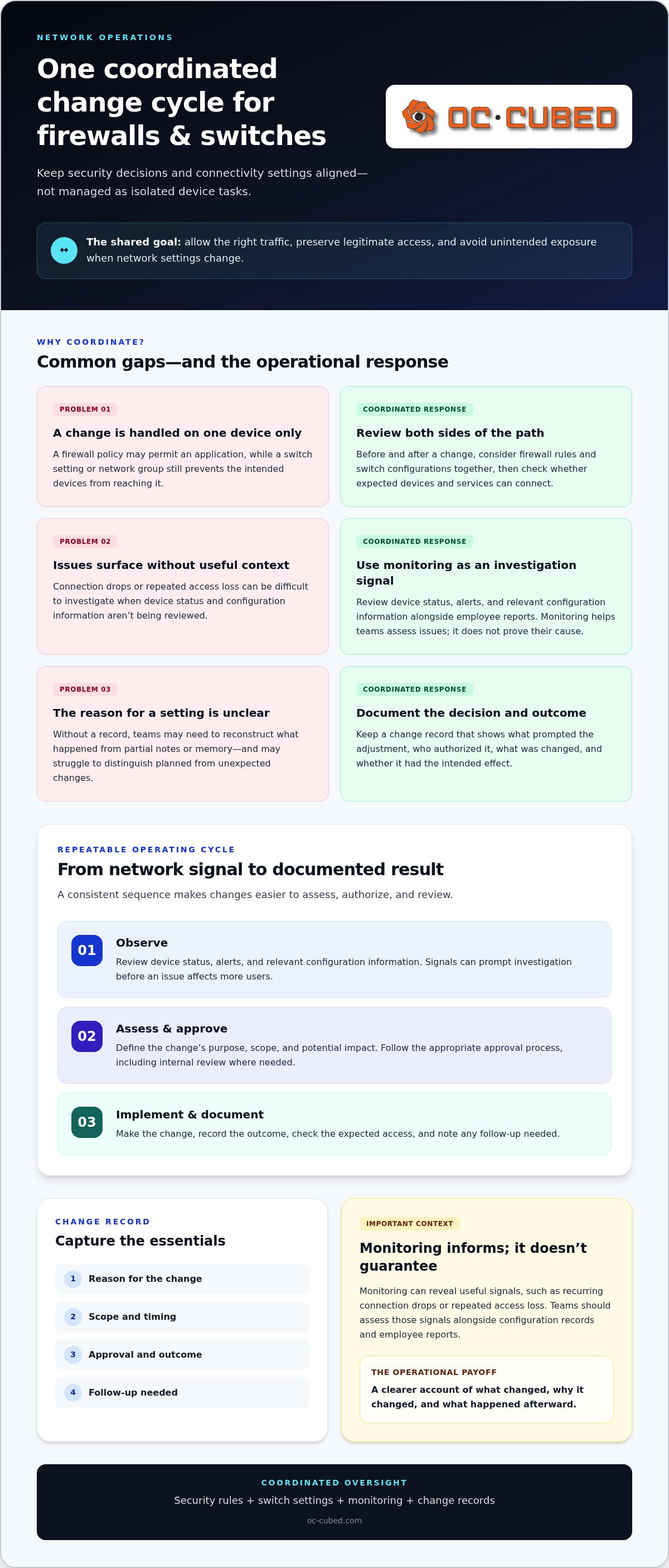
Coordinated operations give teams a repeatable way to manage network changes instead of treating each device as a separate concern. A useful cycle is to observe network status, assess a proposed change, approve it, implement it, and document the result. This creates a record of what prompted an adjustment, who authorized it, and whether it had the intended effect.
Consider a business changing how employees reach an internal application. The firewall may need a policy adjustment, while switch settings may affect which devices can reach the relevant network path. Reviewing both sides before implementation helps identify dependencies and reduce the chance that a security adjustment interrupts legitimate access or that a connectivity change creates unintended exposure.
Coordinated change records make network decisions accountable by showing what changed, why it changed, and what happened afterward. That record supports routine operations and helps investigate an unexpected slowdown or access problem.
- Observe: Review device status, alerts, and relevant configuration information.
- Assess and approve: Define the purpose, scope, potential impact, and appropriate approval.
- Implement and document: Make the change, record the outcome, and note any follow-up needed.
How monitoring informs network decisions
Monitoring provides visibility into device status, changes, and emerging issues. Recurring connection drops or a device repeatedly losing access can prompt IT teams to investigate before the issue affects more users. Monitoring doesn’t prove the cause or guarantee prevention. It gives teams useful signals to assess alongside configuration records and employee reports.
How change control reduces avoidable disruption
For each material change, record its reason, scope, timing, approval, and outcome. If a network access path is changing, consider firewall rules and switch configurations together, then check whether the expected devices and services can connect. Approval and escalation practices should fit the business’s operating needs, including which changes require internal review and who should be informed.
Documentation also helps distinguish a planned adjustment from an unexpected configuration change. Without a record, teams may have to reconstruct the sequence from partial notes or memory. With one, they can compare the intended result with observed behavior, identify follow-up needs, and explain the change to affected employees or business leaders.
Routine administration and security incident response are related, but they aren’t identical. Administration covers planned oversight and approved adjustments. Incident detection and remediation address a suspected threat or active security issue, which may require investigation, containment, and corrective action. Keeping the distinction clear helps teams route work to the right process while maintaining visibility across network operations and security concerns.
For businesses that want consistent oversight, remote IT support can bring network monitoring, configuration management, and escalation into a coordinated operating approach.
How to Evaluate Managed Firewall and Switch Management
Evaluate the operating model, not just the equipment being supported. Managed firewall and switch management should describe continuing oversight, with clear boundaries for routine administration, client decisions, and work handled through separate hardware support or ad hoc troubleshooting. A written scope helps everyone understand what is covered and where responsibility sits.
Use these criteria to compare how a service handles everyday operations:
| Area | What to look for |
|---|---|
| Monitoring | Visibility into device status and a defined process for reviewing potential issues. |
| Configuration control | Clarity on who can propose, approve, and implement firewall or switch changes. |
| Documentation | Records of meaningful changes, identified issues, and follow-up actions. |
| Escalation | A clear route for issues that need internal decisions or security response. |
| Reporting | Regular visibility into work performed and recurring concerns, without assuming a particular dashboard or report format. |
A hardware support arrangement may focus on equipment faults or replacement. Ad hoc troubleshooting typically begins after someone reports a problem. An ongoing management service should explain how monitoring, configuration oversight, and follow-through work between incidents. These approaches can complement one another, but they aren’t interchangeable.
What visibility and accountability should look like
Useful visibility starts with an understandable record of network work: what changed, what issue was identified, and what follow-up remains. Monthly reporting can help business leaders track activity over time and notice recurring concerns that may deserve attention. Reports don’t need a particular format to be valuable. They should make the status and ownership of relevant work clear enough to support informed decisions.
Managed support shouldn’t mean a business loses oversight. Define which changes can be handled within the agreed scope, which require approval, and who receives updates. A business may delegate routine administration while retaining decision-making authority over changes with broader operational impact. Clear boundaries reduce uncertainty without requiring leaders to manage every technical detail.
How to assess fit with broader IT support
Network operations affect more than network devices. A connectivity issue may involve a switch, while a security concern may also require review of endpoint protection or security response. Defined escalation paths help the people monitoring network activity coordinate with helpdesk support and the teams responsible for threat detection and remediation. That connection can prevent an issue from being passed between teams without clear ownership.
For a broader view of how these responsibilities connect with business protection, explore the Managed Cybersecurity for Small Business: 2026 Guide. The right management approach makes network work visible, clarifies who owns each decision, and connects routine oversight with wider IT and security efforts.
What Businesses Should Expect from Ongoing Network Management
Ongoing network management should have a clear rhythm and defined ownership. This practical sequence gives the business and its IT support team a shared picture of the work:
- Establish scope: Identify the devices and responsibilities covered, along with decisions that remain with the business.
- Monitor: Review device status and network activity for issues that may need attention.
- Review changes: Assess proposed configuration changes for their purpose and potential effect on connectivity or security.
- Document work: Keep records of relevant actions, issues, and follow-up.
- Report: Share visibility into network work and patterns that may need a business decision.
The division of responsibilities depends on network complexity, internal IT ownership, and how the business operates. A company with several locations or a dedicated internal IT team may need a different approval and communication process than a smaller organization with limited technical resources. The goal is a scope that fits the environment, not a one-size-fits-all checklist.
Delegating routine administration doesn’t mean giving up control. Agree on which tasks can proceed within scope, which changes need approval, how issues are escalated, and what information the business receives. Consistent records and reporting give business leaders the context to oversee network decisions without managing every technical detail.
How routine oversight supports steady operations
Planned attention to device status, configuration consistency, and emerging network issues helps teams spot changes that deserve review. That’s different from waiting for employees to report lost access or a slowdown. User reports remain valuable, while monitoring and routine review can add context earlier. Neither guarantees that disruptions will be prevented, but together they give teams more information to assess what’s happening and decide what to do.
How managed support fits into remote IT operations
Network monitoring works best when it connects to workflows for user support and broader IT needs. A reported connectivity problem can be routed for network review, while an issue involving a user’s device can move through helpdesk support. Clear escalation helps teams coordinate ownership instead of leaving employees to guess where to report a problem. The wider approach described in Remote IT Management: Complete Guide for Modern Business provides context for connecting network oversight with remote support.
Managed firewall and switch management should also account for how security response fits alongside routine network administration. A suspected threat may need a different escalation path from a planned configuration adjustment. Defining those paths helps the business understand who takes the next step and how the issue connects to other IT responsibilities.
OC Cubed provides remote IT support that combines network monitoring and configuration with helpdesk and NOC integration, giving businesses a coordinated structure for network oversight and support.
How OC Cubed Manages Firewalls and Switches as Part of IT Support
Firewall and switch oversight is most useful when it fits into a business’s broader IT operations. OC Cubed provides remote IT support that includes firewall and switch management, network monitoring, and configuration. This connects network-device oversight with the systems and support processes employees rely on to do their work.
That connection matters when a network issue affects more than one device. A configuration concern may need network review, while an employee who can’t access a business application may also need helpdesk support. Helpdesk and NOC integration helps coordinate those points of contact. Security threat detection and remediation address concerns that call for a security-focused response, while monthly reporting gives the business ongoing visibility into network work.
The result is a connected support model, with network configuration and monitoring considered alongside user support and security operations. This can reduce fragmented ownership by giving issues a clearer path for review and escalation. Responsibilities depend on the agreed scope and the business’s internal ownership, so teams understand which decisions stay with them and how support work is coordinated.
How network management connects to wider IT support
Network management is part of remote IT operations, not a separate island. Monitoring can surface a device or connectivity concern; configuration oversight provides context; and helpdesk workflows can connect the issue to its effect on employees. If a concern involves a potential security threat, it can be directed toward security detection and remediation. This coordination supports clearer ownership across related IT tasks.
Leaders assessing how external IT support fits their organization can also consult What Is a Managed Service Provider? A Guide for Leaders. The broader MSP model helps frame how ongoing network responsibilities can sit within a wider support relationship, rather than being treated solely as isolated equipment work.
A practical next step for business leaders
Start by reviewing how network issues are handled now. Consider who monitors devices, who approves configuration changes, how employees report connectivity problems, and what visibility leaders receive into work performed. These questions help identify gaps in ownership and communication, and provide a starting point for defining the right scope of managed firewall and switch management for the business.
OC Cubed provides remote IT support for business IT environments. Its approach brings network monitoring and configuration together with firewall and switch management, helpdesk and NOC integration, security response, and monthly reporting. The aim is consistent oversight and clearer coordination aligned with the business’s support needs.
For a practical overview of how these responsibilities relate to an MSP relationship, What Is a Managed Service Provider? A Guide for Leaders offers useful context. A focused discussion of your network environment and current support model can help establish priorities, ownership, and reporting expectations without adding unnecessary complexity.
Set a Clear Direction for Your Network
Business needs change. New applications, evolving work patterns, and growth can affect how employees use the network. Treat managed firewall and switch management as an ongoing part of planning, not a decision that ends once devices are configured. When priorities shift, revisit whether network responsibilities and oversight still support the way your business operates.
Connect network priorities to business goals. Consider what reliable access means for your teams, where security decisions sit, and how much visibility leaders need. These points help shape a support model that fits your organization without obscuring who owns key decisions.
OC Cubed can help businesses clarify their network-management needs and how those needs fit their current IT support approach. A focused conversation can turn uncertainty about ownership and oversight into a practical direction for the next stage of network operations.
With clear priorities and dependable oversight, your network can better support the work ahead.
Frequently Asked Questions
What is included in managed firewall and switch management?
Managed firewall and switch management generally covers ongoing administration of network security and connectivity devices. Depending on the agreed scope, it may include reviewing settings, monitoring device health, managing approved configuration changes, and keeping records of work. For example, if a business adds a new application or office device, the support team can assess whether network settings need adjustment. Hardware purchasing and one-time setup are separate considerations.
Why manage firewalls and switches together?
Managing them together helps keep security rules and device connectivity aligned. A firewall may permit a business application, but a switch setting could still prevent a particular group of employees from reaching it. Reviewing the related configurations together can help teams find that mismatch sooner. This coordination is useful when adding devices, changing access needs, or reorganizing how employees connect to shared business systems.
Can a managed service provider manage network equipment remotely?
Yes. A managed service provider can remotely monitor and configure supported network equipment as part of remote IT operations. Remote oversight can be useful for reviewing device status or applying an approved change without requiring a technician to be stationed at the business. The provider and business should define equipment scope, access controls, approval responsibilities, and escalation paths so remote work remains coordinated with internal IT ownership.
How does managed switch management help business security?
Managed switch administration can support security by keeping device access and network grouping aligned with business needs. For instance, a company may separate employee devices from equipment used for a distinct business function. Switch settings can help maintain that separation, while firewall policies govern traffic between networks where applicable. These measures support a broader security approach, but they don’t replace endpoint protection, user access controls, or security monitoring.
Does managed firewall and switch management replace in-house IT?
No. Managed support can complement an internal IT team by taking on agreed network oversight while the business retains ownership of priorities and decisions. Internal staff may still define requirements, approve sensitive changes, and coordinate projects with business teams. The division of work should reflect available internal expertise and the network’s complexity. Clear responsibilities help prevent duplicated effort and ensure important network decisions have an accountable owner.
How often should firewall and switch configurations be reviewed?
Review configurations on a planned basis and when meaningful changes occur, such as introducing a business application, changing access requirements, or investigating unexpected connectivity. The right cadence depends on the network environment, operating needs, and internal change practices. A review should consider whether settings still match current business use, whether older rules or configurations need attention, and whether a proposed adjustment requires approval before implementation.
What should businesses expect in managed network reporting?
Managed network reporting should make work and relevant concerns easier to understand. Useful updates can describe completed network activities, issues that need attention, and outstanding follow-up in a format suited to the business. OC Cubed includes monthly reporting in its IT service portfolio, supporting ongoing visibility. Businesses can use reporting to discuss recurring patterns, clarify ownership, and decide whether network priorities or support responsibilities need to change.


