

What if cybersecurity headlines weren’t a to-do list for your business? Constant reports of new attacks can make every threat feel urgent, especially when you’re unsure which protections are already in place. But reducing anxiety about cybersecurity threats doesn’t mean ignoring risk. It means understanding your exposure and focusing on practical steps that give you more control.
This guide explains how to separate useful action from headline-driven worry. You’ll learn how to review key safeguards, prioritize steps that can reduce business risk, and create a manageable response plan instead of reacting to every alert. We’ll also cover when ongoing monitoring or virtual CISO guidance can help turn uncertainty into clear priorities. The goal isn’t to promise that incidents can never happen. It’s to build a proportionate approach so you can protect your business and focus on running it.
Key Takeaways
- Recognize the difference between reasonable cybersecurity vigilance and constant worry, without treating everyday concern as a diagnosis.
- Map your business-critical accounts, devices, and information, then identify existing safeguards and unanswered questions.
- See how reducing anxiety about cybersecurity threats starts with purposeful safeguards, not reactive efforts to follow every headline.
- Build a repeatable plan that assigns owners, schedules routine reviews, and clarifies what to do when a credible alert appears.
- Learn how threat detection, endpoint protection, network monitoring, and virtual CISO guidance can provide ongoing security oversight.
Why cybersecurity threats create anxiety for business owners
Concern about cybersecurity is reasonable when your business depends on email, customer records, payment systems, or shared files. You’re responsible for keeping work moving and handling information carefully, often while managing many other priorities. That responsibility can make uncertainty feel personal. The goal isn’t to dismiss the risk or stay on alert every hour. It’s to distinguish useful vigilance, which leads to clear decisions, from persistent worry that drains time without showing you what to do next.
Cybersecurity anxiety is worry about possible digital harm to a business or its information. It isn’t a diagnosis or proof that an incident is happening. The specific concerns depend on what a business stores, how it operates, and which safeguards are in place. A company that relies on cloud accounts may have different questions from one whose operations depend on networked devices.
Uncertainty can compound the concern. A business owner may not know whether important accounts use strong sign-in protections, whether devices are monitored, or who would respond to a credible warning. When those questions sit alongside responsibility for staff, customers, and business continuity, a possible threat can feel like an immediate personal failure. Write down the unanswered questions to separate practical gaps from imagined worst-case outcomes. This gives the concern a business focus without assuming the business is already compromised.
How cyber-threat headlines affect business risk perception
Repeated breach stories can make a vivid event feel close to home. A headline shows that a threat can happen somewhere, but it doesn’t establish that your business faces the same conditions or has been affected. Awareness can prompt a useful review. It becomes less useful when every story feels like evidence of an active problem, even without an alert or other sign connected to your systems.
Before treating a headline as a reason to overhaul everything, ask whether it identifies a specific weakness relevant to your business or simply describes a possible threat. That distinction keeps attention on evidence and applicable safeguards rather than the emotional force of the news cycle.
When cybersecurity worry becomes hard to manage
Notice how the worry affects your day, not just what it is about. Repeatedly checking accounts without a specific reason, struggling to focus on other work, or finding that security concerns regularly interrupt rest may suggest the worry is becoming difficult to manage. These signs don’t diagnose a condition. They can help you recognize when another review of the same controls isn’t bringing clarity or relief.
A practical security plan can clarify business controls, ownership, and next steps. It can’t address every emotional response or guarantee a sense of calm. If distress significantly affects daily life, consider seeking support from a qualified mental-health professional. For business questions, reducing anxiety about cybersecurity threats starts with separating what can be reviewed and managed from what requires personal support.
How to assess your cybersecurity exposure without catastrophizing
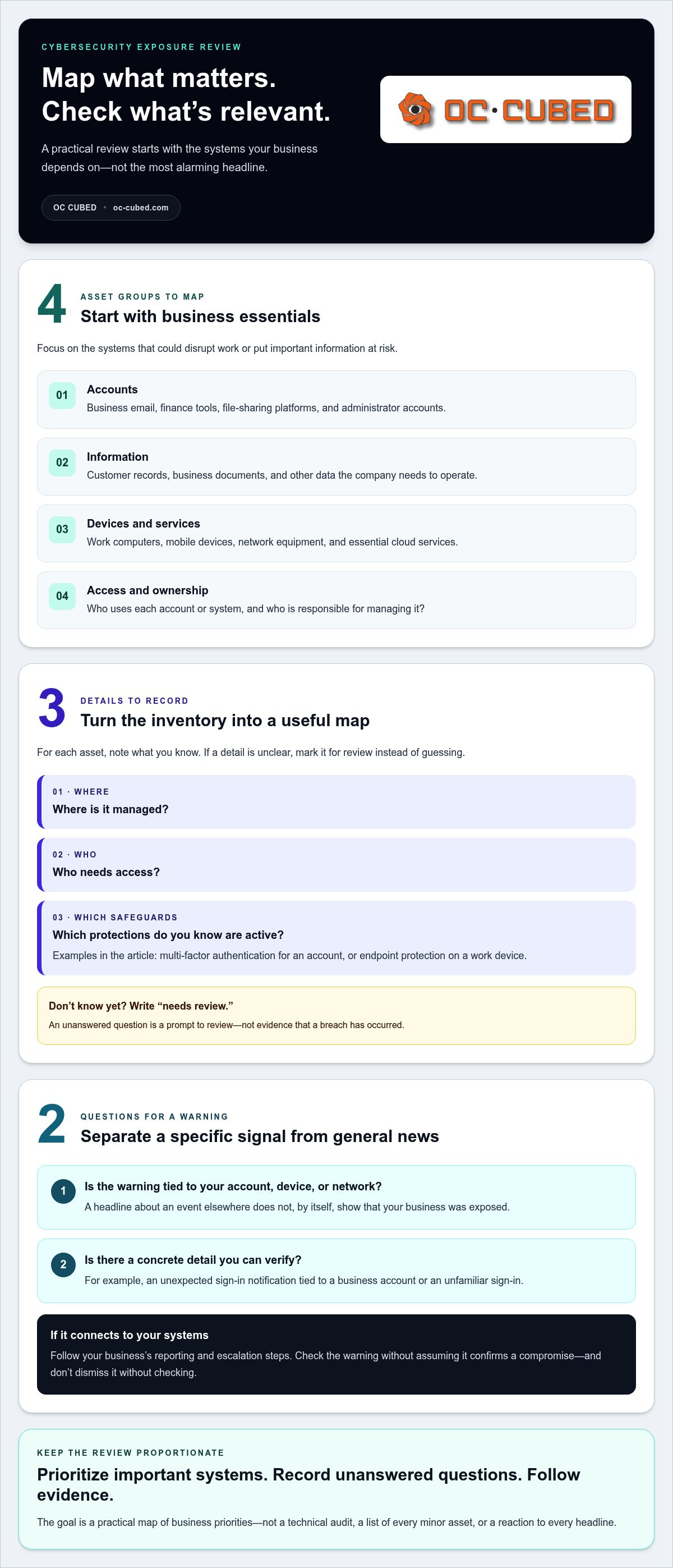
A useful review starts with what your business depends on, not with the most alarming headline you’ve seen. Set aside a focused period to identify essential accounts, devices, information, and services. Then note which safeguards are in place and what you still need to find out. An unanswered question is a prompt for review, not evidence that a breach has occurred.
Start with the business assets that matter most
Begin with the systems that would disrupt work or put important information at risk if they became unavailable or were accessed improperly. Keep the inventory practical:
- Accounts: Business email, finance tools, file-sharing platforms, and administrator accounts.
- Information: Customer records, business documents, and other data the company needs to operate.
- Devices and services: Work computers, mobile devices, network equipment, and essential cloud services.
- Access: Who uses each account or system, and who is responsible for managing it?
For each item, record where it is managed, who needs access, and which protections you know are active. For example, note whether an account uses multi-factor authentication or whether a work device has endpoint protection. If you don’t know, write “needs review” rather than guessing. The aim is a useful map, not a technical audit or a list of every minor asset. Give more attention to important systems than to tools with little access to business data.
This inventory supports cybersecurity risk planning for small businesses by connecting safeguards to business priorities. It also makes it easier to discuss specific gaps with the people responsible for IT or security, instead of trying to solve every concern at once.
Separate warning signs from general cybersecurity news
A general news story describes something that happened elsewhere or a threat that could affect some organizations. By itself, it doesn’t show that your business has been exposed. An unexpected sign-in notification tied to a business account is a specific signal to review through your established response process. Don’t assume it confirms a compromise, but don’t dismiss it without checking.
Use a simple filter: Is the warning tied to your account, device, or network? Does it include a concrete detail you can verify, such as an unfamiliar sign-in? If yes, follow your business’s reporting and escalation steps. If it’s a headline without a connection to your systems, record any relevant question for your next scheduled review. Repeatedly refreshing news feeds rarely tells you whether your own controls are working.
Reducing anxiety about cybersecurity threats becomes more manageable when you sort concerns into three categories: known safeguards, unanswered questions, and specific alerts that need review. A scheduled review with managed cybersecurity support can help turn those questions into practical priorities without treating every headline as an emergency.
Which cybersecurity safeguards reduce real risk, and which add noise?
A small business still depends on accounts, devices, and information that need protection. Basic controls can reduce avoidable exposure, even when a company doesn’t have a large security team. The useful question isn’t whether you can eliminate every threat. It’s whether practical safeguards protect the systems your business relies on and are maintained over time.
Layered, maintained safeguards reduce more uncertainty than constant threat-checking because they address how business systems are protected, not just what might happen.
Purposeful safeguards | Intended outcome
Access protection: Multi-factor authentication and appropriate account permissions help make it harder for unauthorized people to use business accounts.
Endpoint protection: Security tools on work devices help identify and address suspicious activity on those devices.
Email security: Filtering and protection for business email help reduce exposure to unwanted or deceptive messages.
Maintained network safeguards: Monitoring and properly managed firewalls provide oversight of network activity and configuration.
Reactive habits | Likely result
Repeatedly refreshing breach headlines may increase concern without revealing anything about your own systems. Rechecking accounts without a specific signal can consume time without changing protection. Installing a new tool in response to every story may also add complexity if it isn’t aligned with a known business need.
Prioritize foundational controls over constant checking
Think of controls as layers with different jobs. Account protections, including multi-factor authentication, help strengthen sign-in security, but they aren’t a guaranteed solution. Endpoint protection focuses on work devices. Email security addresses risks delivered through messages, while network monitoring and firewall management support visibility and control across network activity. Together, these safeguards can reduce exposure, but no single tool covers every risk.
Choose priorities based on the accounts and systems your business relies on. Then make sure someone is responsible for maintaining the controls and reviewing whether they still fit. Tools that are installed but neglected may not provide the oversight you expect.
Recognize when a precaution becomes unproductive
A scheduled review has a purpose: confirm protections remain active, address identified gaps, and record decisions. Repeatedly checking the same dashboard or searching for new threat stories without a specific alert or change in risk is less likely to improve security. It can also pull attention away from controls you already know need attention.
Assign an owner to review security alerts, decide when an issue needs escalation, and track updates to safeguards. That way, a credible warning has a clear path, while general headlines don’t automatically become emergencies. Reducing anxiety about cybersecurity threats starts with controls and ownership that turn concern into routine oversight.
If your team needs help aligning protections with business priorities, managed security support can provide ongoing oversight. Safeguards lower exposure; they don’t promise that incidents will never occur.
How to build a calm, repeatable cybersecurity response plan
A written plan makes security work easier to manage because people don’t have to invent their next step under pressure. Keep it short enough to use. Separate routine prevention from incident response, name who owns each decision, and make the instructions easy for employees to find. Review the plan when systems, responsibilities, or key contacts change.
Create a routine for prevention and review
Set a recurring time to review essential controls. Choose a schedule that fits your business and available support. During each review, confirm that access remains appropriate, endpoint protection is active, email safeguards are operating, and network protections are being maintained. Add open questions from employees or earlier reviews to the agenda, so they have a clear path to resolution instead of becoming a reason for constant checking.
For each action, record an owner, the next step, and how completion will be noted. A simple tracker might say, “Review access to finance accounts, owner: operations lead, status: scheduled.” This turns a vague concern into accountable work. Keep employee guidance equally direct: how to report a suspicious message or unexpected alert, who to notify, and where to find the current instructions. Brief, role-relevant reminders are easier to revisit than a long policy no one can quickly use.
Decide what happens when an alert appears
Define who receives reports and who decides whether an alert needs escalation. Employees should know how to share what they observed without being expected to diagnose the cause. Include the internal decision-maker and the appropriate IT or security contact in a concise list that staff can access even if their usual account or device is unavailable.
When someone reports a credible alert, ask them to record the time, affected account or device, alert wording, and any action already taken. Preserve relevant messages or screenshots according to your process. Employees shouldn’t investigate beyond their role or expertise, delete potentially useful information, or make technical changes unless the designated response lead instructs them to. A clear handoff helps the right person assess the signal and choose the next step.
- Routine maintenance: Review safeguards, assign follow-up work, and document completion.
- Credible alert: Report it through the agreed channel, capture the relevant details, and wait for direction from the assigned lead.
This separation is central to reducing anxiety about cybersecurity threats. Routine work stays on the calendar. A specific warning follows a known route. You can build on that foundation with this managed cybersecurity for small business guide, which explores how ongoing security support can fit into a business’s protection plan.
How OC Cubed helps businesses replace cybersecurity worry with oversight
A plan is most useful when security tasks have consistent ownership. Managed IT and cybersecurity support can help businesses maintain that routine through ongoing oversight, rather than relying only on ad hoc checks. OC Cubed brings together monitoring, protection, maintenance, and strategic guidance so business leaders can connect security work to operational priorities.
What ongoing managed security support can help address
Network monitoring provides ongoing visibility into network activity and configuration. OC Cubed provides 24/7 network monitoring, giving businesses an ongoing view of their network rather than requiring an owner to watch it manually. Monitoring doesn’t guarantee that incidents will be prevented. It supports oversight by helping identify activity that may need attention.
Endpoint protection and threat detection focus on work devices and potential security issues. Threat detection and remediation support the process of identifying and addressing threats, while endpoint protection adds a layer of defense on devices. For businesses using Microsoft 365, tenant maintenance keeps account settings and the environment under ongoing management. Firewall management and email security with Proofpoint add further layers to network and email protection.
These responsibilities work together, but each has a distinct purpose. A protected endpoint doesn’t replace email security, and a managed firewall doesn’t remove the need to maintain accounts and devices. Coordinated support helps keep those different parts visible as business systems and needs change.
Turn security concerns into a clear next step
Managed support connects routine technology responsibilities with the security priorities identified in a business plan. Instead of leaving maintenance, monitoring, and follow-up scattered across a team, businesses can establish clearer responsibility for ongoing oversight. That structure helps leaders understand what is being managed and where a decision or additional review may be needed.
Virtual CISO guidance adds a strategic perspective. It can help translate security concerns into priorities, support security governance, and connect protective measures to business needs. For example, leadership can use that guidance to decide which systems deserve closer attention and how security responsibilities fit into broader operations. The aim is clearer direction, not the claim that risk can be eliminated.
Reducing anxiety about cybersecurity threats is more practical when protection is treated as continuing business work rather than a one-time project. Monitoring, security management, and strategic guidance provide a steadier view of that work, while leaving room to respond when conditions change. Security support can reduce uncertainty about responsibilities, but no service can promise that incidents will never occur.
Explore OC Cubed’s business IT support to see how managed IT and security services can support your business.
Make steady security progress, one decision at a time
Reducing anxiety about cybersecurity threats doesn’t require predicting every risk or staying on constant alert. Start by choosing a manageable next step, then build a security process your business can maintain. With the right oversight, you can give important decisions clear ownership and make room to focus on the work that moves your business forward.
OC Cubed supports that approach through 24/7 network monitoring and configuration, endpoint protection, threat detection and remediation, and Virtual CIO, CTO, and CISO advisory services. These capabilities provide ongoing visibility and direction without promising that every incident can be prevented. Security is an ongoing business responsibility, and you don’t have to manage every part of it alone.
Take the next step at a pace that works for your business. A clear plan and reliable support can help you move forward with greater confidence.
Frequently Asked Questions
Is it normal to feel anxious about cybersecurity threats?
Yes, concern is understandable when breach stories are frequent and you’re responsible for a business. Make the concern more useful by writing down the specific question behind it, such as whether a former employee still has account access. That creates a practical issue to review rather than an open-ended fear. If distress substantially disrupts daily life, consider speaking with a qualified mental-health professional.
How can I stop worrying about cyberattacks at my business?
You may not be able to remove all uncertainty, but you can limit how much attention it receives. Choose a set time to review security questions, and avoid checking headlines or dashboards repeatedly outside that routine unless a specific alert needs attention. Keep a short record of what requires follow-up and who owns it. If worry continues to interfere with daily functioning, seek appropriate professional support.
Can cybersecurity anxiety be reduced without ignoring real threats?
Yes. Take a concern seriously when it points to a specific, reviewable issue, such as an account notification you don’t recognize. Then use the appropriate reporting or response channel rather than repeatedly checking unrelated systems. General news can inform future planning, but it isn’t evidence of an incident in your business. Direct attention toward actions that can change protection or improve response.
What should a small business do first to feel more secure online?
Start with one business-critical service, such as company email, and confirm who manages its access and settings. This focused review can reveal whether responsibilities are clear before you expand to other systems. Note what you can verify and what needs follow-up, then assign each open item to an owner. A focused first step is more useful than attempting a full security overhaul without priorities.
Can managed IT support help reduce worry about cybersecurity threats?
It can help by giving security responsibilities a clear operational owner and providing ongoing attention to business technology. For example, managed support can help coordinate device protection and account maintenance so those tasks don’t depend solely on an owner remembering to check them. It can’t eliminate incidents or replace mental-health care. If anxiety significantly affects everyday life, seek qualified personal support as well.
What should I do if I receive a suspicious security alert?
Report it through your business’s established process, and don’t use links or phone numbers provided in an unexpected message to verify the alert. Instead, use a known route to reach the relevant account or support contact. Preserve the notification and note when it arrived, but avoid investigating beyond your role. This gives the responsible person useful details without risking further exposure or disrupting a review.
When should I seek help for cybersecurity anxiety?
Seek security guidance if you can’t tell whether an account, device, or business process needs attention, or if alert ownership is unclear. Consider mental-health support if worry is persistent or interferes with sleep, work, or daily activities. These are separate needs: technical guidance can help clarify business controls, while a qualified mental-health professional can address personal distress. Getting one kind of support doesn’t replace the other.


