

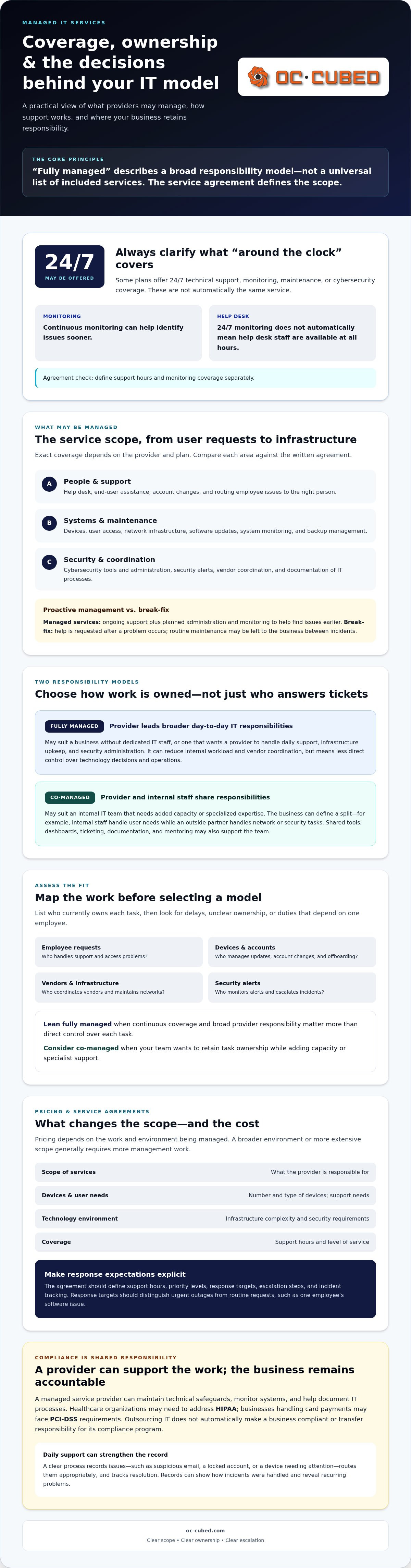
Fully managed IT services put a business’s ongoing technology management in the hands of an outside provider. Coverage commonly includes help desk support, system and network monitoring, cybersecurity, software updates, and backup management, with the exact scope set by the service agreement. The provider works proactively to keep systems supported and secure, rather than responding only when something breaks.
This can simplify IT for a business without an internal team, while giving a company with IT staff an additional source of support. But “fully managed” doesn’t mean every provider covers the same work, and outsourcing IT does not automatically make a business compliant. A clearly defined scope matters.
This guide explains what fully managed IT services can include, how ongoing support and security work, and where compliance support fits. It also compares fully managed and co-managed approaches to help you assess which model suits your team, technology needs, and responsibilities.
Key Takeaways
- Compare the support, monitoring, security, and maintenance included in a service agreement to understand what the provider will manage.
- Compliance support can help maintain technical safeguards and documentation, but it doesn’t transfer the business’s responsibility for meeting applicable requirements.
- Businesses without internal IT staff may value a provider-managed model; companies with IT teams can consider sharing responsibilities through co-managed support.
- Continuous network monitoring can help identify issues sooner, while clear escalation and help desk processes keep users supported.
- Assess security needs, staffing capacity, and control preferences to decide which IT management approach fits your business.
Can managed IT help with compliance requirements?
Yes. A managed service provider can support compliance by maintaining technical safeguards, monitoring systems, and helping document IT processes. For example, healthcare organizations may need to address HIPAA, while businesses handling card payments may face PCI-DSS requirements. A provider can help manage the technology involved, but the business remains responsible for its compliance program.
Help desk and end-user support connect those safeguards to daily work. Employees can report issues such as suspicious email, a locked account, or a device that needs attention. A clear support process records the issue, routes it to the right person, and tracks its resolution. Those records can reveal recurring problems and show how incidents were handled.
Comprehensive IT administration covers more than answering tickets. It can include user access, devices, network infrastructure, software updates, security tools, and vendor coordination. A proactive approach addresses maintenance and emerging issues before they interrupt work. For instance, when an employee leaves, the organization can review and remove their access to business systems as part of its offboarding process.
Managed IT services and managed IT support can describe overlapping work, but they often indicate different scopes. Support usually emphasizes help desk assistance and resolving user or device problems. Managed services typically add ongoing administration and monitoring. Outsourcing describes who performs the work: a business assigns some or all IT responsibilities to an outside provider. Fully managed arrangements cover broader responsibilities, while co-managed arrangements share them with internal staff.
Break-fix support works differently. A business calls for help after a problem occurs, such as a failed workstation or network outage. Routine maintenance and monitoring may then be left to the business between incidents. Ongoing managed services combine support with planned administration, helping identify issues earlier and ensuring routine work does not depend on an emergency.
Depending on the provider and plan, technical support may be available 24/7. Some managed service plans also include 24/7 monitoring, maintenance, and cybersecurity coverage. Around-the-clock monitoring does not automatically mean a help desk is staffed at all hours, so the agreement should define each separately.
What factors affect managed IT services pricing? Scope, the number and type of devices, user needs, infrastructure complexity, security requirements, and support coverage all affect pricing. A broader environment or a more extensive service scope generally requires more management work.
What service-level agreements and response times should an MSP provide? The agreement should define support hours, priority levels, response targets, escalation steps, and how incidents are tracked. Response targets should distinguish urgent outages from routine requests, such as one employee’s software issue.
Who Should Consider a Fully-Managed Solution?
A business without dedicated IT staff may consider fully managed IT services when technology tasks compete with core work. For example, a growing company may need someone to manage user accounts, maintain devices, coordinate updates, and respond when employees lose access. An outside provider can take responsibility for ongoing IT administration instead of leaving those duties to an owner or office manager.
Small and midsize businesses often weigh building internal expertise against outsourcing IT operations. A fully managed arrangement can suit a business that wants one provider to handle daily support, infrastructure upkeep, and security administration. It can also reduce the burden of coordinating separate vendors for email, networks, devices, and support.
Internal IT teams may prefer co-managed services when they need extra capacity or specialized expertise. The provider and employees can divide responsibilities according to business priorities. For example, an internal team might manage user needs while an outside partner handles network or security tasks. Co-managed arrangements can also give staff shared tools, dashboards, ticketing, documentation, and mentoring.
Assess the fit by mapping current IT tasks before choosing a model. List who handles employee requests, device updates, account changes, vendor issues, and security alerts. Then identify tasks that are delayed, lack clear ownership, or depend on one employee. If continuous coverage and broad responsibility matter more than direct control over each task, a fully managed approach may fit. Businesses that want to retain task ownership can define a co-managed split instead.
How do businesses choose a managed service provider? Compare the provider’s scope, support process, security responsibilities, reporting, and escalation approach against your task list. Choose an arrangement that clearly assigns responsibility for everyday needs and major incidents.
There are trade-offs. Fully managed IT services can reduce internal workload, but the business gives up some direct control over technology decisions and operations. A poorly defined scope can also leave gaps between the provider’s duties and the company’s responsibilities. Clear ownership and regular communication help prevent this.
What are the risks and drawbacks of fully managed IT services? The main considerations are reduced hands-on control, reliance on an outside provider, and possible gaps if responsibilities are vague. Keep decision rights, access, documentation, and escalation paths clear.
What questions should businesses ask before signing an MSP contract? Ask which users, devices, systems, and tasks are covered, how requests are prioritized, and how incidents are escalated. Clarify reporting, access ownership, excluded work, and the process for ending or changing the agreement.
For businesses weighing outsourced support against internal capacity, managed IT support options can help frame the next conversation around the work that needs coverage.
What is Managed IT Services?
Managed IT services are ongoing technology administration and support delivered by an outside provider. With fully managed IT services, the provider takes responsibility for the agreed parts of a business’s IT operations, rather than responding only to isolated repair requests. The service agreement defines which users, systems, and tasks are covered.
Monitoring and Downtime Prevention
Network monitoring tracks infrastructure, devices, and system performance so emerging issues can be investigated before they disrupt work. Depending on the agreement, monitoring may run 24/7 and flag events such as a device going offline or a network connection becoming unstable.
For a business using fully managed IT services, monitoring alerts can help the provider spot patterns and prioritize investigation. A recurring connection issue, for example, can be addressed before it disrupts a customer meeting. Monitoring can help reduce avoidable interruptions, though it cannot prevent every outage.
Cybersecurity Monitoring and Threat Response
Cybersecurity monitoring reviews alerts and system activity for signs of threats. Threat response involves investigating suspicious events and taking action based on the incident and agreed responsibilities. Security software, endpoint protection, and email safeguards can help cover different points where risks may arise.
A defined response process clarifies how an alert is prioritized, who investigates it, and whether affected devices need to be contained. For example, a report about a suspicious email can prompt a review of the message and related account activity. Clear escalation paths give employees a practical way to report concerns.
Remote Monitoring and Management Tools
Remote monitoring and management tools let support teams review endpoints, networks, and devices without being physically present. They can also support remote system updates and patch management, helping providers manage routine tasks across a business environment.
These tools provide a shared view of device health and maintenance needs. They may reveal a workstation that missed an update or network equipment reporting a fault. Remote access also supports troubleshooting without an on-site visit, while access controls help restrict who can manage business systems.
Coverage varies by agreement. Plans may include monitoring, security, endpoint protection, backups, updates, and help desk support. Review the scope against the systems your organization relies on, including employee devices, business applications, and network equipment.
How does onboarding with a managed IT service provider work? Onboarding typically takes 2 to 8 weeks, depending on the customer’s environment and requirements. It can involve assessing systems, setting up tools and access, documenting the environment, and transitioning support.
What services are included in a fully managed IT services plan? Plans may combine ongoing monitoring, security, updates, backups, and help desk support. The agreement identifies the systems and tasks the provider manages, along with how alerts and support requests are handled.
Cybersecurity assessments, managed security, and employee training
Managed cybersecurity combines risk reviews, security controls, and response planning to protect business systems and data. Employee habits matter too, since a misdirected email or unsafe attachment can expose an organization.
Managed Security and Data Backups
Managed security uses ongoing safeguards to detect threats, while data backups preserve copies of important business information. Together, they address different risks: security controls aim to limit unauthorized access, and backups support recovery after data loss or system disruption. A practical review checks which systems are backed up, who can access those copies, and whether recovery steps work. For example, a company can document how staff would restore access to a critical file after accidental deletion.
Compliance and Data Protection
Cybersecurity controls can support compliance by protecting systems that store or process regulated information. HIPAA is relevant to healthcare organizations, PCI-DSS to businesses handling credit card data, SOX to publicly traded companies, and GDPR to organizations handling EU data. Applicable requirements depend on the organization’s activities and information. Technical safeguards can support compliance efforts, but they don’t replace the business’s broader responsibilities.
A cybersecurity assessment gives a business a structured view of its risks. It can review user access, endpoint protection, email security, update practices, and backup arrangements. Findings help prioritize remediation instead of treating every alert as equally urgent. For instance, an account with unnecessary access to sensitive files presents a different risk from an employee’s device needing routine maintenance.
Managed security turns those findings into ongoing work. Security Threat Detection and Remediation, endpoint protection, and email security can help identify suspicious activity and guide response. The process should define how alerts are assessed, who handles containment, and how outcomes are recorded. The National Institute of Standards and Technology (NIST) warns that a cyberattack on a vulnerable MSP can increase the cybersecurity vulnerability of the businesses it supports. Provider security therefore belongs in the risk discussion.
Employee training adds a practical layer. Use examples that match daily work, such as a message asking staff to open an unexpected attachment or share login details. Employees should know how to report suspicious messages and where to get help. Clear reporting steps can help security teams investigate early, while focused guidance avoids disrupting productivity with abstract warnings.
The need for coordinated protection is clear in reported breach findings. Human error or misconfigurations caused 24% of data breaches covered by IBM’s Cost of a Data Breach Report 2024. External threat actors were involved in 68% of breaches reported in Verizon’s 2024 Data Breach Investigations Report. These figures point to different control needs: safer processes for users, and technical defenses against outside threats.
Backups, access controls, endpoint protection, and staff reporting work best as connected safeguards. Map each control to the relevant systems and data, assign an owner, then review gaps and response procedures. This gives security and compliance discussions a practical foundation, rather than relying on software alone.
Definition of fully managed IT services
This arrangement places responsibility for agreed technology operations with an outside service provider. Rather than handling only isolated repairs, the provider manages defined areas such as user support, network administration, security, maintenance, and planning. The service agreement sets out which systems, users, and tasks fall within that scope.
“Fully” describes the breadth of delegated work, not a universal package. One business may outsource most IT operations, while another keeps selected decisions or specialist tasks in-house. For example, an agreement could assign daily network administration to the provider while the business retains approval of major technology purchases. Clear ownership helps prevent employees from assuming someone else handles a task.
This ongoing model differs from break-fix support. With break-fix, a business requests help after a problem occurs, such as a failed computer or interrupted connection. Fully managed IT services combine user support with planned administration and proactive monitoring. A provider can review system alerts, coordinate updates, and address recurring issues as part of regular operations, rather than waiting for employees to report each problem.
The term also helps distinguish managed IT services from managed IT support. Support often centers on resolving employee requests and device problems. Managed services generally cover broader responsibilities, including infrastructure, security, maintenance, reporting, and technology planning. The labels can overlap, so the written agreement matters more than the name. Businesses should be able to identify who owns each important task.
Delivery can involve remote work, on-site services, or infrastructure hosted in a provider’s or third-party data center. Remote monitoring and management tools let providers review networks and endpoints, while a help desk handles employee requests. Some agreements include 24/7 monitoring, and providers may supply monthly system performance and security reports. These details show how the relationship works day to day.
For a growing business, fully managed IT services can provide a more coordinated way to assign responsibility. When a new employee joins, for example, the business and provider can define who handles account setup, device readiness, and access approval. That reduces duplicated effort and helps preserve efficiency as staffing changes. It also gives leadership a clear route for support requests, maintenance decisions, and technology projects.
Before choosing this model, map the work you expect the provider to own. Include daily user needs, network operations, cybersecurity, vendor coordination, and longer-term planning. Compare that list with the written scope, support process, reporting, and escalation terms. A precise definition turns “fully managed” from a broad label into a workable operating arrangement.
OC Cubed - Your trusted MSP: Remote IT Support
OC Cubed - Your trusted MSP helps businesses manage everyday IT needs through remote support and ongoing technology maintenance. Turn to its Remote IT Support when employees need help accessing systems or resolving device issues. Microsoft 365 Tenant Maintenance supports the administration of your Microsoft 365 environment, while Security Threat Detection and Remediation and Endpoint Protection / Antivirus address important parts of cybersecurity coverage.
These services can fit businesses looking to coordinate user assistance, Microsoft 365 upkeep, and security support through an ongoing IT relationship. The next step is to discuss which responsibilities your business wants managed and how they align with your current systems.
Contact OC Cubed, your managed IT provider, to discuss your IT needs, or visit oc-cubed.com.
Turn Your IT Priorities Into a Clear Plan
The value of fully managed IT services depends on how well the arrangement fits your operations. Before making a change, identify who owns each decision, which systems need consistent attention, and where delays affect employees or customers. That review gives you a useful basis for defining responsibilities and assessing whether support meets business needs.
OC Cubed - Your trusted MSP can support that work through Remote IT Support, Microsoft 365 Tenant Maintenance, and Security Threat Detection and Remediation. These services address user assistance, Microsoft 365 upkeep, and security monitoring as parts of an ongoing IT approach. Aligning those responsibilities with your priorities helps create a practical next step, rather than adding technology without a clear purpose.
Start with the work your team needs covered and the outcomes you want your IT arrangement to support. A clear conversation with OC Cubed can help turn those priorities into a practical path forward.
With defined responsibilities and support from OC Cubed, your team can focus more confidently on its next stage of growth.
Frequently Asked Questions
Why do growing businesses choose fully managed IT?
Growing businesses choose fully managed IT services when technology needs expand beyond their team’s capacity. An additional location, new business application, or growing employee base can create more work across user access, devices, and support. An outside provider can take ownership of agreed responsibilities while leadership focuses on business priorities. Before choosing this model, identify which IT tasks are consuming staff time or delaying planned work.
Does fully managed IT include cybersecurity?
Cybersecurity may be included, but the service agreement defines the actual coverage. Check whether responsibilities include endpoint protection, email safeguards, threat investigation, and response coordination. For example, establish who reviews a reported phishing message and who decides whether affected accounts need action. Fully managed IT services can bring these duties together when they are within the agreed scope. Clear ownership helps employees know where to report suspicious activity.
What are fully managed IT services?
They’re an ongoing arrangement where an outside provider manages agreed technology responsibilities for a business. The scope can cover daily operations, maintenance, security, and planning, depending on the agreement. To understand the arrangement, map each system and task to an owner. For example, document who approves new user access, handles a business application issue, and coordinates a technology change.
What is the difference between fully managed and co-managed IT services?
With a fully managed arrangement, an outside provider owns broader agreed IT responsibilities. Co-managed services divide work between the provider and the company’s internal IT staff. A business might keep employee support in-house while assigning network administration to its partner. The distinction is about responsibility and control, not simply the number of tasks outsourced. Document ownership, decision rights, and escalation paths so requests don’t stall between teams.
What cybersecurity protections are included in managed IT services?
Coverage depends on the agreement and may include endpoint protection, email security, network safeguards, threat detection, and remediation. Clarify how alerts move from detection to action and who communicates with affected employees. Fully managed IT services can coordinate these protections with routine system administration when that work is included. For example, define how the team handles a device that triggers a security alert during normal business operations.
Are managed service providers required to comply with HIPAA, SOC 2, or other regulations?
A provider does not have the same compliance obligations in every case simply because it offers managed services. Requirements depend on the organization’s activities, the information involved, and the provider’s role. HIPAA is relevant to healthcare organizations, while businesses handling credit card data may need to address PCI-DSS. Define data-handling and security responsibilities in the service agreement, then align them with your organization’s compliance needs.

Article by
Peter Irizarry
Peter Irizarry founded OC Cubed, LLC in 2023 to help small to mid-sized businesses stop worrying about downtime and cybersecurity threats. A frequent speaker on SMB digital transformation, Peter is passionate about translating complex IT roadmaps into plain-English business growth strategies. He resides in North Texas with his family.


