

A backup is only one part of recovery. IT disaster recovery planning for small business means documenting how to restore critical systems and data after a disruption, then setting clear limits for downtime and data loss. These goals help your team prioritize recovery.
It’s understandable to focus first on whether important files are backed up. But a backup only helps if you can restore it in time to keep essential work moving. Your recovery time objective (RTO) defines how long a system can be unavailable; your recovery point objective (RPO) defines how much data loss the business can tolerate.
This guide explains what a disaster recovery plan does and how to set recovery goals around the systems your business depends on. You’ll also learn how to test backup restoration and coordinate IT recovery with business continuity, so people know what to do when a disruption occurs.
Key Takeaways
- Define how quickly essential systems must return and how much recent data the business can afford to lose.
- Prioritize systems by their impact on core operations, security, communication, and revenue.
- Test backup restoration against recovery goals, not just whether backup jobs appear successful.
- Use tabletop exercises to clarify roles, decisions, and communications during a disruption.
- Coordinate IT recovery with business continuity so employees can keep essential work moving.
What is a Disaster Recovery Plan?
A disaster recovery plan explains how an organization will respond to an emergency and restore critical information, systems, and communications. Build it around specific risks, recovery priorities, and clear instructions for employees and external contacts.
-
Assess Risks and Plan Communications
List risks that could interrupt operations, such as ransomware, equipment failure, or a natural disaster. For each scenario, identify affected systems, likely business consequences, decision makers, and communication channels that remain available if email or phones fail.
U.S. laws and industry rules depend on the data, industry, and jurisdictions involved. Some jurisdictions may require organizations to notify regulators or affected individuals of a breach within a defined timeframe. Identify applicable requirements and include a process for recording decisions and sending required notices.
The National Institute of Standards and Technology lists Contingency Planning Guide for Federal Information Systems as Special Publication 800-34 Rev. 1. Use its contingency-planning framework as a reference when documenting recovery roles and procedures.
-
Notify Stakeholders During Emergencies
Assign someone to coordinate emergency updates and maintain a contact list for employees, customers, partners, and vendors. Include alternate contacts and a backup method, such as a phone tree, in case the organization’s primary communications platform is unavailable.
Prepare short message templates for situations such as a service outage, suspected breach, or facility closure. State what is affected, what recipients should do, and when the next update will come. Avoid sharing unverified causes or promising a restoration time before the response team can support it.
For a suspected breach, route decisions through the people responsible for security, legal review, and customer communications. Record when notices are sent and to whom, so the organization can track stakeholder updates alongside recovery work.
-
Communicate With Customers After a Disaster
Choose an accessible channel for customer updates, such as a status page or recorded phone message, and identify who will publish them. If the usual channel depends on a disrupted system, use an independent alternative customers can still reach.
Explain which services are affected, what customers can do in the meantime, and where to find the next update. For example, a business restoring its payment system can direct customers to an available ordering method without implying normal processing has resumed.
Keep messages consistent across customer service staff, partners, and vendors. Give representatives approved details and an escalation route for questions they cannot answer. Update messages as operations change, and promptly correct earlier information when facts change.
Recovery time objectives and recovery point objectives
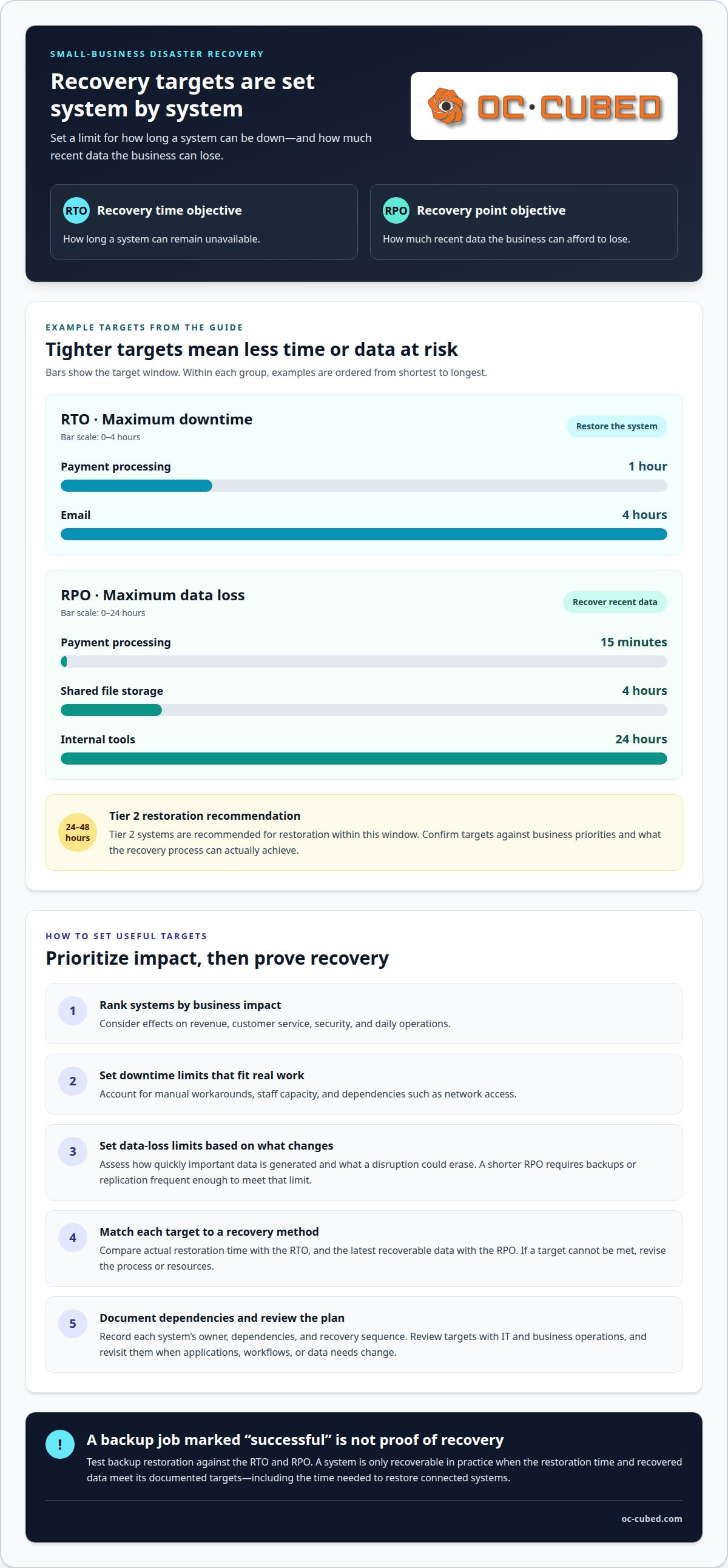
Set a recovery time objective (RTO) for how long each critical system can remain unavailable. Set a recovery point objective (RPO) for how much recent data the organization can afford to lose.
-
Set Recovery Time Objectives
Rank each system by its effect on revenue, customer service, security, and daily operations. Then set the maximum acceptable downtime for each, considering manual workarounds, staff capacity, and dependencies such as network access.
Set objectives according to business impact, not a convenient technical target. For example, payment processing might need a one-hour RTO, while email might have a four-hour RTO. Confirm the recovery sequence can meet each target, including the time needed to restore connected systems.
-
Set Recovery Point Objectives
Assess how quickly each system generates important data and what a disruption could erase. A shorter RPO means less data loss is acceptable, so backups or replication must be frequent enough to meet that limit.
For example, payment processing might have a 15-minute RPO. Shared file storage might allow a four-hour RPO, while internal tools might allow 24 hours. Set separate targets where data changes at different rates, and include the work required to recreate anything lost.
- Match each RTO and RPO to a recovery method. Compare actual restoration times with the RTO, and compare the latest recoverable data with the RPO. If restoring shared files takes longer than its 24-hour RTO, revise the process or resources rather than leaving the objective unattainable.
Document each system’s owner, dependencies, and recovery sequence alongside its targets. For example, a customer-facing application may depend on identity services, a database, and the network. Restoring the application alone will not resume operations if a required dependency is still offline.
- Review objectives with the people responsible for business operations and IT. Ask what work stops during downtime, which tasks can continue manually, and how long those workarounds remain practical. A Tier 2 system may tolerate a short outage, while a Tier 1 system supporting core operations needs earlier restoration.
Record approved targets in the recovery plan and use them to guide testing. Tier 2 systems are recommended for restoration within 24 to 48 hours. Confirm that stated targets reflect real business priorities, not assumptions about what technology can restore.
Network monitoring and configuration can help teams identify service disruptions and assess system availability. Connect monitoring observations to recovery targets so responders can prioritize systems by business impact.
Revisit objectives whenever applications, workflows, or data needs change. Network monitoring and configuration can support visibility into network conditions that affect recovery priorities.
Tabletop exercises and backup restoration testing
Define how backups will be protected, restored, and tested before an emergency occurs. Pair technical restoration checks with exercises that clarify decisions, responsibilities, and communications.
-
Set Backup and Testing Frequency
Schedule backups according to how quickly each system’s data changes and its recovery point objective. A system with a short acceptable data-loss window needs more frequent backups than records that change rarely. Use the 3-2-1 approach: keep three copies of data on two media types, with one copy offsite.
Protect backup information from unauthorized access and, where appropriate, separate it from primary systems. Include at least one air-gapped or immutable backup, and consider whether on-premises, cloud, or hybrid storage best separates recovery copies from the same disruption.
Small businesses should test backup integrity and restoration capabilities quarterly. Run a disaster recovery practice drill at least once a year, and schedule additional tests after material changes to systems or procedures.
-
Test Backup Restoration
Restore selected files and systems to a safe test environment, then compare the results with the original data. Confirm that files open, applications run, and restored information is usable. A successful backup job alone doesn’t prove that a server or software can be recovered.
Document each restoration procedure, including access steps, required software, dependencies, and the person responsible. Record restoration time and whether recovered data meets the recovery point objective. If a test fails, identify the cause, correct the procedure, and retest the affected backup.
Periodically validate that data has been backed up accurately. For example, restore a sample business document and a critical application, then verify both before closing the test.
-
Conduct Tabletop Exercises
Choose a realistic scenario, such as ransomware making a file server unavailable, and walk the response team through its decisions. Ask who declares an incident, who authorizes recovery, and how staff will communicate if normal systems are down.
Include the people responsible for IT, operations, and customer communications. Note unclear handoffs, missing contacts, and decisions that depend on unavailable information. Ready.gov recommends identifying likely emergency and business disruption scenarios as the basis for tabletop exercises.
The National Institute of Standards and Technology lists Guide to Test, Training, and Exercise Programs for IT Plans and Capabilities as Special Publication 800-84. Use exercise findings to update procedures and assign follow-up actions.
When choosing a disaster recovery service provider, assess backup protection, restoration procedures, testing practices, and the ability to support your recovery objectives. Set backup frequency according to data-change rates and recovery point objectives, test integrity and restoration quarterly, and run a disaster recovery practice drill at least once a year.
Disaster recovery plan definition and business continuity
Connect IT recovery procedures with business continuity so employees can restore technology while keeping essential work moving. Build, train, and maintain both plans as one coordinated process.
-
Define Disaster Recovery and Business Continuity
Disaster recovery covers the procedures for restoring critical information, systems, and communications after an emergency. Business continuity covers how the organization maintains essential operations while recovery proceeds. The National Institute of Standards and Technology identifies documenting recovery objectives and prioritizing restoration based on business impact as useful business impact analysis planning steps.
For example, if an online ordering system fails, the recovery plan guides system restoration while business continuity guides order handling in the meantime. Don’t treat technology restoration as the whole response. Employees need clear direction for continuing priority work during downtime.
-
Build the Plan and Set Its Contents
Write practical, ordered instructions for evacuation, emergency notifications, accessing backups, and restoring software. Include names and contact details for decision makers, employees, vendors, and customers. Record insurance and financial information, along with the location of offsite data storage.
Use the business impact analysis to prioritize systems and restoration tasks. Make instructions usable during an emergency: identify who can authorize each action, where recovery information is stored, and how employees can access it if the primary network is unavailable.
-
Train Employees
Train employees on their recovery roles and the actions to take during an emergency. Explain how to report an incident, where to find instructions, and which manager directs the response. Use a scenario such as a closed office or unavailable business application to make responsibilities concrete.
Conduct initial training and repeat it throughout the year. Include employees who handle customer service, IT, finance, and operations so they understand critical handoffs. Train new employees during onboarding, and don’t rely on a single person’s memory for essential recovery tasks.
-
Maintain the Plan
Assign a cross-functional team to review the recovery plan when regulations, equipment, or company direction change. Update it when facilities, vendors, applications, software, backup procedures, or budgets change, too. A new vendor, for example, may alter contact paths or recovery dependencies.
After each review or exercise, record changes, owners, and next actions. Keep current contact details and recovery instructions accessible during an outage. Review employee training throughout the year so people who use the plan stay up to date on changes to roles and procedures.
- Set a budget by identifying the systems to recover, required backup and restoration capabilities, and acceptable downtime. Disaster recovery costs depend on the business’s needs and are provided after a quote request; relevant factors include the systems, data, and recovery requirements involved.
Small-business disaster recovery planning
Build a recovery plan around the hardware, software, data, and people your operations depend on. Effective IT disaster recovery planning for small business connects each recovery task to its business impact.
- Inventory the technology that supports daily work. Document hardware, software applications, data, and their dependencies. For example, record which server hosts customer records and which applications rely on it. Include laptops and wireless devices, not just equipment inside the office.
Identify vital paper records, too. Scanning contracts or employee documents can make them available from a separate location. Keep copies of program software and the information needed to reinstall it on replacement hardware.
- Prioritize systems by their effect on business operations. Tier 1 systems support core operations, security, communications, or revenue. Tier 2 systems matter but can tolerate short downtime. Tier 3 systems can wait until the business is stable.
Connect each tier to its recovery time and recovery point objectives. IT disaster recovery planning for small business should tie those targets to dependencies and workable manual alternatives. A payment system, for example, may need to be restored before an internal reference tool.
- Protect backups against the same events that could damage primary systems. Store copies somewhere a fire, flood, equipment failure, or cyberattack at the main site cannot also reach. Use access controls to limit who can retrieve sensitive data during recovery.
Encrypt sensitive information at rest and in transit. For example, protect a backup file while it is stored and while it is transferred to offsite storage. Include desktop, laptop, and wireless-device data in scheduled backup procedures.
- Plan how employees will work if their usual location or network is unavailable. Document emergency, vendor, and customer contacts; financial and insurance information; and the location of offsite data. Give employees step-by-step instructions for accessing recovery information.
Choose a recovery location based on the delay the business can accept and the resources it needs. A hot site has duplicated hardware and current processing systems. A cold site may provide only space and basic facilities, so restoring operations can take longer.
- Review insurance coverage for building damage, repairs, indirect disruption costs, and lost income. Consider regional risks when assessing whether additional coverage, such as flood insurance, fits the business. Review policies once a year, and update the recovery plan when coverage or budgets change.
FEMA estimates that approximately 40% of small businesses in the United States do not reopen after a disaster. Treat IT disaster recovery planning for small business as an operational priority, not a document to file away. Revisit the plan whenever hardware, software, vendors, facilities, or business direction changes.
OC Cubed - Your trusted MSP
OC Cubed - Your trusted MSP helps small businesses strengthen the IT systems their recovery plans depend on. Remote IT Support helps address user and system issues, while Microsoft 365 Tenant Maintenance supports the ongoing management of a key business platform.
Security Threat Detection and Remediation and Endpoint Protection / Antivirus help businesses respond to threats that could disrupt operations or compromise data. Email Security with Proofpoint adds protection for business email, a common channel for customer and vendor communications. These services support a broader recovery strategy alongside documented priorities, tested backups, and clear employee roles.
If you need help strengthening the IT protections that support your recovery plan, contact OC Cubed, your trusted MSP, to discuss your business needs.
Make Recovery Planning Part of Business Decisions
Recovery goals work best when they reflect how your business operates now, not how it worked when the plan was first written. As customer expectations, workflows, and technology change, revisit the decisions that shape acceptable downtime and data loss. This keeps IT disaster recovery planning for a small business connected to real business priorities.
Choose a practical next step: bring business and IT decision makers together to identify which changing priorities could affect recovery. Use that discussion to keep the plan relevant as the organization grows, adds tools, or changes how it serves customers. Assigning a clear owner to these decisions helps make planning an ongoing business practice.
OC Cubed helps businesses strengthen the IT protections that support recovery planning. Contact the team to discuss your business’s needs and priorities.
Steady preparation gives your team a clearer path forward when disruption occurs. Take the next step with confidence.
Frequently Asked Questions
How do I simplify a DR plan for a very small business (under 10 to 20 employees)?
Keep the plan focused on essential systems, clear responsibilities, and instructions employees can use during an emergency. A business with five to 30 employees can consolidate ten disaster recovery roles into three. Assign roles by function, such as incident coordination, technical recovery, and employee or customer updates. Name alternates for each role, store contact details separately from business systems, and make the plan easy to access if the office network is unavailable.
What’s the difference between a DR plan and a business continuity plan?
A disaster recovery plan focuses on restoring technology and data, while a business continuity plan addresses how the organization keeps priority work moving. For example, the recovery plan may guide restoration of an ordering system; continuity procedures explain how staff handle orders while it is down. The plans should work together, sharing contacts, decision-making roles, and priorities so employees can maintain essential operations while IT recovery proceeds.
What is an IT disaster recovery plan for a small business?
An IT disaster recovery plan is a written set of procedures for restoring the technology a small business relies on after a disruption. It identifies key systems, recovery priorities, responsible people, and steps for retrieving data and restoring services. For example, a retailer might document how staff access customer order records if its main computer becomes unavailable. The plan should also explain how employees report problems and find current instructions.
What should a small business include in an IT disaster recovery plan checklist?
Include an inventory of critical hardware, software, applications, and data; named recovery roles and alternate contacts; and instructions for accessing backups. Add system dependencies, restoration priorities, and recovery time and data-loss targets. Include vendor contacts, customer communication procedures, insurance and financial details, and the location of offsite recovery information. For example, list the identity service a sales application needs, so employees know restoring the application alone won’t restore access.
How do small businesses set recovery time objectives (RTO) and recovery point objectives (RPO)?
Set an RTO by deciding how long each system can be unavailable before its effect on operations becomes unacceptable. Set an RPO by deciding how much recent data the business can recreate or afford to lose. Consider a web store: its owner might prioritize restoring the website within four hours and limit lost sales data to 30 minutes. Compare those targets with restoration capabilities, then adjust the recovery approach if it cannot meet them.
What are the best backup options for small businesses: cloud, onsite, or hybrid?
The best fit depends on how quickly the business needs data, how much it can lose, and whether a local incident could affect its backups. Onsite copies can support local recovery; cloud copies provide a separate storage location, while hybrid approaches combine both. For example, a business might use local copies for quick file recovery and remote copies if its office equipment is damaged. Test access and restoration for each method.
What steps should a small business take to create and implement an IT disaster recovery plan?
Start by identifying the business’s technology, data, and dependencies, then rank systems by their impact on essential work. Set recovery targets, choose backup and restoration procedures, and assign people to response tasks. Document how employees access instructions and communicate during an outage. Test a sample restoration, fix gaps, and train employees on their roles. Review the plan whenever the business changes its applications, vendors, equipment, or workflows.
What are the biggest IT disaster recovery risks for small businesses, including ransomware and outages?
Ransomware, software vulnerabilities, equipment failure, service outages, accidental deletion, and loss of access to essential accounts can all interrupt operations. Verizon’s 2026 Data Breach Investigations Report analyzed more than 22,000 confirmed breaches across 145 countries; ransomware appeared in 48% of the breaches covered. Consider how each risk could affect systems and data, then plan for recovery if the primary network or workplace is unavailable.

Article by
Peter Irizarry
Peter Irizarry founded OC Cubed, LLC in 2023 to help small to mid-sized businesses stop worrying about downtime and cybersecurity threats. A frequent speaker on SMB digital transformation, Peter is passionate about translating complex IT roadmaps into plain-English business growth strategies. He resides in North Texas with his family.


