

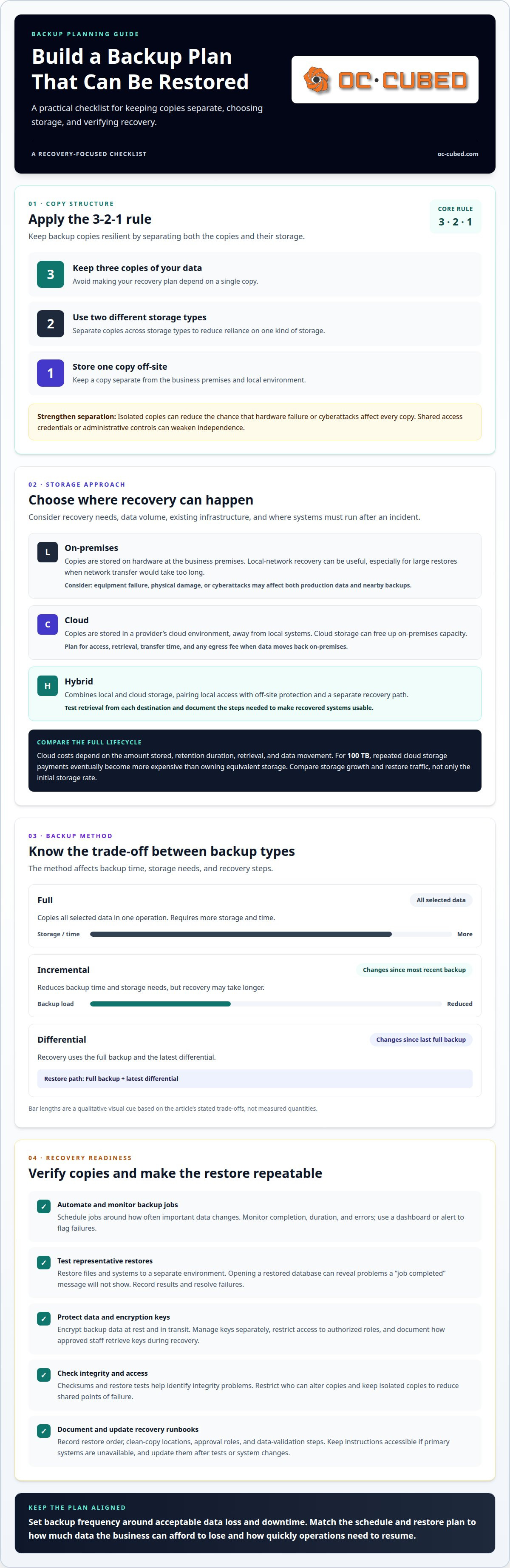
One backup copy leaves your recovery plan dependent on a single point of failure. The 3-2-1 rule recommends keeping three copies of your data on two different storage types, with one copy stored off-site. Strong data backup and recovery best practices also match backup frequency and restore plans to how much data your business can afford to lose and how quickly it needs to resume work.
It’s reasonable to want a simple answer, but the right method depends on what you’re protecting and the recovery time your operations require. This guide explains the differences between full, incremental, and differential backups, then compares on-premises, cloud, and hybrid approaches. You’ll also learn how to apply the 3-2-1 rule, test restores, prepare a disaster recovery plan, and set backup schedules around service-level demands. The goal is a practical strategy that supports recovery, not just a collection of backup copies.
Key Takeaways
- Automate backup jobs, restrict who can alter copies, and monitor job status so failures are easier to catch.
- Choose on-premises, cloud, or hybrid storage based on recovery needs, available capacity, and how data must move during restoration.
- Build backup resilience with separate copies and storage types, then strengthen the approach with offline protection and verification.
- Document recovery roles and procedures, and use restore tests and disaster drills to find gaps before an incident.
- Set backup frequency around acceptable data loss and downtime, giving the most critical systems the coverage they need.
1. Will a backup strategy guarantee that data can be restored successfully?
No. A backup strategy creates recovery options, but a successful restore depends on usable copies, secure access, and tested procedures. Automate backup jobs on a schedule that reflects how often important data changes. Automation reduces missed runs and manual errors, but it does not prove that files are complete or that recovery will work.
Monitor each job for completion, duration, and errors. Use a dashboard or alert to flag a failed backup before the next run. Then test representative files and systems by restoring them to a separate environment. For example, restoring and opening a database can reveal problems that a “job completed” message will not show. Record test results and resolve any failures.
Full backups copy all selected data in one operation, but require more storage and time. Incremental backups save changes since the most recent backup, reducing backup time and storage needs but potentially lengthening recovery. Differential backups capture changes since the last full backup. Recovery uses that full copy and the latest differential.
Regulatory needs depend on the organization and the records it handles. According to the U.S. Department of Health and Human Services, healthcare organizations that maintain patient healthcare records need to comply with HIPAA. GDPR-related requirements may involve retaining and segregating specific data types, while deletion rules can require removing selected customer data and keeping other records. Build retention and deletion steps into backup handling.
Encrypt backup data both at rest and in transit. Use secure transfer methods when sending backup copies between locations or to cloud storage. Manage encryption keys separately from backup files, restrict key access to authorized roles, and document how approved staff can retrieve keys during recovery. A protected backup is unusable if its key is lost or inaccessible.
Common risks include failed jobs, silent corruption, stolen credentials, and a storage device acting as a single point of failure. A backup can appear complete while containing damaged or incomplete data. Checksums and restore tests help identify integrity problems, while separate, isolated copies reduce the chance that hardware failure or cyberattacks affect every copy.
Automated recovery runbooks turn tested steps into a repeatable process. Document which systems to restore first, where clean copies are stored, who can approve access, and how to validate restored data. Keep runbooks accessible if primary systems are unavailable. After each restore test or system change, update the instructions so recovery steps match the current environment.
2. On-premises, cloud, and hybrid backup methods
On-premises backup stores copies on hardware at your business premises. It can support recovery over a local network, but equipment failure, physical damage, or cyberattacks can affect both production data and nearby backups. Cloud backup stores copies in a provider’s cloud environment, away from local systems. Cloud recovery means retrieving those copies to restore data or services. A hybrid approach combines local and cloud storage, balancing local access with off-site protection.
Choose an approach based on recovery needs, data volume, existing infrastructure, and where systems must run after an incident. Local storage can suit large restores when network transfer would take too long. Cloud storage can free up on-premises capacity, while hybrid backup provides a separate recovery path. Neither approach ensures a successful restore on its own. Plan for access, transfer time, and the steps needed to make recovered systems usable.
Cloud costs depend on the amount stored, retention duration, retrieval, and data movement. For 100 TB, repeated cloud storage payments eventually become more expensive than owning equivalent storage. Recovery can also involve an egress fee when data moves from a cloud provider back on-premises. Compare the full lifecycle, including storage growth and restore traffic, rather than focusing only on the initial storage rate.
Choose a provider based on your required storage locations, security controls, restore options, and expected data movement. Map which systems and copies would be stored with each provider. Check how data can be exported and restored, and account for transfer charges during recovery. A provider’s cloud location alone does not make a backup independent if access credentials or administrative controls are shared with production systems.
For cloud migration, begin with an inventory of systems and data. Identify dependencies, retention needs, and which workloads must recover first. Move a representative dataset before migrating everything. Then test a restore into the intended environment, measuring transfer time and confirming that applications can use the recovered data. Document any format, network, or access issues, and revise the migration plan before moving the remaining workloads.
Cross-region copies can separate backups from a local outage, while cross-cloud copies can reduce dependence on one provider. These designs add complexity: different environments may use different backup formats, permissions, and recovery steps. Test that the intended team can retrieve and restore a copy from each location. Include transfer limits and egress fees in recovery planning, especially when moving a large full backup.
A practical design assigns each copy a specific purpose. Keep local copies for fast recovery, cloud copies for off-site separation, and another provider or region when the risk warrants it. Set retention and access rules for each destination. Then simulate the loss of the primary environment and record how the chosen copies support recovery. This turns “storing backups” into a tested plan for a specific failure scenario.
When cloud placement and security controls need to work together, security threat detection and remediation can support the wider protection strategy.
3. The 3-2-1 backup rule
The 3-2-1 rule gives organizations a practical structure for data protection: keep three copies of important data, use two different storage types, and store one copy off-site. The working data counts as one copy, so a business with a server and one backup drive still needs another copy. A cloud location can serve as the off-site copy, separating it from local equipment and some site-level failures.
Apply the rule to a specific dataset, such as customer records. Keep live records on the business server, create a backup on a different storage type, and place another copy off-site. Two drives beside the server may satisfy the copy count, but not the off-site element. A fire, theft, or building outage could affect both local copies. Separate storage locations address a different risk than simply adding more copies.
Storage types should be meaningfully distinct. For example, pair local disk storage with cloud backup rather than relying only on identical devices attached to one system. Different types can reduce exposure to a shared hardware failure, while off-site storage protects against local damage. The rule does not determine backup frequency or retention. Organizations still need schedules and retention periods that reflect how often data changes and how long records must remain available.
The 3-2-1-1-0 rule extends this approach with one offline copy and zero errors in backup verification. An offline copy is disconnected from the network, making it harder for a network-based attack to reach. “Zero errors” means verifying backups and resolving reported problems, not assuming that a completed job is ready for recovery. Test whether selected files can be restored and opened.
Ransomware protection depends on keeping copies beyond the reach of compromised accounts and systems. Use an offline copy, restrict access to backup controls, and isolate backup storage from primary systems. Immutable backups add another control: S3 object lock can prevent alterations or deletions for a specified duration. Choose the retention period to match the organization’s recovery and data-retention needs.
Keep a simple record of how each copy satisfies the rule. Note its location, storage type, access controls, and most recent successful restore test. For example, a recovery plan might identify one copy on the production server, one on separate local storage, and one in cloud storage. This inventory helps teams find the right copy during an outage and identify gaps before an incident.
Review the arrangement after changes to systems or storage. If a server moves to a new environment, confirm that all three copies still exist and that one remains off-site. Recheck offline access and verification results, too. The 3-2-1 framework is a baseline for resilient copies; regular review keeps the arrangement aligned with the organization’s actual data and recovery needs.
4. What is a disaster recovery plan?
A disaster recovery plan documents the procedures and resources an organization needs to recover and resume operations after a disruptive event. A backup is a copy of data; disaster recovery coordinates the people, systems, and steps needed to restore business services. For example, restoring customer files alone will not restore an order system if its database, application, and access controls remain unavailable. The plan connects these recovery tasks and supports business continuity.
Start by identifying critical services and their dependencies. For an order-processing system, document its database, application, network access, and the team responsible for each recovery step. Set a recovery order that reflects how those components depend on one another. Record where usable backup copies are stored, who can access them, and how staff will communicate if email or the main network is down. Clear instructions help teams act without relying on memory during a disaster.
Natural disasters and power outages can make a primary site or its hardware unavailable. Plan for these scenarios by identifying which systems and data must be recovered elsewhere and what access the recovery team needs. Include practical resources such as administrator credentials, system configurations, and recovery contacts. Keep the plan accessible outside the environment it protects, so a building outage does not also block access to recovery instructions.
Testing shows whether documented steps work in practice. Verify backup files, perform full and partial restores, and confirm that restored files or services are usable. A partial restore can test an individual file; a full restore can reveal dependencies across an environment. Monitor backup status between exercises, then record failures, restore times, and missing instructions. Assign each issue to an owner and update the plan after system or staff changes.
Disaster simulations help teams practise decisions before a real outage. Run a scenario, such as a power failure that disables the primary server, then follow the recovery plan using a backup copy. Regular disaster recovery drills should include backup recovery scenarios, not just discussions of response roles. Track which steps succeeded, where staff needed additional access, and which systems could not resume. Use the results to revise procedures and schedule another exercise.
A recovery plan must be executed, not merely filed. Keep the current version available to authorized recovery staff, and review it after infrastructure changes or restore tests. During an incident, follow the documented sequence, validate restored data, and confirm that dependent services function. This process connects backups to operational recovery: copies provide the data, while tested procedures and assigned responsibilities help restore the services that rely on it.
5. Aligning backups with service-level demands
A backup schedule should reflect the business impact of data loss and downtime. An accounting application, customer database, and internal archive may need different recovery targets. Prioritize each application based on how often its data changes, how much data it holds, and how quickly staff need it restored. This turns data backup and recovery best practices into operational decisions tied to real business needs.
A Recovery Point Objective (RPO) defines the amount of data loss an organization considers acceptable after an incident. A Recovery Time Objective (RTO) sets the maximum acceptable time to restore full functionality. An RPO of one hour means the organization can afford to lose no more than one hour’s worth of data.
Use those targets together. If a service-level demand allows only a short data gap, schedule backups at least as frequently as that limit. An organization requiring a 15-minute recovery service level must back up its data at least every 15 minutes. Frequent backups alone don’t meet the RTO; restoration must also finish within the allowed downtime.
Match backup frequency to the rate at which data changes. Hourly, daily, or weekly schedules can suit different levels of data criticality. Data that changes frequently may need multiple backups a day rather than just a nightly copy. Continuous data protection captures changes in real time and can restore a system to virtually any point in time. Choose an approach based on acceptable data loss, system demands, and recovery capacity.
Set targets by application, not just by department. For example, an organization might prioritize its order-processing application over an older reporting archive because disruption affects customer transactions first. Document the RPO and RTO for each critical system, then identify dependencies such as databases, identity services, and network access. A target is incomplete if a required application cannot function without another unavailable service.
Testing determines whether the targets are achievable. Restore a representative system, record the time required, and compare the result with its RTO. Confirm that restored data meets the RPO by checking its latest recovery point. Include the steps needed to regain access, validate records, and reconnect applications. If ransomware or another incident disrupts normal access, recovery may depend on isolated copies and available credentials.
Review targets when business operations or applications change. A new customer-facing system may increase the cost of downtime, while growing data volumes can affect restoration time. Update backup schedules and runbooks, then repeat recovery tests. These data backup and recovery best practices help keep technical plans aligned with business priorities as systems evolve.
OC Cubed - Your trusted MSP
OC Cubed - Your trusted MSP helps businesses strengthen the IT controls that support a reliable recovery strategy. If you’re reviewing backup access, recovery priorities, or protection for Microsoft 365, its services can support that work through Remote IT Support, Microsoft 365 Tenant Maintenance, Security Threat Detection and Remediation, and Endpoint Protection / Antivirus.
Turn to OC Cubed when your backup plan needs to fit alongside broader security and IT operations. A clearer view of threats, endpoints, and cloud tenant maintenance can help your team address gaps around the systems and data it depends on. For guidance on aligning your IT environment with your recovery priorities, contact OC Cubed.
Make recovery readiness part of routine operations
A backup plan should evolve as your business changes. New applications, shifting workflows, and changing service expectations can all affect what needs protection and how quickly it must return. Set a recurring review point, assign responsibility for updates, and treat recovery exercises as an opportunity to improve the plan. That keeps data backup and recovery best practices connected to how your organization actually works, rather than leaving them in a document that falls behind.
The next step is to identify a critical system and confirm that its recovery plan still matches business priorities. From there, address gaps in access, documentation, or coordination across your IT environment. OC Cubed helps businesses with IT support and security services that contribute to a more prepared operating environment.
With a clear owner and a plan that keeps pace with change, your team can move forward with greater confidence.
Frequently Asked Questions
Is it necessary to have multiple backup copies of data?
Yes. Separate copies reduce dependence on a single device, account, or location. For example, a laptop and an attached drive can both be lost or damaged together, so keep another copy somewhere separate. Protect access to each destination independently where possible. Also consider which copy can be reached if your usual network or administrator account is unavailable, and include that recovery path in your continuity planning.
What is cloud backup and recovery?
Cloud backup copies data to storage managed through a cloud service, while cloud recovery retrieves that data when files or systems need restoration. For example, a business might restore a deleted project folder to a replacement laptop rather than rebuilding it manually. A sound plan accounts for who can access the cloud account, how data returns to the environment, and whether restored applications can use it.
Will a backup strategy guarantee that data can be restored successfully?
No. A successful backup job does not prove that stored data is complete, readable, or usable by the application that needs it. Test a realistic recovery task, such as restoring and opening a spreadsheet or bringing a service online in a recovery environment. Record what worked and what failed. That evidence helps distinguish a usable recovery path from copies that only appear available.
What is a disaster recovery plan?
A disaster recovery plan gives staff a coordinated way to resume essential technology operations after a disruption. It can identify decision-makers, system dependencies, alternate access methods, and the order for restoring business functions. For example, a team may need to restore identity services before employees can sign in to other applications. Keep instructions accessible outside the systems they describe, then update them as responsibilities and technology change.
What is the 3-2-1 backup rule, and are there newer variations?
The 3-2-1 rule calls for three copies of data, on two different storage types, with one copy off-site. The 3-2-1-1-0 extension adds one offline copy and zero errors in backup verification. These frameworks help identify gaps, but they don’t set backup schedules or decide how long to retain data. Apply them to important datasets, then confirm each copy can be accessed and restored.
How often should businesses and individuals back up their data?
Set backup frequency according to how often data changes and how much loss is acceptable. A business system handling regular transactions may need hourly or more frequent coverage, while a less active archive may need a different schedule. Individuals can consider how often they create or update important files. Revisit the schedule when work patterns, data volumes, or recovery expectations change.
What is the difference between cloud, local, and hybrid backup storage?
Local backups are stored on equipment at the same site, while cloud backups are held in a cloud environment. Hybrid storage uses both, giving a recovery plan more than one location to draw from. For instance, local storage may suit a nearby restore, while a cloud copy can remain available if office equipment is damaged. Consider access, transfer time, and recovery dependencies for each location.
How much do cloud backup services cost, including storage and data recovery fees?
The price depends on the case and is provided after a quote request. Cost factors include the volume of data stored, retention duration, retrieval frequency, and charges for moving data during recovery. A large restore may involve different transfer costs from routine backup storage. Compare the complete storage and recovery model, including how charges change as data grows or copies are retrieved.

Article by
Peter Irizarry
Peter Irizarry founded OC Cubed, LLC in 2023 to help small to mid-sized businesses stop worrying about downtime and cybersecurity threats. A frequent speaker on SMB digital transformation, Peter is passionate about translating complex IT roadmaps into plain-English business growth strategies. He resides in North Texas with his family.


