

In 2026, the global average cost of a data breach reached a record $4.99 million, while U.S. businesses faced an even steeper $11.5 million per incident. It's natural to feel overwhelmed by the hundreds of toggle switches in the admin center or the 56% increase in AI-driven attacks reported this year. You want your team to work without friction, but the constant threat of business email compromise makes every login feel like a potential risk to your company's future.
This guide provides a clear, prioritized roadmap on how to secure microsoft 365 tenant environments against modern adversaries. We'll move beyond basic defaults to build a proactive security posture that protects your business data and your peace of mind. You'll learn the specific configurations and maintenance routines required to shield your environment from sophisticated threats. We'll preview the essential steps for identity protection, threat remediation, and the strategic oversight needed to ensure your operations remain resilient against unplanned downtime.
Key Takeaways
- Understand the Microsoft Shared Responsibility Model and why relying on default settings leaves your business data vulnerable to modern attacks.
- Learn how to secure microsoft 365 tenant environments by moving beyond simple MFA to robust Conditional Access and identity protection strategies.
- Identify why security is a continuous process that requires regular monitoring of audit logs rather than a one-time setup.
- Follow a prioritized 2026 audit checklist to eliminate high-risk vulnerabilities like legacy authentication and excessive global admin accounts.
- Discover how Virtual CISO leadership and proactive maintenance routines provide the steady hand needed to manage complex security configurations.
Why Default Microsoft 365 Settings Are No Longer Sufficient
Security in a cloud environment relies on a partnership known as the Shared Responsibility Model. Microsoft secures the underlying global infrastructure, physical data centers, and the availability of services. You are responsible for securing the data, identities, and devices that access your environment. Many business owners mistakenly assume that a subscription to Microsoft 365 provides a "set it and forget it" security posture. In reality, out-of-the-box settings prioritize ease of use and seamless collaboration over maximum protection. This creates gaps that attackers exploit with increasing frequency.
Unmanaged tenants face three primary risks that can stop a business in its tracks. Business Email Compromise (BEC) allows attackers to intercept financial transactions. Credential harvesting provides a master key to your company's proprietary information. Data exfiltration leads to costly regulatory fines and reputational damage. While Microsoft provides the tools for defense, the burden of configuration rests on your shoulders. This is where managed cybersecurity services for small business fill the gap, turning complex settings into a hardened shield. Knowing how to secure microsoft 365 tenant environments starts with recognizing that defaults are merely a starting point. Expert guidance from OC Cubed - Your trusted MSP ensures these gaps are closed before they become liabilities.
The Rise of Sophisticated Business Email Compromise (BEC)
Identity is the new perimeter. Modern attackers no longer just guess passwords; they hijack active sessions to bypass Multi-Factor Authentication (MFA). By stealing a browser cookie, a threat actor can step into an executive's mailbox without ever needing a login code. The financial impact is often devastating. A single compromised account can lead to fraudulent wire transfers or the theft of sensitive client contracts. When an executive's identity is stolen, the attacker gains the quiet authority to issue commands that employees rarely question. Protecting the tenant requires moving beyond simple passwords to monitor these identity-based anomalies in real time.
Default Permissions and the 'Oversharing' Problem
Internal collaboration tools often create an invisible attack surface. By default, many tenants allow "Share with Everyone" links that make sensitive files searchable to any user in the organization. If one low-level account is compromised, the attacker can discover and download the entire company's payroll or strategic plans. Legacy protocols also present a significant risk. Older authentication methods don't support modern security features like MFA, yet they remain active in many tenants to maintain compatibility with outdated software. Finally, unmonitored app integrations lead to "Shadow IT," where employees grant third-party tools access to your data without oversight. Learning how to secure microsoft 365 tenant settings means closing these doors with help from OC Cubed - Your trusted MSP before someone decides to walk through them.
The Four Pillars of a Secure Microsoft 365 Posture
Securing a cloud environment requires a multi-layered defense strategy. It's not enough to toggle a few switches and hope for the best. A truly resilient posture stands on four distinct pillars: identity protection, data governance, threat protection, and device management. Each pillar supports the others to create a comprehensive shield around your business data. Understanding how to secure microsoft 365 tenant assets involves aligning these categories with modern security standards and proactive oversight.
Identity and Access Management (IAM) Essentials
Identity is the primary target for modern threat actors. Over 97% of identity attacks today are password spray attacks, which attempt to guess common passwords across many accounts. To combat this, businesses must move beyond basic Multi-Factor Authentication (MFA). Mandating phishing-resistant MFA, such as FIDO2 security keys or the Microsoft Authenticator app, is a critical first step. These methods are much harder to bypass than SMS or voice codes. You should also implement Conditional Access policies. These rules evaluate the risk of every login attempt based on location, device health, and user risk scores. By enforcing Least Privileged Access (LPA), you ensure that admins only have the permissions they need for specific tasks, reducing the "blast radius" if an account is ever compromised. Citing CISA's Microsoft 365 security recommendations provides a clear baseline for these identity standards.
Advanced Email Security with Proofpoint
Phishing and social engineering remain the initial access vectors in 28% of all breaches. While native Microsoft filters catch many common threats, they often miss sophisticated zero-day phishing attempts. Integrating email security with Proofpoint provides a critical second layer of defense. This enterprise-grade tool uses advanced detection techniques to identify malicious URLs and attachments before they reach the inbox. It also offers automated threat remediation and mailbox isolation. These features allow your security team to pull malicious emails from every user's mailbox simultaneously once a threat is identified. This proactive approach stops an infection from spreading across your entire organization.
AI Governance and Copilot Security
The rise of "Agentic" AI and tools like Microsoft Copilot introduces new risks. If your internal permissions are loose, AI can inadvertently index and expose sensitive data to unauthorized employees. This is often called the "oversharing" problem. To prevent this, you must establish sensitivity labels for your files. These labels tell the AI which documents are confidential and should be excluded from its index. Establishing a Virtual CISO advisory can help you create a clear policy for AI tool adoption. This ensures that new technology enables growth without compromising your data governance standards. Properly managed AI is a tool for efficiency; unmanaged AI is a liability.
Configuration vs. Monitoring: Why Setup is Only Half the Battle
Many business owners believe that once they've checked the boxes on a security setup list, their work is done. This is a dangerous assumption. Security isn't a static project; it's a living state that requires constant vigilance. Knowing how to secure microsoft 365 tenant environments involves more than just a strong initial setup. It requires the active, daily monitoring of audit logs and sign-in reports to catch anomalies before they become breaches. This ongoing oversight is a core part of a robust 2026 cybersecurity risk strategy for small business, ensuring that your defenses evolve as quickly as the threats do. Monitoring allows you to spot "impossible travel" alerts, such as a user logging in from New York and London within the same hour, which is a clear indicator of compromised credentials.
The Danger of Configuration Drift
Configuration drift happens silently and poses a significant threat to your stability. It often starts with a temporary exception, like disabling MFA for one user who is traveling and lost their device. These "quick fixes" frequently become permanent security holes that attackers eventually find and exploit. Beyond human error, Microsoft releases frequent feature updates and changes to the admin center. These updates can reset or alter your existing settings without warning, leaving your tenant in a vulnerable state. Without consistent monthly reporting and auditing, these small changes stack up until your tenant no longer meets your compliance requirements. Regular tenant maintenance prevents this decay, ensuring that your protection remains as strong as the day it was first configured.
24/7 Security Threat Detection and Remediation
An alert is just noise until a professional acts on it. Most security systems generate hundreds of notifications daily, but only a few represent a genuine, actionable incident. True protection requires a team that can distinguish between a legitimate user login and a sophisticated session hijacking attempt at 3 AM. A managed service provider utilizes a Network Operations Center (NOC) and Security Operations Center (SOC) to provide this level of round-the-clock oversight. They don't just wait for an alarm to go off. They engage in proactive threat hunting within your tenant logs to find hidden indicators of compromise that automated tools might miss. This rapid remediation reduces the risk of unplanned downtime and gives you the confidence that your business data is being watched by a steady, expert hand at all times.
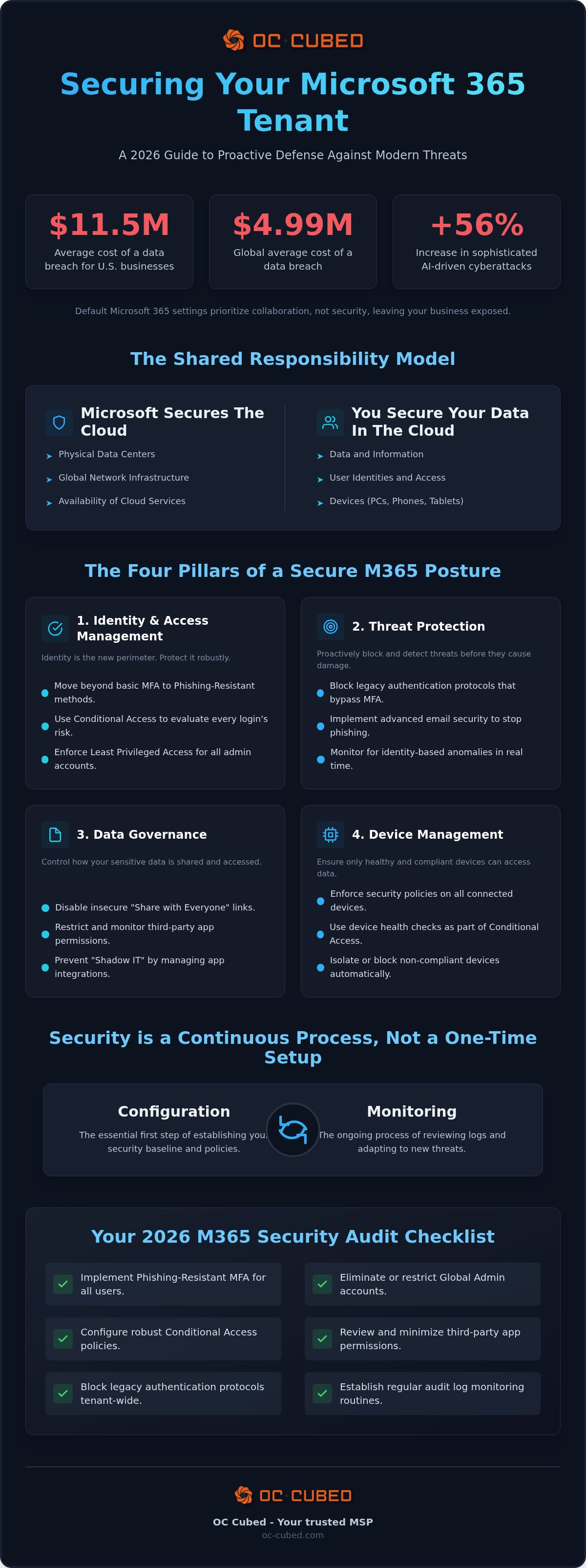
Your 2026 Microsoft 365 Security Audit Checklist
A resilient posture requires a balance between strict protection and daily productivity. While automated scores provide a baseline, they don't replace a manual, expert review of your specific configurations. Understanding how to secure microsoft 365 tenant assets begins with a focused audit of high-impact settings. These steps provide the greatest return on your security investment by closing the most common entry points.
- Limit Global Admins: Audit your administrative roles. Ensure you have only 2 to 4 Global Admin accounts to reduce your attack surface.
- Kill Legacy Authentication: Disable older protocols that don't support modern MFA. These outdated methods are a favorite target for credential theft and automated attacks.
- Tighten External Sharing: Review SharePoint and OneDrive settings. Restrict anonymous "anyone" links so sensitive data isn't exposed to the public internet.
- Enable Mailbox Auditing: Turn on auditing for all users. This allows OC Cubed - Your trusted MSP to track unauthorized access and see exactly what happened during a potential incident.
- Review Licensing: Ensure your Microsoft 365 license management strategy includes essential security features like Conditional Access.
Quarterly Administrative Reviews
Configuration drift happens when settings aren't reviewed regularly. Every quarter, your team should remove access for all offboarded employees to prevent "ghost" accounts. You must also audit third-party app permissions to stop unmonitored integrations from accessing your data. Finally, test your incident response plan. A simulated breach ensures your team knows how to react with confidence when it matters most. Consistent oversight from OC Cubed - Your trusted MSP prevents these small gaps from becoming major risks.
User Awareness and Phishing Simulations
Technical controls are only one part of the solution. Even the best filters can fail if a user is tricked into sharing their credentials. Recurring phishing simulations keep security top of mind for your staff. Establish a clear "Report Message" protocol so employees know exactly what to do when they spot a threat. This turns your workforce into a reliable human firewall that supports the technical work of OC Cubed - Your trusted MSP.
Proactive Tenant Maintenance: The OC Cubed - Your trusted MSP Approach
Building a secure environment is just the first step. Maintaining that posture requires a shift from reactive repairs to proactive governance. OC Cubed - Your trusted MSP integrates comprehensive Microsoft 365 tenant maintenance into a predictable, flat-rate monthly retainer. This model removes the anxiety of fluctuating IT costs while ensuring your security settings never drift into vulnerability. Learning how to secure microsoft 365 tenant environments is a continuous effort, and our approach provides the steady hand needed to manage that complexity. We move beyond the "break-fix" mentality to offer active threat remediation and enterprise-grade protection for every user.
Strategic IT Leadership and Governance
Small businesses often struggle to navigate the expanding regulatory landscape. A Virtual CISO from OC Cubed - Your trusted MSP provides the high-level leadership necessary to align your technical defense with legal requirements. This role isn't just about security; it's about business enablement. Your Virtual CISO helps you prioritize IT spending on high-impact initiatives, ensuring your budget supports your growth goals. By bridging the gap between daily operations and technical strategy, we ensure your security posture evolves alongside your business needs. This level of oversight provides the quiet authority required to make informed decisions about AI adoption and data governance.
The Value of a Managed MSP Partnership
A partnership with a dedicated Managed Service Provider eliminates the surprise costs associated with security breaches and unplanned downtime. You gain access to enterprise-grade security tools, such as email security with Proofpoint, without the heavy overhead of managing individual vendor relationships. The team at OC Cubed - Your trusted MSP provides 24/7 network monitoring and threat remediation, responding to incidents before they can impact your productivity. We focus on proactive configuration, ensuring that your how to secure microsoft 365 tenant strategy remains effective against the latest threats. This partnership transforms your IT from a source of stress into a foundation for stability.
Future-Proofing Your Microsoft 365 Security Posture
Securing your environment isn't a one-time project. It's a continuous commitment to protecting your identities and data against evolving AI-driven threats. By moving beyond basic defaults and implementing proactive monitoring, you turn a potential liability into a foundation for stable growth. This guide has outlined the essential roadmap for how to secure microsoft 365 tenant environments, but true protection requires the daily vigilance of an expert partner. You shouldn't have to navigate the overwhelming settings of the admin center alone.
OC Cubed provides the steady hand your business needs through 24/7 threat detection and Virtual CISO advisory services. We combine enterprise-grade email security from Proofpoint with a structured maintenance approach that eliminates configuration drift. Our team manages the technical complexity so you can focus on your business goals with complete peace of mind. We ensure your data stays protected and your team remains productive, regardless of how the threat landscape changes.
Take control of your digital environment today. We're ready to help you build a resilient, future-proof posture that protects your data and enables your team to thrive.
Frequently Asked Questions
What is the single most important security setting in Microsoft 365?
Phishing-resistant Multi-Factor Authentication (MFA) is the most critical setting you can enable. It stops over 97% of identity-based attacks by requiring more than just a password for access. While basic MFA is a start, using FIDO2 keys or the Microsoft Authenticator app provides a much higher level of protection. This single configuration prevents attackers from using stolen credentials to enter your environment and steal sensitive business data.
Does Microsoft 365 backup my data automatically?
No, Microsoft does not provide a traditional backup of your data. Under the Shared Responsibility Model, Microsoft ensures the platform is available, but you are responsible for protecting the information stored within it. Deleted items are only kept for a limited time in the recycle bin. To prevent permanent data loss from ransomware or accidental deletion, you need a third-party backup solution that provides long-term retention and easy recovery.
Can I secure my tenant without upgrading to a more expensive license?
You can implement basic security on any plan, but advanced protection often requires specific licenses. While Business Basic and Standard include Security Defaults, they lack the granular control of Conditional Access found in Business Premium. You can still harden a lower-tier tenant by disabling legacy authentication and limiting admin roles. However, learning how to secure microsoft 365 tenant assets effectively usually involves leveraging the automated threat protection found in higher-tier subscriptions.
How do I know if my Microsoft 365 tenant has already been compromised?
You should check your sign-in logs for "impossible travel" alerts or logins from unfamiliar locations. Look for new mailbox forwarding rules that you didn't create, as attackers often use these to exfiltrate data silently. Unexpected password reset requests or a sudden spike in sent spam from a user account are also major red flags. Proactive monitoring of these audit logs is the only way to catch a breach before it causes damage.
What is the difference between MFA and Conditional Access?
MFA is a single security check that requires a second form of identification, like a code or a fingerprint. Conditional Access is a sophisticated engine that decides whether to allow a login based on context. For example, a policy might allow access from a known office IP but require MFA if a user logs in from a personal laptop. It provides the granular control needed to secure your tenant without frustrating your employees with unnecessary prompts.
Is it safe to use third-party apps with my Microsoft 365 account?
It is only safe if you have a clear process for auditing and approving these integrations. Many third-party apps request "Read all files" or "Send mail" permissions that they don't actually need. This creates a "Shadow IT" environment where your data is exposed to external vendors without your knowledge. You should regularly review the Enterprise Applications list in your admin center and revoke permissions for any apps that aren't essential for your operations.
How often should I perform a security audit of my M365 environment?
You should perform a deep-dive security audit at least once per quarter. This review should include checking admin roles, external sharing settings, and offboarded user accounts. However, security is a living state, so your sign-in logs and threat alerts require daily monitoring. This combination of strategic quarterly reviews and daily technical oversight ensures that your configuration doesn't drift into a vulnerable state over time while maintaining your compliance standards.
Why do I need an MSP if Microsoft has its own security tools?
Microsoft provides the tools, but you provide the expertise to manage them. An MSP like OC Cubed offers the 24/7 monitoring and threat remediation that most small businesses can't handle internally. We also provide Virtual CISO leadership to ensure your technical settings align with your business goals. Our proactive approach includes how to secure microsoft 365 tenant environments with enterprise-grade tools like Proofpoint, giving you the peace of mind that your data is always protected.


