

Strong business security isn’t built on one tool or policy. Achieving peace of mind with managed security means combining clear security practices, risk assessments, layered protection, and guidance aligned with business needs. This approach helps reduce avoidable exposure and gives your team a clearer plan for protecting important systems and information.
It’s reasonable to want protection without letting security distract from daily work. The right controls clarify responsibilities, help employees recognize suspicious messages, and strengthen defenses against threats such as ransomware. This article explains how policies and risk reviews identify gaps, how practical safeguards reduce risk, and how virtual CISO services provide strategic direction. Managed security brings these efforts together, making protection an ongoing part of business operations rather than a set of disconnected tasks.
Key Takeaways
- Use security policies and risk assessments to clarify expectations and uncover gaps in technology and procedures.
- Prioritize safeguards by identifying likely hazards, assessing their potential impact, and addressing the risks that matter most to your operations.
- Reduce ransomware exposure with layered protection and employee practices that help prevent suspicious email from becoming a security incident.
- A virtual CISO can guide security policies, risk reviews, and decisions so your security program supports your business objectives.
- Managed security brings ongoing monitoring and protection together; OC Cubed’s Email Security with Proofpoint can help strengthen defenses against email threats.
1. Security policies and risk assessments
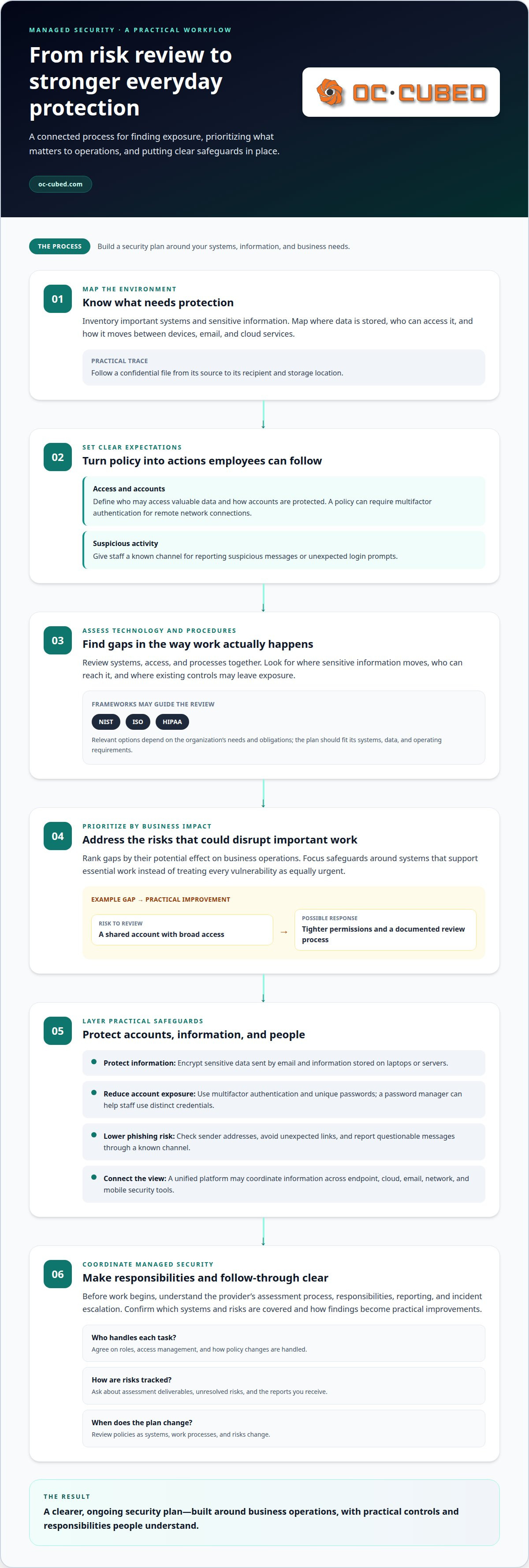
A useful security policy turns broad intentions into steps employees can follow. It should define who may access valuable data, how accounts are protected, and where staff report suspicious activity. For example, a policy can require multifactor authentication for remote network connections and specify a clear way to report unexpected login prompts. Review the rules as systems, work processes, and risks change.
A trustworthy managed security provider explains its assessment process, responsibilities, reporting practices, and incident escalation steps before work begins. Look for clear communication about who handles each task and how findings become practical improvements. During early discussions, ask for examples of assessment deliverables and how the provider tracks unresolved risks.
For U.S. organizations, relevant assessment frameworks can include NIST, ISO, or HIPAA, depending on their needs and obligations. Ask how identified technology and process gaps are mapped to the standards that matter to your business. A framework can guide the review, but your systems, data, and operating requirements should shape the resulting security plan.
Managed security pricing in the United States depends on the case and is provided after a quote request; factors include monitored systems, tools, support scope, and reporting needs. Compare the work covered and the responsibilities assigned, rather than treating a monthly figure alone as a measure of protection.
Before signing, ask which systems and risks fall within the agreement, how incidents are escalated, and what reports you receive. Clarify how access is managed and how policy changes are handled. Clear answers help you understand the provider’s role, your team’s responsibilities, and the steps that follow an assessment.
Reducing phishing risk takes both technical controls and employee practice. A suspicious message may imitate a familiar sender or pressure someone to open an attachment. Train staff to inspect sender addresses, avoid unexpected links, and report questionable messages through a known channel. Test emails can help identify where additional instruction would be useful.
A risk assessment should examine both technology and procedures. Map important systems, identify who can access them, and note where sensitive information moves. Then rank gaps by their potential effect on business operations. For example, a shared account with broad access may call for tighter permissions and a documented review process.
Interest-rate risk is a separate business finance concern, but it can affect security planning. If borrowing costs change, a business may need to reassess cash flow and planned technology spending. Preserve essential safeguards in the budget, then phase other improvements according to operational risk and available resources.
Security awareness can also ease the stress of digital work. When employees know how to report a concern, they’re less likely to feel they must solve it alone. Shared habits can strengthen workplace relationships and make protecting valuable information part of everyday work.
2. Identifying hazards and reducing risks
Risk reduction starts with a clear view of business systems, information, and access. Map where sensitive data is stored, who uses it, and how it moves between devices, email, and cloud services. A customer record sent by email, for example, has different exposure from a file kept on a managed server. This inventory helps focus strategies on risks that could disrupt important business activities.
U.S. businesses face budget pressure, cybersecurity skills gaps, and malicious activity, including state-sponsored attacks. An economic downturn can also make security spending harder to maintain. Identify which systems support essential work, then prioritize safeguards around those assets. A practical plan helps teams use available resources effectively without treating every vulnerability as equally urgent.
A unified cybersecurity platform can share information across endpoint, cloud, email, network, and mobile security tools. That joined-up view helps security teams see assets and vulnerabilities across separate layers. For example, they can consider a suspicious email event alongside unusual device activity instead of reviewing them as unrelated alerts. The value depends on whether the relevant tools provide useful, coordinated information.
Managed security services have limits: visibility and actions depend on the systems, access, and responsibilities included in the service. Internal teams still need to communicate changes, protect accounts, and follow agreed incident procedures. A clear division of responsibilities helps prevent gaps, such as an alert reaching one team while another controls the affected system.
Protect confidential information in transit and at rest. Encrypt sensitive data sent by email and information stored on laptops or servers. Unencrypted email may be readable as it moves across networks or waits on an internet server before delivery. For a practical review, trace a confidential file from its source to its recipient and storage location, then identify where encryption applies.
Good account habits also reduce exposure. Check the sender address before responding to an unexpected request, use multifactor authentication, and choose unique passwords for different accounts. A password manager can help employees use unique credentials without having to remember every password. These steps support confident digital work while limiting the damage a compromised account can cause.
Risk planning should include physical disruption, not just cyber incidents. Document response steps for fires, storms, and intrusions, and clarify who communicates with staff. A named contact and an accessible procedure can reduce confusion when normal operations are interrupted. Review the plan after changes to the workplace, key systems, or staff responsibilities.
Achieving peace of mind with managed security starts with matching controls to real hazards and revisiting priorities as conditions change. Begin with the systems that hold valuable information or keep operations running. Combine that focus with coordinated security visibility, encryption, sound account practices, and clear emergency procedures. Together, these strategies make risks easier to recognize and manage.
3. Ransomware prevention
Ransomware can lock access to business files and disrupt daily work. Email is a common route for its delivery, making the inbox a key focus for prevention. A message that appears to come from a supplier might contain an unexpected attachment or link. Staff need a consistent way to pause, assess, and report suspicious messages before opening them.
Start with a simple reporting process. Tell employees which team or channel receives reports of suspicious email, and explain what details to include. For example, they can report the sender, subject line, and whether they opened an attachment. Clear steps help responders assess the message and warn others if needed. They also reduce the chance that someone will forward a questionable message to colleagues.
Training makes those steps easier to follow. Use realistic examples, such as an invoice with an unfamiliar sender address or a request to sign in through an unexpected link. Ask staff to notice mismatched addresses, unusual urgency, and requests that bypass normal approval. Test emails can reveal where guidance needs reinforcement. Keep the tone practical so employees feel comfortable reporting a mistake quickly.
- Check the sender address, not only the display name.
- Pause before opening an unexpected attachment or link.
- Confirm unusual payment or login requests through a known contact method.
- Report suspicious messages through the designated channel.
Layered safeguards matter because one missed email should not become an unchecked incident. Email filtering can help identify suspicious messages, while endpoint protection can help detect threats on business devices. Security monitoring can connect an alert to investigation and remediation. Ask how these controls work together and who responds when one raises an alert.
Prepare for the possibility that prevention controls may not catch every threat. Maintain a written incident process that identifies decision-makers, communication steps, and affected systems. For example, staff should know how to report an encrypted file without deleting evidence or attempting unapproved fixes. Clear roles can limit confusion and support a faster, more coordinated response.
Organizational readiness includes people as well as technology. During a ransomware concern, uncertainty can create stress and slow decisions. Practice reporting and escalation with a realistic scenario, then clarify which connections or systems need attention first. An incident is more manageable when employees know where to report concerns and leaders have defined next steps.
Review email controls, employee guidance, and response procedures together. Changes to suppliers, payment workflows, or sign-in practices can create new opportunities for impersonation. Update examples and instructions to reflect those changes. Regular review keeps prevention relevant to how the business actually communicates, rather than relying on a one-time awareness message.
4. Virtual CISO services
A virtual chief information security officer provides security leadership without requiring a full-time executive role. This can help organizations that need strategic direction but lack dedicated security leadership. The role connects policy, risk management, and business priorities instead of treating cybersecurity as a set of isolated technical tasks.
A virtual CISO can set or direct privacy and security policies, standards, procedures, and guidelines. For example, they can shape rules for granting system access, reporting incidents, and handling sensitive information. Clear ownership helps employees and managers understand their responsibilities and apply consistent expectations across teams.
Risk assessments are another core responsibility. A virtual CISO can review operational security, identify weaknesses, and help leadership prioritize improvements. Each finding should connect to a business impact, such as disruption to customer service or exposure of confidential records. That makes the next step clearer: assign an owner, choose a response, and track progress.
Business alignment matters. Security decisions should account for operational needs, available resources, and the information the organization must protect. A virtual CISO can help leaders weigh these factors before approving a new system or changing access practices. Sometimes a technical control is the right choice; in other cases, updated procedures or focused employee training may address the issue more effectively.
Training can build lasting security habits. A virtual CISO can develop internal programs that strengthen staff knowledge and support loyalty and retention. For example, a training plan might pair guidance on suspicious messages with clear instructions for reporting concerns. Consistent expectations help individuals understand how their actions contribute to the organization’s security program.
Virtual CISO guidance can also help an organization assess machine learning and artificial intelligence for its security program. An advisor can help leaders consider where these tools may support existing work and how their use fits established policies. Decisions should follow identified needs, not pressure to adopt new technology.
Security leadership can also examine software spending. A review may find unused contracts with support maintenance fees that could be redirected to cybersecurity spending. It can also uncover purchases from the same vendor across business units, potential volume discounts, or teams paying separately for software covered by an enterprise license. These findings can inform budget discussions without assuming every contract can be changed.
Managed security services and an in-house team differ mainly in staffing and organizational context. In-house staff work directly within company operations, while a virtual CISO provides external security leadership. A virtual role may cost less than hiring a full-time employee. Organizations can compare these approaches by considering the leadership they need, their internal capacity, and how closely security decisions must connect to daily operations.
5. What does managed security include?
Managed security combines people, processes, and tools to protect business systems. Its scope can include monitoring, threat detection, endpoint safeguards, email protection, and network configuration. For example, an alert from a work laptop can prompt investigation instead of sitting unnoticed in a separate system. The specific work depends on the systems and responsibilities covered by the service.
Monitoring helps surface activity that deserves attention. Security tools collect information from devices, email, cloud services, and networks. When these signals are correlated, teams can understand an incident across multiple layers. Security automation paired with correlated activity data can support extended detection and response without requiring teams to trace every incident from the beginning manually.
Detection is only one part of the work. A managed security process also needs a clear path from alert to investigation and remediation. That means assigning responsibility, assessing the event’s scope, and taking appropriate corrective steps. A suspicious sign-in, for instance, may require reviewing account activity and limiting access while the issue is addressed.
Protection measures can cover different points of exposure. Endpoint safeguards focus on business computers and other devices. Email protection helps screen a common route for malicious messages. Network controls, such as firewall and switch management, support oversight of connections between systems. Microsoft 365 tenant maintenance can also help keep cloud account settings aligned with organizational needs.
Security policies and risk assessments guide these technical controls. A policy explains expected practices, while an assessment identifies gaps that need attention. Monthly reporting can make completed work and open issues easier to review. For example, a report might summarize detected threats, remediation actions, and unresolved risks, giving business leaders a basis for prioritizing next steps.
Support matters because a security alert often affects ordinary work. A defined helpdesk process gives employees a way to report problems, while network operations support can help coordinate technical investigation. Before work starts, the business and security team should establish who handles alerts, which systems are in scope, and how important findings are communicated.
Managed security is not a single product that replaces every internal responsibility. It brings agreed services into a coordinated operating approach. The business still provides context about its systems, users, and priorities. Clear handoffs help the security team distinguish normal activity from a potential concern and focus on meaningful risks.
A practical way to assess coverage is to map each service to a business need. Match email safeguards to message threats, endpoint controls to user devices, and network oversight to critical connections. Then confirm that detection, remediation, and reporting fit together as one process. This makes gaps easier to spot before they complicate a response.
OC Cubed - Your trusted MSP: Email Security with Proofpoint
OC Cubed - Your trusted MSP helps businesses bring email protection into a broader security approach. Email Security with Proofpoint supports defenses against suspicious messages, a key concern when email can carry ransomware. Pairing email safeguards with Security Threat Detection and Remediation helps connect threat identification with follow-up action.
Businesses can also draw on Remote IT Support for help with day-to-day technology needs and Microsoft 365 Tenant Maintenance to support their cloud environment. These services can be relevant when security responsibilities span email, user devices, and business accounts, but internal teams need additional support managing them.
Managed security works best when its scope reflects the systems and risks that matter to your operations. Contact OC Cubed - Your trusted MSP to discuss your business’s security needs.
Build a Security Approach That Grows With Your Business
Security decisions should keep pace with changes in your systems, team, and priorities. Set a regular time to review what has changed, who owns each next step, and whether your approach still supports the work your business needs to do. That ongoing attention makes achieving peace of mind with managed security a practical part of running your organization, not a one-time project.
OC Cubed - Your trusted MSP can support that work through Remote IT Support, Microsoft 365 Tenant Maintenance, and Security Threat Detection and Remediation. These services can help businesses seeking support across daily IT needs, cloud environments, and security concerns. The next step is a conversation about your current setup and the priorities you want your security approach to address.
With a clear plan and the right support, your team can move forward with greater confidence.
Frequently Asked Questions
Want to improve the security of your business?
Yes. Start by identifying which business tasks would be hardest to resume after an IT problem, then map the accounts, devices, and information those tasks depend on. Review access when employees join, change roles, or leave, and make sure someone owns each update. OC Cubed - Your trusted MSP offers Security Threat Detection and Remediation and Remote IT Support to help businesses address security concerns and day-to-day technology needs.
What does secure peace of mind mean?
It means understanding how your organization protects important systems, who handles concerns, and what happens next. It doesn’t mean every risk has disappeared. For a business owner, achieving peace of mind with managed security can start with knowing who receives an alert, who makes decisions, and how staff report an issue without confusion.
How can managed security services provide peace of mind?
Managed security can make responsibilities easier to track by connecting ongoing technical support with reporting and clear ownership. For example, a manager reviewing a monthly report can see which issues were addressed and which need a business decision. That visibility helps leaders plan follow-up work instead of relying on informal updates or discovering unresolved tasks during a disruption.
What security risks do managed security providers help prevent?
Managed security providers can help reduce exposure to malicious email, compromised accounts, endpoint threats, and suspicious network activity. The right safeguards depend on the systems a business uses and how its employees work. For example, a departing employee’s access should be addressed through a documented offboarding process, while unfamiliar activity on a business device can be reviewed through security monitoring.

Article by
Peter Irizarry
Peter Irizarry founded OC Cubed, LLC in 2023 to help small to mid-sized businesses stop worrying about downtime and cybersecurity threats. A frequent speaker on SMB digital transformation, Peter is passionate about translating complex IT roadmaps into plain-English business growth strategies. He resides in North Texas with his family.


