

A firewall policy is only as reliable as the rules applied across every vendor’s device. Firewall configuration sets the rules and access controls governing network traffic. Effective firewall policy best practices include defining permitted traffic, restricting administrative access, and protecting management connections. The goal is consistent control, not simply having a firewall in place.
Managing devices from multiple vendors can make consistency harder to maintain. A clear policy gives administrators a shared standard for secure protocols, least-privilege access, network protections, and rule reviews. Centralized tools can bring policies and rules into one view. This article explains firewall configuration and how these practices support safer management across a multi-vendor environment.
Key Takeaways
- Understand how firewall rules control network traffic and why administrator access should match each person’s responsibilities.
- Protect firewall management by using encrypted connections and limiting access to authorized administrators.
- Build rules around business needs: deny unapproved traffic by default and allow only necessary access.
- Review configurations, document changes, and test that permitted traffic works while unwanted paths remain blocked.
- Use centralized management to view and manage policies across firewalls from multiple vendors in one place.
1. What Is Firewall Configuration?
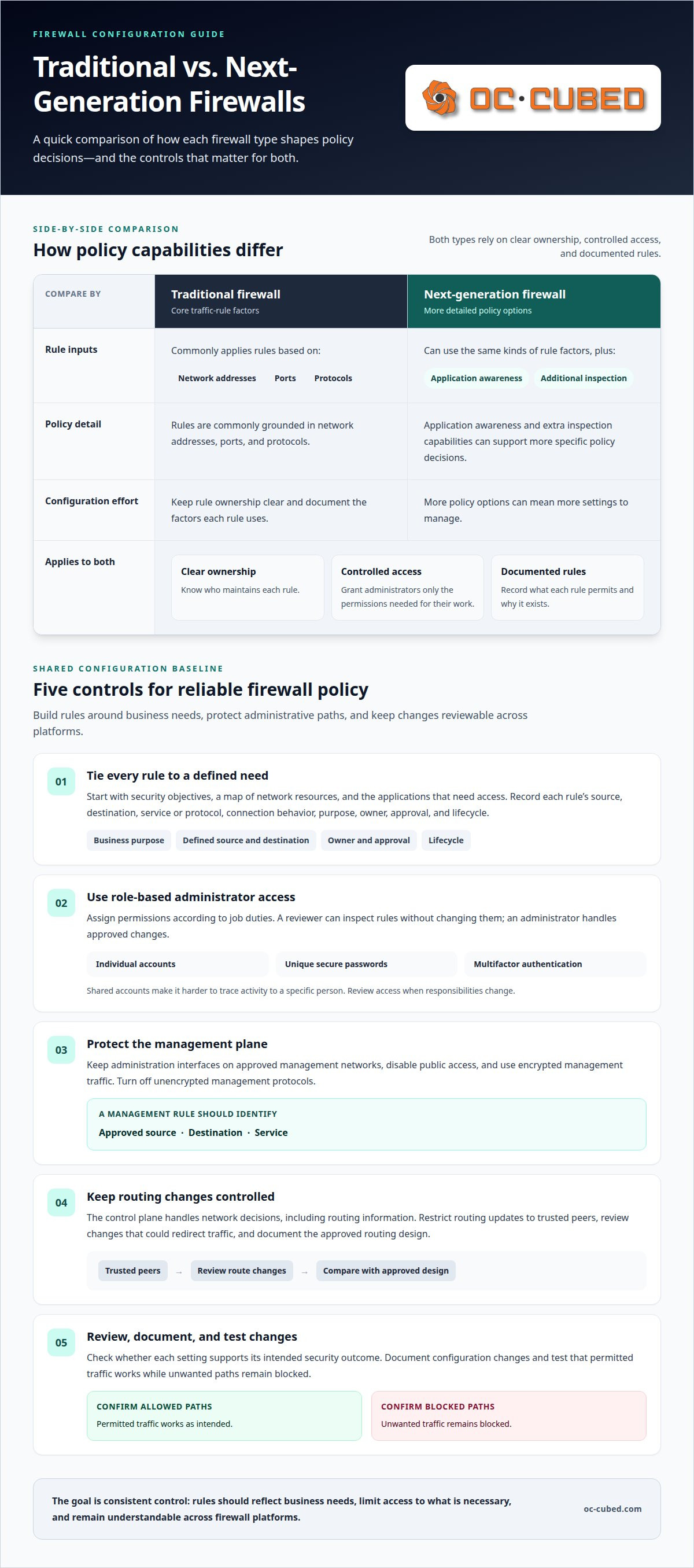
Firewall configuration sets the rules that control traffic moving between network interfaces. A ruleset determines which connections can pass, where packets can go, and what the firewall blocks. For example, a business might permit an approved application to reach a specific server while denying unrelated traffic. Effective firewall policy best practices start with security objectives, a map of network resources, and documentation of which applications need access.
Role-based access control, or RBAC, limits configuration changes to authorized staff. Assign each administrator a role based on job duties, then grant only the permissions needed for that work. A reviewer might inspect rules without changing them, while an administrator handles approved changes. Use individual accounts, unique secure passwords, and multifactor authentication. Shared accounts weaken accountability because activity is harder to trace to a specific person.
Harden the management plane, the interfaces used to administer the firewall. Restrict those interfaces to approved management networks, disable public access, and use encrypted management traffic. Turn off unencrypted management protocols. These controls protect configuration sessions and reduce the paths an attacker could use to reach administrative functions. Limit administrative privileges to people who need them, and review access when responsibilities change.
Protect the control plane, too, because it handles network decisions, including routing information. Restrict routing updates to trusted peers and review changes that could redirect traffic. For example, an unexpected route change could send traffic along an unintended path. Separating routing responsibilities from general administration can limit who may affect connectivity. Document the approved routing design so changes can be compared with the intended network layout.
Next-generation firewalls generally support more detailed policy decisions than traditional firewalls. Traditional devices commonly apply rules based on factors such as network addresses, ports, and protocols. Next-generation devices can also use application awareness and additional inspection capabilities. That can make policies more specific, but adds settings to manage. In either case, clear ownership, controlled access, and documented rules remain central to reliable policy management.
In the United States, PCI DSS includes requirements for network security controls, including documented configuration standards under Requirement 1.2.1 and change management under Requirements 1.2.2 and 6.5.1. Applicability depends on the organization and the data environment. NIST firewall guidance also addresses firewall configuration, but guidance is not itself a universal legal mandate. Organizations should map the frameworks that apply to their operations and align firewall controls with those obligations.
A practical configuration process connects each rule to a security objective, an owner, and a defined business need. Administrators document permitted applications and services, assign access by role, and protect management and routing functions. They then check whether each setting supports the intended security outcome. This foundation makes later rule reviews and changes easier to control across different firewall platforms.
2. Secure management protocols and encryption
Firewall management sessions can expose sensitive settings if traffic is unencrypted. Restrict administrative access to authorized management networks and use encrypted connections for configuration work. Disable unencrypted management protocols and keep administration interfaces away from public access. For example, a rule allowing management traffic should specify its approved source, destination, and service. That makes the access path clear and easier to review.
Encryption protects information as it moves between an administrator’s device and a firewall, but it does not replace access controls. Assign individual accounts, require multifactor authentication, and limit permissions to each person’s duties. Document which devices can administer each firewall. When a staff member changes roles, adjust access without disrupting unrelated network traffic.
Security inspection profiles add scrutiny to traffic passing through a firewall. A profile can be associated with a firewall rule to inspect relevant connections and help detect suspicious activity. For example, a policy for traffic reaching a business application may use inspection suited to that application’s risk. Match profiles to each rule’s purpose, since broad inspection everywhere can complicate policy review and troubleshooting.
SNMP, or Simple Network Management Protocol, helps monitoring systems collect information from network devices. Restrict which management systems can query firewall devices and protect monitoring credentials. Document the approved monitoring source and the devices it can reach. This limits unnecessary access and helps distinguish expected monitoring traffic from unfamiliar requests during review.
Security policy development starts with the organization’s data and operational needs. Identify and classify sensitive data, then document essential applications and services that require network access. Assign responsibility for maintaining security tools. These decisions shape inspection profiles and management permissions. Each rule should serve a defined business purpose, rather than remain simply because it existed in an earlier configuration.
How do professionals structure and document firewall rules? Record each rule’s source, destination, service or protocol, connection behavior, purpose, owner, approval, and lifecycle. This information helps administrators understand what a rule permits and decide whether a proposed change still fits the security policy.
Cloud applications add another policy layer. A cloud access security broker, or CASB, can help protect cloud-based assets and enforce security policies. Consider how cloud access connects with existing firewall controls, then document which applications and traffic paths need attention. This coordination helps maintain visibility when users access services beyond the organization’s directly managed network.
For continued visibility across network devices, network monitoring and configuration can support the review of firewall activity and related events.
3. Default-deny and least-privilege rules
A default-deny policy blocks traffic unless an explicit rule permits it. This makes intended access visible in the firewall configuration rather than relying on broad, inherited permissions. For example, if a business application needs to reach a database, its rule should identify that specific path. Unrelated traffic remains blocked instead of gaining access through a permissive default.
Start by identifying the business services that need network access. Define each allowed flow by its source, destination, application or service, and protocol. An inbound rule might permit a required application to reach a designated service while excluding other destinations. This gives each permission a testable purpose and limits access to traffic the business needs.
Access control lists should end with a deny-all rule. This final instruction filters traffic not explicitly allowed by earlier rules. Sequence matters: an overly broad allow rule placed earlier could permit traffic before the final denial applies. Review rule order and scope together, then test both required connections and nearby prohibited paths.
Least privilege applies to users, systems, and services. Give each only the network access needed for its role or function. A server that sends information to a specific service should not automatically have unrestricted outbound access. Restricting unnecessary destinations can help limit malware spreading from that server to other hosts.
What is the least-privilege approach to firewall rules? Permit only traffic needed for a defined business purpose, and deny other access by default. Scope each rule to its actual source, destination, and required service, then remove permissions that no longer serve that purpose.
Review default settings before a firewall enters production. Generic defaults may leave unnecessary ports open or rules more permissive than the organization needs. Compare those settings with documented application requirements, customize them, and confirm that every allowed path has an owner and business purpose. Software updates can change available settings or behavior, so include configuration review in planned updates.
Network segmentation strengthens this approach by separating systems with different access needs. For example, a server handling sensitive information can sit in a segment with narrowly defined connections to other systems. Rules between segments should permit only required services. If an application’s needs change, assess the affected paths instead of broadly expanding network access.
Outdated permissions can weaken a carefully scoped policy over time. Review rules for obsolete applications, unused access, duplicates, and errors. Confirm that each remaining allow rule still has a valid purpose and owner. This maintenance keeps the default-deny model meaningful as business systems and firewall software change.
4. Firewall configuration and network protection
Professionals begin with the organization’s security policy and network structure before redesigning firewall rules. They map devices, applications, connections, and data flows, then identify which paths support business operations. For environments handling payment card data, PCI DSS Requirements 1.2.3 and 1.2.4 are relevant to reconciling network and account-data-flow diagrams. This mapping helps align configuration changes with intended traffic paths.
Change management makes each adjustment traceable. A provider documents the requested change, its objective, potential risks, mitigations, approval workflow, and audit trail. The record should identify the affected rules and the reason for the change. PCI DSS Requirements 1.2.2 and 6.5.1 connect network security control changes to documented change management. A formal process helps identify unauthorized changes and clarify who approved each modification.
How often should a provider review and recertify firewall rules? Review them on a recurring schedule based on organizational risk and applicable security commitments, and reassess after meaningful network changes or security incidents. Recertification confirms that each rule still has a valid purpose, an accountable owner, and appropriate scope.
During an audit, compare deployed rules with documented business needs and network diagrams. Identify redundant, duplicate, unused, and shadowed rules, then correct errors through the change workflow. Confirm that each permitted port and protocol has an approved business need. This cleanup makes rules easier to understand and reduces unintended connections.
Customization matters before production. Professionals replace generic defaults with settings suited to the organization’s applications and network design, then check for unnecessary open ports and overly broad access. They apply appropriate configurations before deployment and review outbound traffic as well as inbound connections. Limiting unnecessary outbound paths can help prevent malware on a server from reaching other hosts.
Test both permitted and prohibited traffic. A successful connection test confirms only that the intended path works, so also test nearby paths that should remain blocked. Vulnerability scanning and penetration testing can help assess configuration weaknesses. Before testing, back up firewall configurations in a secure location, then verify that backups can be restored.
Resilience checks cover more than individual rules. Test high-availability failover and confirm routing integration remains correct after approved changes. Send firewall logs to a logging service, where monitoring can help identify unexpected behavior. After software updates, review configuration behavior and retest critical connections. These checks help catch vulnerabilities and configuration errors before they disrupt network protection.
5. Centralized management of multi-vendor firewalls
Organizations with firewalls from multiple vendors can use centralized management to view and manage policies and rules in one place. This shared view helps administrators see how network protections fit together without treating every device as a separate policy island. Centralization does not remove the need to understand each firewall’s role. It gives teams a clearer way to compare policy intent across the architecture.
Start by mapping where each firewall sits and what it protects. For example, one device may control traffic between an office network and the internet, while another protects a server segment. Define each device’s purpose, responsible owner, and relevant network boundaries. This context helps administrators understand whether an allowed connection is expected at that point in the architecture.
Next, establish common policy language. Define how to record a rule’s purpose, source, destination, service, owner, and approval status. Vendor interfaces may display or implement those details differently, so the shared record should describe intended access in terms that remain clear across platforms. This reduces ambiguity during review without assuming every device uses identical controls.
Centralized visibility can support access control reviews. Identify rules across managed firewalls, then compare them with approved business needs. For instance, a service permitted through an internet-facing firewall may also need a controlled path through an internal device. Reviewing both policies together helps reveal where a connection is allowed and whether its route matches the documented design.
Inspection needs can vary by network segment and traffic purpose. A team might apply a relevant inspection profile to traffic serving a business application, while using different controls for other connections. Central management helps administrators view policies across devices, but each rule still needs to match the firewall’s role and intended traffic. Review deployed settings, not just a shared policy description.
Logs provide another operational view. Forward firewall logs to a central system and establish response workflows for meaningful alerts. A useful workflow identifies who reviews an alert, how to find the affected device and rule, and how to record any required change. Centralized records can connect an alert to policy context across vendors, helping teams investigate while keeping track of device ownership.
Centralized management works best when ownership and change controls remain clear. Define who may propose, approve, and implement policy updates, then preserve an audit trail for each change. Confirm that intended access is allowed after implementation and adjacent traffic remains restricted. The key takeaway: central tools create a common view, while documented purpose, accountable owners, and device-level reviews keep policies meaningful across vendors.
OC Cubed - Your trusted MSP: Firewall and Switch Management
OC Cubed - Your trusted MSP provides Firewall and Switch Management for businesses that need professional support maintaining network controls across devices and vendors. The service helps keep firewall and switch configurations aligned with security needs as applications, users, and network connections change.
Turn to this support when rule reviews, configuration updates, or coordination across firewall vendors become difficult to manage internally. Remote IT Support can also help address related IT needs, while Security Threat Detection and Remediation supports response to identified threats. Microsoft 365 Tenant Maintenance can help maintain the separate tenant environment alongside network protections.
Share your network priorities, known concerns, and relevant changes with OC Cubed - Your trusted MSP. Contact OC Cubed - Your trusted MSP to discuss Firewall and Switch Management.
Make policy ownership part of ongoing operations
Make firewall policy ownership part of routine network operations, not a one-time cleanup. Assign responsibility for keeping decisions aligned as teams, applications, and vendor environments change. This gives each policy update a clear path from business need to controlled implementation.
Strong firewall policy best practices depend on continuity. Someone needs to connect technical decisions with operational priorities and coordinate changes across systems. A managed partner can help when internal teams need support maintaining firewall and switch configurations alongside broader IT and security work.
OC Cubed - Your trusted MSP provides Firewall and Switch Management, Remote IT Support, Microsoft 365 Tenant Maintenance, and Security Threat Detection and Remediation. This support can help businesses keep technology management connected as their operating needs evolve.
A clear ownership model gives your team a steadier foundation for protecting the network as it grows.
Frequently Asked Questions
What Is Firewall Configuration?
Firewall configuration is the set of settings and rules that determines which network connections pass, where they go, and what gets blocked. It can also define how the firewall handles specific applications or records activity. For example, a company may permit a business application to reach a designated service while restricting unrelated connections. Administrators maintain these settings as network needs change, preserving a clear relationship between business operations and permitted traffic.
What are the core principles of firewall policy design?
Core principles include matching access to a defined business purpose, limiting permissions, and documenting who owns each rule. A provider can map how applications communicate before translating those needs into device settings. For example, a payment application may need to reach a processing service but not unrelated internal systems. A clear policy helps administrators assess whether a requested connection fits the organization’s architecture and security objectives.
How can a provider safely test and deploy firewall policy changes?
Document the change, its purpose, affected connections, risks, approval, and audit trail before implementation. Back up the current configuration securely, apply the approved update, and test the required connection. Testing should also cover nearby traffic that must remain blocked. For example, confirming an application connects to its server does not prove other destinations are restricted. Verify backup restoration as part of resilience planning.
What logging and monitoring should a provider require for firewall policies?
Send firewall logs to a central logging system, with response workflows for meaningful alerts. Monitoring should give responders enough context to identify the device, affected traffic, and related rule. For example, an alert about an unexpected connection is more useful when staff can trace its source and determine whether the activity matches an approved application. Assign responsibility for reviewing alerts and recording follow-up actions.
How should a provider manage temporary firewall rules and expiration dates?
Document why a temporary rule is needed, who owns it, what traffic it permits, and when it should expire. Record the expiration date with the approval so the rule can be removed or reassessed on time. For example, a short-term project connection should not remain active after the project ends. Include temporary rules in routine reviews and alert the owner before the planned end date.
What firewall policy best practices should a provider apply to cloud environments and security groups?
Define cloud access around the specific applications, users, and services that need it, then review how those permissions connect to the wider network. Cloud access security brokers can help protect cloud-based assets and enforce security policies. For example, a security group supporting an application should not grant broad access to unrelated workloads. Document ownership and purpose, then include cloud rules in policy reviews and monitoring.
What are common firewall misconfigurations and their security risks?
Common issues include unnecessary open ports, overly broad rules, outdated permissions, exposed management interfaces, and unencrypted administration traffic. These gaps can allow unintended connections or expose configuration activity. Duplicate or shadowed rules can also obscure which policy governs traffic. For example, a broad allow rule may permit connections that a later deny rule was intended to block. Regular reviews help identify these problems and clarify the effective policy.

Article by
Peter Irizarry
Peter Irizarry founded OC Cubed, LLC in 2023 to help small to mid-sized businesses stop worrying about downtime and cybersecurity threats. A frequent speaker on SMB digital transformation, Peter is passionate about translating complex IT roadmaps into plain-English business growth strategies. He resides in North Texas with his family.


