

A personal phone can become a doorway to company data. Bring your own device (BYOD) means employees use personally owned devices for work, while the organization remains responsible for the business data and resources those devices can access. A bring your own device (BYOD) security policy sets the rules for that access and helps protect both business information and employee privacy.
Using a familiar device can make work more flexible, but it also raises practical questions: What happens if a phone is lost? Which work data can be stored on it? How can the organization remove company information without exposing personal files? Clear policies and safeguards answer these questions and replace guesswork with defined procedures.
This article explains BYOD, its security and confidentiality risks, and the trade-offs organizations should weigh before adopting it. It also covers device protocols and management controls that separate work data from personal activity, limit access, and support a more secure approach.
Key Takeaways
- Define which people and devices can participate, what work data they may access, and what to do if a device is lost or employment ends.
- Assess risks such as unsupported operating systems, multiple devices per employee, and workarounds that can emerge when security rules are difficult to use.
- Weigh flexible working and reduced device provisioning against the added demands of supporting varied devices and operating systems.
- Set clear boundaries for collecting business information from personal devices so company records can be handled without exposing employees’ private data.
- Use device protocols and management controls to support security requirements, apply updates, and keep work information under control.
What Are the Best Practices of BYOD Security?
A bring your own device (BYOD) security policy is a written agreement governing employees’ personal devices and their access to company systems. It should define approved users and devices, permitted data access, security measures, employee responsibilities, and procedures for lost devices or changes in employment.
Written Policy and Employee Responsibilities
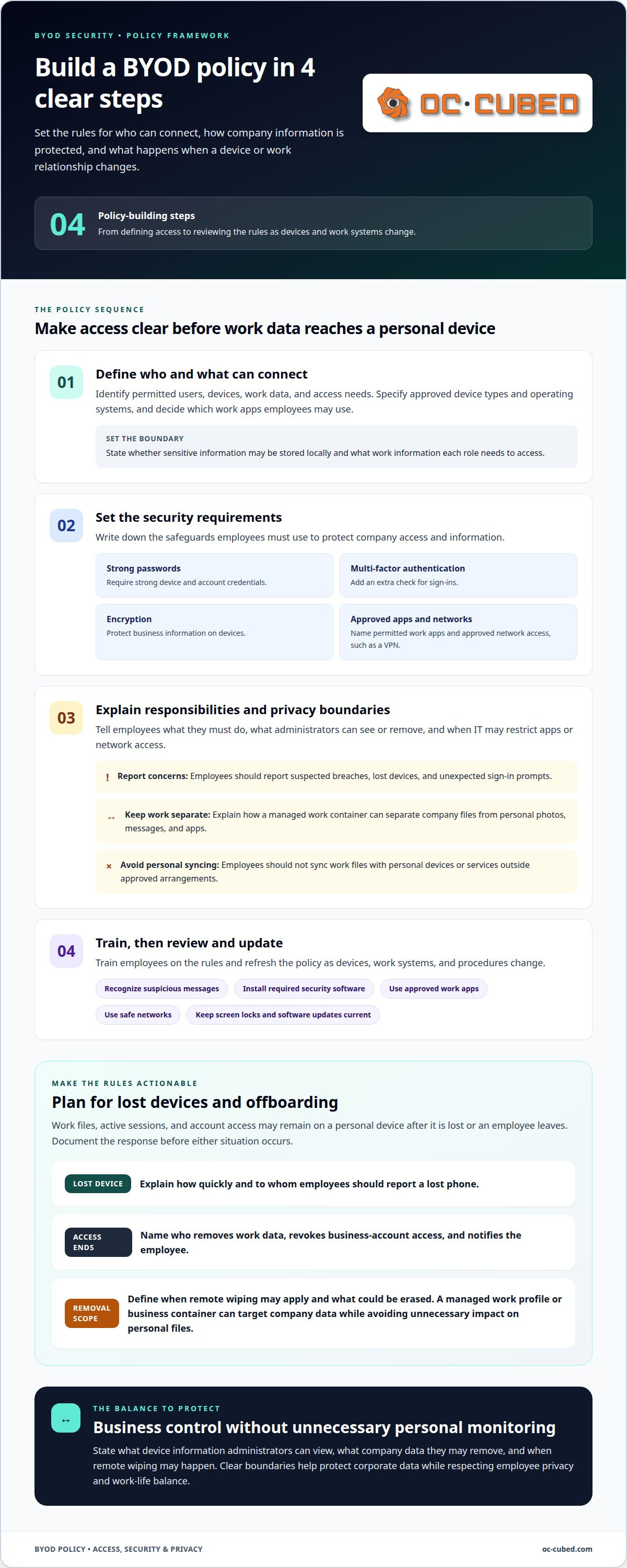
A written policy sets the conditions for using personal phones and laptops for work. It gives employees clear instructions before corporate data reaches their devices. Specify which devices and operating systems are allowed, which work apps employees may use, and whether sensitive information can be stored locally. Include requirements for strong passwords, multi-factor authentication, encryption, and approved network access, such as a VPN.
Organizations can build and implement the policy through these steps:
- Identify permitted users, devices, work data, and access needs.
- Set security requirements, including passwords, encryption, and approved apps.
- Explain employee duties, privacy boundaries, and lost-device reporting procedures.
- Train employees, then review the policy as devices and work systems change.
Employees should report suspected breaches and avoid syncing work files with personal devices. The policy should also explain when IT can restrict apps or network access.
Removing Company Data at Employment End
Offboarding procedures remove corporate data and revoke access when an employee leaves the organization or BYOD program. This matters because saved files, active sessions, and account access can remain on a personal device after work ends. Document who handles removal, which business accounts lose access, and how the employee will be notified.
Define how the organization will remove work information without unnecessarily affecting personal files. For example, removing a managed work profile or business container can target company data. Explain when a remote wipe may apply, such as when a device is lost or an employee leaves the program, and state its scope plainly. Employees should know beforehand what data could be erased.
Employee Education and Security Awareness
Employee education explains how to follow security procedures on personal devices. Even a clear policy cannot prevent breaches if employees overlook basic steps. Training should show how to recognize suspicious messages, report a lost phone, install required security software, and use approved work apps. For example, employees should report an unexpected sign-in prompt instead of approving it.
Reinforce the rules when employees enroll devices and when procedures change. Short reminders can cover screen locks, software updates, safe network use, and where to report concerns. Explain why these measures protect corporate data, rather than presenting them as unexplained restrictions. For organizations handling health information, BYOD policies may address HIPAA compliance, according to the U.S. Department of Health and Human Services.
Data Partitioning and Employee Privacy
Data partitioning separates work apps and corporate data from an employee’s personal content. This helps organizations protect business information without treating a personal phone as fully company-owned. A managed work container can keep business files separate from personal photos, messages, and apps, while limiting company controls to the work environment.
A well-designed bring your own device (BYOD) security policy states what device information administrators can view, what work data they can remove, and when remote wiping may occur. Explain whether employees must use approved software or allow settings that protect corporate data. Clear boundaries support privacy and usability. They also help employees understand when work access applies, reduce unnecessary monitoring outside work, and support work-life balance.
BYOD security and confidentiality risks
Personal devices can expose company data through weak safeguards, lost hardware, or unclear access controls. The level of risk depends on what employees access and how the organization monitors connected devices.
BYOD Security Vulnerabilities
BYOD vulnerabilities arise when personal devices connect to company systems with different security settings and software. Each added device increases the organization’s attack surface, while unsupported operating systems may lack current protections. A stolen phone with an open work session, for example, could expose email or files. Deliberate theft and sale of sensitive company data are also possible risks.
Organizations may struggle to see who connects, which device they use, or whether it poses a threat. Screen network access and assess each device before granting permissions. Consider the sensitivity of accessible data, whether the operating system is still supported, and whether one employee can connect multiple devices. These factors help determine appropriate access instead of treating every phone or laptop as equally safe.
User Needs and Risk Objectives
Risk controls should balance employees’ work needs with the protection of company data. A sales employee may need mobile access to schedules and email, while another role may involve sensitive records that require tighter limits. Define what each role needs to do, which information it can access, and what device conditions apply. This makes controls relevant to actual work instead of imposing broad restrictions that block legitimate tasks.
Then assess how each control affects security and usability. Strong access checks can reduce exposure, but procedures that make ordinary work unreasonably difficult may lead employees to find workarounds. Set clear actions for lost devices, suspicious activity, and access requests outside approved channels. Review whether the policy still supports business objectives as roles, devices, and applications change. Apply consistent rules, tailoring access to the information involved.
Shadow IT Risks
Shadow IT occurs when employees use unapproved applications, storage, or devices to complete work. An overly difficult BYOD arrangement can encourage this behavior. For example, an employee might forward a work attachment to a personal account when approved access feels cumbersome. That shortcut can move company data beyond the organization’s visibility and limit its ability to control access.
Make the approved route practical: explain which tools employees can use, where they can save work files, and how to request access. Monitor access patterns for unexpected devices or applications, then investigate unusual activity. A security team can use security threat detection and remediation to support visibility and response. Clear reporting channels also help employees raise access problems before they create informal workarounds.
What Are The Pros And Cons Of Having A BYOD Policy?
BYOD can support flexible work and reduce the effort of purchasing and preparing devices. Trade-offs include varied phones and operating systems, added support demands, and less control over company information.
For employees, using a familiar personal phone or laptop can make remote work more convenient. They may already know its settings and apps, which can help with routine tasks. Organizations can also avoid buying and provisioning a separate device for every participating employee. The benefit depends on whether personal devices meet business needs without weakening access controls or creating inconsistent work practices.
The costs of BYOD versus company-provided devices depend on which expenses an organization takes on. BYOD may reduce device purchasing and provisioning, but support, security tools, device management, and any employee allowance can add costs. Company-provided devices require the organization to buy and manage hardware, while giving its IT department more control over equipment standards and configurations.
That trade-off is operational, not just financial. A department supporting BYOD may need to handle different screen sizes, operating systems, settings, and update schedules. For example, instructions for one phone may not match the menus on another. Company-provided devices can create a more consistent environment, but the organization must manage device selection, setup, replacement, and inventory.
Data handling can also complicate the comparison. Employees might use personal devices to access sensitive client records, email, or shared files. If a dispute or investigation requires relevant business records, identifying and preserving information on personal devices can be complex. Personal content may sit alongside work material, making collection and review harder than on a dedicated company phone. Careful BYOD procedures must account for both company records and employee privacy.
Before adopting BYOD, assess employees’ work, the sensitivity of the information they access, and the department’s capacity to support varied devices. A role that needs limited access to work email may suit a different arrangement from one involving sensitive files. If employees cannot use approved tools effectively, they may turn to unapproved apps or storage, undermining the intended safeguards.
A practical comparison weighs the full operating model, not just the hardware purchase. Consider support effort, security controls, employee experience, remote access needs, and how work data will be managed when someone leaves. BYOD can be a sound fit when these practices remain manageable. If consistent configurations and tighter control matter more, company-provided devices may better fit the organization’s objectives.
Collecting business data while protecting personal information
Collecting work records from a personal smartphone requires separating business needs from employee privacy. A sound process protects company systems and limits exposure of personal files, health details, and banking information.
Protecting Corporate Data and Infrastructure
Protecting company information means controlling both what employees can access and how personal devices connect to the network. This matters because a compromised phone can expose more than locally saved files if it also provides access to company accounts or systems.
Set access according to work needs. For example, an employee who needs one application may not need access to shared folders or administrative systems. Restrict permissions, screen connections, and prevent sensitive data from being stored locally where possible. These controls limit the spread of a threat from one mobile device into broader corporate infrastructure.
Wiping Data from Lost or Damaged Devices
A remote wipe removes selected work information or device data when a phone is lost or damaged. This matters because an unavailable device may still contain company files or provide access to business accounts.
Decide in advance which conditions trigger a wipe and who can authorize it. Explain whether the action affects only a managed work profile or the entire device. That distinction matters on personal devices, where a full wipe may also erase photos, messages, and other private content. Document the scope, authorization, and employee notification process.
Device Management and Data Protection
Device management applies security settings and access controls to smartphones and other personal devices used for work. Consistent controls help organizations protect business information without relying solely on employees to configure each device correctly.
Management tools can enforce security policies, manage settings, separate work and personal data, and support remote wiping of lost or stolen devices. Organizations should define which tools they use and what those tools can access. For example, a work container can keep company applications apart from personal activity, while access controls limit corporate information to approved users.
Workplace BYOD Laws and Regulations
Which U.S. laws and regulations a BYOD policy addresses depends partly on the information and business activities involved. A policy should connect device practices to the organization’s data-handling responsibilities.
For example, BYOD policies may address HIPAA when health information is involved, according to the U.S. Department of Health and Human Services. Policies may also address the Sarbanes-Oxley Act. Organizations should align data collection, access, and retention procedures with the rules relevant to their work, rather than treating personal-device use as separate from company recordkeeping.
Before collecting information, define the business purpose and the records needed. For example, a work email relevant to a company matter may sit beside personal messages and banking notifications on the same phone. Limit collection to relevant business data where possible, document who handles it, and restrict access to authorized personnel. If a process could expose personal information, pause collection until its scope and safeguards are clear. These steps support evidence handling while reducing unnecessary intrusion into employees’ private lives.
Device protocols and mobile device management
Device protocols define which personal devices can connect, what conditions they must meet, and how access is controlled. Mobile device management helps apply those rules consistently across phones and laptops.
Start with an approved-device standard. Set minimum operating-system versions and exclude devices whose manufacturers no longer provide support. Require a screen lock, strong password, and multi-factor authentication for work access. For example, a phone that cannot receive security updates should not access company email or files. Clear entry requirements make access decisions consistent across employees and devices.
Define connection rules, too. Require employees to use approved work applications and, where appropriate, a VPN when connecting to corporate resources. Limit which applications can access company data, and restrict network resources according to each person’s role. These protocols narrow the path from a personal device to business systems. They also give employees a clear way to complete work without relying on unapproved apps.
Mobile device management can enforce security settings, manage device configurations, and support updates and security patches. It can also separate work information from personal content and enable remote removal of company data from a lost or stolen device. Decide which controls the organization will install, what administrators can manage, and what employees can see. For instance, a managed work profile can keep business applications separate from personal apps.
Use a consistent enrollment and review process. Before granting access, record the device as approved and apply its required settings. Then review whether it still meets the organization’s rules when its operating system changes or its security support ends. A time-based screen lock can limit unattended sessions, while encryption protects stored and transmitted data. These measures work together; a password alone does not address every risk.
Keep the protocol usable. If employees cannot access approved work tools on their devices, they may turn to unapproved services. Explain which actions trigger restricted access, how to report a lost phone, and how work data is removed. Clear procedures help employees understand the controls and help IT apply them predictably. The practical takeaway: approve devices against defined standards, enforce protections through management tools, and review access as device conditions change.
OC Cubed - Your trusted MSP
OC Cubed - Your trusted MSP helps organizations support BYOD safeguards through practical IT management. When personal devices access business systems, coordinated security controls can help protect company information while keeping work access manageable.
Remote IT Support can help address employee access issues, while Microsoft 365 Tenant Maintenance supports the secure administration of work accounts. Security Threat Detection and Remediation helps identify and address threats, and Endpoint Protection / Antivirus adds protection for connected devices. These services can support the safeguards in a BYOD policy, alongside clear rules for employees and personal-device privacy.
If your organization is setting BYOD rules or strengthening existing protections, contact OC Cubed - Your trusted MSP to discuss your IT needs.
Make BYOD Security Part of Your IT Plan
A bring your own device (BYOD) security policy should evolve alongside your organization’s work practices. As teams adopt new applications, roles change, or business systems shift, revisit how personal devices connect and who is responsible for maintaining safeguards. This keeps the policy useful in daily operations, rather than leaving it as a document employees receive during onboarding.
OC Cubed - Your trusted MSP can support that ongoing work through Remote IT Support, Microsoft 365 Tenant Maintenance, and Security Threat Detection and Remediation. These services help address employee access needs, maintain work environments, and respond to security concerns. The right next step is to align your device rules with the systems your organization relies on and the information employees handle.
A clear plan gives employees practical guidance and helps your organization manage device access with confidence.
Frequently Asked Questions
What is bring your own device (BYOD)?
BYOD is a workplace arrangement where employees use personally owned devices for work. The device belongs to the employee, but the organization still controls its business accounts, information, and access permissions. For example, an employee might use a personal tablet to reach an approved work application. The key distinction is ownership: personal hardware does not make company data personal or remove the organization’s responsibility to protect it.
How Does BYOD Work?
Employees enroll eligible personal devices and use them to access approved work systems. The organization sets access conditions, such as identity checks, device settings, or permitted applications. For example, a staff member might sign in to a work portal from a personal laptop, with access limited to the files needed for their role. The arrangement also defines support, privacy, and access-removal procedures.
What Is a BYOD Example?
A common example is an employee using a personal laptop to join a work video meeting and review shared project documents. The organization can limit access to approved accounts and applications, rather than letting work files spread across personal storage. If the employee changes roles, permissions can be adjusted to match new responsibilities. The arrangement works best when the employee understands which activity is monitored and which remains private.
What Is a BYOD Framework?
A BYOD framework is the connected set of rules, roles, and technology controls governing personal-device use for work. It can define eligible users, access levels, device standards, employee privacy boundaries, and incident procedures. For example, a framework might allow one department to access general collaboration tools while restricting sensitive systems to approved devices. It gives managers and employees a consistent basis for decisions.
When should you adopt BYOD?
Adopt BYOD when employee-owned devices meet real work needs and the organization can manage their access securely. Consider the information employees handle, the systems they need, and the capacity available to support varied devices. A team that relies on remote access may benefit from personal-device flexibility. If sensitive work requires tightly controlled configurations, organization-provided devices may be a better fit.
Who is this guidance for?
This guidance is for business owners, IT and security teams, department managers, and employees involved in workplace device decisions. Leaders can use it to assess operational fit and data exposure. IT teams can translate policy into access controls and device procedures. Managers can identify role-specific requirements, while employees need to understand how permitted work access affects their personal devices and privacy.
What are the best security practices for employee-owned devices?
Use a layered approach: approve access by role, require supported devices, and protect sign-ins with strong authentication. Keep work applications and data separate from personal activity where possible. Set a clear process for reporting suspicious access or a missing device, and remove permissions when they are no longer needed. For example, a contractor’s access should end with the project, not remain active indefinitely.
What are the risks of BYOD for businesses?
BYOD can expand the number and variety of devices connecting to company systems, making access harder to monitor consistently. A lost phone, outdated software, or unapproved file-sharing app can expose business information. Personal and work records may also be difficult to separate during an investigation or data collection. Clear access limits and practical approved tools help reduce these risks without ignoring employee privacy.

Article by
Peter Irizarry
Peter Irizarry founded OC Cubed, LLC in 2023 to help small to mid-sized businesses stop worrying about downtime and cybersecurity threats. A frequent speaker on SMB digital transformation, Peter is passionate about translating complex IT roadmaps into plain-English business growth strategies. He resides in North Texas with his family.


