

A VPN connection or familiar device isn’t proof that access is safe. The zero trust security model for SMBs verifies users and devices before granting access, then limits that access to what each person needs. According to the National Institute of Standards and Technology (NIST), zero trust requires authenticating and authorizing both users and devices before a session to an enterprise resource is established.
That doesn’t mean replacing every system your business already uses. Zero trust is a practical way to coordinate people, processes, and technology so access isn’t trusted automatically. Identity checks and multifactor authentication help verify who is requesting access, while least privilege limits what they can reach. Monitoring and network segmentation can help contain suspicious activity. The goal is to secure everyday access, including for remote employees, without treating security as a one-time setup.
Key Takeaways
- Start by identifying the data and systems that matter most, then prioritize access controls around them.
- Grant each person access only to the resources their role requires, and adjust permissions when responsibilities or risks change.
- Use multifactor authentication and device checks to make access decisions more deliberate.
- Monitor user and network activity for unusual patterns, and use segmentation to limit how far a breach can spread.
- Build on existing protections with ongoing security oversight, including endpoint protection and threat detection.
1. Least-privilege access
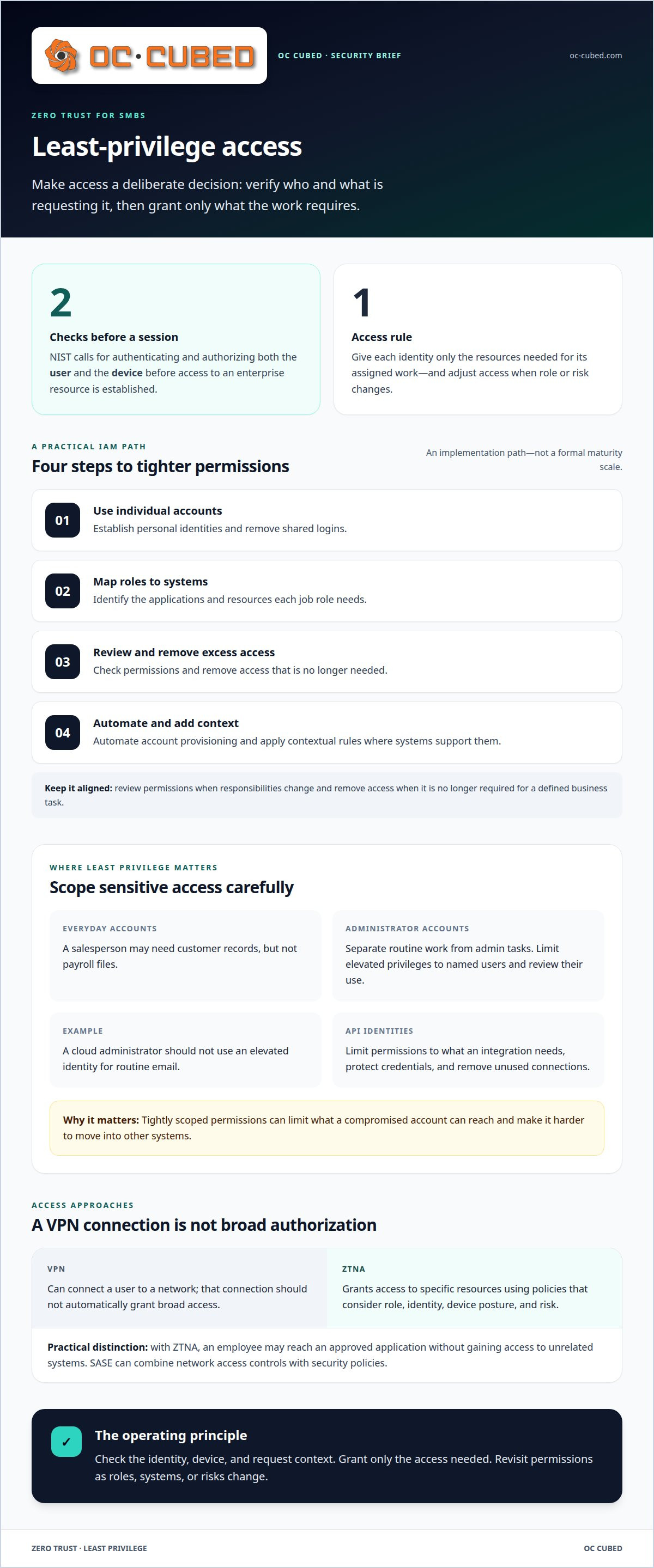
Zero trust architecture makes access a decision, not a default. NIST says users and devices must be authenticated and authorized before a session to an enterprise resource is established. Least privilege puts this principle into practice by giving each identity only the access needed for its assigned work. For example, a salesperson may need customer records but not payroll files. Access policies should also consider the device and request context, then adapt when a person’s role or risk changes.
Identity and access management (IAM) supports these controls by creating identities, granting permissions, and enforcing access policies. SMBs can build capability through four practical steps. First, establish individual accounts and remove shared logins. Second, map job roles to the systems they need. Third, review permissions and remove unnecessary access. Fourth, automate account provisioning and apply contextual rules where systems support them. This is an implementation path, not a formal maturity scale. A managed process helps keep permissions aligned with staff changes.
Privileged access needs separate attention because administrator accounts can change settings, create accounts, or reach sensitive data. Keep daily work separate from administrative tasks, limit elevated privileges to named users, and review their use. For example, someone who administers cloud accounts should not use that elevated identity for routine email. APIs need similar controls: give each API identity only the permissions its integration needs, protect its credentials, and remove unused connections. Exposed or over-permissioned APIs can give attackers a path to connected data and services.
Which zero trust tools and platforms are best for SMBs? Look for tools that support centralized identity management, multifactor authentication, role-based permissions, and access reviews. A cloud identity service may cover applications in that provider’s environment, while endpoint checks and policy-based access can extend controls. The right fit depends on the systems employees use and the permissions their work requires, not on choosing one universal brand.
Zero Trust Network Access (ZTNA) grants access to specific resources under policies that consider role, identity, device posture, and risk. Secure Access Service Edge (SASE) can combine network access controls with security policies. Both go beyond relying on a VPN alone. A VPN can connect a user to a network, but that connection should not automatically grant broad access. With ZTNA, an employee may reach an approved application without gaining access to unrelated systems. Choose an approach that limits each request to its authorized destination.
Least privilege limits what an account can reach if it is compromised. Tightly scoped permissions can make it harder for an attacker with stolen credentials to move into other systems. Review permissions when responsibilities change, and remove access when it is no longer needed for a defined business task.
2. What Is Zero Trust Architecture?
Zero trust architecture is a security approach built from people, processes, and technology, not a single product. John Kindervag conceptualized the Zero Trust model in 2010 while working as a principal analyst at Forrester Research. Its central idea is to evaluate each access request rather than assume that a user or device is safe because it is already inside a network. For an SMB, that approach can build on cloud services, on-premises systems, and communication tools already in use.
Start with basic protections before changing your access architecture. Identify critical data and systems, then assess which accounts and devices can reach them. Keep antivirus, firewalls, and backups in place. Zero Trust should strengthen these safeguards, not replace them. Confirm endpoint protection is active, software receives updates, and backups can support recovery. A risk assessment can uncover gaps and help prioritize work, such as securing administrator accounts before less sensitive applications.
A practical implementation has five steps. Identify important data, applications, and assets. Map how users, devices, and services access them. Define policies for identity checks, device condition, and permitted resources. Apply those policies to a limited group or application, then monitor results before expanding coverage. For example, a ZTNA pilot might protect one cloud application for a small employee group. Testing this way can reveal access problems and workflow impacts before a broader rollout.
Planning matters because a ZTNA rollout affects day-to-day work. Set clear boundaries for a pilot, such as one team and one application. Record who needs access, which devices they use, and which tasks must continue without interruption. Test both normal access and blocked requests, then refine policies before extending them. A managed IT or security services provider can help inventory systems, configure controls, and coordinate implementation when internal staff lack the time or expertise.
Implementation complexity and cost depend on the existing environment, not a universal price. Older applications, inconsistent identity records, multiple cloud platforms, and limited IT capacity can add work. Licensing, integration, policy design, user support, and ongoing monitoring also affect the effort. A phased plan lets an SMB address its highest-priority systems first instead of attempting a full redesign at once. For implementation planning, security threat detection and remediation can support ongoing visibility as controls expand.
Zero Trust is an ongoing operating model, not a one-time installation. After each rollout, review access policies, investigate unusual activity, and update controls as systems or job duties change. This cycle keeps the architecture aligned with business operations and helps reduce unnecessary exposure during a breach.
3. Continuous monitoring and analytics
Continuous monitoring applies the Zero Trust principle after access begins. A successful login is one signal, not proof that activity remains safe. Systems can compare later requests with expected user and device behavior. For example, an employee who usually opens shared project files might trigger a review after suddenly accessing unrelated sensitive data. Analytics can identify the change, while access policies determine whether to allow, restrict, or investigate the request. Connect each factor to a clear response.
Useful monitoring covers both network traffic and endpoint activity. Network records can reveal unusual connections between devices or services. Endpoint detection and response tools watch computers for suspicious changes, such as unexpected processes or altered files. Security teams can correlate these signals with login events and application activity. If an account signs in from an unfamiliar context and then accesses unusual resources, the combined evidence may warrant an alert or session restriction. A single event may be harmless; patterns offer more context.
Analytics can help teams triage alerts faster, but they don’t replace human judgment. A monitoring workflow should identify an alert, link it to the affected account or device, and guide a response. For instance, a suspicious endpoint event might prompt an analyst to isolate the device, review recent account activity, and address the threat. AI-driven analytics can assess login attempts, flag risky behavior, and automate responses in real time. Automation should follow defined policies, with sensitive actions routed for review where appropriate.
For small and medium-sized businesses, monitoring should match available staff and infrastructure. Start with priority systems, such as email, financial applications, and devices that hold business data. Set alerts for events affecting those systems, then assign responsibility for review and escalation. A managed monitoring process can help maintain visibility when internal teams have limited capacity. Network monitoring and configuration also help teams understand normal traffic, spot changes, and keep the network aligned with approved settings.
Monitoring also supports business resilience and continuity. Detection alone cannot restore operations after an incident, so pair alerts with secure backups and a recovery plan. Define which systems must return first, who can authorize recovery, and how staff will continue essential tasks. For example, if a compromised endpoint disrupts access to a business application, a documented recovery process can guide containment and restoration. Review the process after system changes or exercises. This connects continuous verification with practical protection for business operations.
4. Identity verification and multifactor authentication
Modern access decisions begin by verifying both identity and device. The National Institute of Standards and Technology (NIST) says Zero Trust requires users and devices to be authenticated and authorized before an enterprise-resource session begins. In practice, a valid password alone should not establish trust. A policy can consider the account, device condition, requested application, and surrounding context. If an employee signs in from a device that fails the organization’s security checks, access can be limited or denied.
Multifactor authentication (MFA) adds independent verification steps to a sign-in. A user might enter a password and approve a request through a separate authentication method. That makes a stolen password less useful on its own and can help resist phishing or attempts to impersonate a trusted user. Apply MFA to remote access, email, cloud applications, and administrator accounts. Finance workflows can also require a second verification step before staff act on an unusual payment request.
Single sign-on (SSO) lets an employee authenticate through a central identity service to access connected applications. This can simplify account management and reduce repeated sign-ins, while MFA strengthens the central login. SSO does not eliminate the need for application-specific access policies. For example, an employee may sign in successfully but still lack permission to open a sensitive finance system. Treat identity verification and authorization as separate steps, then grant access only to approved resources.
Device checks add another layer of control. Before granting access, a policy can assess whether a device meets the organization’s security requirements and whether its risk has changed. A managed business laptop and an unknown personal device may receive different access decisions. If a device is not compliant, the system can block sensitive applications or allow limited access until its status is restored. Pair these checks with endpoint protection and clear policies for devices used by employees and contractors.
How does zero trust help SMBs meet US cybersecurity and compliance requirements? It supports stronger access controls and records that can help demonstrate how access is managed, but it does not establish compliance on its own. Organizations should map identity, device, and access policies to the rules that apply to their industry and data. How should they combine identity, device, and network controls? Verify the user with MFA, assess the device, then authorize access to a specific resource under network policies.
Keep the process usable. A small business can pilot MFA and device checks with one application, review sign-in issues, and then expand policies to other systems. Network rules should restrict access to approved services rather than treating a successful login as permission to reach the whole environment. Review exceptions, remove accounts that no longer need access, and investigate repeated authentication failures. This makes identity verification part of everyday access, not a one-time perimeter check.
5. Network micro-segmentation
Network micro-segmentation divides a network into smaller zones and limits traffic between them. A broad office network may connect employee laptops, file storage, finance systems, and servers. If one laptop is compromised, unrestricted connections could help an attacker move to other systems. Segmentation creates boundaries between these areas. Policies allow only the connections required for work, reducing the routes available after a breach.
Start by mapping systems and their communication needs. For example, a finance application may need access to its database, while employee devices need access to the application itself. A policy can allow those connections and block unrelated traffic. The goal isn’t to isolate every device from every other device. It’s to make each permitted path deliberate, documented, and tied to a business task.
Micro-segmentation works best as a staged process. First, identify critical systems and the users or services that need them. Next, observe existing traffic to understand legitimate connections. Then group related resources into zones, such as user devices, business applications, and administrative systems. Define rules for traffic between each zone, test them against normal workflows, and adjust before applying them broadly. This sequence helps limit disruption while strengthening cybersecurity controls.
Good rules account for access and operational needs. For instance, a payroll system may need connections from authorized finance devices, but not from every workstation. A backup service may need access to protected data, while ordinary user accounts should not have the same reach. Clear policies reduce unnecessary pathways without blocking approved tasks. Document exceptions, assign an owner to each, and remove them when the business need ends.
Continuous monitoring helps confirm that segmentation remains effective as infrastructure changes. New applications, cloud services, and devices can generate traffic that existing rules don’t cover. Monitor denied connections as well as approved ones. A rise in blocked attempts between an employee network and a sensitive server may point to a misconfigured application or a threat. Investigate the cause, then update the policy only when the connection has a valid purpose.
Segmentation supports resilience by containing problems within a smaller part of the environment. If an endpoint is compromised, separate zones can limit its reach while response teams investigate and restore affected systems. Segmentation does not replace endpoint protection, backups, or incident response. It adds a network control that complements those safeguards. For SMBs, begin with systems whose disruption would most affect business operations, then extend the design as needs evolve.
OC Cubed - Your trusted MSP
OC Cubed - Your trusted MSP helps SMBs turn zero trust principles into practical access and security controls. It can support implementation when your team needs help protecting endpoints, monitoring threats, or maintaining Microsoft 365 access. Security Threat Detection and Remediation helps identify and address suspicious activity, while Endpoint Protection / Antivirus supports protection across business devices. Microsoft 365 Tenant Maintenance can help keep account and tenant settings aligned with your organization’s needs.
These services complement an access strategy; they don’t replace the need to define roles, systems, and policies. Consider support when your current team needs help managing security controls or coordinating ongoing protection alongside daily IT needs. Contact OC Cubed - Your trusted MSP to discuss how your business can strengthen access security.
Make your next security decision deliberate
Choose a starting point that fits your business operations. A zero trust security model for SMBs doesn’t require changing every system at once. Identify one important workflow, decide who needs access, and establish a practical way to review whether the controls work. A clear implementation plan can help your team make progress without losing sight of day-to-day priorities.
OC Cubed - Your trusted MSP can support that work through Remote IT Support, Microsoft 365 Tenant Maintenance, and Security Threat Detection and Remediation. These services can help businesses manage IT operations while strengthening security oversight. The right starting point depends on your current systems, access needs, and internal capacity.
Steady progress builds stronger access practices. Choose a manageable first step, then keep improving.
Frequently Asked Questions
What Is Zero Trust Architecture?
Zero Trust Architecture is an approach that bases access decisions on evidence, not simply a user’s network location. NIST Special Publication 800-207 provides a guide to implementing it. For an SMB, one coordinated approach could cover a cloud accounting service, an office file server, and a remote employee’s laptop. It works across people, processes, and technology rather than relying on a single security appliance.
What is a zero trust security model for small and midsize businesses?
A zero trust security model for SMBs sets rules for how people and devices access business resources. It helps a small company make consistent security decisions across cloud applications, office systems, and remote work. For example, a bookkeeper could use accounting software without access to unrelated customer records. The model should reflect actual work roles and business priorities, so controls protect important information without unnecessarily disrupting daily tasks.
What are the core zero trust principles and components for SMBs?
Core components include an identity service, multifactor authentication, device security checks, access policies, network controls, and activity records. Their value comes from working together. For example, an identity service can establish who is signing in, a device check can assess the laptop, and an application policy can govern access to a financial system. Backups and recovery planning remain important because access controls alone cannot restore disrupted business data.
How can an SMB implement zero trust step by step?
Use a staged rollout that connects each change to a business need:
- Identify important information and business applications.
- Map who uses each resource and which devices they use.
- Set access policies and select a limited pilot group.
- Test common tasks, blocked requests, and support needs.
- Expand gradually, review outcomes, and update controls as systems change.
For example, begin with one cloud application before extending policies across the company.
How much does zero trust security cost for a small business?
There isn’t one fixed implementation cost. The scope depends on existing identity tools, application compatibility, device condition, licensing, staff capacity, and the level of monitoring needed. A company with centralized accounts may face a different project from one with shared logins and disconnected systems. For a specific implementation engagement, the price depends on the case and is provided after a quote request.
How can SMBs apply zero trust to remote workers, cloud apps, and personal devices?
For remote employees, require secure sign-in and grant access to the applications their roles need. Apply the same policy to cloud services, including when employees work outside the office. Set clear boundaries for personal devices: a business may restrict them to approved applications or prevent them from reaching sensitive systems. Tie access decisions to device condition and business purpose, and define how to revoke access for lost devices or departing employees.
What are common zero trust implementation challenges and risks for SMBs?
Common challenges include incomplete account records, older applications, unclear device ownership, and limited staff time. Overly strict policies can interrupt legitimate work, while broad exceptions can weaken protection. A pilot helps uncover these issues before changes spread across the organization. Track support requests and blocked workflows during testing, assign an owner to each exception, and revisit it when the application or work requirement changes.
What are practical zero trust examples and best practices for SMBs?
A practical example is limiting an employee’s cloud access to the applications required for their role, while restricting administrative settings to designated accounts. Another is separating guest Wi-Fi from business systems so visitors cannot reach internal files. Document why each access rule exists, assign responsibility for maintaining it, and review rules after staff or system changes. Pair these controls with employee training so people know how to report suspicious sign-ins or unexpected access requests.

Article by
Peter Irizarry
Peter Irizarry founded OC Cubed, LLC in 2023 to help small to mid-sized businesses stop worrying about downtime and cybersecurity threats. A frequent speaker on SMB digital transformation, Peter is passionate about translating complex IT roadmaps into plain-English business growth strategies. He resides in North Texas with his family.


