

What if the biggest cost of your in-house IT team isn’t on its paycheck? The hidden costs of in-house IT support can include benefits, recruiting, software, security tools, and the time other employees spend waiting for help. Salary may be easy to budget for. The full cost of keeping support available and capable is harder to see.
It’s reasonable to start with salary when comparing support options, but that figure alone won’t show what it takes to cover time off, manage vendors, maintain systems, and respond when something goes wrong. A one-person IT team can also leave your business dependent on a single employee, with coverage or expertise gaps when needs change.
This guide will help you build a complete, defensible estimate of your internal IT costs and compare it with other support models. We’ll look at direct expenses, less visible labor and tools, and operational risks such as downtime and single-person dependency. You’ll also get a practical framework for weighing in-house support against managed or hybrid options based on your business’s needs and growth plans.
Key Takeaways
- Look beyond salary to uncover the hidden costs of in-house IT support, including employee time, tools, and coverage gaps.
- Review recurring expenses for security, backup, monitoring, network management, and Microsoft 365 administration.
- Assess how downtime, security weaknesses, and reliance on one employee could affect business operations.
- Compare support models using a like-for-like cost inventory, separating predictable expenses from project work and uncertain risks.
- Consider whether managed or hybrid support can provide the coverage and capabilities your business needs as it grows.
What Are the Hidden Costs of In-House IT Support Beyond Salary?
The hidden costs of in-house IT support are expenses and business impacts a salary-only estimate leaves out. Pay is one line in the budget. The full support cost also includes the resources needed to equip the employee, maintain coverage, and keep work moving when technology or staffing needs change.
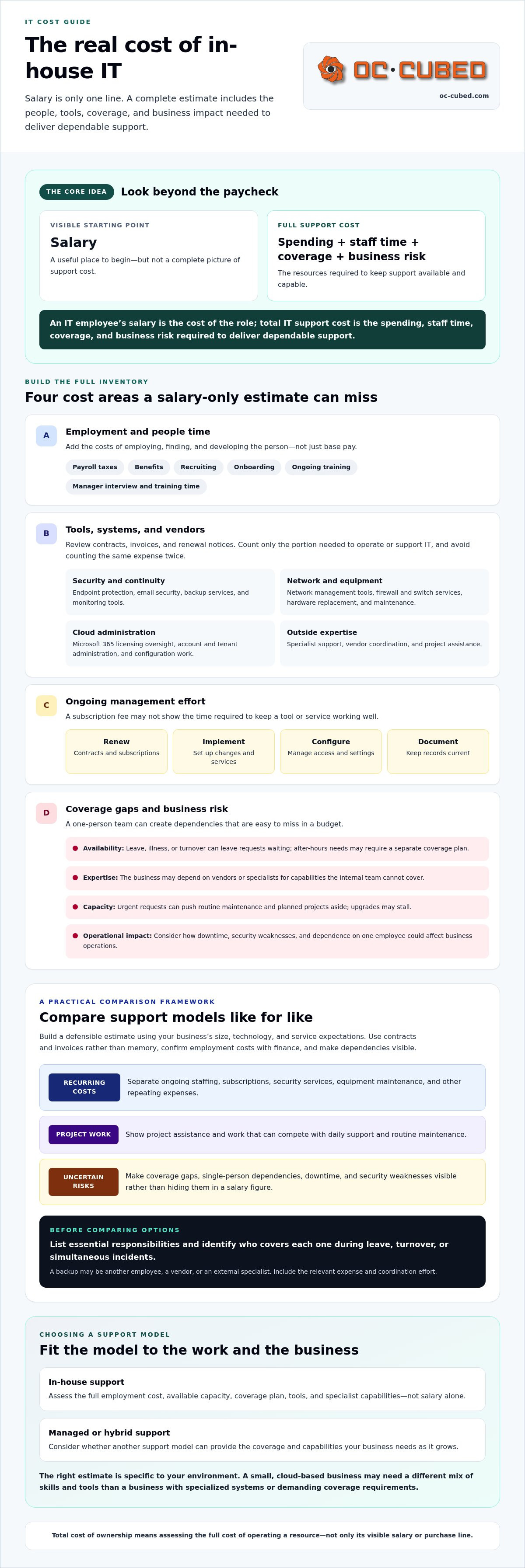
Quotable definition: “An IT employee’s salary is the cost of the role; total IT support cost is the spending, staff time, coverage, and business risk required to deliver dependable support.”
Group the costs into four categories: tools and vendors; employee time spent on support and administration; coverage gaps during leave or turnover; and potential impacts if an issue disrupts work. The right estimate depends on your business’s size, technology, and service expectations. A small, cloud-based environment may need a different mix of skills and tools than a business with specialized systems or demanding coverage requirements. The Total Cost of Ownership (TCO) concept is useful here: assess the full cost of operating a resource, not just its visible purchase or salary line.
Which employment costs sit beyond base salary?
Start with payroll taxes and benefits, then add recruiting, onboarding, and ongoing training. These costs vary by employer, role, and benefits package, so don’t treat a general estimate as your company’s answer. Ask finance to confirm which expenses belong in the calculation and how they’re recorded. Include managers’ time spent interviewing, training, and helping a new hire become productive.
Why does one employee rarely represent the full support model?
An employee provides labor, not every capability the business needs. The support model may also depend on software, outside vendors, and specialist services. List those separately so they don’t disappear inside a general IT budget. Then account for continuity: leave, illness, or turnover can leave requests waiting, while after-hours needs may require a separate coverage plan.
Capacity matters, too. If the same person handles user requests, routine maintenance, and projects, urgent issues can push planned work aside. An upgrade may stall while daily support takes priority. That trade-off has an operational cost, even if it doesn’t appear as a new invoice. A defensible estimate makes these dependencies visible and gives leadership a clearer basis for comparing support models.
Which Ongoing IT Expenses Can an Internal Team Overlook?
Once staffing costs are accounted for, inventory what the IT function needs to operate. The hidden costs of in-house IT support can include recurring subscriptions, security services, equipment replacement, specialist help, and the time spent managing each of them. Separate these costs instead of burying them in a broad technology budget.
Quotable takeaway: “An IT support model includes the tools, vendors, and ongoing management behind the work, not just the labor of the person doing it.”
What technology and vendor expenses belong in the estimate?
Review contracts, invoices, and renewal notices. Memory is an unreliable inventory, and a subscription used across the business shouldn’t automatically be counted as an IT-only expense. Identify the portion needed to operate or support IT, and avoid counting the same cost in multiple budget lines.
- Security and continuity: Endpoint protection, email security, backup services, and monitoring tools.
- Network and equipment: Network management tools, firewall and switch services, and hardware lifecycle costs such as replacement and maintenance.
- Cloud administration: Microsoft 365 licensing oversight, account and tenant administration, and configuration work.
- Outside expertise: Specialist support for work the internal team cannot cover, plus vendor coordination and project assistance.
Include renewal, implementation, configuration, and documentation effort where applicable. A tool may have a clear subscription fee but still require staff time to manage access, resolve issues, and keep records current. IBM’s explanation of total cost of ownership can help frame this broader view of direct and indirect expenses.
How do coverage and skills gaps create additional work?
List essential responsibilities and name who covers each one during leave, turnover, or simultaneous incidents. If one employee owns network changes, security reviews, and cloud administration, determine what happens when those needs overlap. Coverage may involve another employee, a vendor, or an external specialist. Each option has a cost in money, time, or delayed work.
Skills gaps create coordination work, too. A network or security issue may require an outside expert, while the internal employee gathers information, manages access, and follows up. Repeated issues can take time away from maintenance or projects. Track that effort, along with vendor renewals and documentation, to understand the operating load behind the invoice total.
For a clearer view of how support, monitoring, and Microsoft 365 maintenance can fit together, explore remote IT support from OC Cubed.
How Do Downtime, Security Gaps, and Single-Person Dependence Change the Cost?
A salary and tool budget show planned spending. They don’t capture what happens when support is unavailable, an incident takes systems offline, or a security issue demands work the team isn’t prepared to handle. These exposures are part of the hidden costs of in-house IT support, but they shouldn’t be treated like predictable invoice amounts.
Quotable distinction: “Expenses can be added from invoices and payroll records; business risks need scenario-based estimates grounded in your operations.”
What does limited coverage mean when an IT issue occurs?
Define the coverage your business actually needs. Consider business hours, holidays, after-hours escalation, and what happens if several employees report problems at once. A single IT employee may need to prioritize a suspected security incident over routine requests, leaving other work waiting. That could interrupt staff productivity or delay customer-facing operations, depending on which systems are affected.
Use your own incident records to estimate the impact. Review service tickets, outage notes, and internal reports to see how often interruptions occur, which teams or services are affected, and how long work is delayed. If records are incomplete, document that gap rather than presenting a guess as a reliable cost. A useful scenario might describe the business consequences of losing access to a key system during a busy period, without assigning a universal dollar value.
How can security and continuity gaps affect the real cost?
Review who owns each step of security and recovery. Check whether software is patched, endpoints are protected, activity is monitored, access is reviewed, and someone is responsible for coordinating incident response. If a task has no clear owner or backup, response work may take longer or require outside expertise. That increases uncertainty, but it doesn’t mean an incident is inevitable.
The NIST Cybersecurity Framework can provide a practical structure for a risk review. Its functions, Govern, Identify, Protect, Detect, Respond, and Recover, help organize questions about oversight, safeguards, detection, and recovery planning. Use the framework to identify areas to examine, not as a claim of compliance or a promise that risk is eliminated.
- Single-person dependency: Identify critical access, processes, and system knowledge held by one employee, then record who can step in.
- Response readiness: Confirm who communicates with vendors, makes decisions, and tracks recovery tasks during an incident.
- Business impact: Note which operations depend on each system and what work could stop or slow if it becomes unavailable.
Neither one employee nor an outside support model removes cyber risk. Make responsibilities, coverage limits, and response assumptions visible so leadership can weigh known costs separately from uncertain operational exposure.
How Can You Calculate and Compare the Full Cost of In-House IT?
A fair comparison starts with a consistent scope. Don’t compare an employee’s salary with a managed support quote, or a broad service package with a narrow list of internal expenses. First define what the business needs, then calculate how each option would meet those needs. This makes the hidden costs of in-house IT support easier to identify and explain to leadership.
What information should you gather before calculating?
Build an evidence-based inventory. Gather payroll and benefits details, software and hardware invoices, vendor contracts, renewal dates, support tickets, and downtime records. Document the work IT handles today, including routine maintenance, security responsibilities, coverage expectations, and planned projects. Ask finance to validate cost assumptions and operations leaders to review business-impact estimates.
Sort the information into three groups:
- Known recurring expenses: Staffing, benefits, subscriptions, support agreements, and routine renewals.
- Variable work: Projects, equipment replacement, specialist assistance, and unexpected remediation.
- Risk scenarios: Possible disruption or response effort, estimated using company records and clearly stated assumptions rather than treated as certain expenses.
Include internal management time, too. Vendor coordination, approvals, and follow-up take effort even when they don’t appear as separate invoices. Keep assumptions visible so decision-makers can test how the estimate changes if staffing needs, technology, or service expectations shift.
How do you compare staffing and managed support fairly?
Compare responsibilities, not labels. For each option, check which services are included, when support is available, how issues are escalated, and who owns follow-through. Confirm whether monitoring, security work, Microsoft 365 administration, vendor coordination, and reporting are part of the proposed scope or remain internal tasks.
Then identify what your team still needs to do under each model. A provider may handle defined support activities, while your employees retain approvals, business decisions, and access to key information. Count the internal time needed to manage those responsibilities. For service-model context, consult What Is a Managed Service Provider? A Guide for Leaders. For a broader side-by-side decision, see Managed IT vs. In-House IT: Which Makes More Sense?
Put the comparison into one table with columns for scope, recurring cost, variable work, internal time, coverage, escalation, and accountability. That format reveals trade-offs without implying that the lowest visible total is automatically the best fit.
When Is Managed IT Support a Practical Alternative to In-House IT?
Managed IT support may be worth considering when your business needs broader coverage or capabilities than one employee can provide, but isn’t ready to build a larger internal team. The right model depends on the work you need covered, your internal capacity, risk tolerance, and how clearly responsibilities must be assigned. The goal isn’t to assume one model always costs less. It’s to choose a support structure that fits your operations and growth plans.
OC Cubed provides remote IT support, helpdesk and NOC integration, network monitoring, and Microsoft 365 tenant maintenance. These services can support companies looking to coordinate day-to-day needs across multiple areas. A monthly managed IT retainer bundles recurring services, giving businesses a defined way to plan for ongoing support and management.
What should you confirm before choosing a managed service provider?
Get specific about scope before comparing proposals. Ask what monitoring, reporting, and escalation processes are included, and how responsibilities are divided between the provider and your team. Clarify vendor coordination, security duties, project work, and exclusions. Confirm which coverage expectations the provider can meet rather than assuming they’re included. Remote IT Management: Complete Guide for Modern Business offers further context on how remote delivery models work.
A clear agreement should make ownership easy to understand. Who tracks an issue through resolution? Who approves access or major changes? Which tasks still need an internal employee? These details help prevent gaps and make it easier to evaluate the support model over time.
How can fractional IT leadership complement day-to-day support?
Operational support and technology leadership solve different needs. An internal IT employee or support provider may handle ongoing systems work, while decisions about technology direction, security priorities, or vendor relationships need a different perspective. If those decisions keep landing on business leaders without clear ownership, fractional leadership may be worth evaluating.
OC Cubed offers virtual CIO, CTO, and CISO services. These provide fractional technology leadership, not a full-time executive hire. The right role depends on the decisions your business needs help guiding, such as technology planning, technical direction, or security oversight. Define the outcomes and decision-making responsibilities you expect before adding leadership support.
Use your cost comparison to identify the gaps that matter most, then review whether internal, managed, or combined support can address them. If you’re weighing the hidden costs of in-house IT support against broader support needs, discuss your current responsibilities, coverage expectations, and desired outcomes with OC Cubed. A clear view of the work is a practical starting point.
Build an IT Support Model You Can Plan Around
The true cost of in-house IT includes more than salary. Benefits, tools, vendor coordination, and the time required to maintain coverage all belong in the estimate. Downtime and security gaps add another layer: uncertain business risks that should be assessed using your own operations and records, not a universal cost figure.
A like-for-like comparison helps make the hidden costs of in-house IT support easier to evaluate. Separate predictable recurring expenses from project work and risk scenarios. Then compare scope, coverage, accountability, and the internal effort each support model still requires. The right fit depends on what your business needs today and how those needs may change as it grows.
OC Cubed’s monthly managed IT retainer bundles recurring support and management services. Its capabilities include remote support, helpdesk and NOC integration, and 24/7 network monitoring. Reviewing your support needs is a practical next step toward clearer responsibilities and a more considered IT budget.
With a complete picture of the work, costs, and coverage your business requires, you can choose a support model with greater confidence.
Frequently Asked Questions
What are the hidden costs of in-house IT support?
The hidden costs of in-house IT support extend beyond an employee’s salary. Include benefits, payroll taxes, recruitment, training, software, security tools, vendor support, and the coverage needed when your IT employee is unavailable. Internal time spent coordinating vendors or managing projects also counts. Downtime and security incidents are less predictable, so assess them separately using your own incident records and clearly stated scenarios rather than treating them as guaranteed expenses.
Is hiring an in-house IT employee more expensive than using an MSP?
There’s no universal answer. The result depends on your support requirements and the services included in each option. Compare equivalent responsibilities, coverage expectations, employee skills, benefits, tools, and vendor support. Then identify work that stays with your team under either model, such as approvals or provider coordination. Ask finance and operations leaders to review the assumptions before deciding. A fair comparison focuses on scope and accountability, not salary versus a service quote alone.
How do you calculate the total cost of an in-house IT employee?
Start with compensation and employment expenses confirmed by your finance team, including benefits, payroll costs, recruiting, and training. Add the tools, software, outside services, and vendor support the role needs. Estimate time spent managing IT work and coordinating providers. Assess coverage gaps and possible business interruptions separately, using company records where available. Label assumptions that remain uncertain. A complete estimate shows both what you spend regularly and what support requires operationally.
Can one in-house IT person support an entire small business?
Sometimes, but it depends on the organization’s size, systems, risk requirements, and service expectations. One employee may have limited capacity to handle simultaneous incidents, routine maintenance, security responsibilities, and projects. Map each responsibility and its backup before assuming one role provides complete coverage. If expertise or availability is limited in a particular area, specialist or managed support may help fill that gap. Review the actual workload rather than relying on headcount alone.
What happens if an in-house IT employee leaves unexpectedly?
The business may need to recover documentation, credentials, vendor knowledge, open project details, and support procedures. Up-to-date records and appropriate access controls can make the handover more manageable, but they don’t replace a continuity plan. Identify who can handle urgent requests and which systems or processes depend on one person’s knowledge. The impact varies with your systems and workflows, so use your own responsibilities and records to assess the exposure.
Are cybersecurity tools included in the cost of in-house IT support?
Not automatically. Check which endpoint, email, firewall, backup, monitoring, and identity tools your business uses, who maintains them, and whether outside expertise is needed. Some subscriptions may already sit in another department’s budget. Review invoices, contracts, ownership, and responsibilities to avoid leaving security work out or counting an expense twice. Also include the internal time required to configure, monitor, and manage the tools, where those duties apply.
When should a business consider managed IT support instead of hiring internally?
Consider comparing support models if your needs extend beyond one role, coverage is inconsistent, vendor management takes substantial staff time, or security and maintenance responsibilities lack clear ownership. Those signs don’t automatically mean outsourcing is the right choice. Compare the actual service scope, escalation process, accountability, internal responsibilities, and total costs with your business priorities. A managed service provider may be one option when you need broader capabilities without building each function internally.


