

A routine switch change can become a network-wide problem when no one knows what changed, which devices were affected, or how to restore the previous settings. According to EMA Research, human error during manual configuration changes causes 63% of network outages. Switch configuration management helps teams control changes, keep reliable records, and prepare for recovery.
Keeping configurations consistent across multiple switches can feel like one more task on an already full IT workload. But without a reliable record, a small mistake can disrupt connectivity and make recovery harder. You don’t necessarily need complex tools to improve the process. Start with a practical workflow that fits your network and the people responsible for it.
This guide explains how to document switch configurations, control changes, maintain backups, and review settings for configuration drift. You’ll also learn how to compare hands-on, software-assisted, and managed approaches, so you can choose the right level of oversight for your team. The goal is better visibility, safer changes, and more dependable network operations.
Key Takeaways
- Understand how switch settings such as VLAN membership, port assignments, and management access can affect network availability and security.
- Use a clear change workflow, from recording a baseline and approving updates to validating the result and documenting the change.
- Compare manual, software-assisted, and managed switch configuration management to find an approach that fits your team’s capacity.
- Build a practical checklist for device inventory, ownership, recovery testing, and regular configuration reviews.
- See how network monitoring and switch management can provide ongoing oversight as part of broader remote IT support.
What Is Switch Configuration Management, and What Does It Protect?
Switch configuration management is the process of documenting, controlling, and maintaining switch settings over time. It gives a team a reliable record of how network switches are intended to operate and a way to track changes. When an issue occurs, that record can help the team identify what changed and return to a known configuration.
Switches direct traffic between devices and network segments. Their settings influence which devices can communicate, which services remain reachable, and who can administer the network. For example, a VLAN assignment places a device in a particular network segment. A changed port setting could disconnect a workstation or affect a connected access point. Management access settings determine how administrators reach the switch and can affect who is able to change it.
The wider idea is part of configuration management, which centers on keeping a clear record of a system’s components and changes. For switches, treat the configuration as an operational record, not just a collection of commands. The specific settings and recording methods depend on the network design and switch platform.
One distinction is especially useful during troubleshooting. A running configuration is the set of settings currently active on a switch. A saved configuration is stored for later use, often so the device can load it after a restart. On some platforms, changes to the running configuration aren’t saved automatically. Understand how each switch handles this, then record and save approved changes according to your process.
Which switch settings belong in configuration records?
Capture enough information to identify each device, understand its role, and review settings that affect network access. Useful records may include:
- VLAN assignments and the purpose of each relevant segment.
- Port settings, including how important ports are intended to connect.
- Management access details and approved administrative settings.
- Device model or identifier, network location, owner, and configuration version.
Keep configuration records distinct from live performance monitoring. Records describe intended settings and changes. Monitoring shows current conditions, such as whether a switch or connection is reporting a problem. Both provide useful visibility, but one doesn’t replace the other.
Why do configuration records matter during changes or failures?
A known-good baseline gives the team a reference point. If a planned update is followed by an unexpected connection issue, comparing the current settings with the baseline can help reveal unintended differences. Without that reference, it may be harder to tell whether a setting changed, what it was before, or which devices could be affected.
A current backup can support recovery after a failed change, provided it’s appropriate for the device and the team knows how to restore it. Documentation and backups don’t prevent every outage, and an unchecked backup may not be useful when needed. Together with careful change control and validation, however, they give teams a clearer path to investigate problems and restore service.
How Does a Switch Configuration Management Workflow Work?
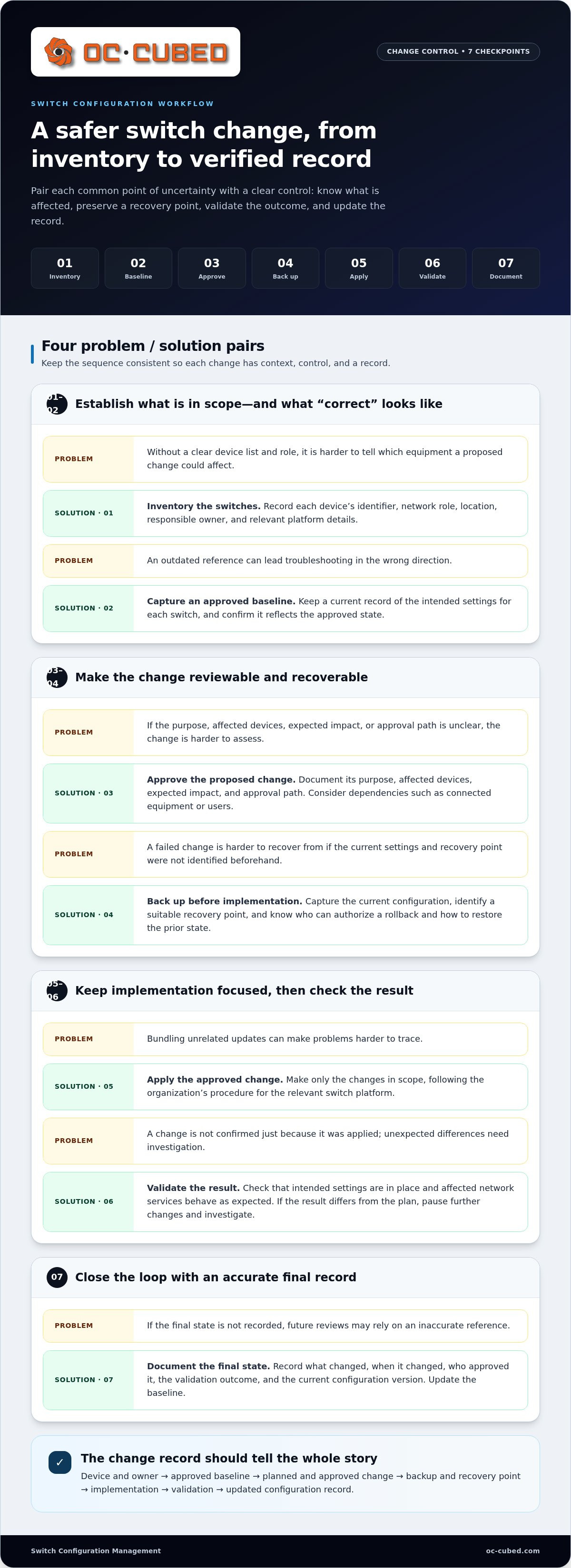
A dependable switch configuration management workflow gives every change a clear path from identification to verification. It doesn’t need to start with complex automation. A consistent sequence helps teams identify which devices are in scope, what should change, and what to do if the result isn’t right.
- Inventory the switches. Record each device’s identifier, network role, location, responsible owner, and relevant platform details. This helps show which equipment a proposed change could affect.
- Capture an approved baseline. Keep a current record of intended settings for each switch. Confirm that it reflects the approved state, rather than an outdated version that could lead troubleshooting in the wrong direction.
- Approve the proposed change. Document its purpose, affected devices, expected impact, and approval path. Consider dependencies, such as whether a port or VLAN change could affect connected equipment or users.
- Back up before implementation. Capture the current configuration and identify a suitable recovery point. Know who can authorize a rollback and how the team will restore the prior state if validation fails.
- Apply the approved change. Make only the changes in scope, following the organization’s procedure for the relevant switch platform. Avoid bundling unrelated updates, which can make problems harder to trace.
- Validate the result. Check that the intended settings are in place and that affected network services behave as expected. If the result differs from the plan, pause further changes and investigate.
- Document the final state. Record what changed, when it changed, who approved it, the validation outcome, and the current configuration version. Update the baseline so future reviews use an accurate reference.
How should teams handle a planned switch change?
Before implementation, make the change record specific enough for another team member to follow. Include its purpose, affected devices, anticipated impact, and approval route. Capture the current settings and identify the recovery point in advance. Afterward, validate the configuration and the services the change could affect, then document the outcome. NIST’s Security-Focused Configuration Management provides further guidance on managing configurations with security in mind.
Rollback is a prepared recovery option, not a promise of uninterrupted service. Restoration may take time, and the prior settings may not resolve every issue. Before a change begins, understand the recovery steps, including who decides whether to revert and how service will be checked afterward.
What should teams do when configurations drift?
Compare current settings with the approved baseline or documented intended state. A difference may be an authorized change that hasn’t been recorded, or an unexplained deviation. Investigate its origin before correcting it. If remediation is appropriate, document the action and verify affected services afterward. This keeps the record useful and helps prevent a valid change from being overwritten based on an outdated baseline.
Teams that need help maintaining this routine can include network monitoring and configuration support within broader remote IT support. Ongoing oversight helps keep changes visible and connects recovery planning to day-to-day network operations.
Manual, Automated, or Managed Switch Configuration: Which Fits?
The right approach depends less on a universal device threshold than on the work your network creates. Consider how often switches change, how quickly the team needs to recover, and who can maintain accurate records. A small, stable network may be manageable with a disciplined manual process. A growing or frequently changing environment may benefit from software-assisted controls or managed oversight. The comparison below highlights the trade-offs.
| Approach | Visibility | Repeatability | Staffing effort | Change control | Recovery readiness |
|---|---|---|---|---|---|
| Manual | Depends on current records and team updates. | Relies on people following the same process. | Hands-on effort falls to internal staff. | Can be clear if approvals and records are maintained. | Depends on current, accessible backups and recovery knowledge. |
| Software-assisted | Can bring configuration records and differences into one view. | Supports consistent capture and repeatable tasks. | Requires staff to configure, review, and maintain the tools. | Can support a defined approval process; people still make decisions. | Can make backups easier to organize, but restoration still needs planning. |
| Managed | Can add ongoing oversight alongside internal visibility. | Uses established practices supported by a management team. | Reduces routine workload on internal staff, with coordination still needed. | Can provide structured oversight for planned changes. | Can help keep recovery planning and configuration support in view. |
Automation can make routine tasks more consistent, especially across multiple devices. It doesn’t replace ownership. Someone still needs to decide which configuration is approved, review differences, authorize changes, and confirm the result works as intended. Choose a switch configuration management approach your team can sustain, not simply the one with the most features.
When can a manual process be sufficient?
A manual approach can fit a small, stable network where changes are infrequent and a responsible person keeps records current. It becomes fragile when the process depends on memory, configuration files scattered across individual computers, or a single administrator who holds all the context. Review the approach as the device count, change volume, or recovery needs grow. A process that once felt simple may no longer provide enough visibility.
When are automation or managed oversight worth considering?
Consider software or managed support when routine updates take too much staff time, changes happen often, or the team needs clearer visibility across devices. Weigh network size, change volume, recovery requirements, and in-house capacity. Managed oversight can add repeatable monitoring and configuration support without requiring the business to handle every routine task internally. For a broader view of remote support models, see this remote IT management guide.
There’s no need to adopt complex tooling just because it exists. Start with an approach that gives your team reliable records, clear responsibility, and a recovery plan it can use. Reassess as the network and workload change.
How to Put Switch Configuration Management Into Practice
Build a process your team can follow consistently, then expand it as your network or workload grows. This phased approach makes switch configuration management practical without requiring complex tooling from day one.
- Inventory devices. Record each switch’s purpose, network location, responsible owner, and relevant device details. Make the list accessible to the people who handle network changes.
- Set a baseline. Capture the approved configuration for each device and note its version or date. Keep the baseline in a controlled, accessible location rather than relying on personal files.
- Assign ownership. Identify who maintains device records, who can approve changes, and who checks the updated configuration. Clear roles prevent important tasks from being assumed but left undone.
- Define the change procedure. Set expectations for documenting the reason, scope, approval, backup, validation, and final outcome of each change.
- Test recovery. Confirm that the team can access the required backup and understands the restoration steps. A planned test can expose gaps before a real failure makes recovery urgent.
- Set a review cadence. Choose a schedule that reflects the network’s size, risk, and level of change activity. Review records between scheduled checks when a major change makes them outdated.
Start with a pilot on a limited scope, such as a small group of switches or one network segment. Use it to see whether staff can find device records, follow the change procedure, and complete validation without unnecessary steps. Note confusion or delays, refine the process, and then extend it to other devices. This makes early adjustments easier to manage.
What should a switch configuration policy include?
Keep the policy short enough to use during routine work. Specify which changes require approval, who provides it, where backups and records are stored, and who documents the final configuration state. Require post-change validation, including what was checked and whether the expected result was achieved. Set review frequency according to the network’s risk and activity, rather than choosing a schedule the team can’t maintain.
How can teams check that the process is working?
Make reviews concrete. Check whether device details and configuration backups are current and accessible to the people responsible for recovery. Sample completed changes for an approval record, validation notes, and an updated configuration version. Look for recurring drift or repeat incidents, then consider whether the baseline, ownership, or procedure needs improvement. These checks show whether the process works in practice, not just whether a policy exists.
Configuration practices support a broader security program by helping teams maintain visibility and control over network settings. For more context on the wider topic, see this small business cybersecurity guide.
How OC Cubed - Your trusted MSP Supports Ongoing Switch Configuration Management
Good configuration practices need more than a one-time setup. They rely on clear records, deliberate changes, and ongoing attention as a business’s network evolves. OC Cubed provides network monitoring and configuration, along with firewall and switch management, as part of its support for business networks.
This is managed IT oversight, not a standalone configuration software product. It helps teams maintain visibility and consistent practices while keeping network work connected to broader IT operations. It can be useful when internal staff have limited capacity for routine configuration work or need additional support to keep responsibilities clear.
What does managed switch oversight look like?
Network monitoring and configuration can sit alongside remote IT support, connecting network operations to the broader support picture. Helpdesk and NOC integration can complement that oversight by connecting user-reported issues and network operations where relevant. Monthly reporting is also available within the service portfolio, giving businesses a way to review managed IT activity. The oversight can reflect the business’s network and priorities.
Disciplined switch configuration management supports visibility into device settings, a structured approach to planned changes, and more informed recovery planning. It doesn’t remove the need for internal ownership or guarantee uninterrupted service. Instead, it gives the business and its IT support team a clearer basis for coordinating work, reviewing network activity, and deciding what needs attention.
When should a business consider outside IT support?
Consider adding support if configuration tasks compete with other IT priorities, changes recur without a consistent process, or no one is clearly responsible for maintaining network records. Start by defining which switches need ongoing oversight, how changes are approved and recorded, and what visibility would help the team. Those answers can guide an approach suited to existing capacity and network needs.
Managed oversight works best when expectations are clear. Agree on who owns decisions, how internal staff and support teams coordinate, and what information should be available for review. This keeps responsibility visible rather than assuming that a service or tool will resolve every gap on its own.
OC Cubed’s broader remote IT support brings network monitoring and configuration together with firewall and switch management. This approach can help teams maintain consistent oversight without treating switch work as an isolated task. It also gives businesses a way to connect network responsibilities with wider IT operations. Learn more about OC Cubed’s managed IT support.
Make Your Next Network Change More Deliberate
Your next step doesn’t have to be a major technology project. Choose one part of your network where switch configuration management could bring clearer ownership or better visibility, then decide what support would make the process sustainable. A focused conversation can connect day-to-day switch oversight with the way your business manages IT overall.
OC Cubed brings network monitoring and configuration together with firewall and switch management. Monthly reporting can also provide visibility into managed IT activity. These capabilities can support a coordinated approach while your team retains a clear view of its priorities and responsibilities.
Reliable network operations are built through steady, practical decisions. Start with the level of oversight that fits your team today, and adapt as your needs change.
With a clear process and the right support, your team can make network changes with better visibility and a defined recovery path.
Frequently Asked Questions
What is switch configuration management?
Switch configuration management is the ongoing practice of keeping switch settings identifiable, controlled, and current. It helps a team answer practical questions, such as which settings were approved for a device and whether a recent update changed them. For example, if a new department needs network access, the team can check the intended configuration and record the change instead of relying on informal notes or memory.
Why should businesses back up switch configurations?
Backups give administrators a reference or recovery option if a configuration change causes unexpected behavior, a device needs replacement, or settings are lost. Organize backups so the team can identify which device and configuration version each file belongs to. Access matters too: a backup that staff can’t locate or use during an incident offers little practical help. Test recovery procedures in a controlled way.
How often should switch configurations be reviewed?
Set a review schedule that reflects how often the network changes and how important each switch is to business operations. Review records after a major network update, staff or ownership changes, or a change in how a device is used. A stable environment may need fewer routine reviews than one with frequent updates. Assign responsibility and make sure reviews happen, rather than choosing a schedule no one maintains.
Can switch configuration management prevent network outages?
No process can prevent every outage. A power problem, hardware failure, or upstream service issue can interrupt connectivity even when switch settings are well managed. A clear record of intended settings, careful review before changes, and checks afterward can help teams catch avoidable mistakes and investigate issues with better context. Treat these practices as risk reduction and recovery support, not a promise that service will never be disrupted.
What is the difference between network monitoring and configuration management?
Network monitoring shows what devices and connections are doing now, while configuration management tracks how devices are set up and how those settings change. For example, monitoring may show that a switch port is down; configuration records can help determine whether its intended settings changed. Using both perspectives can help teams connect an operational symptom to a possible configuration issue, while recognizing that the symptom may have another cause.
Do small businesses need switch configuration management software?
Not necessarily. A business with a small, stable network may be able to maintain useful records and backups through a controlled manual process. Software becomes more valuable as the number of devices, frequency of changes, or need for shared visibility increases. Consider who will maintain the tool and review its records. Technology helps only when the team has a clear process and an owner.
Can an MSP manage switch configurations remotely?
Yes. A managed service provider can support switch oversight remotely when appropriate access and coordination are in place. OC Cubed provides remote IT support, network monitoring and configuration, and firewall and switch management for businesses. Internal staff can help define network priorities and approval responsibilities, while remote support contributes to ongoing operations. This arrangement can suit teams that need additional capacity without assigning every routine network task to in-house staff.


