

Small businesses receive about one malicious email for every 323 messages, according to figures cited by Verizon DBIR and StrongDM. That’s why email security for small business can’t rely on a filter alone. One convincing message can prompt a rushed click, expose account credentials, or send a payment to the wrong place.
Protections built into your email platform are an important starting point, but their value also depends on how they’re configured, monitored, and supported by everyday staff practices. A layered approach helps close the gaps between technology and human decisions.
This guide explains email threats that can affect a small business, from phishing and impersonation to malicious attachments. You’ll learn how filtering, authentication, and multi-factor authentication work alongside clear employee habits, and how to identify practical next steps. Coordinated oversight, including email security with Proofpoint and Microsoft 365 tenant maintenance, helps keep protection connected to your IT environment rather than treating security as a one-time setup.
Key Takeaways
- Map which accounts and business processes depend on email to see where a compromised inbox could create risk.
- Assess filtering alongside account protection, domain authentication, and clear steps for reporting suspicious messages.
- Use this email security for small business checklist to assign ownership for settings, access, reporting, and regular reviews.
- Review built-in protections and added controls based on configuration, account coverage, alert handling, and ongoing administration.
- See how OC Cubed’s Proofpoint email security works alongside Microsoft 365 tenant maintenance and threat detection and remediation.
Why email security for small business starts with understanding inbox risk
Email security includes the controls and everyday practices that reduce risks carried through email. It covers messages, accounts, and domain identity, as well as helping employees recognize suspicious requests. For a small business, the inbox is more than a communication tool. It may connect to business accounts, payment approvals, customer information, invoices, and the routine coordination that keeps work moving.
That makes inbox risk broader than unwanted messages. A successful attack can expose information, interrupt workflows, or misuse a trusted account to deceive someone else. Email privacy is a critical aspect of email security, addressing unauthorized access and inspection of electronic mail. A secure email platform can reduce risk, but no platform can eliminate every threat, especially when a person is persuaded to share credentials or approve a request.
Which email threats should small businesses recognize?
Different attacks exploit different points of trust. Phishing messages try to persuade recipients to reveal information, open a file, or take another risky action. Business email compromise (BEC) uses impersonation to prompt a fraudulent payment, change payment details, or disclose sensitive business data. The message may appear routine and refer to a real project or supplier.
Spoofing and account compromise are related but distinct. A spoofed message falsifies sender details to make an email appear to come from a familiar person or organization. A compromised legitimate account is an actual account being misused after an attacker gains access. Malicious attachments provide another route: a file presented as a document or invoice may carry harmful content. Checking only the display name can’t reliably distinguish these cases.
Why a single inbox mistake can affect the wider business
If an employee enters credentials into a deceptive page, an attacker may try to use them to access the email account and information available through it. A compromised inbox can also expose conversation history, giving an attacker context to make later requests sound credible. The potential impact depends on the account’s access and the business systems connected to it.
Fraudulent payment instructions can disrupt approval routines, delay legitimate transactions, and require staff to verify or correct records. A false request for customer or employee information can create extra work and weaken trust. These incidents don’t always begin with a dramatic warning. They can look like an ordinary invoice, a supplier update, or a message asking for a quick response.
Email threats create operational risk when they turn trusted messages into unauthorized access, mistaken payments, or interrupted work. Understanding that connection is the first step toward choosing protections that address technical weaknesses and everyday decisions.
How layered email security for small business protects the inbox
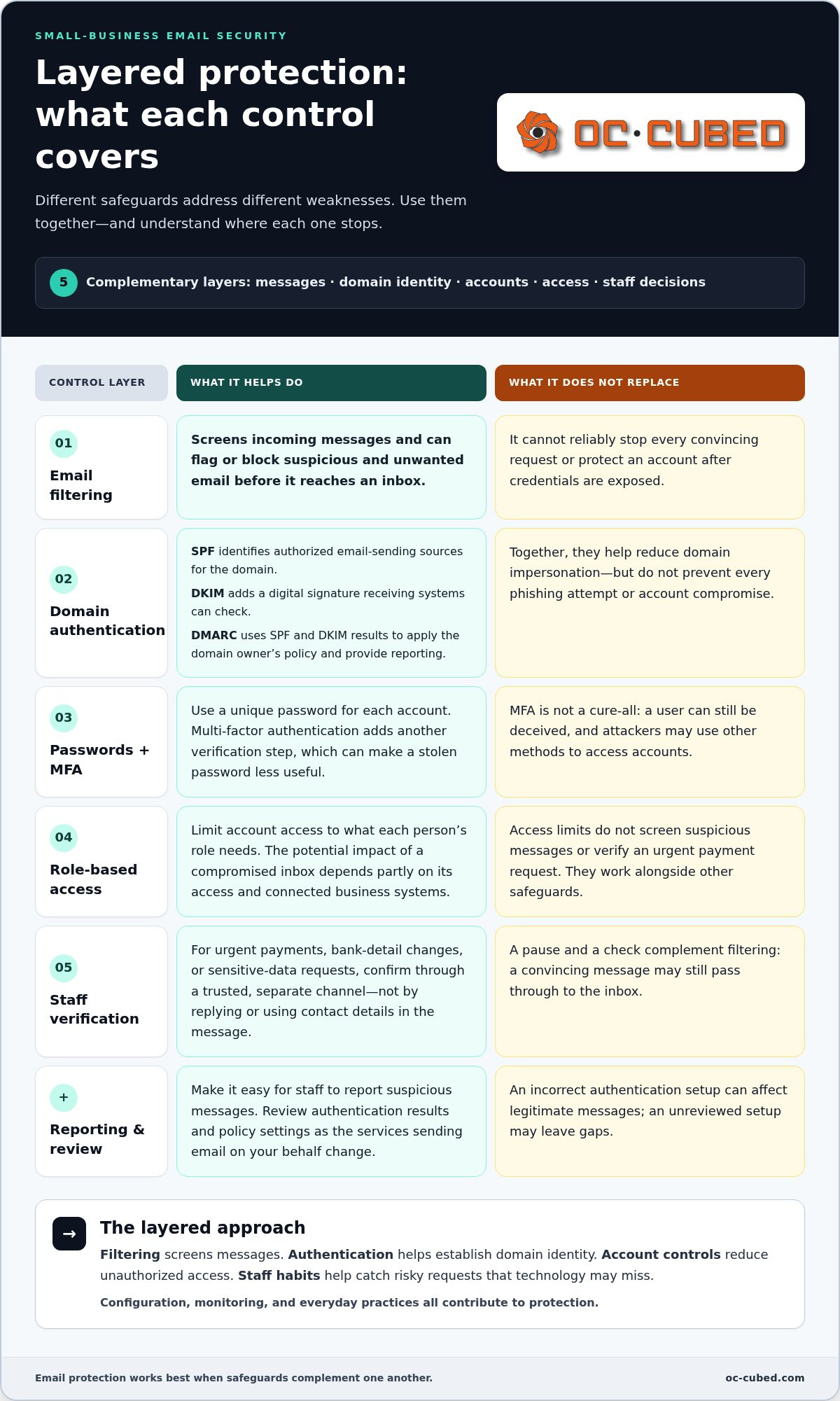
Effective email security for small business coordinates safeguards across incoming messages, user accounts, the sending domain, and staff decisions. Each layer addresses a different weakness. Filtering can flag or block suspicious and unwanted messages before they reach an inbox, but it can’t reliably stop every convincing request or protect an account after credentials are exposed.
Account controls help limit that exposure. Use unique passwords for each account and enable multi-factor authentication (MFA), which requires another verification step in addition to a password. MFA can make a stolen password less useful, but it isn’t a cure-all: a user can still be deceived, and attackers may use other methods to access accounts. Limit account access to what each role needs and make it easy for staff to report suspicious messages.
What SPF, DKIM, and DMARC do for a business domain
These email-authentication standards help receiving systems assess whether messages claiming to come from your domain are legitimate. SPF identifies the sources authorized to send email for the domain. DKIM attaches a digital signature that receiving systems can check to help verify the message. DMARC uses SPF and DKIM results to apply the domain owner’s policy and provide reporting. Together, they help reduce domain impersonation, but they don’t prevent every kind of phishing or account compromise.
Configuration matters. Account for the services that send email on your behalf, then review authentication results and policy settings as those services change. An incorrect setup can affect legitimate messages, while an unreviewed setup may leave gaps. Domain authentication is one part of the picture, not a substitute for filtering and account protection.
How account controls and staff habits complement filtering
Pair unique passwords and MFA with simple verification routines. If an email requests an urgent payment, a change to bank details, or sensitive information, staff should confirm it through a trusted, separate channel rather than replying to the message or using contact details it provides. That pause can interrupt a fraud attempt even if the message passes through filtering. The Federal Communications Commission’s cybersecurity tips for small businesses include employee training and other protective practices, reinforcing the value of treating inbox safety as part of wider security.
Layering works because one control can catch what another misses. Filtering screens messages, authentication helps establish domain identity, account controls reduce unauthorized access, and verification habits slow down suspicious requests. No single safeguard covers all four points. For broader context on coordinating these protections with other safeguards, see this managed cybersecurity guide.
OC Cubed provides email security with Proofpoint alongside Microsoft 365 tenant maintenance and security threat detection and remediation. This support connects email protection with the wider IT environment. Learn how managed email security support fits into a practical protection plan for your business.
Built-in email security or added protection: what should a small business assess?
Built-in email protections can be a strong starting point, while separately managed controls may add another layer of configuration and oversight. Neither label tells you by itself whether your inboxes are adequately protected. Assess what’s available in your platform and license, how it’s configured, and whether someone is responsible for keeping it effective as the business changes.
For email security for small business, review the whole setup rather than focusing on a product name. Check whether controls apply to all relevant accounts, including shared or role-based inboxes, and whether the domain’s email authentication is configured and maintained. Then consider how suspicious activity is surfaced, who receives alerts, and what happens next. A control that nobody reviews may not help the team respond in time.
- Configuration: Are the protections enabled and set in a way that fits the business?
- Account coverage: Are employee, shared, and other business inboxes included?
- Domain authentication: Are authorized sending sources accounted for, with results reviewed when services change?
- Alert handling: Is there a clear owner for reviewing alerts and deciding what action to take?
- Administration: Who updates settings, access, and procedures as people and systems change?
When existing email protections may need closer review
Inconsistent settings across accounts, alerts that accumulate without review, or uncertainty about who owns email security are practical reasons to reassess. Available protections vary by platform, license, and configuration, so two businesses using the same email service may not have the same controls in place. Review what your current setup includes, how it’s configured, and whether its coverage matches the accounts your team relies on. Don’t assume that a default setting or familiar platform name means every protection is active.
What a managed email-security approach adds
Email security needs ongoing administration, not just an initial setup. Settings may need attention as accounts are added, staff roles change, or email services are adjusted. Alerts also need an owner and a defined path for review and follow-up. A managed approach can coordinate these responsibilities with Microsoft 365 tenant maintenance and wider IT support, keeping email safeguards connected to the business environment.
Coordination can make gaps easier to identify and responsibilities clearer, but it doesn’t mean every threat will be prevented. Effective protection still depends on suitable settings, account coverage, staff practices, and timely attention to issues. OC Cubed provides email security with Proofpoint alongside Microsoft 365 tenant maintenance and security threat detection and remediation, connecting inbox protection with broader managed IT support.
A practical email security checklist for small-business teams
A checklist turns email security for small business into assigned work, not a set of settings that nobody owns. Start by naming a responsible person for each task. In a small team, one person may hold several responsibilities, but each item should have a clear owner and a defined path for follow-up.
Set up and review essential email safeguards
Work through these steps in order so you know which accounts and systems need attention before changing settings. Record what you find, who is responsible, and what still needs follow-up.
- Inventory email accounts and domain use. List employee accounts, administrator accounts, shared mailboxes, and the services that send email using your business domain. Assign an owner to keep the inventory current as staff and systems change.
- Review account access. Check that each person has an individual account where appropriate, that access matches their role, and that multi-factor authentication is enabled where available. Assign responsibility for granting, changing, and removing access when roles change or someone leaves.
- Check available email protections. Review the safeguards included with your email platform and license, then confirm how they’re configured and which accounts they cover. Assign an administrator to track settings and alert handling. Don’t assume every protection is enabled by default.
- Check domain authentication. Review SPF, DKIM, and DMARC for your sending domain. Confirm that legitimate services sending mail for the business are accounted for, and use current technical guidance before making changes. Assign someone to revisit the configuration when a sending service is added or removed.
Prepare staff to report suspicious messages
Employees need a simple reporting route they can use without guessing who to tell. Identify the person or support channel that receives reports, and explain what details to include, such as the sender, subject, and whether they clicked a link, opened an attachment, or replied. Make clear that reporting a mistake promptly is more useful than staying silent.
- Verify unusual requests independently. Confirm unexpected payment changes, password requests, or demands for sensitive data through a known phone number or a separate trusted channel. Don’t rely on contact details or links inside the questionable email.
- Assign report review. Name the person responsible for assessing reported messages, sharing guidance, and escalating suspected account issues to the appropriate IT support.
- Close the loop. Tell the reporting employee what action to take, such as stopping a reply or changing their response if they interacted with the message. Track recurring patterns so staff guidance and settings can be reviewed.
- Schedule routine checks. Revisit the account inventory, access, authentication, and reporting process regularly, and after meaningful changes to staff, email services, or business workflows.
Clear ownership makes these steps easier to maintain. Explore OC Cubed’s business IT security support.
How OC Cubed - Your trusted MSP helps small businesses manage email security
Strong email security for small business takes more than selecting a tool. It also requires ongoing attention to settings, accounts, and the way email protection fits with the rest of your IT environment. OC Cubed provides email security with Proofpoint alongside Microsoft 365 tenant maintenance and security threat detection and remediation. These services support a coordinated approach to managing inbox risk without treating any one control as a guarantee against every threat.
How email protection fits into managed IT support
Email is connected to the devices and accounts employees use to work. Coordinating inbox protection with endpoint protection and broader security support can clarify where responsibilities sit and how issues are handled. Microsoft 365 tenant maintenance supports administration of the business’s Microsoft environment, while remote IT support helps teams manage IT without in-house staff. Remote IT support can also connect email security work to the broader IT support plan.
A managed-services relationship gives routine responsibilities a clearer place in the IT plan. These responsibilities can include maintaining email-related settings, reviewing account access, and coordinating follow-up when a security concern is identified. The goal is consistent oversight, not a promise that every suspicious message will be stopped.
- Email security with Proofpoint: A dedicated layer for business email protection.
- Microsoft 365 tenant maintenance: Ongoing attention to the business’s Microsoft 365 environment.
- Threat detection and remediation: Security support that complements email and endpoint protection.
What to do next to strengthen business email security
Start with a clear view of your current environment. Note which email accounts and services your team relies on, who manages settings, and how employees report suspicious messages. Then consider which workflows depend most on email and what sensitive information passes through those inboxes. Payment approvals, customer communication, and access to business accounts may call for different priorities and response procedures.
Use that review to identify gaps in coverage, unclear ownership, or settings that need regular attention. A managed IT partner can coordinate email security with tenant maintenance, endpoint protection, and wider support, while keeping responsibilities visible as your business changes. OC Cubed brings these areas together through email security with Proofpoint and related managed IT services. The practical approach is to understand the environment, set priorities, and maintain oversight over time.
OC Cubed provides ongoing support that connects email protection with the broader IT environment. Review your team’s accounts, workflows, and security priorities to identify where coordinated support can help.
Make email protection part of your next IT review
Your next step doesn’t need to be a major overhaul. Review who manages email settings, how staff raise concerns, and whether your current safeguards still fit the way your business works. That conversation can turn a broad concern about email security for small business into a manageable plan with clear priorities and ownership.
OC Cubed aligns email security with the rest of your IT environment through email security with Proofpoint, Microsoft 365 tenant maintenance, endpoint protection, and security threat detection and remediation. The aim is steady oversight that supports your team, not a promise that every threat will disappear.
A clear plan helps your team work with greater confidence while keeping protection in step with the business.
Frequently Asked Questions
Can email security for small business stop every phishing attack?
No. Email security for small business can reduce the chance that phishing reaches staff or succeeds, but no single control guarantees prevention. A message may look like a real conversation, or an employee may act before noticing warning signs. Reduce risk by combining technical safeguards with clear procedures, and make it easy to report a suspicious message. Quick reporting gives the business a chance to assess potential exposure and respond appropriately.
Does Microsoft 365 include email security for a small business?
Microsoft 365 includes security capabilities, but what’s available depends on the specific license and how the tenant is configured and administered. Identify the business’s subscription, review which protections are enabled, and check whether they cover every relevant account. A feature’s presence in a plan doesn’t mean it’s configured for your needs or monitored. A Microsoft 365 administrator or IT support team can help assess the setup.
How can employees report a suspicious business email?
Employees should use the company’s defined reporting route, such as its designated IT contact or internal reporting process. They shouldn’t click links, open attachments, or reply to the message while deciding whether it’s safe. If the email claims to come from a coworker or supplier, report it rather than forwarding it informally to colleagues. Include whether any link was opened or information was shared so the reviewer can judge the next steps.
What should a small business do if an employee clicks a suspicious email link?
Ask the employee to report the click promptly through the company’s IT or security contact, even if nothing unusual appeared on screen. Share whether they entered a password, downloaded a file, or provided information. IT support can review the account and related activity, then determine whether access changes or further investigation are needed. Avoid deleting the message or attempting cleanup before support reviews it, since those actions may remove useful details.
Is multi-factor authentication enough to protect business email?
No. Multi-factor authentication adds a valuable check beyond a password, so a stolen password alone may not be enough to access an account. It doesn’t address every risk, such as deceptive payment requests, malicious files, or a user approving an unexpected sign-in prompt. Use it alongside account oversight, message protections, and staff procedures for checking unusual requests. Review who has access, especially when employees change roles or leave.
How often should a small business review its email security settings?
Set a recurring review schedule that fits your team’s capacity, and assign someone to own it. Also review settings after changes such as adding an email service, creating new accounts, changing staff responsibilities, or moving to a different license. Those events can affect account coverage, domain settings, or who receives alerts. Keep a brief record of what was checked, what changed, and which issues still need follow-up.
What is the difference between spam filtering and email security?
Spam filtering mainly sorts or blocks unwanted messages, helping reduce inbox clutter and some suspicious mail. Email security covers a broader set of concerns, including account access, domain identity, harmful messages, and the processes staff follow when something looks wrong. Filtering is useful, but it doesn’t by itself address every route to account misuse or fraud. Think of it as one part of protecting how the business sends, receives, and acts on email.


