

What if the biggest cost of a recurring IT problem isn’t the fix itself, but the time employees and managers spend waiting? A locked account, unreliable connection, or software issue can interrupt work while a small internal team is pulled away from planned priorities. That’s why IT helpdesk services should offer more than a place to report a problem. Employees need a clear way to request help, and managers need to understand what support covers, who owns each issue, and how it moves toward resolution.
A defined support process gives employees a reliable route to assistance and helps internal teams stay focused on broader IT work. The important questions are practical: How do employees submit a request? What information helps support staff assess it? When does an issue move to a specialist, and how are recurring problems identified?
This article explains what business IT helpdesk services typically cover, how requests can be triaged and escalated, and what to look for in an integrated support model. It also explains how OC Cubed’s remote helpdesk support works alongside NOC integration, network monitoring, and broader IT management, so everyday problems can be considered in the context of business-wide stability.
Key Takeaways
- Understand which everyday technology issues a business helpdesk can handle and what details help support staff assess a request.
- See how a support request can move from submission through assessment, action, escalation, and follow-up.
- Compare internal, co-managed, and outsourced IT helpdesk services by workload, expertise, and coordination needs.
- Set practical expectations by defining supported users and systems, request channels, escalation paths, and reporting.
- Learn how helpdesk support can connect with network monitoring, endpoint protection, and Microsoft 365 maintenance.
What IT Helpdesk Services Do for a Business
A blocked device, account, application, or network connection can bring an employee’s work to a stop. The immediate need is practical: understand the problem and restore the ability to work. IT helpdesk services give employees an organized way to report technology issues and receive assistance, rather than leaving them to troubleshoot alone or rely on informal messages to whoever seems available.
IT helpdesk services organize user-facing assistance to diagnose and resolve everyday technology issues that interfere with employees’ work. Support may involve clarifying what is happening, guiding a user through a fix, or routing a more complex issue to the right technical resource. The service scope should spell out which users, devices, and systems are covered.
A helpdesk focuses on issues employees report. Broader IT management can also include maintaining accounts and systems, monitoring networks, and managing security protections. These functions are distinct, but they can inform each other: user reports may reveal a wider problem, while monitoring may help the support team understand how many systems are affected. A Help desk is commonly described as a point of contact for assistance. For a business, the more useful question is what work that point of contact actually coordinates.
What kinds of employee IT issues can a helpdesk address?
Common requests involve account access, device problems, email, and business applications. An employee might be unable to sign in, find that a laptop won’t connect as expected, report that email isn’t working, or need help using an application feature. A consistent intake process gives the employee a clear route to report the issue and helps support staff gather useful details before deciding what to do next.
Coverage depends on the systems included in the support arrangement. A useful scope names the supported users and systems, identifies routine issues the helpdesk can address, and explains where more complex work goes. Look for patterns as well as individual requests. Repeated sign-in problems may indicate that an account or access process needs review. Similar connection complaints from several employees may point to a broader network issue. Recurring requests can reveal an underlying problem, not just add to a queue of separate fixes.
Helpdesk, service desk, and IT support: what is the difference?
Helpdesk often means the first point of assistance for user-facing technology problems. “Service desk” may refer to a broader set of service-management processes, such as coordinating requests and tracking issues across IT. “IT support” is a wider term that can cover user assistance and other technical work. Organizations and providers don’t always use these labels in the same way.
Focus on responsibilities, not terminology alone. Find out how employees submit requests, who assesses them, how more complex issues are routed, and how users learn what happens next. A well-defined helpdesk makes everyday assistance easier to access. Coordination with wider IT management can also ensure that recurring or larger problems receive attention beyond the initial ticket.
How IT Helpdesk Services Move an Issue Toward Resolution
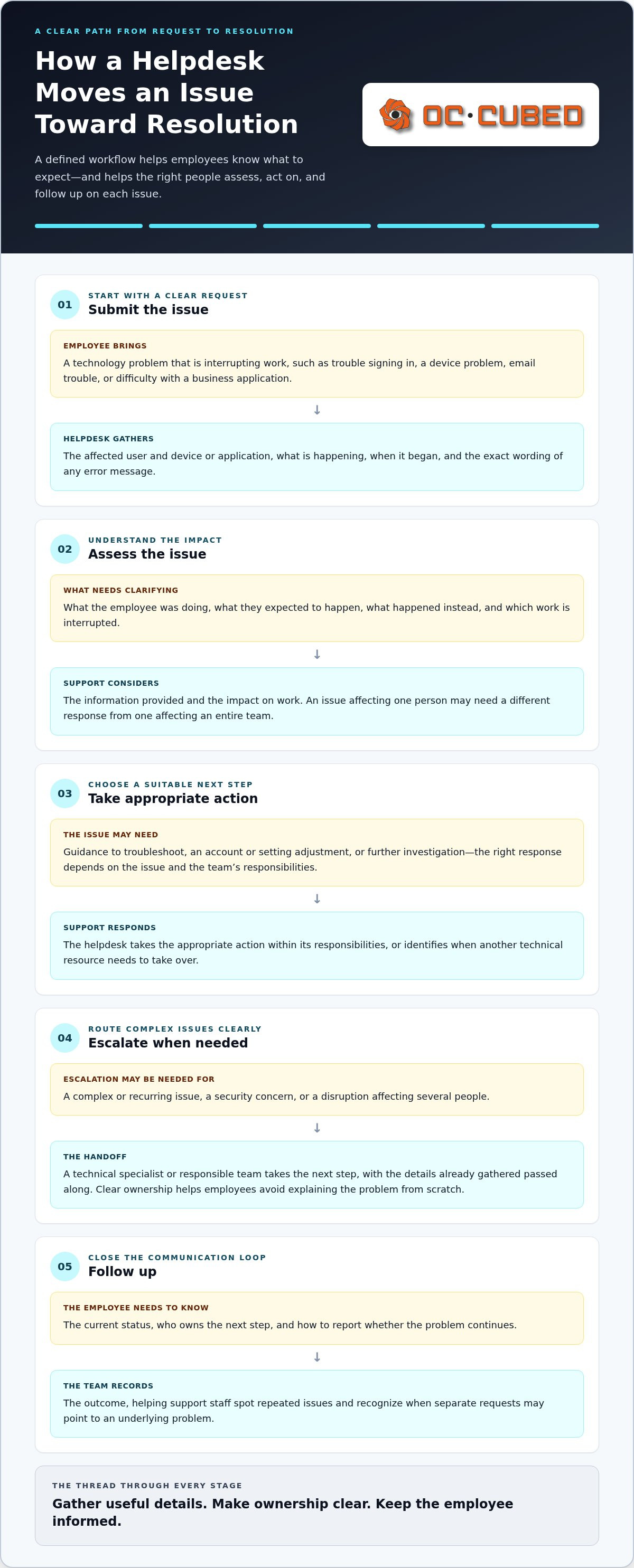
A clear workflow turns “something isn’t working” into an issue the right person can assess and act on. IT helpdesk services generally move through request submission, initial assessment, troubleshooting, escalation when needed, and follow-up. Processes vary, but employees should know how to report a problem and what to expect after they do.
- Submit the request. The employee uses the designated support channel and describes the issue. Useful details include the affected user, device or application, symptoms, when the problem began, and any error message.
- Assess the issue. Support staff review the information, clarify anything that is unclear, and consider the impact on work. A problem affecting one person may need a different response from an issue affecting an entire team.
- Take an appropriate action. The support team may guide the employee through troubleshooting, adjust an account or setting, or investigate further. The next step depends on the issue and the team’s responsibilities.
- Escalate if needed. A complex or recurring issue, security concern, or disruption affecting several people may require a technical specialist or another responsible team. The helpdesk can pass along the details already gathered.
- Follow up. The employee receives a status update, knows who owns the next step, and can report whether the problem continues. Recording the outcome can also help the team spot repeated issues.
Clear escalation paths show who takes ownership when an issue needs specialized attention. They also help employees avoid having to explain the problem from scratch at every handoff. Coordination between the helpdesk and technical specialists can connect an immediate user problem with wider IT operations, even though each issue may follow a different route.
What information helps support teams understand a request?
Describe what you were doing when the problem appeared, what you expected to happen, and what happened instead. Include the affected device or application, when the issue began, and whether other people are affected. Explain which work is interrupted in plain language, and share the exact wording of any error message. Don’t send passwords or sensitive data through an unsecured message. Clear technical writing is useful in other settings too; IEEE Author Tools offers guidance for preparing technical work, while support requests should follow the organization’s own secure reporting process.
When should a helpdesk issue be escalated?
Escalation is appropriate when frontline troubleshooting isn’t enough, a problem keeps returning, a security concern arises, or several users experience the same disruption. A specialist can investigate the underlying system while the helpdesk coordinates communication with the affected employee. A useful update identifies the current owner, what is being investigated, and what the user should do next. It sets expectations without promising a resolution time.
For businesses that want user assistance connected with broader IT operations, OC Cubed combines helpdesk and NOC integration with remote IT support.
Which IT Helpdesk Support Model Fits Your Business?
The right support model depends on who can handle employee requests, how much time your internal team can devote to them, and whether helpdesk work needs to connect with broader IT operations. Compare how each model affects workload, ownership, and coordination before focusing on tools or labels.
| Support model | Ownership | Internal workload | Expertise and coordination |
|---|---|---|---|
| Internal-only | Your employees manage the helpdesk. | The team handles user requests alongside its other duties. | Knowledge of internal systems is close at hand; coverage and expertise depend on available staff. |
| Supplemental or co-managed | Internal staff and an external support team share responsibilities. | Routine requests or defined areas can be shared, freeing internal staff for other priorities. | Broader expertise may be available, but ownership and handoffs need to be clear. |
| Outsourced | An external provider handles agreed support responsibilities. | Less day-to-day helpdesk work sits with internal staff. | Support can bring access to broader expertise; coordination with business systems and decision-makers still matters. |
No model removes the need for clear responsibilities. Decide who receives requests, who approves changes, and who owns an issue that crosses from user assistance into network, security, or account management. For more context on managing technology remotely, see this remote IT management guide.
When can outsourced or co-managed helpdesk support make sense?
A lean internal team may need added capacity for routine employee requests without moving every IT responsibility outside the business. A growing organization may also want a consistent support process before it needs or has the resources for a full internal department. In either case, define which tasks stay with internal staff, which are handled externally, and how shared issues move between them. This makes it easier to avoid duplicated effort and gaps in ownership.
What should a business compare beyond software features?
A helpdesk platform can collect, categorize, and track requests. The platform itself doesn’t provide the people or managed support needed to assess issues and carry out agreed work. Compare service scope, communication, escalation, reporting, and fit with your existing systems. Ask how employee requests connect with wider responsibilities such as network monitoring or endpoint protection. A managed service provider guide can help explain how those broader IT responsibilities relate to helpdesk work.
Consider how the arrangement will work day to day. Can the support team access the information needed to understand your environment? Do employees know where to direct requests? Is it clear who communicates status and who handles issues that require a different technical skill? These operating details matter as much as the ticketing tool’s features.
How to Set Clear Expectations for IT Helpdesk Services
Support works better when employees and managers know what help covers, where to request it, and what happens when an issue needs specialist attention. Define these expectations before problems arise. A written scope gives employees a clear route to help and shows leaders how user requests connect with wider IT operations.
How should businesses define support scope and escalation?
Use this checklist to document the working arrangement. Be specific enough that employees can recognize which issues belong in the support process and staff understand where responsibility sits.
- Supported users: Identify which employees or departments are covered, including how new staff are added.
- Devices and systems: Name the business devices, applications, accounts, and services included in support. Note where responsibilities sit with another team or vendor.
- Common requests: Describe routine issues employees can report, such as access problems, device difficulties, or application questions.
- Request channels: Explain how users should submit requests and what information helps support staff assess them.
- Escalation ownership: State who communicates with the employee when a request needs specialist attention and how complex, recurring, security-related, or business-critical issues are routed.
Document response commitments and operating hours as part of the support arrangement. Don’t assume a helpdesk follows the same schedule as network monitoring. Network monitoring can run continuously, while user-facing support hours and response expectations should be stated clearly for the specific arrangement. This distinction helps prevent confusion between infrastructure alerts and requests from employees who need assistance.
Security concerns need a clear reporting route, too. Employees should know how to report a suspected threat, who receives the report, and how it connects with the organization’s wider protection process. A managed cybersecurity guide can help frame how user support fits alongside protections such as endpoint security and threat response.
Which reports help leaders understand support activity?
Useful reporting turns a record of requests into information leaders can act on. Look for request volume, recurring issue patterns, current status, and the users or work affected. A cluster of similar access requests, for example, may point to a process that needs attention rather than a series of unrelated user mistakes.
Monthly reporting can help leaders review patterns, understand persistent technology friction, and decide where IT attention may be needed. A request count alone says little without context about the issues behind it and whether they keep returning. Use reporting to guide discussion and priorities, not as a substitute for clear ownership, an agreed support scope, or useful updates to employees.
How OC Cubed Connects IT Helpdesk Services With Managed IT
Employee support is most useful when it fits into the wider picture of how a business manages technology. OC Cubed provides remote IT support with helpdesk and NOC integration, connecting user-reported issues with broader IT operations. For businesses without in-house IT staff, this model brings everyday support together with ongoing management rather than treating each request as an isolated task.
How does helpdesk support complement monitoring and maintenance?
A helpdesk responds to issues employees report, such as trouble accessing a system or using a business application. Network monitoring observes network conditions and can help identify concerns that may affect business systems. These activities offer different views: one starts with an employee’s experience, the other with network operations. Together, they help build a broader understanding of what is happening across the IT environment.
OC Cubed’s managed IT capabilities include network monitoring and configuration, endpoint protection, Microsoft 365 tenant maintenance, and security threat detection and remediation. Network monitoring is available 24/7. That does not mean helpdesk support is available 24/7. The distinction matters: a monitoring alert and an employee support request follow different paths, even when both relate to the same technology issue.
For example, if several employees report connection problems, the helpdesk can capture what they are experiencing while network monitoring provides a view of network conditions. If a user reports a security concern, the issue can be considered alongside endpoint protection and threat detection and remediation. Integrating these capabilities connects user-facing support with the work of maintaining and protecting business IT.
What is a practical next step for a business evaluating support?
Start with a simple map of the support your business needs. Note recurring issues, the users or teams affected, the systems involved, and who currently owns each area of IT. Include responsibilities that may sit with internal staff, external vendors, or a managed support team. This map can reveal where requests are handled inconsistently, where internal teams are stretched, and where user support could connect more closely with monitoring or maintenance.
OC Cubed delivers remote support within a monthly managed IT services retainer, a bundled model that brings agreed support together with wider managed IT work. Monthly reporting gives leaders a view of support activity and broader IT management, helping them consider recurring friction alongside the systems and responsibilities involved. Use your support map to decide whether this approach fits your needs and how employee assistance should work with ongoing IT management.
Explore whether integrated remote support fits your business’s needs.
Build a Support Approach That Can Grow With Your Business
Treat support as part of how your business protects employees’ time and keeps people focused, not simply as a place to send tickets. Use recurring disruptions to decide what needs attention first, where ownership should be clearer, and which work should remain with your internal team. Those decisions create a practical starting point for an arrangement that can grow with your operations.
Choose IT helpdesk services that fit how employees work today and leave room to adjust as your systems, team, and priorities change. Review the arrangement when responsibilities shift or new technology changes how employees work. You don’t need every detail solved at once. Start with the friction that most affects your team, then shape support around the needs that matter most.
Ready to connect employee support with the wider management of your IT environment? Explore remote IT support from OC Cubed.
Frequently Asked Questions
Is an IT helpdesk the same as an IT service desk?
Not always. “Helpdesk” often describes user assistance, while “service desk” can include broader coordination of IT services, such as managing requests related to planned changes. Helping one employee regain access is a user-support task; coordinating an application rollout across departments involves wider service management. Organizations use these terms differently, so compare the actual responsibilities and processes rather than relying on the label.
Can an IT helpdesk support employees working remotely?
Yes. Remote IT support can help employees who work away from the office when their users, devices, and systems are covered by the support arrangement. For example, an employee working from home might need help accessing a business application or understanding a device issue. Clear request instructions help support staff distinguish a device problem from a home internet or access issue. OC Cubed provides remote IT support for businesses.
What information should an employee include when submitting an IT support request?
Include enough context for someone unfamiliar with the problem to understand what happened. Name the affected device or application, describe the action you took just before the issue appeared, and note whether anything changed recently, such as a new device or software update. A screenshot can help if company policy allows it and it contains no confidential information. Never include passwords or sensitive data in an unsecured message.
When should a business use co-managed helpdesk support?
Co-managed support can help when an internal IT employee or small team spends too much time on routine user requests to focus on planned work. For example, external support might handle an agreed portion of day-to-day assistance while internal staff retain responsibility for business decisions or specialized projects. Define how requests are divided, who approves changes, and how handoffs work so shared responsibility doesn’t become unclear ownership.
Does a helpdesk service include network monitoring?
Not necessarily. A helpdesk handles employee requests, while network monitoring observes network conditions. A business may arrange these separately or integrate them. Monitoring can reveal a network concern, while an employee’s report explains how it affects work. Understand who reviews monitoring findings, how they connect to support processes, and which team communicates with affected users. Don’t assume monitoring makes user-facing helpdesk support continuously available.
Can a helpdesk help with Microsoft 365 issues?
Yes. Support can cover employee-facing problems such as difficulty signing in, trouble using Outlook, or questions about access to shared Microsoft 365 resources. These user issues are distinct from tenant maintenance, which involves managing the organization’s Microsoft 365 environment. OC Cubed provides Microsoft 365 tenant maintenance alongside remote IT support, connecting employee needs with broader management of the business environment.
How can a business tell whether recurring support requests point to a larger IT problem?
Look for requests that share a system, cause, timing, or affected group. Repeated access problems after new employees join, for example, may suggest that an onboarding or permissions process needs review. Similar complaints across departments could indicate a shared application or configuration issue. Group related requests and compare when they occur. If the same pattern continues, review the underlying process or system instead of treating every report as unrelated.


