

A network outage can start with a change intended to improve performance. A firewall rule, switch setting, or access change can interrupt business systems if it isn’t documented, tested, and controlled. Reliable network configuration services involve more than adjusting settings: they make changes traceable and help keep devices aligned with business needs.
As a business grows, it becomes harder to track devices and changes. You need to know what’s connected, what each configuration does, and which people or systems a proposed change could affect. Monitoring helps surface performance issues, while troubleshooting addresses problems already affecting users. Configuration management provides a controlled way to maintain network settings and make changes.
This guide explains which devices, settings, and processes belong in network configuration management, and how documentation, review, and change control can reduce avoidable disruption. You’ll also see how configuration work fits alongside monitoring, firewall and switch management, and ongoing remote IT support. Consistent oversight and reporting can give a business a clearer view of its network without relying on an in-house network team.
Key Takeaways
- Use network configuration services to standardize device settings and make changes easier to track.
- Follow a defined change process: establish a baseline, assess impact, approve and test the change, document it, and review the result.
- Choose between in-house and managed support based on network complexity, available expertise, and who will own ongoing operations.
- Prepare for configuration work by organizing device inventories, access, priorities, and relevant network documentation.
- Remote monitoring, firewall and switch management, helpdesk and NOC integration, and monthly reporting can support ongoing network oversight.
What Network Configuration Services Manage in a Business Network
Network configuration sets how devices connect, communicate, and apply access rules. Network configuration services establish consistent settings across routers, switches, firewalls, and connected systems, then maintain and control changes to those settings. The aim is a network that is easier to understand and manage as business needs change, not a promise that outages or security incidents can never happen.
The work has two parts. Initial setup establishes the settings needed to connect users, devices, and systems. Ongoing maintenance keeps those settings aligned as equipment, users, applications, and security requirements change. A disciplined approach to network configuration and change management helps teams understand what is changing and why, instead of treating each adjustment as an isolated task.
Which network settings and devices are typically managed?
Configuration covers the practical rules that let network devices work together. IP addressing identifies devices on the network. DNS helps systems find services by name, while DHCP assigns network addresses to devices as they connect. Access rules define which connections are allowed. Device settings determine how routers, switches, and firewalls handle traffic.
For example, a small business might use a router to connect its network to the internet, switches to link computers and printers, and a firewall to apply rules to incoming and outgoing connections. When a new workstation is added, consistent settings help it reach approved business systems without giving it broader access than intended. A record of devices and their settings also gives the support team a clearer starting point when staff report that a service is unreachable.
Configuration supports connectivity and security, but cannot guarantee either on its own. Results also depend on the equipment, network design, access practices, and how changes are handled. For businesses without in-house network specialists, accurate records and regular oversight make it easier to understand what is in place and identify what may need attention.
Network configuration versus network monitoring
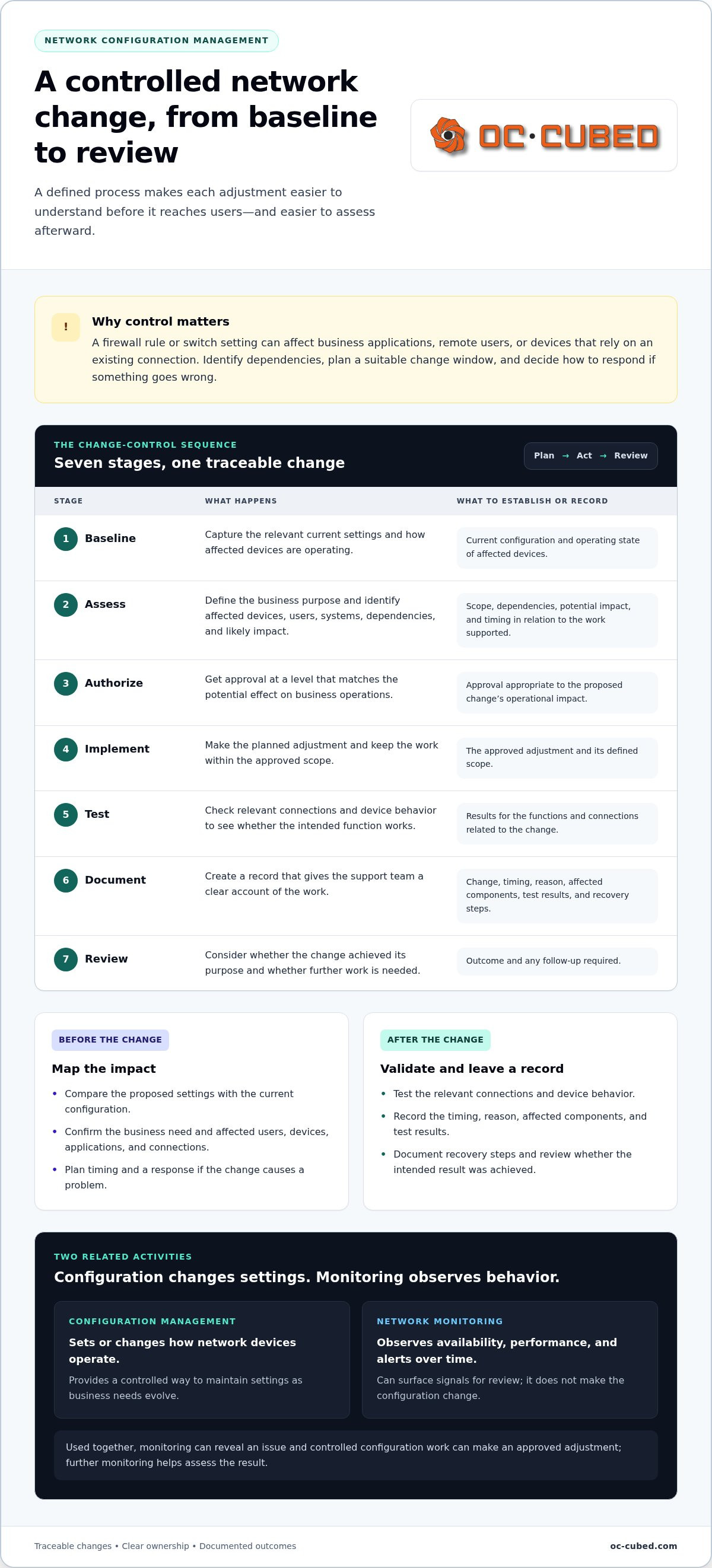
Configuration sets or changes how network devices operate. Monitoring observes availability, performance, and alerts over time. Configuration concerns the network’s settings; monitoring helps reveal how the network is behaving.
The activities work together, but they aren’t interchangeable. Monitoring may show that a connection or device has a problem. Configuration work may then be needed to make an approved adjustment, while further monitoring helps assess the result. Monitoring alone doesn’t make the change, and configuration alone doesn’t provide ongoing visibility into performance.
For a business, this distinction clarifies what ongoing support should do. Monitoring can surface signals for review, while configuration management provides a controlled way to maintain settings as needs evolve. Together, they give internal staff or a remote IT support team better information for responding to network needs, without relying on memory or informal, undocumented changes.
How Network Configuration Services Control Changes from Plan to Review
A reliable change process makes each network adjustment understandable before it reaches users. Network configuration services can follow a consistent sequence: establish a baseline, assess the request, authorize the work, implement it, test the result, document what happened, and review the outcome. This gives business leaders and support teams a clear view of why a change is needed, its likely impact, and who owns the next step.
For example, changing a firewall access rule may affect a business application, remote users, or another device that depends on the existing connection. Identify those dependencies before implementation, then plan a suitable change window and decide how to respond if the change causes a problem.
- Baseline: Record the relevant current settings and how the affected devices are operating.
- Assess: Define the business purpose, affected devices and users, connected systems, dependencies, and likely impact.
- Authorize: Obtain approval at a level that matches the potential effect on business operations.
- Implement: Make the planned adjustment, keeping the work within the approved scope.
- Test: Check relevant connections and device behavior to confirm whether the intended function works.
- Document: Record the change, timing, reason, affected components, test results, and recovery steps.
- Review: Consider whether the change achieved its purpose and whether follow-up is needed.
What happens before a network configuration change?
Before work begins, compare the proposed settings with the current configuration and confirm the business need. Map which users, devices, applications, and connections could be affected. Consider timing in relation to the work those systems support. A limited adjustment may need a simpler approval and communication process than a change that could interrupt access across a department. The NSA Network Infrastructure Security Guidance can also inform security-focused planning.
How should teams validate and document a change?
After implementation, test the functions related to the request. That might mean confirming that an approved application connects or that an intended access restriction works as expected. Record what changed, when and why it changed, which devices were involved, and what the tests showed. Document the steps to restore the previous settings so the response is clear if users encounter problems.
Documented network changes help teams investigate later issues by showing what changed, when it changed, and which systems may be affected. A useful record supports continuity, even when the person handling a later issue wasn’t involved in the original work. For ongoing remote oversight, remote network configuration support can connect controlled changes with broader IT management.
Managed Network Configuration or In-House Work: What Fits Your Business?
A network that works today still needs clear ownership. New users, devices, applications, and security requirements can make earlier settings less suitable over time. Configuration oversight keeps network changes accountable, whether the work belongs to an internal team, a managed provider, or both.
The right model depends on network complexity, available expertise, and operational requirements. Network configuration services can add recurring support, but outsourcing isn’t the only sound choice. An internal team with suitable skills, time, defined responsibilities, and documented procedures may manage the work effectively.
Internal expertise
In-house: Staff own changes and build knowledge of the environment. Managed: Remote specialists provide additional configuration expertise.
Continuity
In-house: Coverage depends on assigned staff and their availability. Managed: Recurring support can provide ongoing oversight alongside the internal team.
Documentation
In-house: The team maintains records and change procedures. Managed: Documentation can support consistent work and shared visibility.
Operational ownership
In-house: The organization directs configuration priorities and execution. Managed: Responsibilities are shared according to the support arrangement.
Monitoring, configuration, and break-fix response serve different purposes. Monitoring observes network availability, performance, or alerts. Configuration establishes or changes device settings through a controlled process. Break-fix response focuses on addressing an existing fault. A business may need one or more of these functions. Make ownership clear so alerts and changes have someone responsible for them.
When can an internal team manage configuration effectively?
Internal ownership can work well when a named person or team has suitable network expertise, enough time for planned changes, and documented procedures. Those procedures should specify who approves work, how changes are recorded, and how results are reviewed. Assigning ownership matters. If configuration tasks are squeezed between other priorities, records and follow-up can slip.
Review the approach as staff, devices, and business requirements change. A network that was straightforward to oversee may need more coordination as new systems or access requirements are added. Security planning can also draw on CISA recommendations for securing network infrastructure. Outsourcing isn’t required by default; what matters is accountable ownership and enough capacity for the work.
What does managed configuration add for a lean IT team?
For a lean team, remote IT support can add recurring oversight and configuration assistance, rather than treating network management as a one-off settings exercise. Firewall and switch management supports oversight of key network devices, while monitoring provides visibility into availability, performance, and alerts. Helpdesk and NOC integration can connect network operations with broader IT support, and monthly reporting gives the business a regular view of support activity.
This model can complement internal staff rather than replace their knowledge of the business. OC Cubed provides remote IT support and network services that connect network oversight with wider IT responsibilities. Teams considering how remote support fits into their operations can explore this remote IT management guide.
How to Prepare for Network Configuration Services and Reduce Disruption
Good preparation gives network configuration services a clearer picture of the business before work begins. It helps the team understand what is connected, which systems matter most, and how a planned change could affect staff. You don’t need perfect records to get started. An accurate inventory and a few practical details make remote work more informed and help surface questions before a change is scheduled.
Use this preparation sequence:
- Inventory devices and systems. List known routers, switches, firewalls, access points, servers, and important connected services.
- Map people and priorities. Identify the teams that rely on the network and the applications most important to daily work.
- Gather existing documentation. Share available network diagrams, configuration records, and notes about known dependencies.
- Arrange appropriate access. Provide authorized support personnel with secure, controlled access for remote work.
- Plan communication. Decide who needs notice, what impact to expect, and how staff can report issues.
An accurate inventory helps prevent assumptions about what a device supports or what depends on it. Even a simple record of device names, locations, roles, and known connections gives the support team a more useful starting point. Note gaps instead of guessing. A clear picture of what is known and what still needs review supports better planning.
What information helps configuration work start smoothly?
Share a current list of network devices, connected systems, relevant users or teams, and any configuration documentation you have. Identify business-critical applications and normal operating requirements, such as when staff need reliable access to a particular system. Include known dependencies, such as a service that relies on a specific connection. For remote IT work, provide access through the organization’s approved process and limit it appropriately.
How can a business limit disruption during planned changes?
Before a planned change, communicate its purpose, expected user impact, and timing to the people who may be affected. Choose a change window that fits business operations, not just the support team’s schedule. A period with fewer users may suit some work; other changes may need to align with application owners or critical business activities.
Agree on how to validate the result and what steps to take if the change causes unexpected problems. Testing should reflect the affected systems and the way staff use them. A recovery plan gives the team a clear next step, but planning cannot guarantee that disruption will never occur. The goal is to make changes informed, communicated, and easier to manage.
Prepare for consistent network oversight with OC Cubed.
How OC Cubed - Your trusted MSP Delivers Ongoing Network Configuration Support
Network configuration is most useful when it fits into ongoing IT operations, not just a one-time setup. OC Cubed provides remote network monitoring and configuration as part of managed IT support. This gives growing businesses access to network oversight without relying solely on an in-house network team.
The work connects practical network management with broader IT support. Configuration addresses planned settings and changes, while monitoring provides visibility into network activity. Firewall and switch management supports oversight of key network devices. Together, these services provide a more consistent view of the environment while keeping each task’s role distinct.
How configuration fits into OC Cubed - Your trusted MSP’s managed IT support
OC Cubed’s remote IT support and network configuration are part of a continuing support relationship. Ongoing management makes it possible to consider a setting change alongside broader IT needs, rather than treating it as an isolated task. Learn more about the wider service model in this managed service provider guide.
Firewall and switch management supports oversight of those devices within the network environment. Monitoring adds a different perspective by helping the support team observe availability, performance, or alerts over time. Helpdesk and NOC integration connects network operations with ongoing IT support, placing network concerns within a broader operational picture. These functions work together, but monitoring does not make configuration changes, and configuration work does not replace ongoing monitoring.
For a business without dedicated network staff, this combination offers a clearer way to manage routine oversight and changing requirements. The business can share its priorities and operational context, while remote support keeps network work connected to the larger IT environment.
What ongoing visibility and leadership can support
Monthly reporting gives business leaders a regular opportunity to review IT activity and understand how support work relates to business priorities. It can help frame conversations about recurring needs, planned changes, and areas that may require attention. Reporting supports visibility, but it doesn’t replace leadership decisions about risk, investment, or operational priorities.
OC Cubed also offers virtual CIO, CTO, and CISO services. This leadership support helps businesses consider technology, operations, and security priorities alongside ongoing IT management. Organizations without those roles in-house can bring strategic IT perspectives into planning while keeping that guidance distinct from day-to-day network configuration work.
Network configuration services are most effective as part of a clear support approach that connects oversight, operational needs, and informed decision-making. If your business is reviewing how to manage network changes and ongoing support, explore OC Cubed’s managed IT support.
Build a Network Support Plan That Grows With Your Business
Decide how network oversight should support the business you’re building, not only the network you have today. Consider who owns configuration decisions, how upcoming changes will be reviewed, and what visibility leaders need as systems and teams evolve. Those priorities help shape a practical approach to network configuration services that fits your operations.
OC Cubed brings remote IT support, network monitoring, and configuration together with firewall and switch management, NOC integration, and monthly reporting. This ongoing support model connects network operations with wider IT priorities without relying solely on an in-house network team.
A clear support plan makes future decisions easier and gives your team a steadier foundation for growth. With the right support in place, your team can focus on moving the business forward.
Frequently Asked Questions
What is included in network configuration services?
Network configuration services cover the settings and records needed to keep a business network organized as it changes. This can include addressing and connection settings, access policies, and configurations for network devices. The scope depends on the environment and agreed responsibilities. For example, when a business adds an application, the support team can review whether existing network settings need adjustment and record any approved changes for future reference.
How often should a business review its network configuration?
Review configurations on a planned schedule and after meaningful changes to the network or business. Examples include adding a new business system, changing how employees connect remotely, or replacing a network device. Reviews can also identify settings that no longer match current needs. The right cadence depends on how quickly the environment changes and the business’s internal processes. Treat reviews as routine upkeep, not just a response to a problem.
What is the difference between network configuration and network configuration management?
Network configuration refers to the settings applied to devices and connections. Network configuration management is the broader practice of keeping those settings controlled over time. It includes assigning responsibility, maintaining records, and reviewing whether changes remain appropriate. Think of configuration as a specific adjustment, such as changing a device setting. Management is the process that gives the adjustment a clear purpose, an owner, and a place in the network’s history.
Can network configuration services be delivered remotely?
Yes. Many configuration tasks can be handled remotely when authorized support staff have secure access to the relevant network devices and systems. Remote work can help with reviewing settings, making approved changes, and checking results without requiring a business to have network specialists on staff. The work still depends on accurate information about the environment and appropriate access controls. Physical tasks involving equipment or cabling are separate from changing device settings remotely.
Do small businesses need managed network configuration?
Not every small business needs outsourced configuration support. The decision depends on whether staff have the expertise, time, and clear ownership to maintain settings and records as the business changes. A small organization with a stable network and an experienced internal owner may manage the work itself. Managed support can help when network responsibilities compete with other IT duties or when the business wants ongoing oversight without building a dedicated network team.
What should happen before a network configuration change is made?
Before a change, the responsible team should understand its business purpose and identify who or what could be affected. Confirm the relevant system owner, dependencies, approval, and suitable timing. Agree on how success will be checked and what to do if the change has an unexpected effect. For example, before adjusting access for a new business application, identify the employees who rely on it and decide how they’ll report connection issues after the change.
How do network configuration services work with network monitoring?
Configuration services and monitoring support different parts of network oversight. Monitoring can alert a team to an availability or performance concern, while configuration work can address a setting that needs a deliberate adjustment. For example, if monitoring shows that a business service is unreachable, the team can investigate before deciding whether a configuration change is appropriate. After an approved adjustment, continued monitoring can help assess whether network behavior has changed as intended.
To discuss network configuration and ongoing remote IT support for your business, contact OC Cubed.


