

What if your next technology decision started with a business goal, not a new tool? A practical IT strategy for small business isn’t a shopping list. It helps you decide which technology improvements matter, which risks need attention, and how each investment supports sustainable growth.
When time and resources are limited, urgent requests can crowd out important planning. Security, continuity, and new projects compete for attention, and initiatives lose momentum when no one owns the next step. You don’t have to tackle every technology need at once. You need clear priorities and a practical way to measure progress.
This guide shows you how to connect technology decisions to business objectives, assess risks, and choose improvements your team can carry forward. You’ll learn how to build a manageable roadmap with owners, review points, and next steps, then keep it accountable through project management and regular reporting. The result is a plan that gives technology a defined role in supporting your business, without making complexity the goal.
Key Takeaways
- Build an IT strategy for small business around business goals, key workflows, and technology dependencies, not a list of tools to buy.
- Review security, access, data protection, continuity, and support needs to identify risks that deserve attention.
- Rank potential investments by business impact, risk reduction, dependencies, effort, and available capacity.
- Use an adaptable 90-day planning sequence to move from discovery to priorities, project ownership, and review.
- Connect strategic direction with project delivery and ongoing IT operations to keep approved priorities moving forward.
What Is an IT Strategy for a Small Business, and Why Does It Matter?
An IT strategy connects technology choices to business goals by setting planned outcomes, managing risk, assigning ownership, and guiding future priorities. That’s the difference between making deliberate decisions and reacting to each new request. A useful IT strategy for small business gives technology a clear role in how the company works today and where it plans to go.
A strategy is not simply an inventory of laptops, software, and network equipment. It’s also not an annual budget, which records planned spending, or a wish list of tools that might be useful someday. A project plan sets out how to complete a specific initiative. Strategy helps determine which initiatives deserve attention and how they fit together. For a foundational overview, see What is an IT Strategy?
Consider a company that wants to improve customer service. A strategic approach might examine how staff use the customer management system, email, and shared files, then identify technology changes that could support faster, more consistent responses. The goal isn’t to add tools for their own sake. It’s to connect a business need to a planned outcome, a decision-maker, and a way to review progress.
What should a small-business IT strategy accomplish?
A strategy should help leaders decide what technology needs to support, which systems deserve attention, and who is responsible for decisions and follow-through. Goals might include improving service quality, making routine work more efficient, strengthening resilience, or preparing for expansion. Clear ownership matters: someone needs to approve priorities, coordinate implementation, and revisit the plan as business needs change.
Start by identifying the workflows that keep daily operations moving, such as taking orders, serving customers, or paying employees. For each one, note the systems and people it depends on, then consider what would be affected if a key system became unavailable or changed. This makes dependencies visible and gives planning a practical foundation. It also helps you compare new requests against agreed priorities. A strategy can’t remove every risk or prevent all downtime, but it can make trade-offs clearer.
Why is IT strategy relevant when the business is small?
Small companies still rely on connected systems, vendors, and people. A change to one service may affect access to files, customer records, or everyday communication. If those dependencies live only in someone’s memory, planning a change or responding to disruption becomes harder. A lightweight strategy records what matters and who owns key decisions without adding unnecessary process.
Strategic planning doesn’t require a large internal IT department. The plan can match the business’s staffing and capacity: a concise record of goals, key systems, risks, owners, and review dates may be enough to guide decisions. A virtual CIO, CTO, or CISO can provide technology leadership, while project management and ongoing IT support help carry approved priorities into practice.
Build a Small-Business IT Strategy Around Goals, Risks, and Current Systems
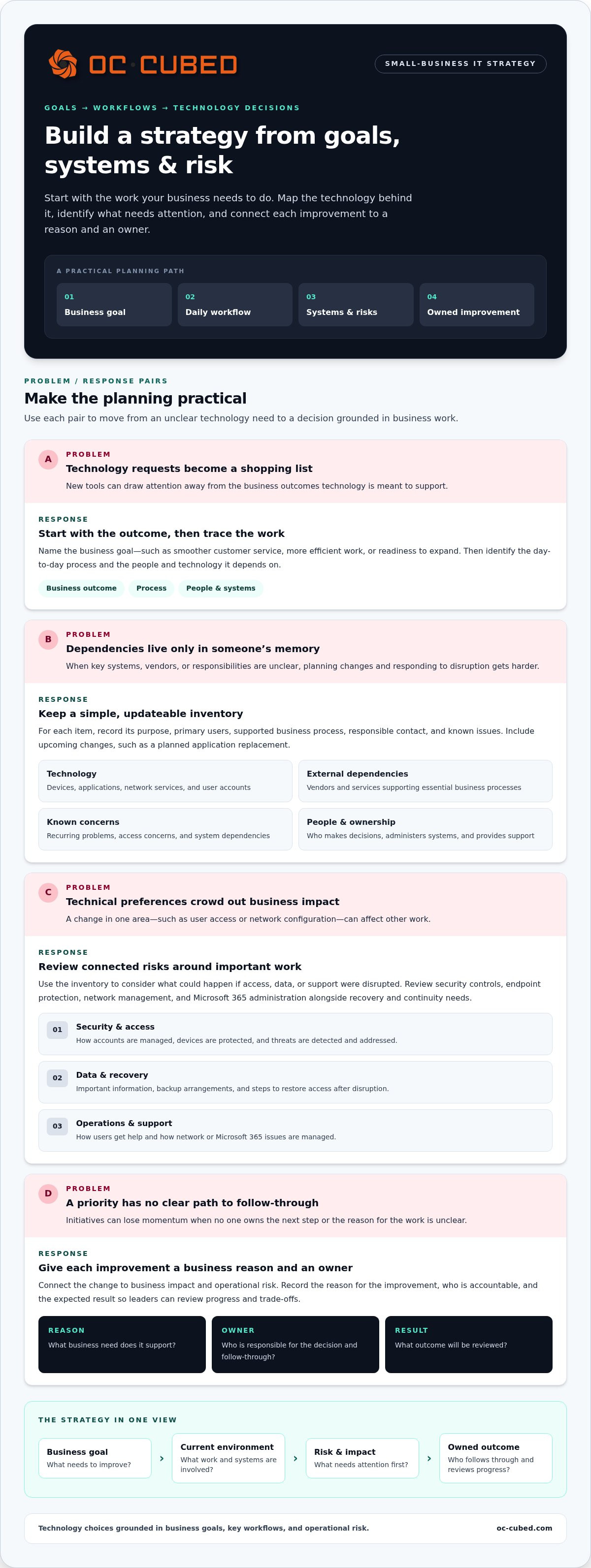
Turn business goals into a clear picture of what technology needs to support. Start with outcomes such as smoother customer service, more efficient work, or readiness to expand. Then trace the day-to-day processes behind those outcomes. If employees need shared files to complete customer orders, for example, document the process, the people who use it, and the systems and vendors it depends on.
Strategy priorities should reflect business impact and operational risk, not just technical preference. Connect each improvement to a business reason, an accountable owner, and an expected result. This also helps reveal how a change in one area, such as user access or network configuration, could affect other work.
How do you assess your current IT environment?
Build a practical inventory, then use it to see how work depends on technology. Keep the record simple enough to update. For each item, note its purpose, primary users, business process supported, responsible contact, and known issues. Include upcoming changes, such as a planned application replacement, so you can assess them alongside current gaps and risks.
- Devices, applications, network services, and user accounts
- Vendors and services that support essential business processes
- Recurring problems, access concerns, and dependencies between systems
- People responsible for decisions, administration, and support
Which strategy areas belong on the planning agenda?
Use the inventory to review connected needs, rather than treating each technology area as a separate checklist. Consider security controls, endpoint protection, network management, and Microsoft 365 administration alongside backups, recovery planning, user support, and continuity. Focus on the systems that support important work and what could happen if access, data, or support were disrupted.
- Security and access: Review how accounts are managed, devices are protected, and threats are detected and addressed.
- Data and recovery: Identify important information, backup arrangements, and the steps needed to restore access after disruption.
- Operations and support: Note how users get help and how network or Microsoft 365 issues are managed.
For focused guidance on the security portion of this review, OC Cubed’s Managed Cybersecurity for Small Business: 2026 Guide covers related planning considerations. Treat each proposed change as a business decision: record the issue it addresses, the outcome you expect, who will own implementation, and how you’ll review whether it helped. This keeps recommendations tied to practical needs without suggesting that a plan guarantees compliance or eliminates risk.
When the assessment raises questions about priorities, virtual technology leadership can help connect business goals with security, systems, and accountable next steps.
How to Prioritize IT Investments Without Treating Every Need as Urgent
A strategy doesn’t mean buying every tool someone recommends. It means choosing improvements that fit the business, then sequencing them around risk, dependencies, and available capacity. For an IT strategy for small business, a short list of well-owned priorities is more useful than a long list of projects no one has time to deliver.
Compare each idea against the same questions: What business outcome does it support? What risk could it reduce? Does another task need to happen first? How much effort will it take, and who has capacity to own it? A change that addresses a material exposure may deserve attention before a convenient upgrade. A new technology isn’t a priority just because it’s novel.
How can a small business rank competing IT priorities?
Score candidate initiatives against business goals and documented risks. Use a simple scale, such as low, medium, or high, to rate impact, risk reduction, dependency, and effort. The scores aren’t a substitute for judgment. They make trade-offs visible and help explain why one item comes before another.
Then separate immediate safeguards from enabling work, longer-term improvements, and ideas to defer. For example, if a planned system change depends on clarifying user access first, resolve that dependency before scheduling the larger project. Keep these categories visible on a priority board:
- Urgent risk: Address a material exposure or an issue affecting essential operations.
- Enabling work: Complete prerequisites that allow a higher-impact project to proceed safely.
- Valuable improvement: Plan changes that support efficiency, service, or growth after higher-priority needs.
- Defer: Revisit ideas with unclear value, missing prerequisites, or no available owner.
This approach avoids treating every security concern as equal while still taking risk seriously. It also prevents convenient projects from displacing safeguards simply because they’re easier to describe or more visible.
When does an IT project belong in the roadmap?
Include a project when it has a clear objective, a defined owner, a workable scope, and a way to assess progress. State the expected business result in plain language, such as reducing a recurring access problem or preparing a core system for expansion. If the value is unclear or a prerequisite is missing, defer the work and record what must change before it can move forward.
Capacity matters. A plan that assigns several major initiatives to the same person without accounting for daily responsibilities is unlikely to hold. Review the workload, sequence projects realistically, and adjust when business needs shift. Predictable IT planning also depends on understanding how support and project work fit available resources. OC Cubed’s guide, Predictable IT Costs: Why Flat-Rate Support Changes Everything, explores that planning connection. Build a roadmap your team can sustain, not one that assumes every priority can start at once.
Create a Practical IT Roadmap for the Next 90 Days
A 90-day roadmap is a planning framework, not a promise that every project will be finished within three months. Its purpose is to move from understanding current needs to choosing work, assigning responsibility, and checking progress. Adjust the pace to your team’s capacity, operational demands, and the size of each initiative. A useful IT strategy for small business should leave room to revise the plan when circumstances change.
Use these phases as a starting sequence:
- Days 1-30: Discover and agree. Gather business goals, system information, operational concerns, and dependencies. Identify gaps that could disrupt important work or expose sensitive information. Agree on a short list of desired outcomes and name the people who will make decisions.
- Days 31-60: Select and plan. Choose priorities based on business value, risk, prerequisites, and available capacity. For each approved initiative, define its scope, owner, next milestone, dependencies, and an observable measure of progress.
- Days 61-90: Deliver and review. Begin work that is ready to proceed. Track milestones, discuss blockers with owners, and record decisions or changes. Review what has moved forward and what needs to be adjusted before setting the next planning period.
What should happen in the first 30 days?
Keep discovery focused on information that will affect decisions. Bring together business goals, core systems, the people who rely on them, recurring concerns, and known dependencies. Then identify high-priority gaps that could interrupt essential work or put sensitive information at risk. End the first phase with a small set of outcomes and clear decision owners, rather than an unranked list of every possible improvement.
How should months two and three turn priorities into action?
Sequence approved work around prerequisites, staff capacity, and operational constraints. A project may need access decisions or vendor coordination before implementation can begin. Give each initiative a milestone that shows progress, such as a documented decision, completed review, or agreed project scope. Review blockers with the responsible owner and change the sequence if business needs or material risks shift.
For example, a company planning a system change might first confirm who needs access and coordinate the required vendor work. The project owner can track those dependencies before the implementation milestone. If a higher-impact risk emerges, leadership can reassess priorities instead of letting the original schedule dictate the response. Regular oversight keeps the roadmap connected to current business needs.
Roadmap planning also needs a clear approach to ongoing management after an initiative moves into day-to-day operations. Remote project management and monthly reporting help make ownership, progress, and open blockers visible. OC Cubed’s Remote IT Management: Complete Guide for Modern Business covers ongoing management in more detail.
Put Your IT Strategy Into Practice With Ongoing Leadership and Support
A roadmap creates direction. It doesn’t deliver projects or handle daily support on its own. These responsibilities work together, but they aren’t interchangeable. Leadership connects technology decisions to business goals. Project coordination turns approved priorities into defined work. Ongoing IT operations support users and maintain the systems the business depends on.
For a growing company, virtual CIO, CTO, or CISO leadership provides planning and oversight without requiring a full-time executive in each role. This guidance helps leaders assess trade-offs, align initiatives with business needs, and review progress. Remote IT support, network monitoring, vendor management, and Microsoft 365 tenant maintenance help carry approved decisions into operations. Monthly reporting makes progress and open issues easier to review.
Who owns the IT strategy after the roadmap is written?
An executive or business owner should remain accountable for outcomes and major technology decisions. That person doesn’t need to manage every task. Assign coordination for project work, vendor communication, user support, and reporting to the appropriate internal or external roles. Clear ownership reduces the chance that decisions stall between meetings or that a project’s purpose gets lost during delivery.
Set regular review points that fit the pace of the business. A review should cover whether work is moving, whether owners have what they need, and whether a decision is overdue. Keep responsibilities visible in the roadmap, including who approves changes and who reports on progress. An IT strategy for small business stays practical when accountability is clear and review is part of normal operations.
How can a business keep its IT strategy current?
Use planned reviews to compare progress with current business objectives. Look at completed milestones, operational issues, upcoming changes, and risks that may affect essential work. If a dependency changes or the business adds a new process, revisit the affected priorities instead of assuming the original roadmap still fits.
Not every change requires a full strategy reset. A new operational concern may simply alter the order of work, while a major shift in business needs could require reconsidering goals, systems, and ownership. Record why priorities changed, who approved the decision, and what the next review should examine. This gives the plan continuity without making it rigid.
Virtual project management and monthly reporting help keep owners, milestones, and decisions in view. For broader leadership context, OC Cubed’s Enterprise-Grade IT Leadership Without a Full-Time Hire: The 2026 Strategy Guide discusses how virtual technology leadership can support businesses as they grow.
OC Cubed’s managed IT support and virtual CIO, CTO, and CISO advisory connect strategic priorities with ongoing support and oversight. If your roadmap needs clearer ownership or a practical path into day-to-day operations, make that your next planning conversation.
Make Your Next IT Decision Count
Your next step doesn’t need to be a major technology project. Start by choosing one business priority and deciding how you’ll keep it visible as daily demands shift. An IT strategy for small business becomes more useful when it guides regular decisions, not just an occasional planning exercise.
OC Cubed can connect that direction to practical support. Virtual CIO, CTO, and CISO advisory supports planning and oversight, while remote IT support, vendor management, monthly reporting, and 24/7 network monitoring and configuration help keep operational needs in view. Together, these services support steady progress while leaving room to adjust as your business changes.
A clear next step can bring more control to technology decisions and create a stronger foundation for growth. Start with the priority that matters most to your business.
Your plan can start small and grow with your goals. Take the next step by discussing your priorities with OC Cubed.
Frequently Asked Questions
What is the first step in creating an IT strategy for a small business?
Start by naming a business outcome technology should support. For example, if the goal is to handle more customer orders without adding manual steps, identify where delays happen and which process needs attention. Ask the people who do that work what slows them down, then agree on how you’ll recognize progress. This gives planning a practical starting point and keeps tool decisions tied to a real business need.
How often should a small business review its IT strategy?
Set a regular review cadence, such as quarterly, and revisit the plan sooner if a major change affects operations. A new service, a key vendor change, repeated system issues, or a shift in business objectives may alter what deserves attention. Keep reviews focused: check whether priorities still fit, whether decisions are moving, and whether anything new affects the plan. Choose a schedule leaders can follow consistently.
Does a small business need a full-time CIO to have an IT strategy?
No. A business can maintain a clear technology direction without hiring a full-time CIO. An owner or executive can retain responsibility for business decisions while a virtual CIO, CTO, or CISO provides technology leadership and advisory support. This can help when the business needs support evaluating risks, coordinating vendors, or overseeing priorities, but doesn’t need a dedicated technology executive on staff. The right arrangement depends on the organization’s needs and capacity.
What should an IT strategy include besides cybersecurity?
It should also address the technology that supports daily work, such as business applications, user support, network services, vendor relationships, and how systems will be maintained as needs change. For example, a company that relies on a customer database should consider who administers it, how staff get access, and what support is needed if it becomes unavailable. Include areas that connect to business goals or operational needs, rather than adding topics for completeness alone.
How can a small business measure whether its IT strategy is working?
Choose measures that reflect the outcomes behind each initiative. If a project aims to reduce delays in a routine process, track whether that process becomes easier to complete. If the aim is clearer accountability, check whether owners and decisions are documented and reviewed. Operational indicators, such as recurring support issues or unresolved project blockers, can also show where attention is needed. Set a starting point and review the same measures over time.
Can an IT strategy change as a small business grows?
Yes. Growth can bring new users, more complex workflows, additional software, or greater reliance on vendors. Those changes may create new requirements for access, support, network capacity, or oversight. Revisit the strategy when the way the business operates changes, not only on a fixed review date. A growing company might, for instance, need clearer system ownership as responsibilities spread across more teams. Adjusting priorities keeps the plan aligned with current operations.
What is the difference between an IT strategy and an IT roadmap?
An IT strategy sets the direction: the business outcomes technology should support and the principles guiding decisions. A roadmap translates that direction into planned initiatives, owners, dependencies, and timing. For instance, a strategy may establish that improving employee access to shared information is a priority. The roadmap then identifies the work required, who will coordinate it, and how progress will be reviewed. The roadmap can change as conditions shift without losing sight of the strategy.


