

A convincing spear phishing email can look like the next message in a real conversation. That’s why learning how to stop spear phishing emails takes more than asking employees to spot typos or suspicious links. Targeted messages can imitate colleagues, executives, and vendors, then pressure staff to act quickly.
Employees should use good judgment, but they shouldn’t have to make security decisions alone or slow routine work to verify every request. Layered email controls, a simple verification habit, and a clear reporting process make safer decisions easier.
This practical playbook explains how to reduce the chance that targeted messages reach inboxes or trigger unsafe actions. You’ll learn what warning signs to look for, how to verify unusual requests independently, and how to report a suspicious email. It also covers what to do if someone clicks a link, opens an attachment, or shares information. Email security tools, Microsoft 365 maintenance, and a coordinated response can strengthen defenses and help contain a suspected threat.
Key Takeaways
- Learn how to stop spear phishing emails with layered safeguards that reduce risk without relying on employees to catch every attack.
- Understand what SPF, DKIM, and DMARC tell receiving systems about a sender, and where authentication has limits.
- Use independent verification for sensitive requests so staff can confirm unusual instructions without derailing routine work.
- Follow clear response steps for suspicious messages, clicked links, exposed credentials, and payments that may need review.
- See how ongoing email security, Microsoft 365 maintenance, and threat remediation can help keep protections and response processes current.
What makes spear phishing emails so convincing, and why ordinary filters can miss them
Spear phishing is a targeted attempt to deceive a particular person or organization through communication tailored to its recipient. Unlike broad phishing messages sent to many people with the same generic lure, a spear phishing email may use a familiar name, refer to a current project, or arrive when a payment or document is genuinely expected. The broader Phishing overview explains how attackers use deceptive messages. Targeted messages gain added credibility from details that fit the recipient’s work.
Context matters. An email about an invoice isn’t suspicious simply because it’s polished, and a typo-free message isn’t proof of fraud. Attackers may use public staff directories, company announcements, social media, or details exposed in earlier conversations to make a request feel routine. Their goal is to prompt action before the recipient checks whether the request fits the usual process.
Knowing how to stop spear phishing emails starts with recognizing requests that deserve a second look. The answer isn’t to distrust every message. It’s to verify unusual or sensitive requests through a separate, trusted channel.
Which details can signal a targeted phishing email?
Focus on the requested action and whether it follows established procedures. An unexpected request to change bank details, share login credentials, open a file-sharing link, or send sensitive data deserves independent verification, even if the sender’s name looks familiar. Urgency, secrecy, or pressure to bypass an approval step can add concern, but no single sign proves a message is malicious.
- Inspect the full sender address and reply-to details, not only the display name.
- Check links carefully for subtle changes to a familiar domain.
- Pause when a request changes payment, access, or data-sharing procedures.
Use a known phone number or another trusted channel to confirm sensitive instructions. Don’t reply to the message or use contact details included in it to verify its legitimacy.
Why do legitimate-looking messages still reach inboxes?
Attackers can tailor language and timing to a recipient’s role, such as a finance employee handling invoices or a manager coordinating a project. They may also send messages from a compromised account, making the sender address genuine. A familiar name or an ongoing email thread doesn’t necessarily mean the current request is safe.
Email filtering reduces exposure by identifying and blocking suspicious messages, but it can’t judge every business context or confirm that a request is legitimate. A message may contain no obvious malicious link, or it may come from an account that has been taken over. A filter’s decision to deliver a message isn’t a safety guarantee. Treat unusual requests with care and verify them independently rather than relying on appearance or a single filter decision.
How to stop spear phishing emails with layered prevention
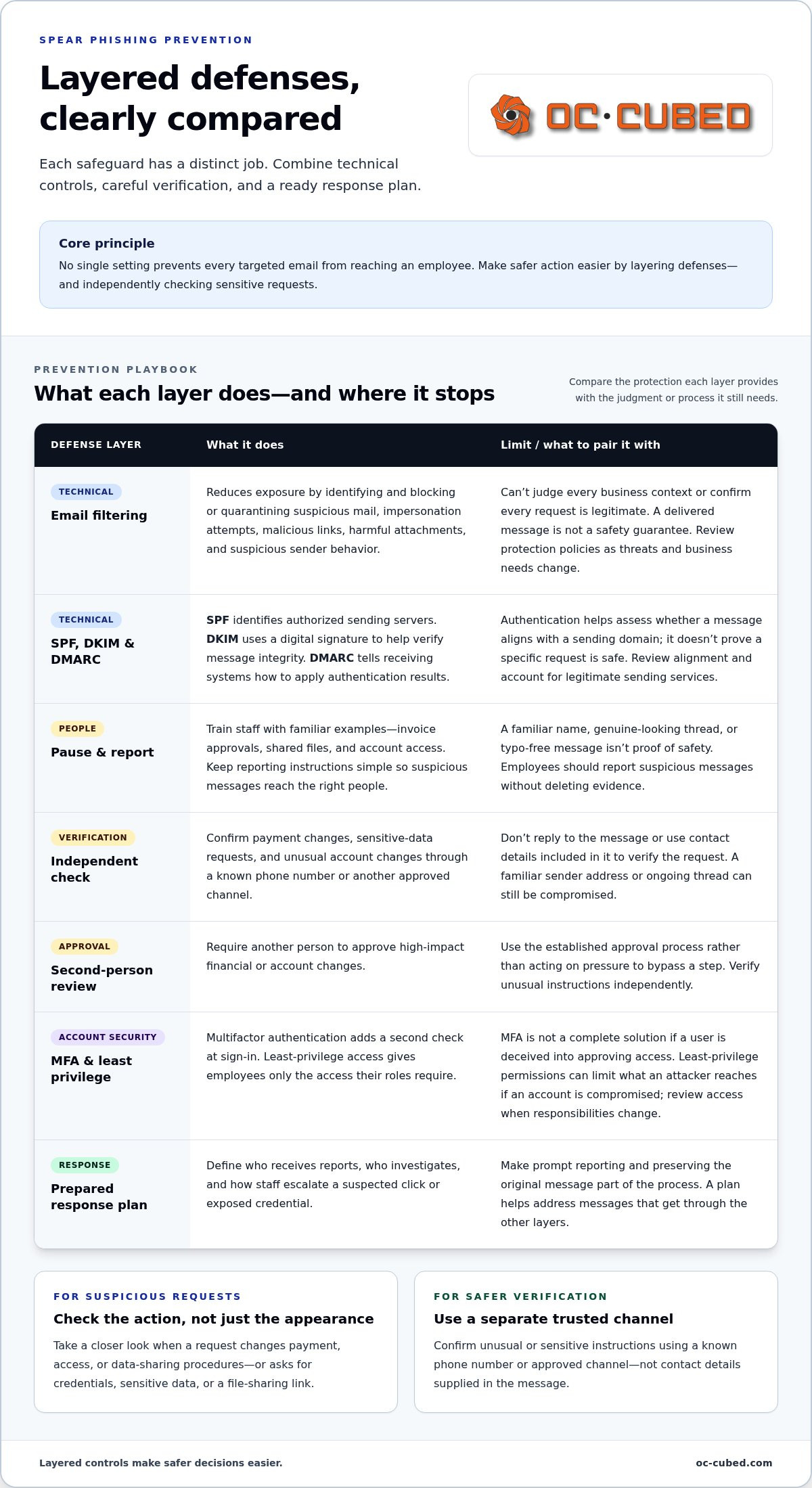
No single setting can prevent every targeted email from reaching an employee. A stronger approach combines technical controls, clear habits, and a response plan. Give each layer a defined purpose. As IBM’s overview of spear phishing explains, attackers tailor messages to make them more convincing, so defenses need to address both the message and the actions it may prompt.
- Secure incoming email. Use email filtering to reduce exposure to impersonation attempts, malicious links, harmful attachments, and suspicious sender behavior. Review protection policies as business needs and threats change.
- Authenticate your sending domains. Configure SPF, DKIM, and DMARC for the organization’s domains. SPF identifies authorized sending servers, DKIM uses a digital signature to help verify message integrity, and DMARC tells receiving systems how to apply authentication results. Review alignment and account for legitimate sending services.
- Train employees to pause and report. Use examples from everyday tasks, such as invoice approvals, shared files, and account access. Keep reporting instructions simple so staff know where to send suspicious messages without deleting evidence.
- Verify sensitive requests independently. Confirm payment changes, requests for sensitive data, and unusual account changes through a known phone number or approved channel. Require a second person to approve high-impact financial or account changes.
- Prepare for messages that get through. Define who receives reports, who investigates, and how staff should escalate a suspected click or exposed credential. Make sure employees know to report promptly and preserve the original message.
Which email and account controls reduce exposure?
Filtering can block or quarantine suspicious mail, but it can’t confirm the legitimacy of every business request. Domain authentication helps receiving systems assess whether messages align with a sending domain, but it doesn’t prove that a particular request is safe. Multifactor authentication adds a second check at sign-in and can limit the risk of account takeover if a password is exposed. It isn’t a complete solution, especially if an attacker can deceive a user into approving access.
Pair MFA with least-privilege access. Give employees only the access their roles require, and review permissions when responsibilities change. This can limit what an attacker can reach if an account is compromised. Regularly check that authentication policies cover legitimate sending services and that email protections reflect the organization’s current setup.
How can employees verify high-risk requests?
Keep verification practical. For a changed payment destination, call a trusted number already on file, not one in the email. For sensitive data or account changes, use an approved internal channel and require a second-person review where appropriate. Give employees one clear route for reporting suspicious messages, and ask them to preserve the original for investigation.
These layers work best when someone owns their upkeep. A broader managed cybersecurity approach can connect email protection with account controls, monitoring, and response planning. OC Cubed provides email security with Proofpoint, Microsoft 365 tenant maintenance, and threat detection and remediation to support this wider security effort. Learn more about managed IT security support.
Email filters, authentication, and employee checks: what each defense can and cannot do
Each safeguard addresses a different part of a spear phishing attempt. Filtering evaluates incoming messages, domain authentication checks aspects of sender identity, multifactor authentication protects sign-ins, and employee verification checks whether a request makes sense in context. None guarantees that every targeted email will be stopped or that every delivered message is safe. The goal is to make attacks harder to deliver, harder to act on, and easier to contain.
| Control | Risk it reduces | Limitations | Operational owner |
|---|---|---|---|
| Email filtering | Exposure to suspicious content, links, attachments, impersonation, or sender behavior. | May miss tailored or compromised-account messages. Results vary by product, configuration, and available signals. | IT or the team managing email security. |
| SPF, DKIM, and DMARC | Some forms of domain spoofing and mail that fails sender-domain authentication checks. | Authentication does not establish the sender’s intent or prove that a request is legitimate. | IT, with input from whoever manages business email and domain settings. |
| Multifactor authentication | Account access using only a stolen or guessed password. | Doesn’t validate emails or stop every account takeover method. Users can still be tricked into approving access. | IT or the identity and account administrator. |
| Independent verification | Fraudulent payment, data-sharing, and account-change requests. | Works only if employees follow the process and use a separate, trusted channel. | Requesting employee and the approver responsible for the transaction or change. |
What can filtering and authentication catch?
Filtering can assess message signals such as suspicious links, attachments, sender patterns, and content that resembles known threats. It helps reduce exposure, but a targeted message may use ordinary language or arrive from a real account that has been compromised. A secure email gateway is a valuable layer, not a promise that every attack will be caught.
SPF, DKIM, and DMARC help receiving systems assess whether email aligns with the sending domain and its authentication settings. This can help identify certain spoofing attempts. It can’t determine whether an authenticated sender is making a safe request or whether a genuine account has been taken over. A passing authentication result isn’t a certificate of trust.
Where do verification and access controls add protection?
Technical controls assess messages and accounts. Approval workflows assess business intent. If an email asks to redirect a vendor payment, a finance employee can verify the change using a known phone number, then follow the organization’s approval process. For a request to share sensitive files, staff can confirm the need through an approved channel before granting access.
MFA helps reduce the chance that a stolen password alone will unlock an account, but it doesn’t confirm whether an email is genuine. Use it alongside least-privilege access and clear approval steps. Together, these controls offer a practical answer to how to stop spear phishing emails without relying on any single filter, protocol, or employee to get every decision right.
Responding to suspected spear phishing or clicks
A quick, calm response can limit what happens next. Employees don’t need to prove a message is malicious before reporting it. They need a clear process that gets the right information to the people responsible for investigating and containing a possible threat. A prompt report is more useful than a perfect diagnosis made after further interaction.
- Stop interacting. Don’t reply, open attachments, follow links, enter credentials, or provide requested information. If you already took one of these actions, stop and report what happened.
- Report through the approved route. Use the organization’s designated reporting tool or contact. Preserve the original message where possible, including its attachments and details. Don’t casually forward it to coworkers, since forwarding can spread a risky link or remove useful investigation context.
- Follow the response process. Tell the responder what you received and what you did, including whether you clicked, replied, entered information, or approved a transaction. Be direct. This information helps determine the next step.
What should an employee do before interacting further?
If a message feels unusual, leave it untouched and report it. Don’t use the email’s links, phone numbers, or reply address to verify an urgent instruction. Confirm business requests through a separate, trusted channel, such as a known company number or an approved internal contact. Keep the original message available for the designated response team, and let them decide whether it should be removed from other inboxes.
What changes if someone clicked, replied, or sent money?
Escalate immediately to the designated IT or security contact, even if nothing obvious happened. Be specific about the action taken. Authorized responders can assess the account, check the device, and decide whether to reset credentials or revoke active sessions. Employees shouldn’t investigate or clean up the device on their own unless the response process directs them to do so.
- Clicked a link or opened a file: Report the time and what opened. Follow responder instructions for checking the device and account.
- Shared a password or approved a sign-in: Tell the response contact which account was involved. Responders can coordinate credential changes and revoke sessions as appropriate.
- Replied or shared sensitive information: Report what was disclosed and who received it. The organization can assess what information may need protection.
- Approved or sent a payment: Notify the organization’s finance contact and contact the financial institution promptly through a trusted channel. Share the transaction details with the response team.
Preparation makes these steps easier to follow under pressure. An organization-wide cybersecurity risk strategy can clarify reporting ownership, escalation paths, and response responsibilities before an incident occurs. OC Cubed provides security threat detection and remediation, along with remote IT support, to help businesses maintain controls and respond to suspected threats.
How managed email security helps businesses keep spear-phishing defenses current
Email protections need regular attention after setup. Staff roles change, new services send mail on the company’s behalf, and business processes evolve. A policy that once fit the organization may no longer reflect its email traffic or approval workflows. Periodic reviews help uncover configuration gaps and clarify who owns decisions when a suspicious message is reported.
Review whether email security policies, domain authentication, account protections, and reporting routes still match how the business operates. Check that legitimate sending services are accounted for, employees know how to report concerns, and someone is assigned to receive and assess reports. Use brief, role-relevant guidance to reinforce when to verify a request and how to report it. Finance staff, for example, may need reminders about confirming payment changes, while other teams may focus on unexpected file access requests.
Track recurring patterns and lessons from reports. If messages repeatedly imitate a vendor or target a particular process, use that information to refine employee guidance and review relevant controls. The goal is to keep protections operational and improve the response process over time, not to assume any measure guarantees that an attack will be prevented.
What should an ongoing spear-phishing program include?
Give each task an owner. IT can review email and account settings, business leaders can maintain approval procedures, and managers can reinforce reporting expectations with their teams. Revisit the process when email services, roles, or workflows change, and after a suspected incident. A clear review record helps the organization see what was checked, what needs follow-up, and who is responsible.
When can managed IT support make prevention easier?
Managed support can coordinate the technical work behind a consistent email security program. Microsoft 365 tenant maintenance supports ongoing review of tenant settings, while OC Cubed’s email security with Proofpoint adds an email-protection layer. These controls work alongside employee verification and business approvals; they don’t replace either one. Staff still need a trusted way to validate unusual requests, and leaders still need to define which changes require approval.
When an employee reports a suspected threat, clear escalation ownership helps route the report to the right people. Security threat detection and remediation can support investigation and response, while remote IT support can help maintain controls and coordinate next steps. Together, these capabilities help keep defenses current and route reports for investigation without expecting employees to handle technical work alone.
Start by assessing your current setup: who reviews email protections, who receives reports, and how do employees verify high-impact requests? The answers can reveal practical gaps in how to stop spear phishing emails and where clearer ownership would help. OC Cubed supports businesses with email security, Microsoft 365 maintenance, and threat remediation as part of broader managed IT services.
Make your next security review count
Turn your current protections into a routine your team can rely on. Set a date to review who owns email security decisions, whether employees know how to report concerns, and whether sensitive requests have a practical verification path. Look for friction, too. If people aren’t sure where to report a message or how to pause a questionable request, make the process clearer before the next suspicious email arrives.
Learning how to stop spear phishing emails isn’t about expecting every person or tool to catch every attempt. It’s about building a steady process that makes safer actions easier and gives your business a clear path forward when something seems wrong. Consistent improvements can strengthen confidence without disrupting the work your team needs to do.
With clear ownership and practical safeguards in place, your team can respond with greater confidence and keep its attention on serving customers and growing the business.
Frequently Asked Questions
Can spear phishing emails bypass spam filters?
Yes. A targeted message may resemble normal business correspondence, use wording specific to a recipient, or arrive from a compromised account, making it harder for filters to flag. Filters may handle similar messages differently depending on their configuration and available signals. Treat filtering as one protective layer, not proof that a delivered email is safe. If a message asks you to take an unusual action, verify it through your organization’s trusted process.
What should I do if I clicked a link in a spear phishing email?
Stop using the page and promptly report the click to your designated IT or security contact. Tell them which link you opened, whether you entered information, and whether a file downloaded or opened. Don’t revisit the link to investigate. If you entered a password, identify the account so authorized responders can decide how to secure it. Follow their instructions for your device and account.
Can multifactor authentication stop spear phishing?
No. Multifactor authentication can make it harder for an attacker to access an account with only a stolen password, but it doesn’t identify a deceptive email or prevent every account compromise. An employee might still be tricked into approving an unexpected sign-in or sharing a one-time code. Treat an approval prompt you didn’t initiate as a warning and report it instead of accepting it to clear the notification.
How do SPF, DKIM, and DMARC help prevent email spoofing?
SPF identifies servers authorized to send for a domain, DKIM uses a digital signature to help verify message integrity, and DMARC lets domain owners set how receiving systems should handle messages that fail authentication checks. Together, they help assess whether mail aligns with a sending domain and can reduce certain spoofing risks. They don’t confirm the sender’s intent or prove a message is safe, so recipients still need to assess unusual requests.
What happens if an employee replies to a suspected spear phishing email?
Report the reply to the organization’s IT or security contact, including what information was shared and whether the conversation continued. A reply alone doesn’t prove an account was compromised, but it can confirm that the address is active or give an attacker a chance to build trust. Don’t continue the exchange or send more details. The response team can assess the content and decide whether additional account or employee precautions are needed.
Should employees forward suspicious emails to coworkers for a second opinion?
No. Casual forwarding can expose coworkers to risky links or attachments and complicate investigation of the original message. Use the company’s designated reporting method instead. If there isn’t a clear route, contact the responsible IT or security person through a known channel and ask how to submit it safely. Avoid copying message contents into a new email, since that can omit useful details or preserve clickable links.
Can a legitimate sender account be used to send a spear phishing email?
Yes. If an attacker gains access to a real employee, vendor, or partner account, they may send messages from its genuine address. That can make the email look familiar and fit an existing conversation. Check the request itself, especially if it asks you to change a payment destination, share restricted files, or bypass a normal approval step. Confirm unexpected instructions using contact information already trusted by your organization.


