

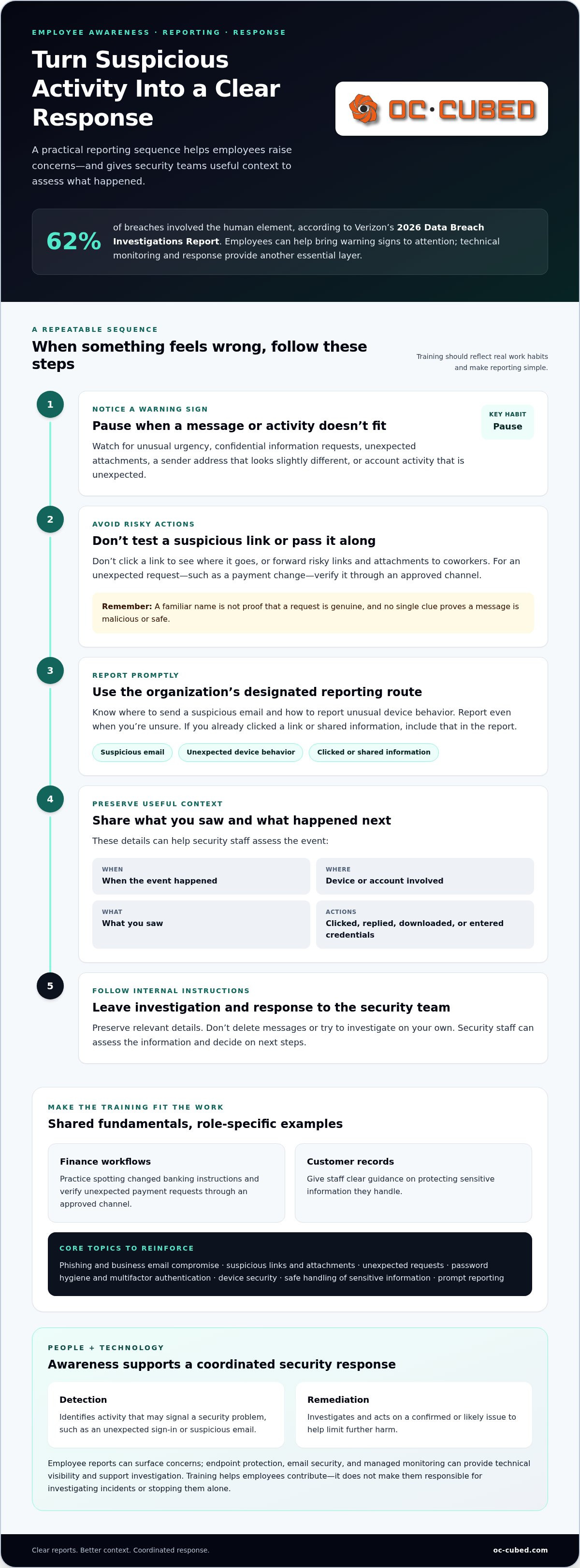
The human element played a role in 62% of breaches, according to Verizon’s 2026 Data Breach Investigations Report. Employees may be the first to notice a suspicious message or unusual account activity, but they need to know what to look for and how to report it. Threat detection and remediation services provide technical monitoring and response, while employee reports can help bring potential threats to attention.
Security training should be practical, not a one-time presentation employees soon forget. It should reflect real work habits and give staff a clear path to raise concerns without hesitation. Leaders also need to explain what happens after a report, so employees understand how their actions fit into a coordinated response.
This checklist covers repeatable training topics, including phishing, password and account safety, and reporting suspicious activity. It also explains how employee awareness complements endpoint protection, email security, and managed monitoring. The goal is straightforward: help your team recognize warning signs, report them promptly, and support a stronger threat detection and remediation process.
Key Takeaways
- Separate threat detection, which identifies suspicious activity, from remediation, which addresses a potential or confirmed issue.
- Adapt training to employees’ roles, systems, and access to sensitive data or payment processes.
- Give employees a clear reporting sequence and explain which details help IT assess a suspicious event.
- Threat detection and remediation services work alongside employee awareness, not in place of it.
- Endpoint protection, network monitoring, email security, and Microsoft 365 maintenance can support a coordinated security approach.
Threat Detection and Remediation Services Start With People and Technology
Threat detection means identifying activity that may signal a security problem, such as an unexpected sign-in or a suspicious email. Remediation means taking steps to address a confirmed or likely issue. Detection finds the warning signs; remediation investigates and acts on them to limit further harm. Together, threat detection and remediation services combine technical visibility with a clear process for responding.
People and technology contribute different pieces of that process. Employees encounter messages, files, and account prompts during everyday work. Monitoring and security tools can examine activity across systems and devices, including signs an employee might never see. Employee awareness helps surface concerns, while technical controls and managed monitoring help investigate activity and support a response. Neither should be treated as a substitute for the other.
Security teams may also look for signs of threats that have not yet triggered a clear alert. This proactive practice, known as threat hunting, can complement reactive detection. What is Threat Hunting? describes the approach and how it differs from waiting for an alert to identify suspicious activity.
What employee training can and cannot do
Training can help employees recognize unusual requests, questionable links, unexpected attachments, or account activity that doesn’t fit their normal workflow. Just as important, it can make reporting feel like a routine security habit rather than an admission of error. A quick report may give the security team an early lead, even if the employee isn’t certain the activity is malicious.
Training has limits. It can’t guarantee that every person will spot every deceptive message, and employees can’t see all activity across a network or cloud environment. They aren’t responsible for investigating incidents or stopping them alone. Technical controls, such as endpoint protection and email security, and managed monitoring provide additional visibility and support. The goal is a coordinated process, not a burden placed on staff.
Why a reporting path matters
A clear reporting route removes guesswork. Employees should know where to send a suspicious email, how to report unexpected device behavior, and what to do if they’ve already clicked a link or shared information. Make the instructions easy to find and simple to follow. If people have to search for the right contact or worry that a report will get them in trouble, they may wait.
Prompt reports can add useful context to an investigation: when the event happened, which device or account was involved, what the employee saw, and whether they clicked, replied, downloaded a file, or entered credentials. Employees should preserve relevant details and follow internal instructions, rather than deleting messages or trying to investigate on their own. That information can help security staff assess what occurred and decide on next steps.
Training works best as one part of an ongoing security program. For a broader view of how managed services support business protection, explore this managed cybersecurity guide. It explains how informed employees and technical support can work together without asking either to carry the responsibility alone.
Employee Cybersecurity Training Topics Every Business Checklist Should Cover
A useful training checklist reflects the systems employees use, the information they handle, and the decisions their roles require. Start with shared fundamentals, then add examples for specific workflows. A finance employee who reviews payment requests needs practice spotting changed banking instructions. A staff member handling customer records needs clear guidance on protecting sensitive information.
Core training checklist: phishing and business email compromise; suspicious links and attachments; unexpected requests; password hygiene and multifactor authentication; device security; safe handling of sensitive information; and prompt reporting of suspected issues.
Keep these topics grounded in real work. Threat detection and remediation services can support technical investigation and response, while consistent employee habits can help reduce avoidable exposure and bring unusual activity to attention.
Recognizing suspicious messages and requests
Teach staff to pause when a message creates unusual urgency, asks for confidential information, includes an unexpected file, or comes from a sender address that looks slightly different. A familiar name isn’t proof that a request is genuine. For example, an email or collaboration message that appears to come from a manager and asks for an immediate payment change deserves verification through an approved channel.
Show employees how to report suspicious messages using the organization’s designated process. They shouldn’t click a link to test it or forward risky links and attachments to coworkers. Examples help build judgment, but no single clue proves a message is malicious or safe. Reinforce the habit of pausing and reporting when something doesn’t fit.
Protecting accounts, devices, and information
Training should turn everyday safeguards into repeatable routines. Employees should use unique passwords, follow the organization’s password-management practices, and approve multifactor authentication prompts only when they initiated the sign-in. An unexpected prompt is a reason to stop and report, not to approve it just to clear a notification.
- Secure devices: Lock screens when stepping away, install approved updates, and use only software authorized for work.
- Protect information: Share customer, employee, and business records only through approved channels, and provide access only to intended recipients.
- Report warning signs: Promptly flag lost devices, unexpected login prompts, or suspected account compromise through the internal reporting route.
Tailor practice to the work. Teams that handle payments can rehearse verifying changes to payment instructions; employees with access to sensitive records can review safe sharing and storage procedures. Keep the guidance aligned with actual tools and workflows so employees can apply it without guessing.
Clear training and technical safeguards reinforce each other. Businesses looking to align employee habits with ongoing IT and security support can consider how managed monitoring, email security, endpoint protection, and account maintenance fit their environment.
How to Prioritize Training Topics for Different Roles and Risks
Every employee needs a shared security baseline, but not every role faces the same decisions. Prioritize added training by considering which systems a person uses, what information they can access, and what actions they’re authorized to take. An employee who processes payments needs practice verifying financial changes. Someone with access to sensitive records needs guidance specific to handling and sharing that information.
A simple role-to-scenario-to-action table can turn those differences into practical lessons. Keep the action specific and within the employee’s authority. The goal isn’t to label a role as “high risk”; it’s to prepare people for situations they may encounter in their normal work.
- Finance team: A message requests a last-minute payment or changes a vendor’s account details. Verify the request through an approved channel before acting, and report anything unusual.
- Managers: A message that appears to come from an executive or vendor asks for confidential information or an urgent exception. Pause, confirm the sender and request through a known contact method, and follow internal approval steps.
- General staff: A login prompt appears unexpectedly, or a colleague requests access to a shared file. Don’t approve an uninitiated sign-in or change sharing access without checking that the request is legitimate.
Use these scenarios as starting points, then adapt them to the organization’s actual payment process, communication tools, and approval paths. Threat detection and remediation services can support technical monitoring and response, while role-focused training helps employees make safer decisions within their responsibilities.
Match scenarios to everyday work
Training sticks when employees recognize the situation. Use examples drawn from familiar processes, such as a vendor payment update, an executive asking for a quick favor, or a collaboration message requesting access to a file. Ask employees to identify the appropriate next action, not to diagnose whether a message is malicious. That keeps the exercise realistic and reinforces consistent procedures.
Keep a baseline for all staff, including recognizing suspicious requests, protecting accounts and devices, and knowing how to report concerns. Add focused practice where employees handle payments, manage access, or work with sensitive information. A role-specific lesson should clarify both the employee’s authority and where that authority ends.
Refresh the checklist as work changes
Revisit training when the organization changes systems, workflows, vendors, or employee responsibilities. A new file-sharing tool may change how staff should grant access; a revised payment process may require a different verification step. Questions raised during training and patterns in employee reports can also reveal where instructions need clarification or reinforcement.
Use those observations to update scenarios and reporting guidance, rather than repeating the same lesson unchanged. Broader planning can help connect training priorities with the organization’s security goals. The 2026 cybersecurity risk strategy offers additional context for aligning security decisions with business risks.
Turn Cybersecurity Training Into Clear Reporting and Response Habits
A useful reporting process gives employees a straightforward response when a message, account, or device seems wrong: stop, avoid further interaction, report what happened, and follow internal instructions. Clear steps reduce guesswork. Employees don’t need to decide whether an event is a confirmed incident before raising a concern.
A consistent reporting path turns an employee’s observation into useful context for an organized security response. Make the reporting channel easy to find, explain who receives reports, and tell staff what to expect after they submit one. Reinforce that reporting a mistake or an uncertain concern is better than staying silent.
What employees should do when something looks wrong
Train employees to stop interacting with the suspicious message or device activity. They shouldn’t click again, reply, test a link, delete a potentially relevant message, or investigate on their own. Instead, they should use the organization’s designated reporting channel promptly and follow instructions from authorized security or IT staff.
Encourage employees to describe what they observed, not guess at the cause. A concise report can include:
- The time they noticed the activity, including the time zone if known.
- The device, account, or application involved.
- The sender or message details, such as the subject line or where a collaboration request appeared.
- What they observed and any action they took, such as opening a file or approving a sign-in prompt.
Employees should preserve relevant details when it’s safe to do so and follow internal instructions for handling the original message or device. They shouldn’t send sensitive material through an unapproved channel just to provide more context. A factual report helps responders assess the situation without turning employees into investigators.
How managed detection supports the response
One employee sees only part of an event. Monitoring and security tools can help authorized teams assess related activity across devices, accounts, email, and networks. A report may help connect an unusual message to other signals, while technical alerts can flag activity employees never encounter directly. Together, these inputs give the response team a broader basis for deciding what to examine.
Investigation, containment, and remediation belong to authorized teams following the organization’s procedures. Depending on what they find, they may need to review activity, secure an account or device, address a vulnerability, or provide employees with further instructions. The exact steps depend on the circumstances. Threat detection and remediation services support this work through ongoing security monitoring and response, while employees contribute timely, accurate observations.
Review the reporting process periodically. Confirm that staff know where to report, that instructions are understandable, and that reporting doesn’t require them to make technical judgments. A clear path builds confidence and helps technical support act on employee observations alongside system signals.
How OC Cubed - Your trusted MSP Connects Threat Detection and Remediation With Ongoing IT Support
Employee awareness is an important part of a business security program, but it works best alongside technical safeguards and support. OC Cubed connects security threat detection and remediation with the day-to-day IT environment. Employees can share what they notice, while security tools and support teams provide visibility into activity beyond any one person’s view.
A coordinated layer of security support
Different controls address different parts of the environment. Endpoint protection helps secure devices; network monitoring provides visibility into network activity; and email security helps address threats delivered through business messages. OC Cubed provides email security with Proofpoint. Microsoft 365 tenant maintenance supports attention to the cloud environment employees use for communication and collaboration. No single control catches every threat, so these layers work together rather than guaranteeing prevention.
Security threat detection and remediation brings those protections into a broader response process. If an employee reports an unusual message or a tool flags activity, IT and security teams can assess the available signals and determine appropriate next steps. The employee’s report adds context; monitoring and security controls can help show whether the concern is isolated or connected to other activity.
Remote IT support, including helpdesk and NOC integration, can connect security concerns with ongoing IT support. Employees need a practical way to raise issues, while the teams supporting the environment need a clear picture of relevant systems and reported concerns. A coordinated support model helps keep those conversations connected without making employees responsible for investigating incidents.
Keep training and security operations aligned
Training should evolve with the business. Reviewing recurring employee reports alongside security and support observations can reveal where instructions need clarification. For example, if staff repeatedly ask how to handle file-sharing requests, that workflow may need clearer guidance. Changes to business processes, Microsoft 365 use, or vendor interactions can also call for refreshed examples.
Keep the review practical. Look for patterns, update relevant training, and make sure employees know how to report a concern through the organization’s established process. Then people, support practices, and technical controls can reinforce one another as workflows change.
OC Cubed brings managed IT and security support together for businesses that want employee awareness to complement technical monitoring and response. To discuss how this support can fit your organization, talk with OC Cubed about managed IT support.
Make Security Habits Part of How Your Business Grows
Security practices work best when they keep pace with the business. As teams adopt new tools, responsibilities shift, or workflows change, ask whether employees still know how to raise concerns and where those reports should go. Treat recurring questions as useful feedback. They can point to a process that needs clearer guidance or a training example that no longer reflects daily work.
For leaders considering threat detection and remediation services, a practical next step is to identify who owns employee guidance, who receives reports, and how those responsibilities connect with security support. Clear ownership gives staff confidence to speak up and helps the organization keep improving without expecting employees to manage threats on their own.
OC Cubed provides managed IT and security support to help businesses strengthen protection while keeping their teams focused on their work.
Build on the habits your team has started, and keep moving toward a more prepared, confident workplace.
Frequently Asked Questions
What does threat detection and remediation mean?
Threat detection identifies activity that may indicate a security issue, while remediation means taking steps to address the issue after it’s assessed. For example, an unusual sign-in might prompt a review of account activity; if the review finds unauthorized access, the response team can secure the account and investigate related activity. The specific response depends on what the evidence shows and the organization’s established procedures.
What cybersecurity topics should employee training cover?
Training should cover common risks employees may encounter in their actual work, including deceptive messages, suspicious links, account security, and safe handling of business information. It should also explain how to report a concern and what not to do, such as approving an unfamiliar login prompt. Use short practice scenarios, then ask employees to explain the action they’d take. This checks whether instructions make sense in real situations.
How often should employees receive cybersecurity training?
Provide training during onboarding, then revisit it regularly and whenever meaningful changes affect employees’ work. A new collaboration tool, payment process, or file-sharing workflow may introduce different decisions that staff need to understand. Short refreshers tied to these changes can be easier to apply than relying only on a long annual presentation. Use employee questions and reporting patterns to decide which subjects need another explanation or practice.
Can employee training prevent every cyberattack?
No. Training can help people make safer choices, but it can’t guarantee that every attack will be recognized or stopped. A convincing message may reach a careful employee, or suspicious activity may happen outside anyone’s view. Treat training as one part of a broader security approach that includes technical safeguards, monitoring, and a clear incident process. Employees should know how to raise concerns, not feel personally responsible for preventing every incident.
What should an employee do after clicking a suspicious link?
Stop interacting with the page and report what happened through the organization’s designated channel. Be direct about whether you entered a password, downloaded a file, or approved a sign-in request. Don’t try to hide the mistake, delete related messages, or investigate the device yourself. Follow instructions from authorized IT or security staff. Prompt, accurate disclosure helps them decide what to review and whether protective steps are needed.
How do managed security services work with employee training?
Employee training helps staff recognize unusual situations and share useful context; managed security support can assess that information alongside signals from systems and devices. Threat detection and remediation services may bring employee reports together with technical monitoring, helping authorized teams decide what to investigate and how to respond. This division of responsibility matters: employees report observations, while security professionals handle technical analysis and remediation through established processes.
Is antivirus software enough to detect business security threats?
Antivirus is useful, but it shouldn’t be treated as the entire security program. Business risks can involve email, network activity, compromised accounts, or unsafe access to information, so protection needs to account for more than files on an individual device. Combine endpoint safeguards with account practices, email security, monitoring, and employee reporting. The right mix depends on the systems the business uses and the information it needs to protect.


