

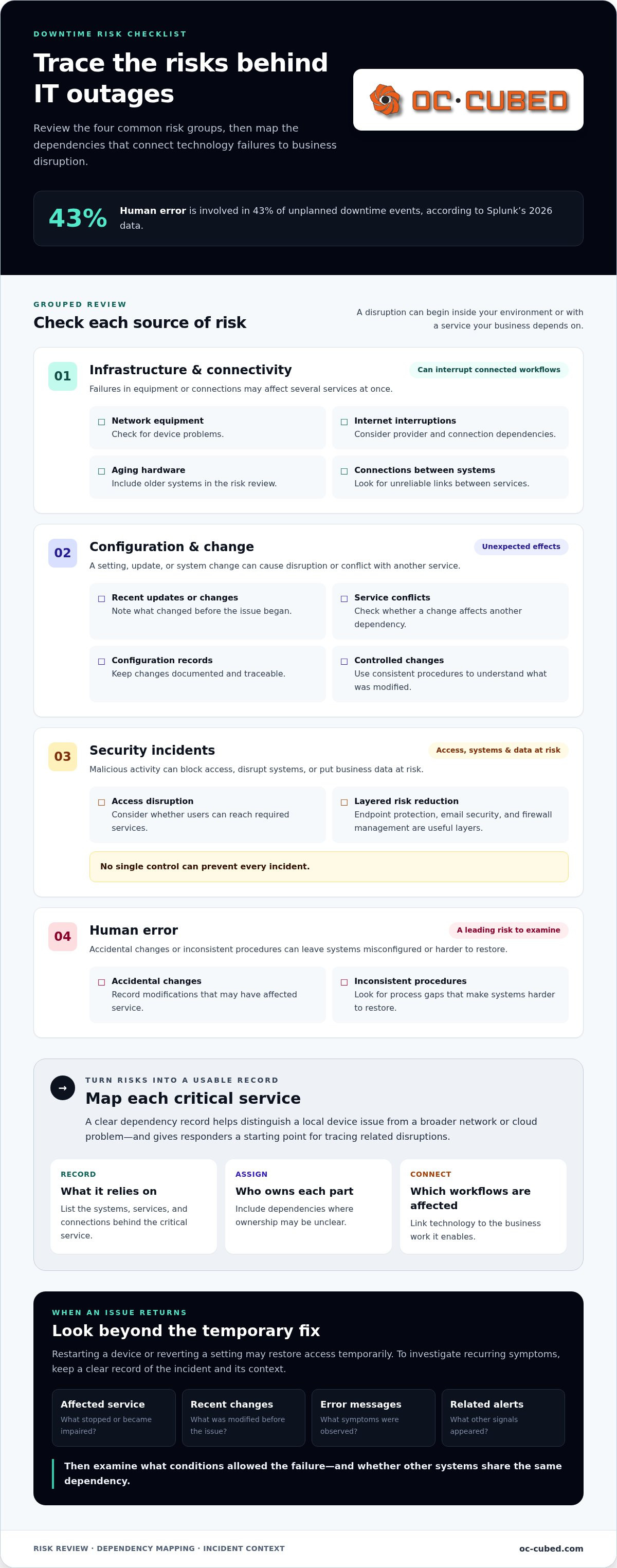
Splunk’s 2026 data indicates that 43% of unplanned downtime events involve human error. That makes an outage less like a bolt from the blue and more like a risk businesses can work to control. To reduce unplanned IT downtime, leaders need more than a quick fix after systems fail. They need a repeatable process to prevent problems, respond to incidents, restore service, and learn from what happened.
An unexpected outage can stall employee work, disrupt customer service, and interrupt essential processes. When the same issue keeps returning, temporary repairs only postpone the next disruption. The challenge isn’t simply keeping technology running. It’s knowing which failures would hurt operations most and whether the business can recover in a measured, coordinated way.
This guide explains how to identify business-critical IT risks, strengthen prevention and recovery processes, and track downtime frequency, duration, and business impact. It also shows how monitoring, clear response roles, tested backups, and root-cause reviews fit together, and how managed IT support can help replace firefighting with a steadier operating process.
Key Takeaways
- Distinguish a full outage from slow, partial, or team-specific disruption to understand the scope of an incident.
- Trace risks across connectivity, infrastructure, configuration, security, and human processes, including dependencies with unclear ownership.
- Track incident frequency, duration, availability, MTTR, and MTBF to see where efforts to reduce unplanned IT downtime can have the greatest impact.
- Build a clear operating sequence for assigning ownership, monitoring systems, preparing recovery, and reviewing incidents.
- Connect proactive monitoring with helpdesk response and ongoing system management. OC Cubed combines 24/7 network monitoring with NOC integration.
What Unplanned IT Downtime Means for a Business
Unplanned IT downtime is an unexpected loss of access to a technology-dependent service, while planned maintenance is scheduled work communicated and prepared for in advance. A service doesn’t need to go completely offline for disruption to count. A full outage makes a system unavailable; degraded performance makes it slow or unreliable; partial service loss affects only certain features or users. A disruption may also be limited to one team while other employees continue working.
This broader view matters because a problem can be operationally serious before anyone sees a blank screen. If staff can open email but can’t send messages or access shared files, service is impaired. If a business application loads but transactions fail, customer-facing work may be blocked even though the application appears to be running. The Downtime (computing and telecommunications) overview also distinguishes planned and unplanned interruptions in technology services.
Which business services can an IT disruption affect?
Consider a team that relies on internet connectivity to use Microsoft 365, access shared files, and work in a business application. A network problem could interrupt all three workflows at once. A failed device may affect one employee, while an account or application issue could prevent an entire team from completing its work.
The impact depends on what the service supports. A brief delay opening an internal reference may be inconvenient. Losing access to a system used to process orders, respond to customers, or meet a deadline can interrupt a time-sensitive business process. Map technology to the work it enables, not just to the equipment or software name. For each essential service, note the teams that rely on it, the tasks it supports, and what work can continue if access is lost.
How does unplanned downtime differ from planned maintenance?
Planned maintenance is work scheduled in advance, with timing and expected effects communicated so teams can prepare. For example, employees may be able to save work, shift a task, or use an alternate process during a planned service interruption.
An unexpected outage offers less room to prepare. It can arrive during a customer interaction or a deadline-driven task, leaving employees unsure what’s affected or what to do next. Planned work still needs controls: choose a suitable window, communicate the impact, and coordinate dependencies to limit disruption.
These distinctions help teams describe incidents accurately. Record which service failed, whether access was lost or impaired, who was affected, and which business activities stopped or slowed. That context makes it easier to identify patterns and prioritize efforts to reduce unplanned IT downtime based on operational impact, rather than treating every alert as equally urgent.
Address the Real Causes of Unplanned IT Downtime
IT outages can start in several places. A service interruption may trace to a network device, an internet connection, an endpoint, a cloud service, or identity access. It can also follow a configuration change, a security incident, or human error. Mapping these dependencies helps teams see how a failure in one place can ripple into several business workflows.
Review risks in four practical groups:
- Infrastructure and connectivity: Network equipment problems, internet interruptions, aging hardware, or unreliable connections between systems.
- Configuration and change: A setting, update, or system change that produces unexpected effects or conflicts with another service.
- Security incidents: Malicious activity that disrupts access, systems, or business data.
- Human error: Accidental changes or inconsistent procedures that leave systems misconfigured or harder to restore.
Where do IT outages start?
A business may depend on internal network equipment and endpoints, as well as an internet provider, cloud applications, and identity services that control sign-ins. A disruption at an external service can interrupt work even when the company’s own hardware is functioning. Outdated systems, undocumented connections, and dependencies without a clear owner make it harder to spot exposure and coordinate a response.
Make a simple dependency record for each critical service: list what it relies on, who owns each part, and which workflows would be affected by a failure. That record helps responders distinguish a local device problem from a broader network or cloud issue, and gives them a starting point for tracing related disruptions.
How do security incidents and human error cause disruption?
Malicious activity can block access, disrupt systems, or put business data at risk. An accidental change can also interrupt a service, especially when teams use inconsistent procedures or don’t record what was modified. Endpoint protection, email security, and firewall management are useful layers of risk reduction, but no single control can prevent every incident. Consistent configuration records and controlled changes help teams understand what happened.
Pay attention to symptoms that return. Restarting a device or reverting a setting may restore access temporarily, but it doesn’t explain why the issue keeps recurring. After an incident, record the affected service, recent changes, error messages, and related alerts. Then ask what conditions allowed the failure, whether other systems share the same dependency, and what control would reduce the chance or impact of a repeat. A fix should address the cause, not just the visible symptom.
Monitoring shows where service behavior changes; change control connects those changes to owners, timing, and impact before a small risk interrupts work. Together, they give IT teams a clearer way to spot warning signs, assess recent modifications, and investigate patterns instead of relying on memory. That evidence helps prioritize which issues to address first to reduce unplanned IT downtime.
OC Cubed’s managed IT support brings monitoring, security management, and ongoing system oversight into a coordinated approach for businesses that need help managing day-to-day IT operations.
Measure IT Downtime and Prioritize the Risks That Matter
Useful downtime measures connect technical incidents to business impact. A count of alerts alone won’t show whether a recurring issue affects a critical workflow or how long employees were unable to work. Keep a consistent incident record: note when disruption began and ended, which service and teams were affected, whether access was fully lost or degraded, and when normal operations resumed.
Start with these measures:
| Metric | What it measures | What to clarify |
|---|---|---|
| Incident frequency | Number of distinct disruptions in a defined period | What counts as a separate incident? |
| Downtime duration | Time a service is unavailable or impaired | Is this per incident or total for the period? |
| Availability | The share of a stated time window that a service is available | What window and availability criteria are used? |
| MTTR | Average time to restore service after an incident | Are start and restoration times recorded consistently? |
Which IT downtime metrics are useful to business leaders?
Availability means how much of a defined period a service was ready for use. State the measurement window, such as a month, and decide whether degraded performance counts as unavailable. Availability is a tracking measure, not a promise of uninterrupted service. MTTR is average restoration time; MTBF is average operating time between failures. Both are useful only when incident records apply the same definitions.
Read the numbers together. A low incident count can still hide a long interruption, while a shorter MTTR may show faster restoration even if incidents continue. Track affected business functions alongside technical measures. That shows whether a disruption blocked customer transactions, delayed internal work, or caused a less time-sensitive inconvenience. Keep the definitions stable from one review to the next so the comparison is meaningful.
How can teams prioritize critical systems?
Map each system to the teams and workflows that depend on it. Then compare likely operational impact, the number of users affected, connected dependencies, and recovery needs. A system supporting several essential processes may deserve attention before a tool used by one team for occasional reference. Look for single dependencies that could interrupt multiple workflows.
- Business function: What work stops or slows if access is lost?
- Reach: Which teams, customers, or processes are affected?
- Dependencies: What other services rely on this system?
- Recovery: What must be restored first to resume essential work?
Use the measures in a regular review, not just after a major outage. Compare the current period with the previous one, identify repeat incidents and high-impact dependencies, then assign an owner and follow-up action. Revisit the metrics after changes to systems or workflows. This turns reporting into a practical way to reduce unplanned IT downtime, with priorities grounded in business needs rather than alarm volume alone.
Build a Practical Prevention, Response, and Recovery Plan
A reliable downtime plan connects everyday prevention with clear actions during an incident and a review afterward. Keep it practical. Employees and IT support should be able to find their responsibilities, key dependencies, and recovery steps without searching through scattered documents.
- Inventory dependencies. List essential systems, the services they rely on, and the business processes each one supports. Include ownership and recovery information so a team can see what may be affected if one dependency fails.
- Assign ownership. Name who maintains each service, who assesses business impact, and who coordinates technical work. Make ownership clear for vendor-managed and cloud services as well as internal systems.
- Monitor important services. Define what should be monitored and how an alert gets reviewed. Focus on signals that point to a loss of access or impaired service, not just a flood of technical notifications.
- Prepare recovery. Document recovery steps, access requirements, backup responsibilities, and alternate ways to continue essential work. Test the steps so the team knows whether they are usable.
- Review incidents. Capture what happened, what was affected, how service was restored, and what should change. Assign each follow-up action to an owner and revisit it until complete.
What should an IT incident response plan include?
Before an outage, establish how employees report a problem and where they can find the response instructions. Name who assesses impact, who coordinates technical response, and who owns internal updates. Choose a backup communication channel in case email or collaboration tools are unavailable, and keep essential contact details and procedures accessible outside the systems they support.
Before disruption: Prevention controls include monitoring, documented dependencies, controlled changes, and recovery preparation. Clarify how an alert becomes an incident, who can make service changes, and how updates are communicated. Employees should know where to report symptoms and how to check the current status, rather than sending separate reports to multiple people.
During disruption: Confirm the scope, identify affected services and business functions, and coordinate response through the assigned owner. Share concise updates with affected employees, including what is known, what they should do, and when to expect another update. Avoid guessing at a cause or restoration time. Revise the message as the team learns more.
How should a business learn from an outage?
After service is restored, record the timeline, affected systems and teams, restoration steps, and operational consequences. Compare the incident with earlier events to see whether a recurring cause or shared dependency is involved. Assign corrective actions to named owners, then decide whether monitoring, response procedures, or dependency documentation needs to change. This review turns recovery into a stronger plan for the next disruption.
A consistent operating plan helps reduce unplanned IT downtime by connecting prevention, response, recovery, and learning. OC Cubed’s remote IT management connects ongoing oversight with practical support for business systems.
Reduce Unplanned IT Downtime with Proactive Managed Support
Reducing downtime takes ongoing attention. Systems change, dependencies shift, and small issues can disrupt work if no one is tracking them. Proactive remote IT support connects monitoring, helpdesk response, and routine system management, so teams can spot and assess issues with more context than a one-off repair provides. It supports prevention and response, though it can’t guarantee that incidents won’t occur.
How do monitoring and remote support work together?
Monitoring provides visibility into network and system activity. OC Cubed’s 24/7 network monitoring and NOC integration support detection, triage, and structured escalation, while helpdesk integration gives employees a way to report issues and receive support. Together, these functions help connect an alert to its business impact and the appropriate response.
Ongoing management addresses different areas of operational risk. Endpoint protection helps protect business devices, Microsoft 365 tenant maintenance supports the management of that environment, firewall management supports network security controls, and email security helps address threats delivered through email. These are distinct parts of a broader support approach, not guarantees against outages or security incidents.
Monthly reporting adds a review point. Leaders can use it to see service activity, identify recurring issues, and decide where follow-up is needed. If the same type of helpdesk request keeps appearing, for example, a review can prompt a closer look at the underlying system, process, or user need. Reporting makes support patterns easier to discuss and plan around.
When can managed IT support help reduce downtime risk?
Managed support can be a practical fit for a growing business without an in-house IT department, or for a team that needs ongoing coverage across several IT responsibilities. Rather than treating monitoring, employee support, security tools, and maintenance as disconnected tasks, a managed approach can bring them into a coordinated operating model with clear oversight.
Technology leadership can also connect day-to-day issues with longer-term decisions. Virtual CIO, CTO, or CISO guidance can help businesses plan technology priorities and security governance. Vendor management can help coordinate relationships with providers, while monthly reporting gives leaders a basis for reviewing service activity and recurring concerns. That link between operations and planning helps keep technology decisions aligned with business needs.
OC Cubed’s monthly managed services retainer bundles remote support, helpdesk and NOC integration, network monitoring, endpoint protection, and Microsoft 365 tenant maintenance for a recurring monthly fee. This model is designed to help growing companies without in-house IT staff avoid surprise IT costs and unplanned downtime. The right approach depends on your systems, dependencies, and internal capacity. If your team is spending too much time reacting to recurring issues, a coordinated approach can bring monitoring, support, and ongoing maintenance together.
Make Downtime Readiness Part of Everyday IT
The next step is to make resilience an ongoing business priority, not a project that gets attention only after an outage. Choose one essential service and decide who owns its health, how employees report problems, and what information leaders need to make sound decisions. Then build those practices into regular IT reviews as the business and its technology change.
OC Cubed brings together 24/7 network monitoring and NOC integration, remote helpdesk support, Microsoft 365 tenant maintenance, and endpoint protection. Virtual CIO, CTO, and CISO advisory services can also connect operational needs with technology planning and security governance. The aim isn’t to promise uninterrupted service. It’s to build clearer oversight and a more prepared response.
Explore OC Cubed’s remote IT support to see how coordinated monitoring, helpdesk response, and ongoing system management can fit your team’s needs.
With clear ownership and steady attention, your business can face technology disruptions with greater confidence and keep moving forward.
Frequently Asked Questions
Can a small business completely eliminate unplanned IT downtime?
No. A small business can’t remove every source of disruption, including failures involving external services or unexpected system behavior. It can reduce unplanned IT downtime by understanding which operations depend on technology, maintaining clear response procedures, and addressing repeat incidents at their source. A useful goal is to limit avoidable interruptions and improve readiness, rather than plan around a promise that systems will never fail.
Does cloud software mean my business will not experience IT downtime?
No. Cloud software changes where some systems are hosted, but it doesn’t remove every point of failure. Employees may still lose access because of connectivity, account, device, or configuration issues, even if the cloud service itself is operating. Include cloud applications in your continuity planning: identify the work they support, document account recovery steps, and decide how essential tasks can continue during a temporary access problem.
What is the difference between an IT outage and degraded IT performance?
An outage means a service can’t be used; degraded performance means it remains available but is too slow, unreliable, or limited for normal work. For example, a reporting tool that opens but takes too long to complete a time-sensitive task may be operationally impaired. Employees should report what they can and can’t do, rather than label every technical issue an outage. That detail helps support teams assess severity.
How often should a business review its IT downtime plan?
Review the plan on a recurring schedule and after meaningful changes, such as adopting a major system, changing a key vendor, or reorganizing responsibilities. Revisit it after an incident, too, while the timeline and response gaps are still clear. Confirm that named owners, contact details, alternate communication methods, and recovery instructions remain usable. A calendar reminder helps keep the plan current instead of waiting for the next disruption.
Can cybersecurity incidents cause unplanned IT downtime?
Yes. A cybersecurity incident can interrupt access to accounts or systems, or make business data unavailable. Treat unusual sign-in activity, unexpected security alerts, or suspicious file changes as reasons to follow your organization’s reporting process. Employees shouldn’t try to investigate by deleting files or changing security settings. Promptly pass along what they observed so the response team can assess the event and protect relevant information.
What should employees do when a business system suddenly stops working?
Employees should stop repeating actions that could create duplicate work, note the time and any error message, and report the issue through the company’s approved support channel. Describe the task they were trying to complete and whether colleagues are affected. Don’t disable security controls or make unapproved system changes. If a documented workaround exists, use it only as directed, and keep a record of any work that must be entered later.
Is IT downtime the same as a cybersecurity breach?
No. IT downtime describes an interruption or impairment in access to a service. A cybersecurity breach involves unauthorized access to systems or information. The two can overlap if a security incident disrupts a business service, but an outage can also result from a non-security failure, and a breach may occur without an obvious interruption. Report suspicious activity through security procedures even if systems appear to be working normally.


